1. Inngangur
The BirdDog PF120 is a high-performance Full HD NDI box camera designed for professional video production environments. It features an Exmor R back-illuminated sensor, 20x optical zoom, and a full color matrix, all housed within a durable all-metal chassis. This manual provides essential information for the proper setup, operation, and maintenance of your PF120 camera.
2. Innihald pakka
Please verify that all items listed below are included in your package. If any items are missing or damaged, contact your vendor immediately.
- BirdDog PF120 Full HD NDI 20x Box Camera
- Straumbreytir (DC 12V)
- Linsulok
- Gögn (leiðbeiningar fyrir notendur, öryggisupplýsingar)
3. Vöru lokiðview
The BirdDog PF120 is engineered for versatility and robust performance. Key features include:
- Full NDI support for seamless integration into IP workflows.
- 20x optical zoom for detailed close-ups.
- Exmor R back-illuminated sensor for superior low-light performance.
- Durable all-metal housing.
- Multiple connectivity options including HDMI, NDI/PoE, RS-232, and USB2.0.
3.1 Myndavél Viewog íhlutir

Mynd 3.1: Framhlið view of the BirdDog PF120 camera, showcasing the lens and the BirdDog logo on the side panel.
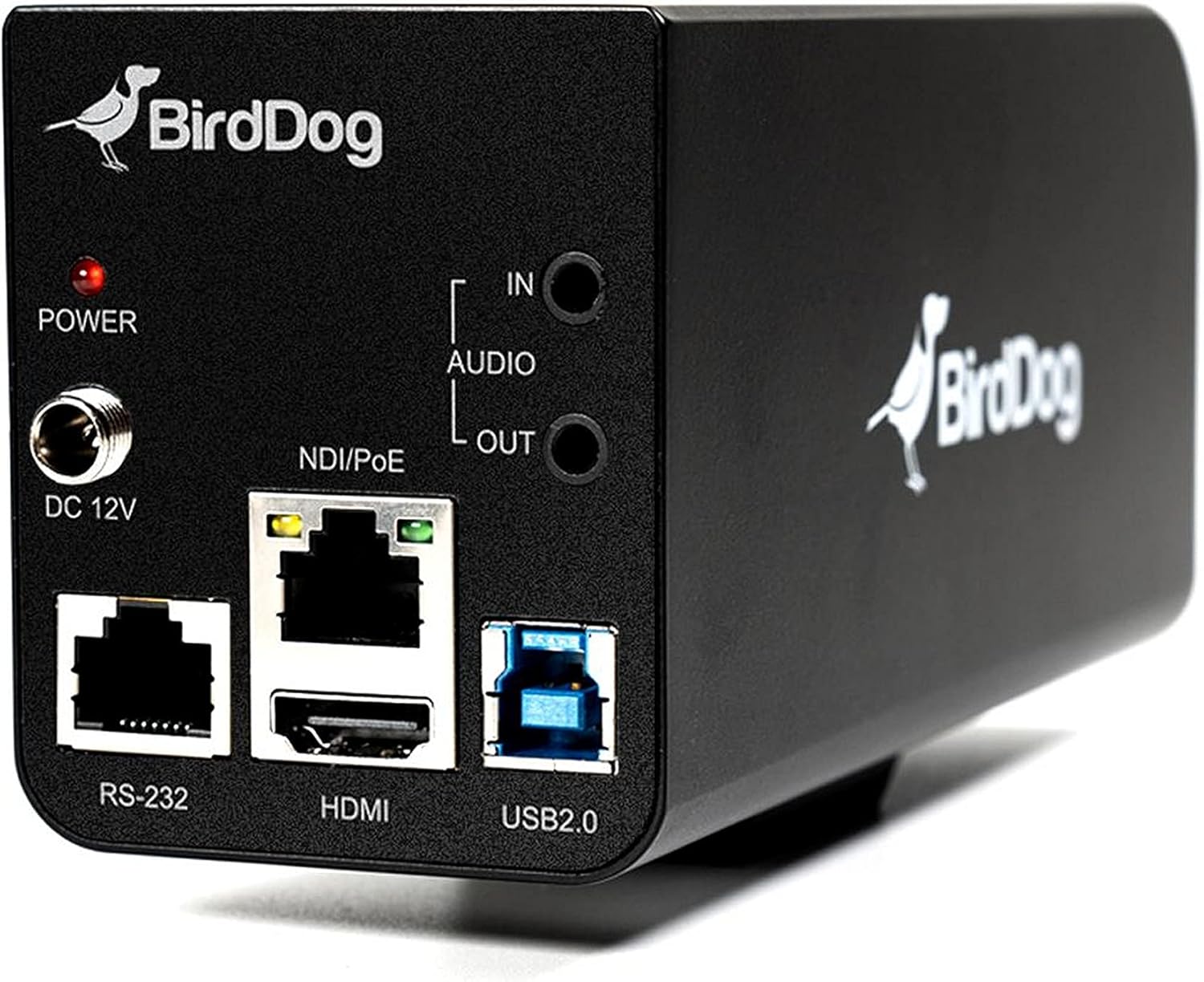
Mynd 3.2: Rear panel of the BirdDog PF120, displaying the power input (DC 12V), audio input/output, NDI/PoE port, HDMI output, RS-232 port, and USB2.0 port.
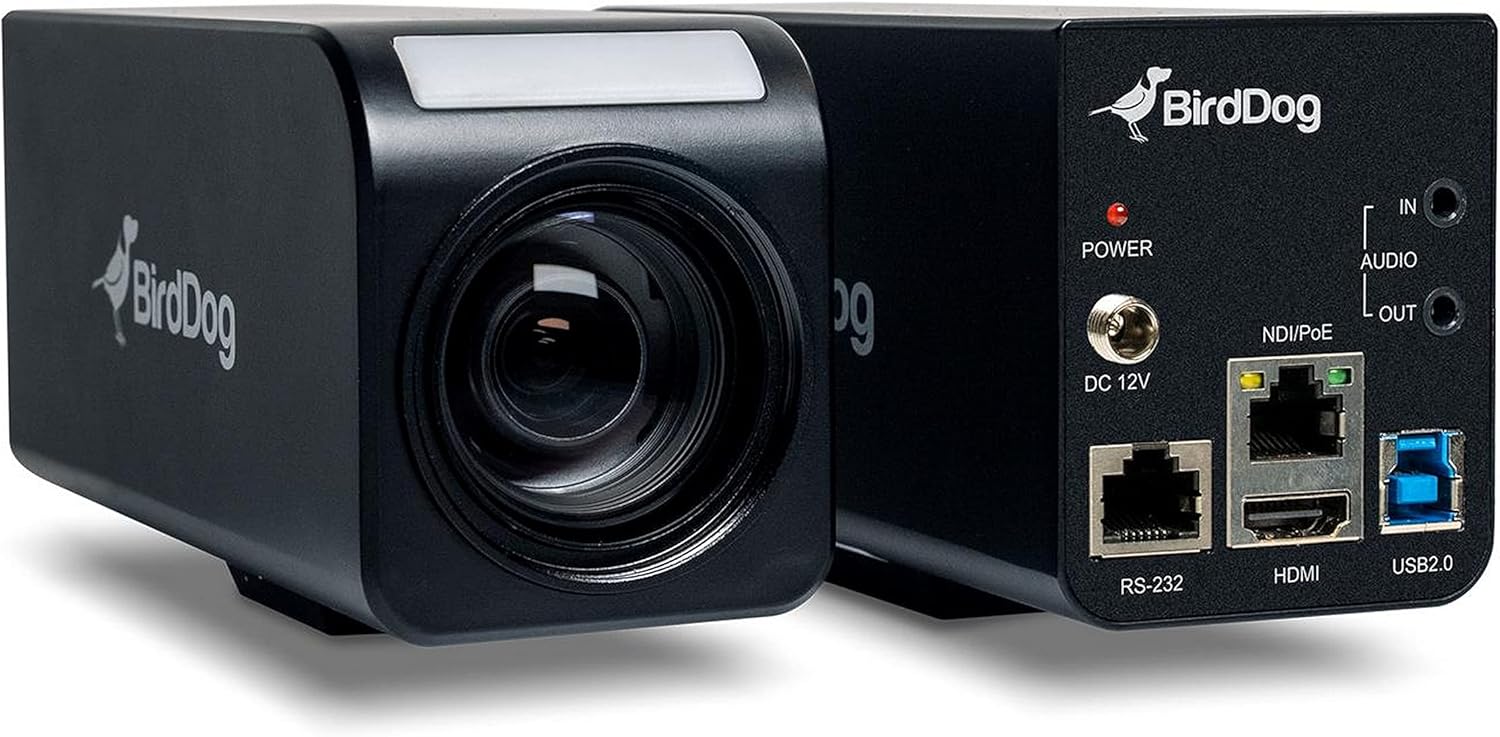
Mynd 3.3: Samsett view of the BirdDog PF120, showing both the front lens assembly and the rear connectivity panel.

Mynd 3.4: Efst view of the BirdDog PF120 camera, highlighting the sleek design and BirdDog branding.
4. Uppsetning
4.1 Kveikt á
- Connect the supplied DC 12V power adapter to the "DC 12V" port on the rear of the camera.
- Stingdu straumbreytinum í viðeigandi rafmagnsinnstungu.
- Alternatively, if using a PoE-enabled network switch, connect an Ethernet cable to the "NDI/PoE" port. The camera will power on via Power over Ethernet.
4.2 Network Connection (NDI)
- Connect an Ethernet cable from the "NDI/PoE" port on the camera to your network switch or router.
- Ensure your network is configured to support NDI protocols.
- The camera will obtain an IP address automatically via DHCP. For static IP configuration, refer to the BirdDog Central application or web viðmót.
4.3 Myndbandsútgangur
- NDI Output: The primary video output is via NDI over the Ethernet connection.
- HDMI úttak: Connect an HDMI cable from the "HDMI" port on the camera to a monitor or video switcher for direct video monitoring.
5. Notkun myndavélarinnar
5.1 Aðgangur að Web Viðmót
- Once connected to the network, use the BirdDog Central application or an IP scanner to discover the camera's IP address.
- Opna a web vafra og sláðu inn IP-tölu myndavélarinnar til að fá aðgang að henni web viðmót.
- Frá web interface, you can configure video settings, network parameters, and control camera functions.
5.2 Myndavélarstýring
The PF120 can be controlled via:
- NDI Tools: Utilize NewTek NDI Tools (e.g., NDI Studio Monitor) for basic control.
- BirdDog Central / Cam Control: BirdDog's dedicated software provides comprehensive control over camera settings, including zoom, focus, iris, and color matrix.
- RS-232: Connect a compatible serial controller to the RS-232 port for hardware control.
- Fjarstýring: The camera supports remote control methods as specified in the product documentation.
5.3 Aðdráttur og fókus
The PF120 features a 20x optical zoom lens. Zoom and focus adjustments are typically made through the web interface or compatible control software.
6. Viðhald
- Þrif: Use a soft, dry cloth to clean the camera body. For the lens, use a specialized lens cleaning solution and microfiber cloth. Avoid abrasive cleaners.
- Uppfærsla vélbúnaðar: Periodically check the BirdDog webvefsíða fyrir uppfærslur á vélbúnaði. Með því að halda vélbúnaðinum uppfærðum er tryggt að hámarksafköst og aðgangur að nýjum eiginleikum séu í lagi.
- Geymsla: Þegar myndavélin er ekki í notkun í langan tíma skal geyma hana á köldum, þurrum stað, fjarri beinu sólarljósi og miklum hita.
7. Bilanagreining
7.1 Enginn kraftur
- Gakktu úr skugga um að straumbreytirinn sé vel tengdur bæði við myndavélina og virkan rafmagnsinnstungu.
- If using PoE, verify that the Ethernet cable is connected to a PoE-enabled port on your switch and that the switch is providing power.
7.2 No NDI Signal
- Athugaðu tengingu Ethernet-snúrunnar.
- Verify that the camera has obtained an IP address (check your router's DHCP client list or use BirdDog Central).
- Ensure your network firewall is not blocking NDI traffic.
- Confirm that NDI tools or software on your receiving device are correctly configured to discover NDI sources.
7.3 Vandamál með myndgæði
- Check lens for smudges or dust and clean if necessary.
- Adjust focus settings via the web interface or control software.
- Review exposure, white balance, and color matrix settings in the camera's web viðmót.
8. Tæknilýsing
| Eiginleiki | Smáatriði |
|---|---|
| Gerðarnúmer | BD-BDPF120 |
| Myndbandsupplausn | 1080p |
| Árangursrík myndbandsupplausn | 720 pixlar |
| Optískur aðdráttur | 20x |
| Aðdráttargerð | Digital Zoom, Optical Zoom |
| Tengitækni | Þráðlaust |
| Tengireglur | Wi-Fi (for control/management, NDI is primary video) |
| Eftirlitsaðferð | Remote, Iris, RS-232 |
| Aflgjafi | AC/DC, PoE |
| Hvaðtage | 5 vött |
| Efni | Málmur |
| Stærðir hlutar (L x B x H) | 9.9 x 9 x 3.6 tommur |
| Þyngd hlutar | 2.94 pund |
| Gerð uppsetningar | Wall Mount (as per spec, but typically box cameras are versatile) |
| International Protection Rating | IP65 |
| Lágljós tækni | Næturlitur |
9. Ábyrgð og stuðningur
For warranty information and technical support, please refer to the official BirdDog website or contact your authorized BirdDog reseller. Keep your proof of purchase for warranty claims.
BirdDog Official Websíða: www.bird-dog.tv


