1. Inngangur
This manual provides instructions for the installation, operation, and troubleshooting of your ARRIS Touchstone TM804G DOCSIS 3.0 Telephone Modem. The TM804G is designed to provide high-speed data access and up to four lines of Voice over IP (VoIP) telephone service over your cable network. It features DOCSIS 3.0 technology for enhanced internet speeds and reliability.
2. Helstu eiginleikar
- DOCSIS 3.0 compliant for high-speed internet.
- Four (4) dedicated VoIP telephone ports.
- Supports download speeds up to 343 Mbps.
- Two independent 96MHz RF tuners.
- Ethernet connectivity for network devices.
3. Innihald pakka
Staðfestu að pakkinn þinn inniheldur eftirfarandi hluti:
- ARRIS Touchstone TM804G Telephone Modem
- Rafmagns millistykki
- Ethernet snúru
- Gögn (leiðbeiningar fyrir notendur, öryggisupplýsingar)
Note: A backup battery is sold separately and is not included in the standard package.
4. Líkamleg einkenni
4.1 Vísar á framhlið
The front panel of the TM804G modem features several LED indicators that provide status information.

Mynd 1: Framan view of the ARRIS Touchstone TM804G Telephone Modem. This image shows the modem's black casing with ventilation holes on top and a row of green LED indicator lights on the right side of the front panel.
| Vísir | Staða | Lýsing |
|---|---|---|
| KRAFTUR | Gegnheill grænn | Kveikt er á mótaldinu. |
| DS (niðurstraum) | Gegnheill grænn | Niðurstreymisrásin er tengd. |
| Bandaríkin (andstreymis) | Gegnheill grænn | Uppstreymisrásin er tengd. |
| ONLINE | Gegnheill grænn | The modem is registered and online. |
| LINK | Gegnheill grænn | An Ethernet device is connected. |
| SÍMI1-4 | Gegnheill grænn | Telephone line is active. |
4.2 Tengi á bakhliðinni
The rear panel provides all necessary connection ports for the modem.
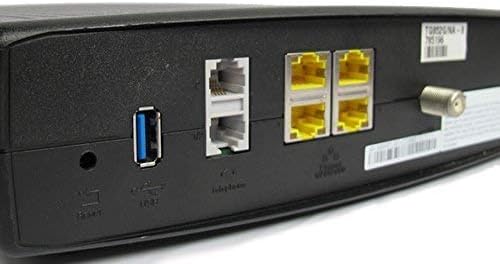
Mynd 2: Aftan view of the ARRIS Touchstone TM804G Telephone Modem. This image displays the back of the modem, featuring a coaxial cable connector, four yellow Ethernet ports, two grey telephone ports (RJ-11), a USB port, a reset button, and the power input.
- COAXIAL: Connects to the cable wall outlet.
- ETHERNET (LAN): Four (4) RJ-45 ports for connecting to a computer or router.
- TEL1-4 (RJ-11): Four (4) telephone ports for connecting to telephones or a home telephone wiring system.
- USB: (Functionality may vary or be disabled by your service provider).
- Endurstilla: Recessed button to reset the modem to factory defaults (use with caution).
- POWER: Tengist við straumbreytinn.
5. Uppsetning og uppsetning
Follow these steps to install your ARRIS Touchstone TM804G modem.
- Tengdu koaxial snúru: Connect one end of a coaxial cable to the COAXIAL port on the modem and the other end to a cable wall outlet. Ensure the connection is finger-tight.
- Tengdu Ethernet snúru: Connect one end of the Ethernet cable to one of the ETHERNET ports on the modem and the other end to your computer's network port or your wireless router's WAN/Internet port.
- Connect Telephone Lines: If using telephone service, connect your telephone(s) or home telephone wiring to the TEL1, TEL2, TEL3, or TEL4 ports on the modem using standard RJ-11 telephone cables.
- Tengdu aflgjafa: Tengdu straumbreytinn við POWER tengið á módeminu og stingdu síðan millistykkinu í rafmagnsinnstungu.
- Kveikt á: The modem will automatically power on. Observe the front panel indicator lights. The POWER, DS, US, and ONLINE lights should eventually turn solid green, indicating a successful connection to the cable network and internet. The TEL lights will illuminate when telephone lines are active.
- Virkja þjónustu: Contact your Internet Service Provider (ISP) to activate the modem. You will need to provide them with the MAC address and serial number, typically found on a label on the bottom or back of the modem.
Important: Do not connect the modem to a power outlet until all other connections are made.
6. Notkunarleiðbeiningar
Once the modem is successfully installed and activated, it operates automatically.
- Internet aðgangur: Any device connected via Ethernet to the modem (or through a connected router) should have internet access once the ONLINE light is solid green.
- Símaþjónusta: If your service plan includes VoIP, connected telephones will have dial tone and function once the corresponding TEL lights are solid green.
- Eftirlitsstaða: Refer to the front panel LED indicators (Section 4.1) to monitor the modem's operational status.
7. Viðhald
- Þrif: Keep the modem clean and free of dust. Use a soft, dry cloth to wipe the exterior. Do not use liquid cleaners or aerosols.
- Loftræsting: Gakktu úr skugga um að mótaldið sé staðsett á vel loftræstum stað til að koma í veg fyrir ofhitnun. Ekki loka fyrir loftræstiopin.
- Uppfærsla vélbúnaðar: Firmware updates are typically managed automatically by your Internet Service Provider. Do not attempt to manually update the firmware unless instructed by your ISP.
- Restarting the Modem: If you experience connectivity issues, try restarting the modem by unplugging the power adapter for 10-15 seconds and then plugging it back in.
- Endurstilla verksmiðju: The recessed RESET button on the rear panel can be used to restore factory default settings. This should only be done if instructed by your ISP, as it will erase all custom configurations. To perform a factory reset, use a paperclip to press and hold the RESET button for at least 10 seconds.
8. Bilanagreining
If you encounter problems with your modem, refer to the following common issues and solutions.
| Vandamál | Möguleg orsök | Lausn |
|---|---|---|
| Enginn kraftur | Rafmagnsbreytir ekki tengdur eða bilaður innstunga. | Ensure power adapter is securely connected to the modem and a working electrical outlet. Check the POWER LED. |
| Enginn Internetaðgangur | Coaxial cable loose, modem not activated, or ISP outage. |
|
| No Dial Tone on Phone | Telephone cable loose, TEL light off, or service issue. |
|
| Hægur internethraði | Network congestion, old router, or ISP issue. |
|
For further assistance, contact your Internet Service Provider's technical support.
9. Tæknilýsing
| Gerðarnúmer | TM804G |
| DOCSIS staðallinn | DOCSIS 3.0 |
| Internet Download Speed | Allt að 343 Mbps (háð þjónustuveitu) |
| VoIP tengi | 4 (RJ-11) |
| Ethernet tengi | 4 (RJ-45) |
| Tengitækni | Ethernet |
| Mál (L x B x H) | Um það bil 11.81 x 9.13 x 2.56 tommur |
| Þyngd | Um það bil 2.16 pund |
| Samhæfðir internetþjónustuaðilar | Optimum, Mediacom (and others, check with your provider) |
10. Ábyrgð og stuðningur
Þessi vara er í boði sem Amazon Renewed vara. Amazon Renewed vörur eru skoðaðar og prófaðar af fagfólki til að tryggja að þær virki og líti út eins og nýjar. Þær eru gjaldgengar fyrir skipti eða endurgreiðslu samkvæmt Amazon Renewed ábyrgðinni ef þú ert ekki ánægður með kaupin.
For technical support, troubleshooting, or service-related inquiries, please contact your Internet Service Provider (ISP) directly. Your ISP is responsible for the activation, configuration, and ongoing support of the modem on their network.


