1. Inngangur
The D-Link DGS-105GL is a 5-Port Gigabit Unmanaged Desktop Switch designed to provide a simple and efficient solution for expanding network connectivity in small office/home office (SOHO) and small to medium-sized business (SMB) environments. This device offers plug-and-play functionality, requiring no complex configuration. Its fanless design ensures silent operation, and the metal housing provides durability. The DGS-105GL incorporates energy-efficient features, including IEEE 802.3az Energy-Efficient Ethernet, to reduce power consumption without compromising performance.
2. Innihald pakka
Staðfestu að pakkinn þinn inniheldur eftirfarandi hluti:
- D-Link DGS-105GL 5-Port Gigabit Unmanaged Desktop Switch
- Rafmagns millistykki
Ef einhverjar vörur vantar eða eru skemmdar, vinsamlegast hafið samband við næsta D-Link söluaðila.
3. Vöru lokiðview
The DGS-105GL switch features a compact, low-profile design with a durable metal housing. It is equipped with five Gigabit Ethernet ports for high-speed network connections.
3.1 Framhlið

Mynd: Framan view of the D-Link DGS-105GL switch, showing the D-Link logo, model number DGS-105GL, a power LED, five port status LEDs (1-5), and five RJ45 Gigabit Ethernet ports (1-5).
The front panel includes the following indicators and ports:
- Power LED: Gefur til kynna aflstöðu rofans.
- LED-ljós fyrir tengi (1-5): Each port has an LED that indicates link status and activity. A solid light indicates a successful connection, and a blinking light indicates data transmission.
- RJ45 Gigabit Ethernet Ports (1-5): These ports are used to connect network devices such as computers, servers, and other switches.
3.2 Bakhlið

Mynd: Aftan view of the D-Link DGS-105GL switch, showing the power input port labeled '5V --- 1A'.
The rear panel contains the power input port, where the included power adapter is connected.
4. Uppsetning
The DGS-105GL is a plug-and-play device, making installation straightforward. Follow these steps to set up your switch:
- Tengdu straumbreytinn: Plug the included power adapter into the power input port on the rear panel of the DGS-105GL switch. Then, plug the other end of the adapter into a standard electrical outlet. The Power LED on the front panel should illuminate.
- Tengja nettæki: Connect your network devices (e.g., computers, network-attached storage, routers) to any of the five RJ45 Gigabit Ethernet ports on the front panel using standard Ethernet cables.
- Staðfestu tengingar: Once a device is connected and powered on, the corresponding Port LED on the switch's front panel should light up, indicating a successful link. If there is network activity, the LED will blink.

Image: The D-Link DGS-105GL switch placed on a desk in an office setting, connected to a laptop and other peripherals, demonstrating a typical setup.
5. Notkun rofans
The DGS-105GL operates automatically once connected. It supports auto-negotiation for speed and duplex mode, and auto-MDI/MDIX, eliminating the need for crossover cables. The switch automatically detects the speed of the connected device (10/100/1000 Mbps) and adjusts accordingly.
5.1 LED Vísar
The LEDs provide visual feedback on the switch's status:
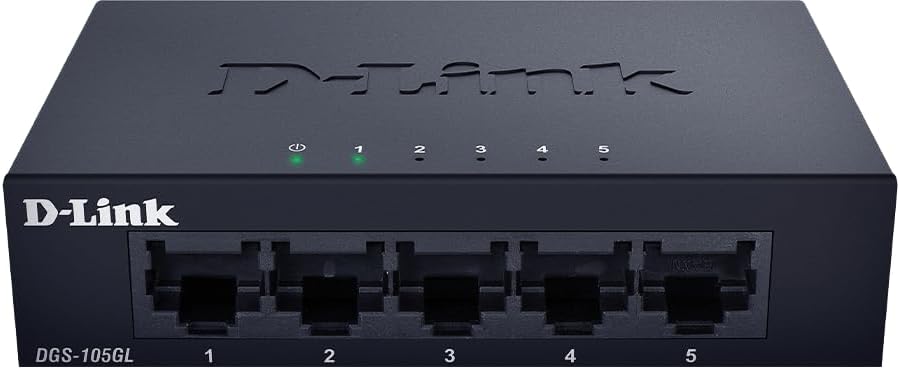
Mynd: Framan view of the D-Link DGS-105GL switch with the green power LED and green port LEDs 1-5 illuminated, indicating active connections.
| LED | Staða | Lýsing |
|---|---|---|
| Kraftur | Gegnheill grænn | Kveikt er á rofanum. |
| Kraftur | Slökkt | Rofinn fær ekki afl. |
| Port (1-5) | Gegnheill grænn | A device is successfully connected to the port. |
| Port (1-5) | Blikkandi grænt | Gögnum er verið að senda eða taka á móti í gegnum tengið. |
| Port (1-5) | Slökkt | Ekkert tæki er tengt við tengið eða tengda tækið er slökkt. |
6. Viðhald
To ensure optimal performance and longevity of your DGS-105GL switch, consider the following maintenance guidelines:
- Þrif: Periodically clean the exterior of the switch with a soft, dry cloth. Avoid using liquid or aerosol cleaners directly on the device.
- Umhverfisskilyrði: Ensure the switch is placed in a well-ventilated area, away from direct sunlight, heat sources, and excessive moisture. Maintain operating temperatures within the specified range (refer to specifications).
- Kapalstjórnun: Keep network cables neatly organized to prevent strain on ports and improve airflow around the device.
- Power Cycling: If you experience network issues, a simple power cycle (unplugging the power adapter, waiting 10 seconds, and plugging it back in) can often resolve minor problems.
7. Bilanagreining
If you encounter issues with your DGS-105GL switch, refer to the following common troubleshooting steps:
- Engin aflgjafa-LED:
- Ensure the power adapter is securely connected to both the switch and a working electrical outlet.
- Staðfestið að rafmagnsinnstungan virki með því að stinga í samband annað tæki.
- No Link LED for a Connected Device:
- Gakktu úr skugga um að Ethernet-snúran sé vel tengd bæði við rofatengið og nettækið.
- Gakktu úr skugga um að tengda nettækið sé kveikt á og virki rétt.
- Prófaðu aðra Ethernet snúru til að útiloka bilaða snúru.
- Prófaðu að tengja tækið við annað tengi á rofanum.
- Hægur nethraði:
- Gakktu úr skugga um að öll tengd tæki og snúrur styðji Gigabit Ethernet (Cat5e eða nýrra).
- Athugaðu hvort óhófleg netumferð eða forrit sem nota mikið bandvídd séu í gangi á tengdum tækjum.
- Perform a power cycle on the switch and connected devices.
8. Tæknilýsing
Key technical specifications for the D-Link DGS-105GL switch:
| Eiginleiki | Forskrift |
|---|---|
| Gerðarnúmer | DGS-105GL |
| Fjöldi hafna | 5 x Gigabit Ethernet (RJ45) |
| Gagnaflutningshraði | 1 Gbps per port |
| Tegund viðmóts | RJ45 |
| Málsefni | Málmur |
| Viftulaus hönnun | Já |
| Orkunýting | IEEE 802.3az orkusparandi Ethernet (EEE) |
| Power Input | 5 Volts (DC), 1 Amps |
| Þyngd hlutar | 160 grömm (5.6 únsur) |
| Vörumál | 39.37 cm L x 25.2 cm B x 0.94 cm H (u.þ.b.) |
| UPC | 790069458606 |
9. Ábyrgð og tækniaðstoð
Vörur frá D-Link eru með takmarkaðri ábyrgð. Nánari upplýsingar um ábyrgðarskilmála er að finna í ábyrgðarupplýsingum sem fylgja vörunni eða á opinberu vefsíðu D-Link. websíða.
For technical assistance, product documentation, or to download the latest software and firmware updates, please visit the D-Link support portal or contact D-Link technical support directly. Contact information can typically be found on the D-Link websíðu fyrir þitt svæði.


