1. Inngangur
Thank you for choosing the Hama Digital Radio DR7 USB. This manual provides essential information for the safe and efficient operation of your new radio. Please read it thoroughly before use and keep it for future reference. This portable radio supports DAB/DAB+ digital radio and conventional FM reception, offering clear sound quality and portability.
2. Öryggisleiðbeiningar
- Verndaðu vöruna gegn óhreinindum, raka og ofhitnun. Notið hana aðeins í þurru umhverfi.
- Ekki láta vöruna detta eða láta hana verða fyrir miklum höggum.
- Ekki opna vöruna eða halda áfram að nota hana ef hún skemmist.
- Ekki reyna að þjónusta eða gera við vöruna sjálfur. Látið hæfa sérfræðinga eftir hvaða þjónustu sem er.
- Geymið þessa vöru, eins og allar rafmagnsvörur, þar sem börn ná ekki til.
- Fargið umbúðum strax í samræmi við gildandi reglur á staðnum.
- Rafhlöður verða að vera settar í með réttri pólun.
- Fjarlægið rafhlöður úr vörunni ef hún á ekki að vera notuð í langan tíma.
3. Innihald pakka
- Hama Digital Radio DR7 USB
- 4 x AA rafhlöður
- Leiðbeiningarhandbók
4. Uppsetning
4.1 aflgjafi
The Hama Digital Radio DR7 USB can be powered by either batteries or an external USB power source.
4.1.1 Uppsetning rafhlöðu
To use the radio with batteries, open the battery compartment cover located on the back of the device. Insert 4 AA alkaline batteries, ensuring correct polarity (+/-). Close the battery compartment cover securely.

Mynd: Aftur view of the radio with the battery compartment open, showing battery insertion.
4.1.2 Tenging við utanaðkomandi aflgjafa
For continuous operation, connect the radio to a USB power source using a compatible USB 2.0 cable. The DC IN port requires 5.0V-0.5A. The USB port is located on the back of the radio.
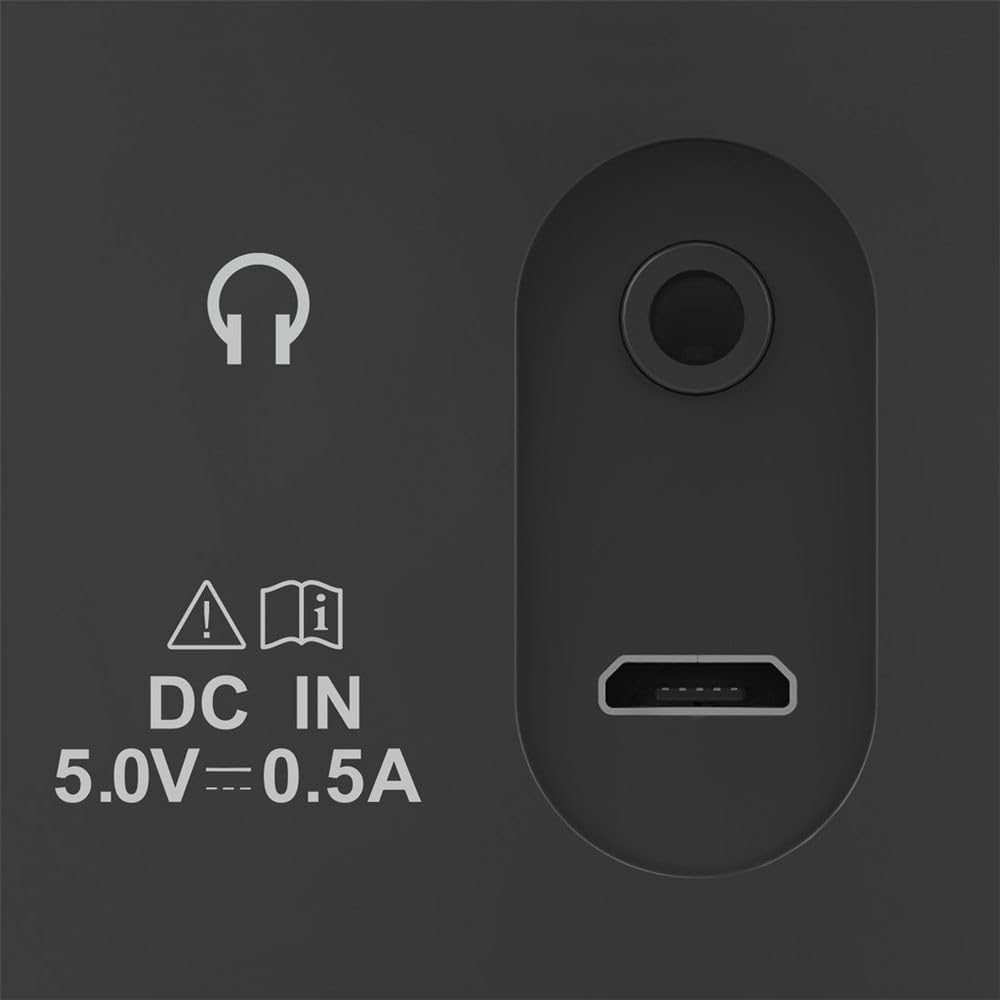
Image: Close-up of the radio's rear ports, including DC IN and USB.
4.2 Loftnet
Extend the telescopic antenna fully for optimal radio reception. Adjust its position to improve signal strength if needed.

Mynd: Aftur view of the radio with the antenna extended.
5. Notkunarleiðbeiningar
5.1 Kveikt/slökkt
Ýttu á Kraftur button (usually marked with a circle and a vertical line) to turn the radio on or off.
5.2 Stillingarval (DAB/DAB+ og FM)
Notaðu Mode or Heimild button to switch between DAB/DAB+ digital radio and FM radio modes.
5.3 Station Tuning
5.3.1 Automatic Scan (DAB/DAB+)
In DAB/DAB+ mode, press the Skanna button to automatically search for available digital radio stations. The radio will store all found stations.
5.3.2 Manual Tuning (FM)
Í FM-stillingu skaltu nota Stilla +/- buttons or the rotary knob (if available) to manually adjust the frequency. Press and hold the Stilla +/- buttons for automatic station seeking.

Mynd: Framan view of the radio, highlighting the display and controls.
5.4 forstilltar stöðvar
The radio features two direct selection buttons and allows for storing up to 10 preset stations.
- Til að spara: Tune to the desired station. Press and hold a preset button (e.g., 1 or 2) or the Forstillt hnappinn þar til skjárinn staðfestir að stöðin sé vistuð.
- Til að rifja upp: Briefly press the corresponding preset button to quickly switch to a saved station.
5.5 Hljóðstyrkur
Stilltu hljóðstyrkinn með því að nota Bindi rotary knob or dedicated volume buttons.
5.6 Vekjaraklukkuvirkni
The radio includes an alarm clock feature. Refer to the detailed instructions in the printed manual for setting and managing alarms.
5.7 Notkun heyrnartóla
Connect standard 3.5mm headphones to the headphone jack on the back of the radio for private listening. The internal speaker will mute automatically.
6. Viðhald
- Hreinsaðu þessa vöru aðeins með örlítið damp, lólaus klút og ekki nota árásargjarn hreinsiefni.
- Ensure no water gets into the product.
- When replacing batteries, always replace all batteries at once.
- Geymið útvarpið á köldum og þurrum stað þegar það er ekki í notkun í langan tíma.
7. Bilanagreining
| Vandamál | Möguleg orsök | Lausn |
|---|---|---|
| Enginn kraftur | Batteries are depleted or incorrectly inserted; power cable is disconnected. | Replace batteries, check polarity; ensure power cable is securely connected. |
| Lélegar eða engar móttökur | Loftnet ekki útrétt; veikt merki; truflanir. | Fully extend and adjust the telescopic antenna; try moving the radio to a different location; perform a new station scan. |
| Ekkert hljóð | Hljóðstyrkur of lágur; heyrnartól tengd. | Increase volume; disconnect headphones if you want to use the speaker. |
8. Tæknilýsing
- Gerð: 00054242
- Mál (L x B x H): 16.5 x 5.5 x 10.5 cm
- Þyngd: 448.54 g
- Tuner tækni: DAB, DAB+, FM
- Frequency (FM): 87.5 MHz
- Aflgjafi: 4 x AA Alkaline Batteries, USB 2.0 (DC IN 5.0V-0.5A)
- Efni: Plast
- Sérstakir eiginleikar: Alarm clock, 2 direct selection buttons, 10 preset stations
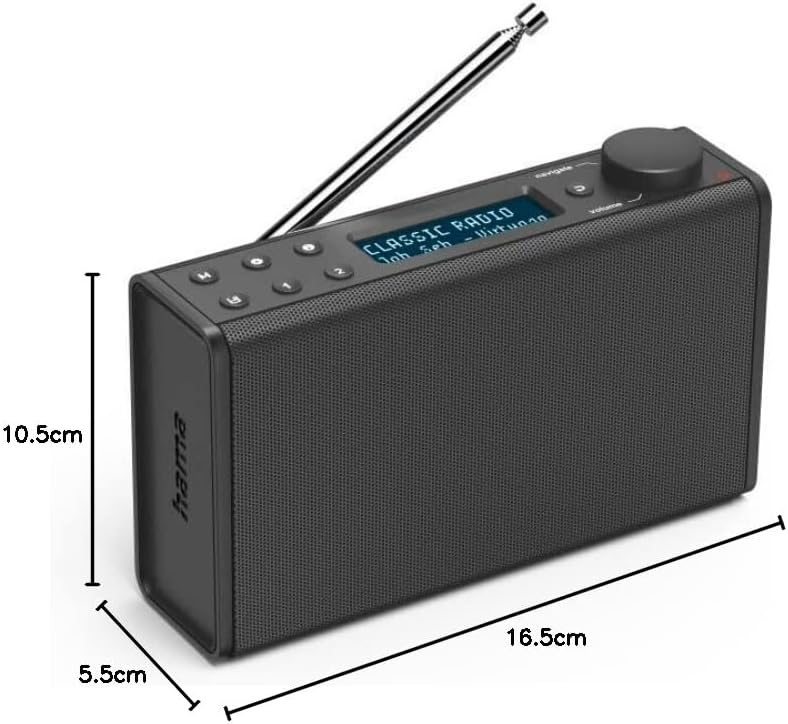
Image: Dimensions of the Hama Digital Radio DR7 USB.
9. Ábyrgð og stuðningur
Hama GmbH & Co KG assumes no liability and provides no warranty for damage resulting from improper installation/mounting, improper use of the product, or from failure to observe the operating instructions and/or safety notes. For further support, please visit the official Hama websíðuna eða hafðu samband við þjónustuver þeirra.