1. Inngangur
Thank you for choosing the iPega PG-P4008 Wireless Game Controller. This manual provides detailed instructions on how to set up, operate, and maintain your controller. The PG-P4008 offers broad compatibility with PS4, PS3, Android (10.0+), iOS (13.0+), and Windows PC, connecting wirelessly via Bluetooth for an enhanced gaming experience.
2. Vöru lokiðview
The iPega PG-P4008 is designed for versatile gaming across multiple platforms. It features a comfortable ergonomic design, responsive controls, and several advanced functionalities to immerse you in your games.
Helstu eiginleikar:
- Wireless Bluetooth connectivity (BT2.1+EDR) with up to 8 meters range.
- No driver installation required for connection.
- Integrated colored LED light indicator for operational status.
- Dual motors for realistic vibration feedback during gameplay.
- Built-in three-dimensional acceleration sensor and gyroscope sensor with six-axis induction.
- Integrated speaker and 3.5mm earphone jack for game audio.
- Dual-point capacitive touchpad for enhanced control.
- Compatible with PS4, PS3, Android (10.0+), iOS (13.0+), and Windows PC.
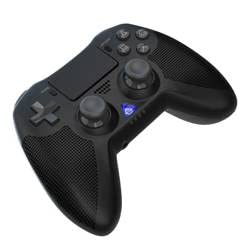
Mynd 1: Framan view of the iPega PG-P4008 Wireless Game Controller. This image displays the controller's ergonomic design, dual analog sticks, D-pad, action buttons, touchpad, and the central LED indicator.
3. Uppsetning og tenging
The PG-P4008 controller connects wirelessly via Bluetooth. Follow these steps to pair your controller with your device:
- Kveikt á: Ensure the controller is charged. Press and hold the PS hnappur (or equivalent power button) to turn on the controller.
- Pörunarstilling:
- For PS4/PS3: Connect the controller to the console using a USB cable. Once recognized, you can disconnect the cable for wireless play. The connection method is similar to the official P4 controller.
- For Android/iOS: Activate Bluetooth on your mobile device. On the controller, press and hold the SHARE button + PS button simultaneously until the LED indicator flashes rapidly, indicating pairing mode. Select "PG-P4008" (or similar) from your device's Bluetooth list to connect.
- For Windows PC: Ensure your PC has Bluetooth capability. On the controller, press and hold the PS button + OPTIONS button simultaneously until the LED indicator flashes rapidly. On your PC, go to Bluetooth settings, add a new device, and select "PG-P4008" (or similar) to pair.
- Vel heppnuð tenging: Once connected, the LED indicator on the controller will change to a solid color, indicating a successful pairing.
Athugið: No additional driver software is required for operation. The controller supports a stable connection up to 8 meters.
4. Notkunarleiðbeiningar
LED vísir:
The built-in colored LED light indicates the controller's operational status and player assignment, similar to the official PS4 controller. Different colors will signify different stages or player numbers.
Viðbrögð við titringi:
The controller features dual motors embedded in the handles, providing tactile vibration feedback to enhance your gaming immersion. This feedback will vary based on in-game events.
Snertiborð:
The dual-point capacitive touchpad allows for intuitive control in games that support touch input, offering an additional layer of interaction.
Audio Functionality:
Connect your 3.5mm earphones to the integrated jack on the controller to experience game audio directly, providing a private and immersive sound experience.
5. Viðhald
- Keep the controller dry and away from moisture to prevent damage to internal components.
- Þrífið stjórntækið reglulega með mjúkum, þurrum klút. Forðist að nota sterk efni eða slípiefni.
- Geymið stjórnandann á köldum, þurrum stað þegar hann er ekki í notkun.
- Forðist að láta stjórntækið verða fyrir miklum hita eða beinu sólarljósi.
- Do not attempt to disassemble or modify the controller, as this will void any potential warranty and may cause damage.
6. Bilanagreining
- Stýring tengist ekki:
- Gakktu úr skugga um að stjórntækið sé fullhlaðið.
- Staðfestu að Bluetooth sé virkt í tækinu þínu.
- Make sure the controller is in the correct pairing mode for your device (refer to Section 3).
- Reyndu að endurræsa bæði stjórnandann og tækið.
- Fjarlægðu fyrri pörun af Bluetooth-lista tækisins og reyndu að para aftur.
- Inntaksseinkun eða tengingarleysi:
- Ensure you are within the 8-meter operating range.
- Lágmarka truflanir frá öðrum þráðlausum tækjum.
- Check for any physical obstructions between the controller and the device.
- Titringur virkar ekki:
- Gakktu úr skugga um að leikurinn sem þú ert að spila styðji titringsviðbrögð.
- Athugaðu stillingar í leiknum til að ganga úr skugga um að titringur sé virkur.
- Audio not working via 3.5mm jack:
- Ensure your earphones are properly plugged in.
- Check the volume settings on your device and in-game.
- Test with another pair of earphones to rule out earphone issues.
7. Tæknilýsing
| Gerðarnúmer | PG-P4008 |
| Vörumerki | iPega |
| Tengingar | Bluetooth (BT2.1+EDR) |
| Wireless Range | Allt að 8 metrar |
| Samhæf tæki | PS4, PS3, Android (10.0+), iOS (13.0+), Windows PC |
| Sérstakir eiginleikar | Wireless, Touchpad, Vibration, 6-axis Gyroscope, Built-in Speaker, 3.5mm Audio Jack |
| Magn hnappa | 17 |
| Aflgjafi | Rafhlöðuknúið |
8. Ábyrgð og stuðningur
Upplýsingar um ábyrgð vörunnar og þjónustu við viðskiptavini eru ekki að finna í þessari handbók. Vinsamlegast skoðið umbúðir vörunnar eða upplýsingar um söluaðila. webvefsíðunni til að fá nánari upplýsingar um ábyrgð og hvernig hægt er að hafa samband við þjónustuver viðskiptavina til að fá aðstoð.