1. Inngangur
Thank you for choosing the Omega OM0520WB 1600 dpi Wireless Optical Mouse. This manual provides detailed instructions for setting up, operating, maintaining, and troubleshooting your new device. Please read this manual carefully before use to ensure optimal performance and longevity of your mouse.
2. Innihald pakka
Vinsamlegast athugið hvort eftirfarandi atriði séu í pakkanum:
- Omega OM0520WB Wireless Optical Mouse
- Notendahandbók
- 1 x AA Battery (may be pre-installed or included separately)
3. Vöru lokiðview
Familiarize yourself with the components of your Omega OM0520WB mouse:
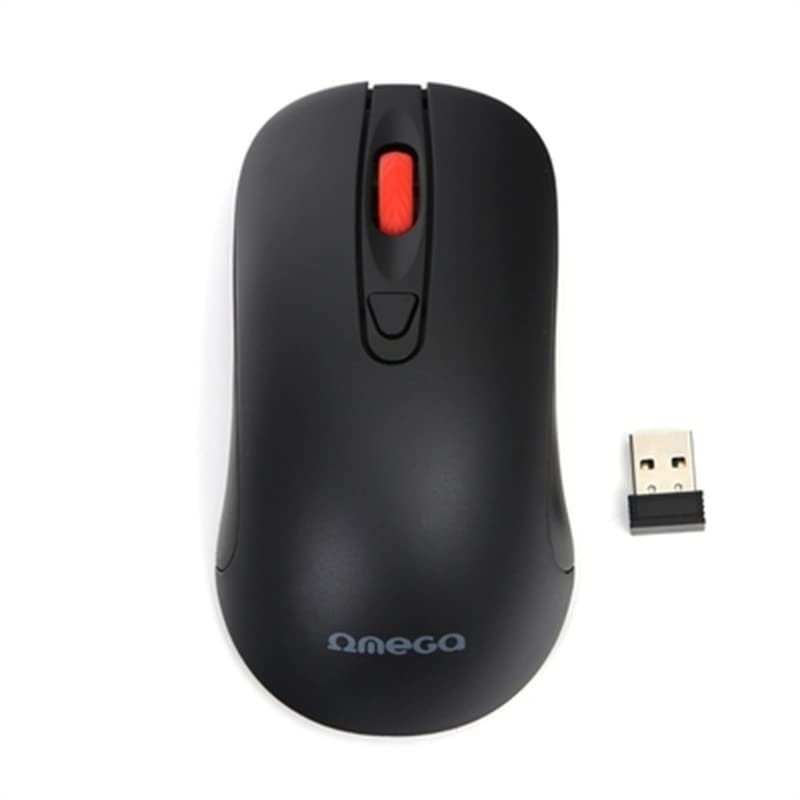
Image: The Omega OM0520WB Wireless Optical Mouse, shown in black. It features a sleek, ergonomic design with standard left and right click buttons, a scroll wheel, and a smooth finish.
- Vinstri smellihnappur: Staðlað aðalsmellvirkni.
- Hægri smellihnappur: Staðlað auka smellvirkni.
- Skrunahjól: Fyrir lóðrétta skrun og miðsmell.
- Optískur skynjari: Located on the underside, for precise tracking.
- Rafhlöðuhólf: Located on the underside, for inserting the AA battery.
- Rofi: On/Off switch, usually on the underside of the mouse.
4. Uppsetningarleiðbeiningar
Follow these steps to set up your Omega OM0520WB mouse:
- Settu rafhlöðu upp: Open the battery compartment cover on the underside of the mouse. Insert one AA battery, ensuring the polarity (+/-) matches the diagram inside the compartment. Close the cover securely.
- Kveikja á músinni: Finndu rofann neðst á músinni og renndu honum í „ON“ stöðu.
- Tengjast í gegnum Bluetooth:
- On your computer or laptop, navigate to the Bluetooth settings.
- Gakktu úr skugga um að Bluetooth sé virkt.
- Leitaðu að new devices. The mouse should appear as 'Omega OM0520WB' or similar.
- Select the mouse to pair. Once paired, your mouse is ready for use.
5. Notkunarleiðbeiningar
Your Omega OM0520WB mouse is designed for intuitive use:
- Grunnleiðsögn: Færðu músina á sléttu yfirborði til að stjórna bendilinn á skjánum.
- Að smella: Use the left button for primary clicks (e.g., selecting items) and the right button for secondary clicks (e.g., opening context menus).
- Skruna: Rúllaðu skrunhjólinu upp eða niður til að fletta í gegnum skjöl og web pages. Press the scroll wheel for a middle-click function, if supported by your application.
- DPI stilling: The mouse operates at a fixed 1600 dpi, providing a balance of speed and precision for most tasks.
- Ambidextrous hönnun: The symmetrical design allows comfortable use for both left-handed and right-handed users.
6. Viðhald
Til að tryggja endingu og bestu mögulegu virkni músarinnar skaltu fylgja þessum viðhaldsleiðbeiningum:
- Þrif: Notið mjúkan, þurran klút til að þurrka yfirborð músarinnar. Fyrir þrjósk óhreinindi, þurrkið örlítið.ampÞvoið klútinn með vatni. Forðist að nota sterk efni eða slípiefni.
- Optískur skynjari: Haltu ljósnemanum að neðan hreinum og lausum við ryk eða rusl.
- Skipt um rafhlöðu: When the mouse performance degrades or it stops responding, replace the AA battery. Always use a fresh, high-quality battery.
- Geymsla: When not in use for extended periods, turn off the mouse using the power switch to conserve battery life. Store it in a cool, dry place.
7. Bilanagreining
If you encounter issues with your Omega OM0520WB mouse, refer to the following solutions:
- Músin svarar ekki:
- Gakktu úr skugga um að kveikt sé á músinni.
- Athugaðu rafhlöðuna. Skiptu um hana ef þörf krefur.
- Verify that Bluetooth is enabled on your computer and the mouse is paired. Try re-pairing the mouse.
- Move the mouse closer to your computer to ensure a strong Bluetooth signal.
- Óregluleg hreyfing bendils:
- Hreinsið ljósnemann á neðri hlið músarinnar.
- Use the mouse on a clean, non-reflective, and uniform surface. Mouse pads are recommended.
- Tengingarvandamál:
- Endurræstu tölvuna þína og reyndu að tengjast aftur.
- Remove the mouse from your computer's Bluetooth device list and then re-pair it.
- Ensure there are no other devices interfering with the Bluetooth signal.
8. Tæknilýsing
| Nafn líkans | OM0520WB |
| Tengitækni | Þráðlaust (Bluetooth) |
| Hreyfingarskynjunartækni | Optískur |
| DPI | 1600 dpi |
| Fjöldi hnappa | 3 (Vinstri, Hægri, Skrunahjól) |
| Handstilling | Tvíhliða |
| Aflgjafi | 1 x AA Lithium-ion battery (required) |
| Samhæf tæki | Einkatölva, fartölva |
| Þyngd | Um það bil 73 g |
| Litur | Svartur |
9. Ábyrgð og stuðningur
Omega products are designed for reliability and performance. For information regarding warranty coverage, technical support, or service, please refer to the warranty card included with your product or visit the official Omega webvefsíða. Geymið kaupkvittunina sem sönnun fyrir kaupunum.


