Inngangur
This manual provides detailed instructions for the setup, operation, and maintenance of your Amazon Basics Projection Alarm Clock. Please read this manual thoroughly before using the product to ensure proper function and to prevent damage.

Image: The Amazon Basics Projection Alarm Clock, showing its digital display and projection lens.
Öryggisleiðbeiningar
- Ekki láta tækið verða fyrir miklum hita, beinu sólarljósi, ryki eða raka.
- Gakktu úr skugga um að rafmagnsmillistykkið sé samhæft við staðbundna aflgjafann þinn.
- Haldið tækinu frá vatni eða öðrum vökvum.
- Ekki reyna að taka tækið í sundur eða breyta því. Það ógildir ábyrgðina.
- Clean the unit only with a soft, dry cloth. Do not use liquid cleaners.
- Fargið rafhlöðum á réttan hátt í samræmi við staðbundnar reglur.
Innihald pakka
- Amazon Basics Projection Alarm Clock
- Rafmagns millistykki
- Notendahandbók
Eiginleikar vöru
- Projection of time onto a wall or ceiling.
- FM Radio with automatic/manual scan and up to 15 preset stations.
- USB port for charging mobile phones or tablets.
- 7-inch high-definition LED display with adjustable brightness.
- Dual alarms for separate wake-up times.
- Snooze function with adjustable duration (2 to 60 minutes).
- Sleep timer for automatic radio shut-off (5 to 90 minutes).
- DST button for Daylight Saving Time adjustment.
- Battery backup (requires 2 AAA batteries, not included) to maintain time settings during power outages.

Mynd: Yfirview of key features including sleep timer, radio presets, and snooze function.
Stjórntæki og skjár
Familiarize yourself with the buttons and ports on your alarm clock for optimal use.

Mynd: Hlið view illustrating the location of controls, USB charging port, and projection lens.
- Tímastillingarhnappur: Notað til að stilla núverandi tíma.
- Hnappar fyrir viðvörun 1/2: Notað til að stilla og virkja Viðvörun 1 og Viðvörun 2.
- Hnappur fyrir blunda/dimma: Activates snooze during an alarm; adjusts display brightness when not alarming.
- Radio/Sleep Button: Turns FM radio on/off; sets sleep timer.
- Volume/Tune Dial: Adjusts radio volume and tunes FM frequencies.
- Projection On/Off/Flip Button: Controls the projection feature and flips the projected time.
- Projection Focus Wheel: Stillir skýrleika áætlaðs tíma.
- Stillari fyrir vörpunhorn: Changes the angle of the projected time.
- USB hleðslutengi: Til að hlaða utanaðkomandi tæki.
- DST Button: Skiptir um sumartíma.
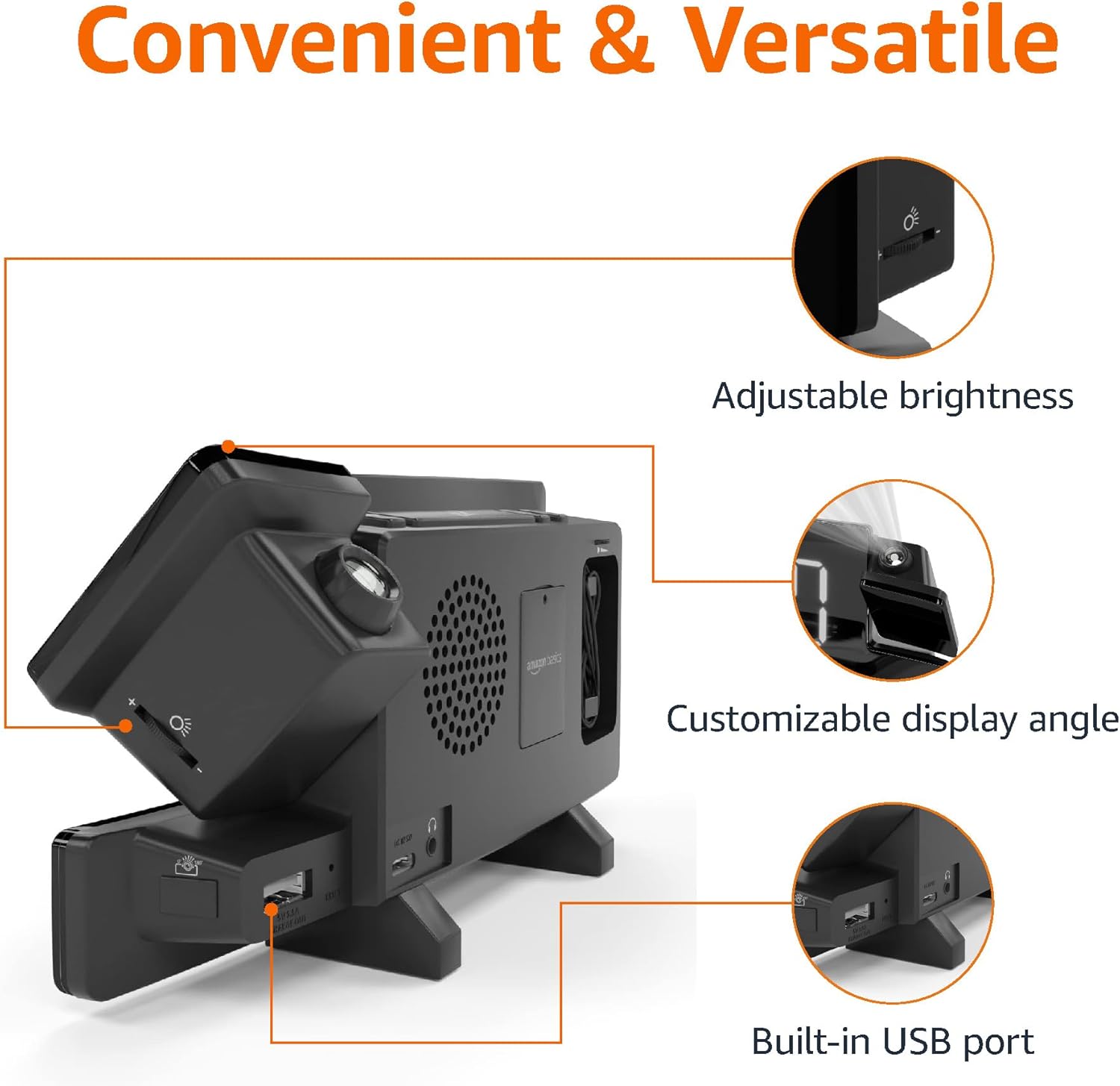
Image: Diagram highlighting the adjustable brightness, customizable projection angle, and USB charging port.
Uppsetning
1. Rafmagnstenging
Connect the AC power adapter to the DC IN port on the back of the alarm clock and plug it into a standard wall outlet. The display will light up.
2. Uppsetning rafhlöðuafritunar
For battery backup, open the battery compartment on the bottom of the unit. Insert 2 AAA batteries (not included), ensuring correct polarity (+/-). Close the compartment. The battery backup maintains time settings during power outages but does not power the display or alarm functions.
3. Upphafleg tímastilling
- Ýttu á og haltu inni Tímasett hnappinn. Tölustafirnir munu blikka.
- Notaðu Volume/Tune Dial að stilla klukkutímann. Ýttu á Tímasett aftur til staðfestingar.
- Mínútustafirnir munu blikka. Notaðu Volume/Tune Dial til að laga fundargerðina. Ýttu á Tímasett aftur til staðfestingar.
- The time format (12H/24H) will flash. Use the Volume/Tune Dial to select your preferred format. Press Tímasett til að staðfesta og hætta í tímastillingarstillingu.
4. Sumartími (DST)
Ýttu á DST button to toggle Daylight Saving Time on or off. The DST indicator will appear or disappear on the display.
Notkunarleiðbeiningar
1. Stilling vekjara (Veikjari 1 og Veikjari 2)
- Ýttu á og haltu inni Viðvörun 1 or Viðvörun 2 hnappinn. Tölurnar fyrir klukkustund vekjaraklukkunnar munu blikka.
- Notaðu Volume/Tune Dial to adjust the alarm hour. Press the respective Viðvörun hnappinn aftur til að staðfesta.
- The alarm minute digits will flash. Use the Volume/Tune Dial to adjust the alarm minutes. Press the respective Viðvörun hnappinn aftur til að staðfesta.
- The alarm source (FM radio or buzzer) will flash. Use the Volume/Tune Dial to select your preference. Press the respective Viðvörun button to confirm and activate the alarm. An alarm icon will appear on the display.
- To deactivate an alarm, press the respective Viðvörun button once. The alarm icon will disappear.
2. Using Snooze
Þegar viðvörun hljómar, ýttu á Blunda/Dimmer button to temporarily silence the alarm. The alarm will sound again after the set snooze duration. The default snooze duration is 9 minutes. To adjust the snooze duration, press and hold the Blunda/Dimmer hnappinn, notaðu síðan Volume/Tune Dial to select a duration between 2 and 60 minutes. Press Blunda/Dimmer aftur til staðfestingar.
3. FM útvarpsrekstur
- Kveikja/slökkva: Ýttu á Radio/Sleep hnappinn til að kveikja eða slökkva á FM útvarpinu.
- Stilla stöðvar: Notaðu Volume/Tune Dial to manually tune to a desired FM frequency.
- Sjálfvirk skönnun: Ýttu á og haltu inni Radio/Sleep button to automatically scan and save available FM stations as presets.
- Veldu forstillingar: Once stations are saved, short press the Radio/Sleep button to cycle through the preset stations.
- Stilla hljóðstyrk: Snúðu Volume/Tune Dial til að stilla hljóðstyrk útvarpsins.
4. Svefntímamælir
While the FM radio is playing, press the Radio/Sleep button repeatedly to set the sleep timer. Options typically range from 5 to 90 minutes. The radio will automatically turn off after the selected duration.
5. Vörpun

Image: The alarm clock projecting the time onto a bedroom ceiling.
- Virkja/afvirkja: Ýttu á Projection On/Off/Flip hnappinn til að kveikja eða slökkva á tímavörpuninni.
- Stilla horn: Manually adjust the projection arm to direct the time onto your desired surface (wall or ceiling).
- Fókus: Snúðu Projection Focus Wheel to achieve a clear image.
- Flip Display: Ýttu á Projection On/Off/Flip button repeatedly to rotate the projected time 180 degrees, ensuring correct orientation.

Image: The alarm clock on a nightstand, projecting the time onto a wall, demonstrating its use in a bedroom setting.
6. USB hleðsla
Connect your mobile phone or tablet's USB charging cable to the USB hleðslutengi on the back of the alarm clock. The device will begin charging. This port is for charging only and does not support data transfer.
7. Skjár birtustilling
Ýttu á Blunda/Dimmer button (when no alarm is sounding) to cycle through different brightness levels for the main LED display.
Viðhald
1. Þrif
Wipe the unit with a soft, dry, lint-free cloth. Do not use abrasive cleaners, waxes, or solvents as they may damage the surface.
2. Skipt um rafhlöðu
If the battery backup is not functioning correctly (e.g., time resets after a power outage), replace the 2 AAA batteries in the battery compartment, ensuring correct polarity.
Úrræðaleit
| Vandamál | Möguleg orsök | Lausn |
|---|---|---|
| Skjárinn er auður. | Engin rafmagnstenging. | Gakktu úr skugga um að riðstraumsbreytirinn sé vel tengdur við tækið og virkan innstungu. |
| Viðvörunin hljómar ekki. | Viðvörunin er ekki virk eða hljóðstyrkurinn er of lágur. | Check if the alarm icon is visible on the display. Re-set the alarm if necessary. Increase radio volume if FM is selected as alarm source. |
| Áætlaður tími er óskýr. | Projection focus is not adjusted. | Snúðu Projection Focus Wheel þar til myndin er skýr. |
| Áætlaður tími sést ekki. | Projection is off or room is too bright. | Ýttu á Projection On/Off/Flip button to activate. The projection is best viewed in a dark room. |
| Útvarpsmóttaka er léleg. | Staðsetning loftnets eða truflanir. | Adjust the position of the FM antenna wire. Move the unit away from other electronic devices that may cause interference. |
| USB hleðsla virkar ekki. | Vandamál með snúru eða ósamhæfni tækis. | Ensure the USB cable is functional and properly connected. Try a different cable or device. |
Tæknilýsing
- Gerð: MET8831-US
- Rafmagnsinntak: Straumbreytir (fylgir)
- Afritun rafhlöðu: 2 x AAA rafhlöður (fylgir ekki)
- Skjár: 7 tommu LED
- Útvarpstíðni: FM
- USB úttak: 5V, 1A (for charging)
- Mál (L x B x H): 7.1 x 1.6 x 3.7 tommur (18.03 x 4.06 x 9.4 cm)
- Þyngd: Um það bil 0.59 pund (267.62 g)

Image: Product dimensions for the Amazon Basics Projection Alarm Clock.
Upplýsingar um ábyrgð
This product is covered by the Amazon Basics warranty. For detailed information regarding warranty terms and conditions, please refer to the official Amazon Basics websíðuna eða hafðu samband við þjónustuver.
Þjónustudeild
For further assistance, troubleshooting, or product inquiries, please contact Amazon Basics customer support through the Amazon website or your purchase platform. Have your product model number (MET8831-US) and purchase details ready.


