1. Inngangur
This manual provides detailed instructions for the setup, operation, and maintenance of your Beelink MINI S12 N95 Mini PC. This compact desktop computer is equipped with an Intel N95 Processor, 8GB DDR4 RAM, and a 256GB SSD, designed for efficient performance in various tasks including home entertainment, web vafra og skrifstofustörf.
The Beelink MINI S12 N95 features:
- Intel N95 Processor (up to 3.4 GHz, 4 Cores/4 Threads)
- 8GB DDR4 RAM and 256GB M.2 SATA3 SSD
- Dual HDMI for 4K display support
- WiFi5 (802.11ax) and Bluetooth 4.2
- 2.5G LAN port for high-speed internet
- Pre-installed Windows 11 Home operating system
2. Innihald pakka
Staðfestu að allir hlutir séu til staðar í vörupakkningunni þinni:
- Beelink MINI S12 N95 Mini PC
- Notendahandbók
- Veggfesting
- HDMI cables (quantity may vary)
- Power adapter (with regional plug options)

Image: Included accessories for the Beelink MINI S12 N95 Mini PC.
3. Vöru lokiðview
3.1 External Ports and Connectors
Familiarize yourself with the various ports and connectors on your Mini PC:
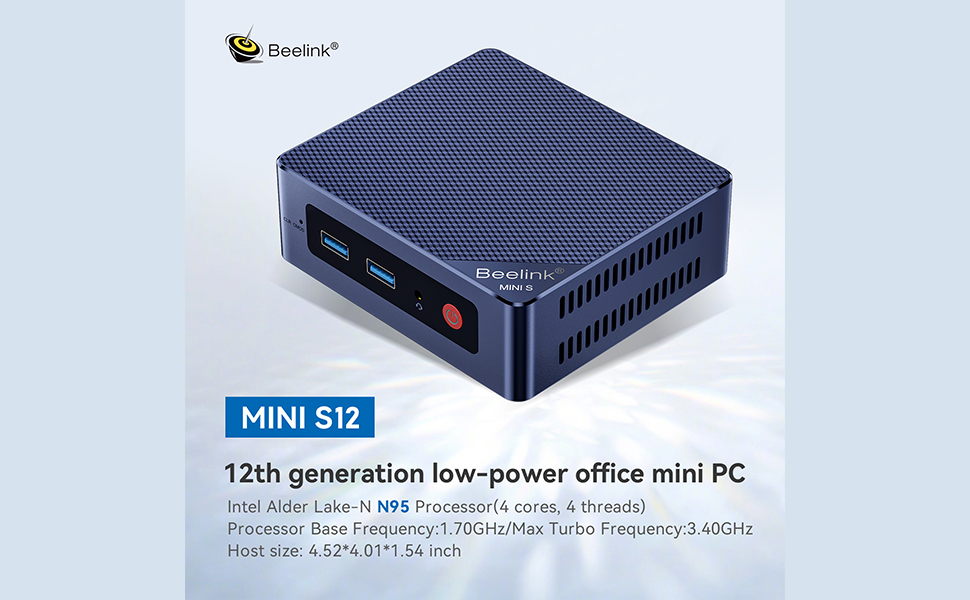
Image: Front and rear panel interfaces of the Mini PC.
- Framhlið: RTC Key (CLR CMOS), USB3.2 Gen2 (10Gbps) ports, Earphone jack, Power button.
- Aftan Panel: USB3.2 Gen2 (10Gbps) ports, LAN (2.5G) port, 4K 60Hz HDMI ports (x2), DC Power adapter input, Locking slot.
3.2 Innri íhlutir
The Beelink MINI S12 N95 supports storage expansion and memory upgrades.

Mynd: Innra view showing dual SSD high-speed storage slots.
- SSD Slots: Supports M.2 2280 NVMe/SATA3 SSD, configurable up to 4TB storage. The Mini S12 ships with a SATA3 SSD.
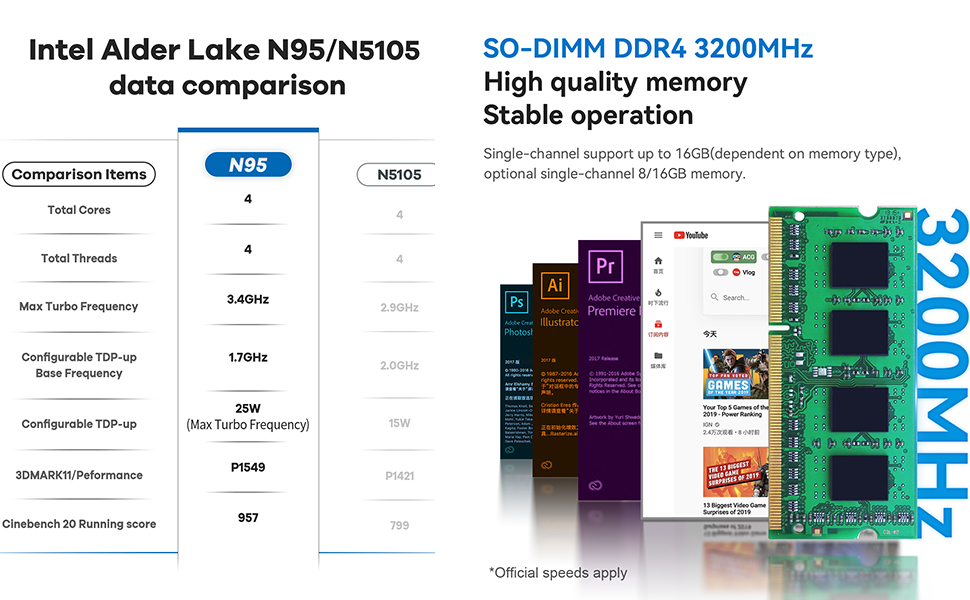
Image: SO-DIMM DDR4 3200MHz memory module.
- vinnsluminni: Single-channel support up to 16GB (dependent on memory type). Optional single-channel 8GB/16GB memory.
4. Uppsetningarleiðbeiningar
Follow these steps to set up your Beelink MINI S12 N95 Mini PC:
- Tengjast við skjá: Use an HDMI cable to connect your Mini PC to a monitor or TV. The device supports dual HDMI output for connecting two displays.
- Tengja jaðartæki: Stingdu lyklaborðinu, músinni og öðrum USB-tækjum í tiltæk USB-tengi.
- Nettenging: For a wired connection, connect an Ethernet cable to the 2.5G LAN port. For wireless, the device supports WiFi5.
- Kveikt á: Connect the power adapter to the DC input port on the Mini PC, then plug the adapter into a power outlet. Press the power button on the front panel to turn on the device.
- Upphafleg uppsetning: Follow the on-screen instructions to complete the Windows 11 Home setup.
5. Notkunarleiðbeiningar
5.1 Grunnaðgerð
- Kveikt/slökkt: Press the power button to turn the PC on. To shut down, use the Windows Start menu options. A short press of the power button can also put the PC to sleep.
- Endurræsa: Use the Windows Start menu options to restart the PC.
- Aðgangur að BIOS: To enter the BIOS settings, press the Eyða takkann ítrekað við ræsingu.
- Ræsingarvalkostir: To access boot options (e.g., boot from USB), press the F7 takkann ítrekað við ræsingu.
5.2 Uppsetning á tveimur skjám
The Mini PC supports connecting two monitors simultaneously via its dual HDMI ports. This allows for extended desktop functionality, improving work efficiency.
5.3 Wake On LAN / Auto Power On
The device supports Wake On LAN and Auto Power On features. For detailed configuration, refer to the official Beelink websíðuna eða hafðu samband við þjónustudeild.
For more details, log on to http://bee-link.com/
6. Storage and Memory Expansion
6.1 Geymslurýmisstækkun
The Beelink MINI S12 N95 includes two M.2 2280 SSD slots. One slot supports PCIe3.0 x1 (not compatible with SATA3 SSDs), and the other supports PCIe3.0 x4 (compatible with SATA3 SSDs). This allows for significant storage upgrades up to 4TB.
6.2 Memory Upgrade
The Mini PC supports single-channel SO-DIMM DDR4 memory up to 16GB. If you wish to upgrade the RAM, ensure the new module is compatible with DDR4 3200MHz SO-DIMM specifications.
7. Viðhald
7.1 Þrif
- Þrífið reglulega ytra byrði Mini-tölvunnar með mjúkum, þurrum klút.
- Ensure ventilation openings are free from dust and obstructions to maintain optimal cooling.
- Ekki nota fljótandi hreinsiefni eða úðabrúsa beint á tækið.
7.2 Kælikerfi
The Mini PC features an ultra-quiet fan and heatsink designed for efficient CPU cooling. Ensure the device is placed in a well-ventilated area to prevent overheating, especially during prolonged use or heavy workloads.

Image: Internal cooling system diagram.
8. Bilanagreining
If you encounter issues with your Beelink MINI S12 N95 Mini PC, refer to the following common solutions:
- Enginn kraftur: Gakktu úr skugga um að rafmagnstengið sé vel tengt bæði við Mini-tölvuna og virka innstungu. Prófaðu aðra innstungu ef þörf krefur.
- Enginn skjár: Verify that the HDMI cable is properly connected to both the Mini PC and the monitor. Ensure the monitor is powered on and set to the correct input source. Try a different HDMI cable or monitor if possible.
- Kerfið svarar ekki: If the system freezes, press and hold the power button for 5-10 seconds to force a shutdown. Then restart the PC.
- BIOS/Boot Issues: If you need to reset BIOS settings, locate the CLR CMOS (RTC Key) button on the front panel. Consult the official Beelink website for specific instructions on using this feature.
- Ofhitnun: Ensure the Mini PC is in a well-ventilated area and that its vents are not blocked. Reduce heavy workloads if temperatures are consistently high.
- Vandamál með stýrikerfið: If Windows is not booting correctly, you may need to use Windows recovery options or reinstall the operating system.
9. Tæknilýsing
Key technical specifications for the Beelink MINI S12 N95 Mini PC:
| Eiginleiki | Forskrift |
|---|---|
| Örgjörvi | Intel N95 (4 kjarnar, 4 þræðir, allt að 3.4 GHz) |
| Grafík | Intel UHD grafík |
| vinnsluminni | 8GB DDR4 (SO-DIMM, 3200MHz) |
| Geymsla | 256GB M.2 SATA3 SSD (Expandable up to 4TB) |
| Þráðlaus tenging | WiFi5 (802.11ax), Bluetooth 4.2 |
| LAN | 2.5G Ethernet |
| Myndbandsúttak | Dual HDMI (4K @ 60Hz) |
| USB tengi | USB 3.2 Gen2 (10Gbps) |
| Stýrikerfi | Windows 11 Home |
| Mál | Um það bil 4.52 x 4.01 x 1.54 tommur |
| Þyngd | Um það bil 1.57 pund |

Image: Intel N95 processor data comparison.
10. Ábyrgð og stuðningur
Beelink provides comprehensive support for your Mini PC:
- Ábyrgð: 1 Year Free Warranty.
- Tæknileg aðstoð: 7 Days/24 Hours Serving.
- Vottun: All products have obtained FCC, CE, and RoHS certification.
For any technical assistance, questions regarding system installation (e.g., Windows 10), or other inquiries, please contact Beelink customer service.


