SSK SC211

SSK SC211 11-in-1 USB-C Laptop Docking Station User Manual

Gerð: SC211 | Vörumerki: SSK

1. Inngangur

The SSK SC211 11-in-1 USB-C Laptop Docking Station is a versatile multiport adapter designed to expand the connectivity of your USB-C enabled laptop, tablet, or smartphone. It integrates multiple essential ports into a single compact device, enhancing productivity and simplifying your workspace.

2. Vörueiginleikar

This docking station provides 11 ports for comprehensive connectivity:

SSK 11-in-1 USB C Hub with all ports labeled

Mynd 1: Yfirview of the SSK SC211 11-in-1 USB-C Docking Station with all ports clearly labeled, including PD 3.0, USB 2.0, HDMI1 (4K@60Hz), HDMI2 (4K@30Hz), RJ45 Ethernet, SD/TF Card, 2x USB 3.0, 3.5mm Audio, and VGA (1080P@60Hz).

3. Uppsetningarleiðbeiningar

  1. Tengjast við hýsiltæki: Plug the integrated USB-C cable from the docking station into the USB-C port of your laptop, tablet, or smartphone. Ensure your device's USB-C port supports "Display Port Alternate Mode" for video output functionality.
  2. Rafmagnstenging (valfrjálst en mælt með): For stable performance and charging, connect your device's original power adapter or a compatible USB-C PD charger (up to 100W) to the docking station's USB-C PD port.
  3. Tengja ytri skjái:
    • For HDMI displays, connect HDMI cables from your monitors to the HDMI1 and/or HDMI2 ports on the docking station.
    • Fyrir VGA skjái skaltu tengdu VGA snúru frá skjánum þínum við VGA tengið á tengikvíinni.
  4. Tengja jaðartæki:
    • Plug USB devices (e.g., external hard drives, flash drives) into the USB 3.0 ports.
    • Connect wireless mouse/keyboard receivers to the USB 2.0 port.
    • Settu SD- eða TF-kort í viðeigandi kortalesara.
    • Til að fá nettengingu með snúru skaltu tengja Ethernet-snúru við RJ-45 tengið.
    • Connect headphones or speakers to the 3.5mm audio port.
  5. Driver Installation (Mac OS Specific): For Mac OS, due to its MST (Multi-Stream Transport) display limitations, installing DisplayLink drivers may be required to achieve extended display functionality across multiple distinct displays. Refer to the DisplayLink website for the latest drivers and installation instructions. For Windows, it is generally plug-and-play.

Video 1: A demonstration of connecting a docking station to a laptop and external monitors, showcasing its multi-display capabilities and various port connections.

4. Notkunarleiðbeiningar

4.1 Sýna stillingar

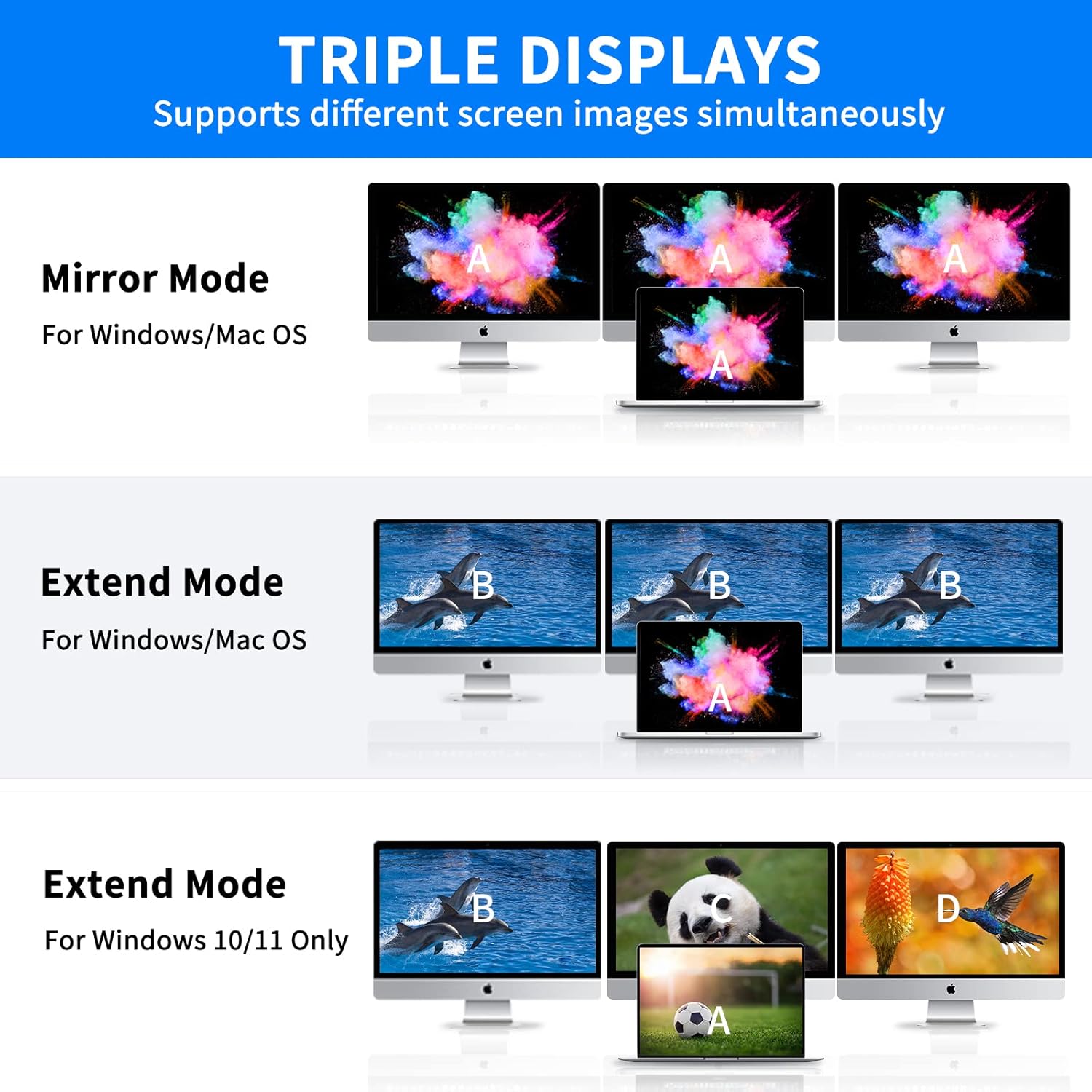
Tengikvíin styður mismunandi skjástillingar eftir því hvaða stýrikerfi þú notar:

Note on VGA: When the VGA port is connected, the maximum resolution for each monitor will be limited to 1920x1080@60Hz.

Diagram showing triple display modes for Windows and Mac OS

Figure 2: Visual representation of Mirror Mode and Extend Mode for both Windows and Mac OS, illustrating how screens are duplicated or extended.

4.2 Gagnaflutningur

Utilize the USB 3.0 ports for rapid data transfer with compatible devices. The SD and TF card readers also offer fast data access for memory cards.

Laptop connected to docking station with USB drives and SD card for data transfer

Figure 3: Illustration of the docking station facilitating super-fast data transfer via USB 3.0 ports and SD/TF card readers, connected to a laptop.

4.3 Aflgjafi

The 100W PD3.0 port allows you to charge your Type-C laptop or other compatible devices while using the docking station. This port is for power input only and does not support data transfer.

Laptop charging via docking station's PD3.0 port

Figure 4: The docking station connected to a laptop and a power adapter, demonstrating its PD3.0 Power Delivery feature for fast charging.

5. Samhæfni

The SSK SC211 docking station is compatible with a wide range of devices and operating systems that feature a USB-C port supporting "Display Port Alternate Mode" for video output. This includes, but is not limited to:

Mikilvægt: To enable HDMI and VGA functions, your laptop or phone's USB-C port must support "Display Port Alternate Mode" video output.

Docking station with various OS logos indicating compatibility

Figure 5: The SSK SC211 docking station shown with logos of compatible operating systems, highlighting its broad compatibility.

6. Tæknilýsingar

EiginleikiForskrift
GerðarnúmerSC211
Mál5 x 3 x 1 tommur
Þyngd5.1 aura
HDMI 1 úttakAllt að 4K@60Hz
HDMI 2 úttakAllt að 4K@30Hz
VGA framleiðslaAllt að 1920x1080 við 60Hz
USB 3.0 tengi2 ports, 5Gbps data transfer
USB 2.0 tengi1 port, for low-bandwidth peripherals
USB-C PD tengiUp to 100W Power Delivery (input only)
Ethernet tengi1000Mbps Gigabit RJ-45
KortalesararSD and TF (Micro SD), up to 80MB/s, simultaneous use
Hljóðhöfn3.5mm (Mic and Audio)
EfniÁlblöndu casing

7. Bilanagreining

8. Umhirða og viðhald

9. Ábyrgð og stuðningur

SSK products come with a standard manufacturer's warranty. For detailed warranty information, technical support, or service inquiries, please refer to the official SSK webvefsíðu eða hafið samband við þjónustuver þeirra. Vinsamlegast geymið kaupkvittunina vegna ábyrgðarkröfu.

Tengd skjöl - SC211

Preview Handbók fyrir SSK SC211 Type-C All-in-One millistykki
Ítarleg notendahandbók fyrir SSK SC211 Type-C All-in-One millistykkið, með upplýsingum um forskriftir, tengi, tengimyndir og algengar spurningar. Þetta millistykki eykur tengingarmöguleika fyrir fartölvur og önnur Type-C tæki.
Preview Notendahandbók fyrir SSK SC302 Type-C fjölnota tengikví
Notendahandbók fyrir SSK SC302 Type-C fjölnota tengikví. Þessi handbók veitir ítarlegar upplýsingar um vörulýsingu, tengimyndir, tæknilegar upplýsingar og algengar spurningar. Millistykkið styður 4K/60Hz upplausn í gegnum HDMI og 100W Power Delivery (PD) hraðhleðslu, samhæft við ýmis kerfi, þar á meðal Windows, macOS, Android og Linux.
Preview Notendahandbók fyrir SSK-DK100 tvískipt HDD tengikví
Notendahandbók fyrir SSK-DK100 tvískipta harða diska tengikví, þar sem ítarleg eru ítarleg einkenni, forskriftir, uppsetning, stillingu fyrir færanlega harða diska og afritunarmöguleikar án nettengingar.
Preview Notendahandbók fyrir SSK DK108 tvískipt HDD tengikví
Notendahandbók fyrir SSK DK108 Dual Bay HDD Docking Station. Kynntu þér eiginleika hennar, hvernig á að nota hana í færanlegum harða diska og HUB ham og finndu lausnir á algengum vandamálum. Styður 2.5/3.5 tommu SATA harða diska/SSD diska með USB 3.0 tengingu.
Preview SSK Portable SSD: Usage Tips, Performance, and Compatibility Guide
Get the most out of your SSK Portable SSD with this comprehensive FAQ and usage guide. Learn about capacity differences, speed factors, heat management, safe disconnection, iPhone 15 compatibility, encryption, and Thunderbolt performance.
Preview SSK SD450 Portable Solid State Drive User Manual
Comprehensive user manual for the SSK SD450 Portable Solid State Drive. This guide provides detailed instructions for connecting, using, and safely disconnecting the external SSD with Windows, macOS, iPhone, iPad, and Android devices. Learn about file management and optimal performance for your SSK SD450.