Inngangur
This manual provides essential information for the safe and effective use of your Insta360 X3 Action Camera. Please read this manual thoroughly before operating the device and retain it for future reference.
Hvað er í kassanum
- 1x Insta360 X3 Camera
- 1x Hleðslusnúra
- 1x hlífðarpoki
- 1x Lens Cloth
- 1x notendahandbók
- 1x Bullet Time Handle
- 1x linsuhlíf
- 1x 256GB SD kort
- 1x EVO Gimbals Lens Cloth
Uppsetning
Upphafleg hleðsla
Before first use, fully charge the Insta360 X3 camera using the provided charge cable. Connect the cable to the camera's charging port and a USB power source. The battery indicator will show charging status.
Að setja SD-kortið í
Locate the SD card slot on the camera. Insert the 256GB SD card (included) into the slot until it clicks into place. Ensure the camera is powered off before inserting or removing the SD card.
Að festa fylgihluti
Attach the lens guard to protect the camera lenses. The bullet time handle can be screwed into the camera's tripod mount for extended reach and unique shooting angles.

Image: Insta360 X3 camera with a protective lens guard.
Notkunarleiðbeiningar
Kveikt/slökkt
Press and hold the power button to turn the camera on or off. The 2.29'' touchscreen will illuminate upon startup.
Notkun snertiskjás
Navigate through menus, change settings, and preview footage using the intuitive 2.29'' touchscreen. Swipe and tap gestures are supported.

Image: Insta360 X3 camera with its touchscreen displaying a live view.
360 Capture & Reframing
The X3 captures 5.7K 360 Active HDR video. This allows you to record everything around the camera and choose your preferred angle during post-production using the Insta360 app.

Image: A 360-degree capture showing a person on a sailboat with a wide, spherical view.
4K Single-Lens Mode
For traditional wide-angle footage, select a single lens to shoot in 4K30fps or 2.7K MaxView for an ultra-wide 170° field of view.

Image: A person on a bicycle on a bridge, demonstrating the 4K Single-Lens Mode.
FlowState Stabilization & 360 Horizon Lock
The camera features FlowState Stabilization and horizon leveling algorithms to ensure smooth and stable video footage, even during dynamic activities.
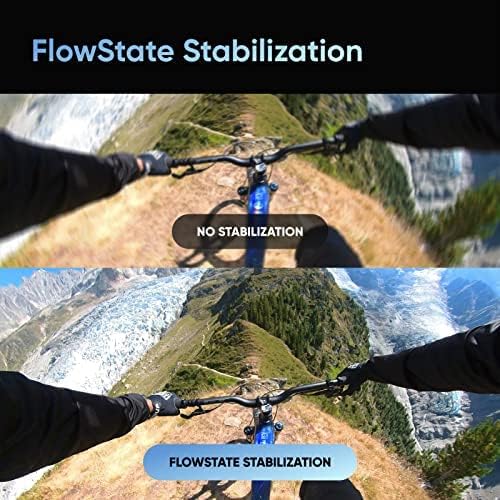
Image: A visual comparison of video footage, illustrating the effectiveness of FlowState Stabilization.
Ósýnilegur Selfie Stick
When using the 360 Lens with a compatible selfie stick, the stick is automatically removed from the footage, creating a third-person perspective or drone-like shots.
Video: An official product video demonstrating the Insta360 X3's features, including the invisible selfie stick effect and 360 capture capabilities.
Viðhald
Að þrífa linsurnar
Use the provided lens cloth to gently clean the camera lenses. Avoid using abrasive materials or harsh chemicals that could damage the lens coating.
Vatnsheld
The Insta360 X3 is IPX8 waterproof. Ensure all port covers are securely closed before exposing the camera to water. After use in saltwater, rinse the camera with fresh water and dry thoroughly.

Image: Insta360 X3 cameras submerged in water, highlighting its waterproof design.
Umhirða rafhlöðu
The camera uses a 1800 mAh Lithium Ion battery. For optimal battery life, avoid extreme temperatures and store the camera with a partial charge if not used for extended periods.

Image: Insta360 X3 camera alongside its 1800 mAh battery.
Úrræðaleit
Algeng mál
- Kveikt ekki á myndavélinni: Gakktu úr skugga um að rafhlaðan sé hlaðin. Tengdu myndavélina við aflgjafa og reyndu aftur.
- Villa í SD-korti: Reinsert the SD card. If the issue persists, try formatting the card (this will erase all data) or use a different compatible SD card.
- Óstöðugur maturtage: Ensure FlowState Stabilization is enabled in the camera settings.
- Tengingarvandamál (Bluetooth/Wi-Fi): Restart the camera and your connected device. Ensure both are within range and Bluetooth/Wi-Fi is enabled.
For more detailed troubleshooting, refer to the official Insta360 support websíðuna eða alla notendahandbókina.
Tæknilýsing
| Eiginleiki | Smáatriði |
|---|---|
| Vörumerki | Insta360 |
| Gerðarnúmer | X3 |
| Ljósmyndaskynjaratækni | CMOS |
| Myndbandsupplausn | 5.7K (360), 4K (Single-Lens) |
| Hámarks brennivídd | 6.7 millimetrar |
| Hámarks ljósop | f/2 |
| Tegund Flash-minni | SD |
| Skjástærð | 2.29 tommur |
| Tengitækni | Bluetooth, WiFi |
| Tegund rafhlöðu | Litíumjónarafhlöður (1800 mAh) |
| Þyngd hlutar | 1.1 pund |
| Sérstakir eiginleikar | 360 action camera, AI editing, live stream, 5.7K Active HDR 360 Video, 72MP Photo, 4K Single-Lens Mode, 8K Timelapse, FlowState Stabilization |
Ábyrgð og stuðningur
The Insta360 X3 camera may be eligible for extended protection plans, such as a 3-Year Protection Plan or a Complete Protect monthly plan, offered by third-party providers. Please refer to your purchase documentation for specific warranty details and coverage.
For product support, technical assistance, or to access the full digital manual, visit the official Insta360 websíða.