Inngangur
The Logitech K585 Multi-Device Slim Wireless Keyboard is designed for versatile use across multiple devices, including laptops, tablets, desktops, and smartphones. Its compact and modern design aims to enhance productivity and comfort in various work environments. This manual provides essential information for setting up, operating, maintaining, and troubleshooting your keyboard.

Figure 1: Logitech K585 Multi-Device Slim Wireless Keyboard in Graphite.
Uppsetning
1. Upptaka og frumskoðun
Fjarlægið alla íhluti varlega úr umbúðunum. Gangið úr skugga um að eftirfarandi hlutir séu til staðar:
- Logitech K585 lyklaborð
- 2 AAA rafhlöður (foruppsettar)
- Sameinandi USB móttakari
- Notendaskjöl

Figure 2: Contents included in the Logitech K585 package.
2. Battery Installation (if not pre-installed or for replacement)
The keyboard comes with two AAA batteries pre-installed. If you need to replace them:
- Locate the battery compartment cover on the top edge of the keyboard, usually integrated with the device cradle.
- Renndu eða lyftu lokið varlega til að opna hólfið.
- Settu tvær AAA rafhlöður í og gætið þess að pólunin (+/-) sé rétt.
- Lokaðu rafhlöðuhólfinu tryggilega.
3. Connecting via USB Receiver (Logitech Unifying Receiver)
For devices without Bluetooth or for a stable 2.4 GHz wireless connection:
- Locate the Unifying USB receiver, typically stored inside the battery compartment or within the product packaging.
- Plug the Unifying USB receiver into an available USB-A port on your computer (laptop or desktop).
- Lyklaborðið ætti að tengjast sjálfkrafa.
4. Connecting via Bluetooth Wireless Technology
For devices with Bluetooth capability (laptops, tablets, smartphones):
- Turn on the keyboard using the power switch, usually located on the side.
- Haltu einum af Easy-Switch tökkunum (1, 2 eða 3) inni í þrjár sekúndur þar til LED ljósið fyrir ofan takkann byrjar að blikka hratt. Þetta gefur til kynna að lyklaborðið sé í pörunarham.
- Farðu í Bluetooth-stillingar í tækinu þínu og leitaðu að nýjum tækjum.
- Veldu „Logitech K585“ af listanum yfir tiltæk tæki.
- Follow any on-screen prompts to complete the pairing process. The LED light will turn solid for a few seconds and then turn off once connected.
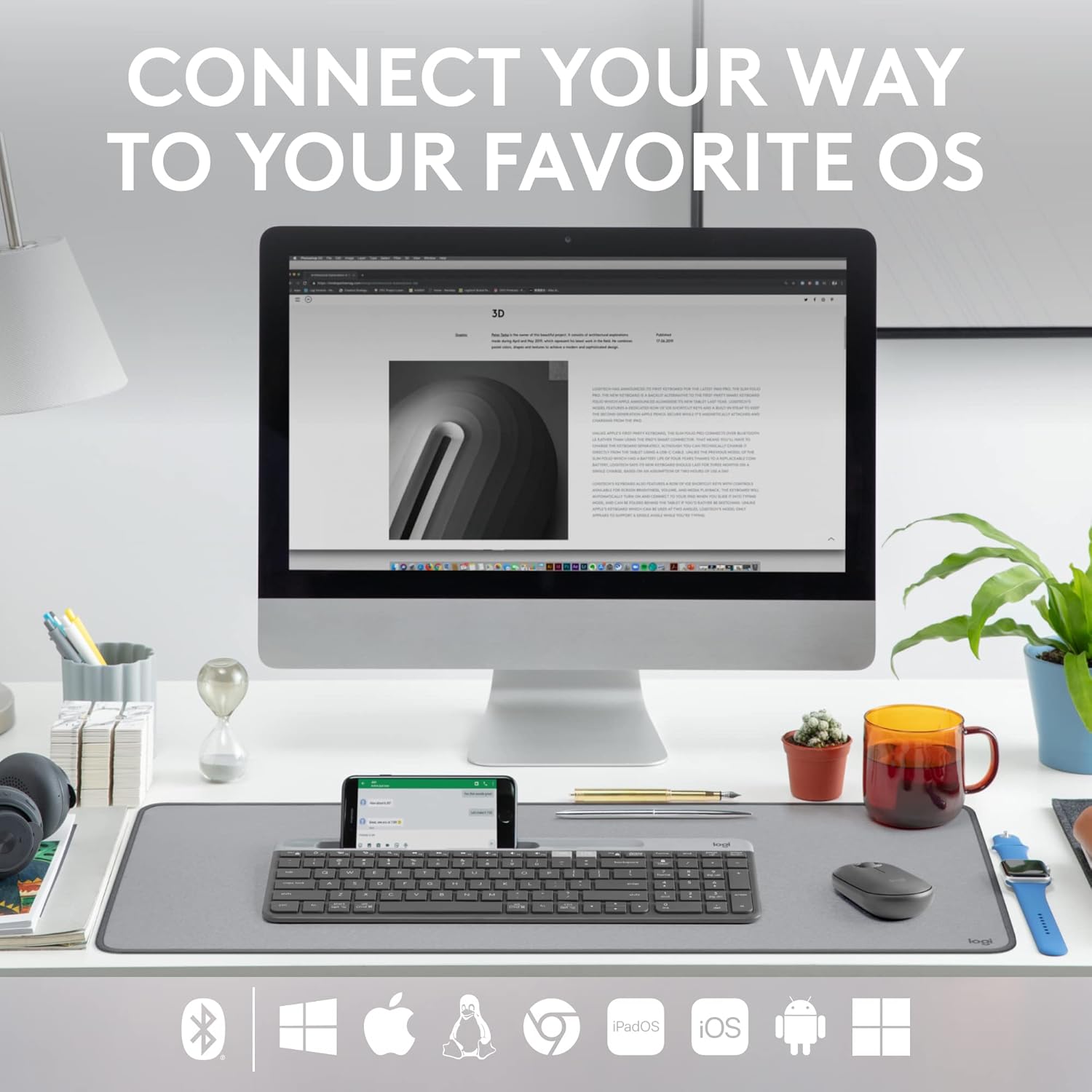
Figure 3: The Logitech K585 supports various operating systems including Windows, macOS, iOS, iPadOS, Android, and ChromeOS.
Að stjórna lyklaborðinu
1. Auðvelt að skipta um
The K585 keyboard allows you to seamlessly switch between up to three connected devices:
- Press the Easy-Switch key (1, 2, or 3) corresponding to the device you wish to use. The LED light above the selected key will briefly illuminate to confirm the switch.
- This feature enables quick transitions between typing on your computer, tablet, or smartphone.
2. Built-in Phone Cradle
The integrated cradle at the top of the keyboard is designed to hold your smartphone or tablet, providing an optimal viewing angle for multitasking.

Figure 4: The K585 keyboard with a smartphone positioned in the integrated cradle for enhanced multitasking.
3. FN Keys and Shortcuts
The keyboard features 12 FN keys that provide easy access to media controls and other shortcuts. These keys can be customized using Logi Options+ Software for enhanced productivity.
- Miðlunarstýringar: Play/pause, volume up/down, mute.
- Aðgerðarlyklar: F1-F12, often used for specific software functions.
- Sérsnið: Download and install Logi Options+ Software from the official Logitech website to personalize FN key assignments.
4. Multi-OS Compatibility
The keyboard layout is optimized for both Windows and Mac OS commands, ensuring a familiar typing experience regardless of your operating system. It also supports iOS, iPadOS, Android, and ChromeOS devices.

Figure 5: Universal compatibility of the Logitech K585 keyboard across different platforms.
Viðhald
1. Rafhlöðulíftími og stjórnun
The Logitech K585 keyboard offers an extended battery life of up to 24 months, thanks to its efficient design and an auto-sleep feature that activates when the keyboard is not in use. Battery life may vary based on user and computing conditions.

Figure 6: The K585 keyboard boasts a long-lasting 24-month battery life.
To maximize battery life, ensure the keyboard is switched off when not in use for extended periods.
2. Þrif á lyklaborðinu
Til að viðhalda útliti og virkni lyklaborðsins:
- Use a soft, lint-free cloth to wipe down the surface.
- Fyrir þrjósk óhreinindi, örlítið dýftampis klútinn með vatni eða mildu, slípandi hreinsiefni.
- Forðist að úða vökva beint á lyklaborðið.
- Do not use harsh chemicals or abrasive materials, as these can damage the finish.
Úrræðaleit
If you encounter issues with your Logitech K585 keyboard, consider the following common solutions:
- Engin tenging:
- Gakktu úr skugga um að kveikt sé á lyklaborðinu.
- Athugaðu rafhlöðuna og skiptu um ef þörf krefur.
- For USB receiver connection, try plugging the receiver into a different USB port.
- For Bluetooth connection, ensure Bluetooth is enabled on your device and try re-pairing the keyboard.
- Töf eða aftengingar:
- Move the keyboard closer to the receiver or Bluetooth-enabled device.
- Avoid placing the keyboard near other wireless devices that might cause interference (e.g., Wi-Fi routers, cordless phones).
- Gakktu úr skugga um að stýrikerfi tækisins og Bluetooth-reklar séu uppfærðir.
- Lyklar svara ekki:
- Hreinsið í kringum viðkomandi takka til að fjarlægja allt rusl.
- Endurræstu tölvuna eða tækið.
- If using Logi Options+ Software, ensure it is running correctly and not causing conflicts.
For more detailed troubleshooting or persistent issues, refer to the official Logitech support website or the comprehensive user guide available for download.
Tæknilýsing
| Eiginleiki | Smáatriði |
|---|---|
| Vörumerki | Logitech |
| Gerðarnúmer | 920-011479 |
| Tengitækni | Bluetooth, USB (2.4 GHz Unifying Receiver) |
| Samhæf tæki | Fartölva, tölva, snjallsími, spjaldtölva |
| Samhæfni stýrikerfis | Windows, macOS, iOS, iPadOS, Android, ChromeOS |
| Litur | Grafít |
| Þyngd hlutar | 1.24 pund (u.þ.b. 562 g) |
| Vörumál (LxBxH) | 14.7 x 5.6 x 0.76 tommur (u.þ.b. 37.3 x 14.2 x 1.9 cm) |
| Rafhlöðuending | Allt að 24 mánuðir (getur verið mismunandi eftir notkun) |
| Wireless Range | Allt að 10m (33ft) |

Figure 7: Detailed dimensions of the Logitech K585 keyboard.
Ábyrgð og stuðningur
Fyrir upplýsingar um ábyrgð, tæknilega aðstoð og frekari úrræði, vinsamlegast farðu á opinberu þjónustusíðu Logitech. website. You can also find a comprehensive User Guide in PDF format for this product:
Tengd skjöl - 920-011479
 |
Leiðbeiningar um uppsetningu á Logitech K585 lyklaborði fyrir marga tæki Ítarleg uppsetningarleiðbeiningar fyrir Logitech K585 Multi-Device Slim þráðlaust lyklaborð. Lærðu hvernig á að setja í rafhlöður, tengjast með USB móttakara eða Bluetooth, para við mörg tæki og velja stýrikerfisuppsetningar. |
 |
Logitech K780 lyklaborð fyrir marga tæki: Eiginleikar, tengingar og uppsetningarleiðbeiningar Kynntu þér Logitech K780 Multi-Device Keyboard, fjölhæft lyklaborð hannað fyrir óaðfinnanlega skiptingu á milli tölva, snjallsíma og spjaldtölva. Þessi handbók lýsir eiginleikum þess, tvöföldum tengimöguleikum (Bluetooth Smart og Unifying Receiver), auknum virkni og uppsetningarleiðbeiningum fyrir ýmis stýrikerfi. |
 |
Tastiera Logitech K780 Multi-Device: Funzionalità, Connettività og Layout Leiðbeiningar um alla bragðgóðu Logitech K780 Multi-Device, chepre le sue funzionalità, koma til með að nota Bluetooth Smart og sameinandi, skemmtilegt aðlaga og tvöfalt skipulag fyrir mismunandi kerfi. |
 |
Notendahandbækur fyrir Logitech K380 lyklaborð og Pebble mús Comprehensive user guides for the Logitech K380 Multi-Device Bluetooth Keyboard and Logitech Pebble Wireless Mouse, covering setup, features, shortcuts, and power management. Includes detailed instructions for pairing, software installation, and key functions. |
 |
Logitech K780 lyklaborð fyrir mörg tæki: Óaðfinnanleg tenging fyrir öll tæki þín Explore the Logitech K780 Multi-Device Keyboard. Learn how to connect and use this versatile keyboard with your computer, tablet, and smartphone via Unifying or Bluetooth Smart for enhanced productivity. Discover its features, setup, and multi-device pairing. |
 |
Logitech K780 lyklaborð fyrir marga tæki: Leiðbeiningar um þráðlausa tengingu, Bluetooth og Uniting Ítarleg leiðarvísir um Logitech K780 fjölnotalyklaborðið, þar á meðal eiginleikar þess, tvöfalda uppsetningu, auðvelda skiptingu á milli tölvu, Mac, spjaldtölvu og síma, og tengimöguleika í gegnum Bluetooth Smart og Unifying móttakara. |