1. Inngangur
Thank you for choosing the Vamav Sync 15 Professional Amplified Speaker. This manual provides essential information for the safe and efficient operation of your device. Please read it thoroughly before use and retain it for future reference.
2. Öryggisleiðbeiningar
- Aflgjafi: Ensure the speaker is connected to a power source that matches the voltage tilgreint á tækinu.
- Loftræsting: Do not block ventilation openings. Maintain adequate space around the speaker for proper airflow.
- Vatn og raki: Keep the speaker away from water, rain, and excessive humidity. Do not operate with wet hands.
- Hiti: Avoid placing the speaker near heat sources such as radiators, heat registers, stoves, or other heat-producing appliances.
- Þrif: Aftengdu rafmagnið áður en þú þrífur. Notið þurran, mjúkan klút. Notið ekki fljótandi hreinsiefni eða úðabrúsa.
- Þjónusta: Ekki reyna að þjónusta þessa vöru sjálfur. Vísaðu allri þjónustu til viðurkennds þjónustufólks.
- Staðsetning: Setjið hátalarann á stöðugt, slétt yfirborð til að koma í veg fyrir að hann detti.
3. Innihald pakka
Gakktu úr skugga um að allir hlutir séu til staðar í pakkanum:
- Vamav Sync 15 Amplöggiltur ræðumaður
- Rafmagnssnúra
- Notendahandbók (þetta skjal)
4. Vöru lokiðview
Familiarize yourself with the various components of your Vamav Sync 15 speaker.
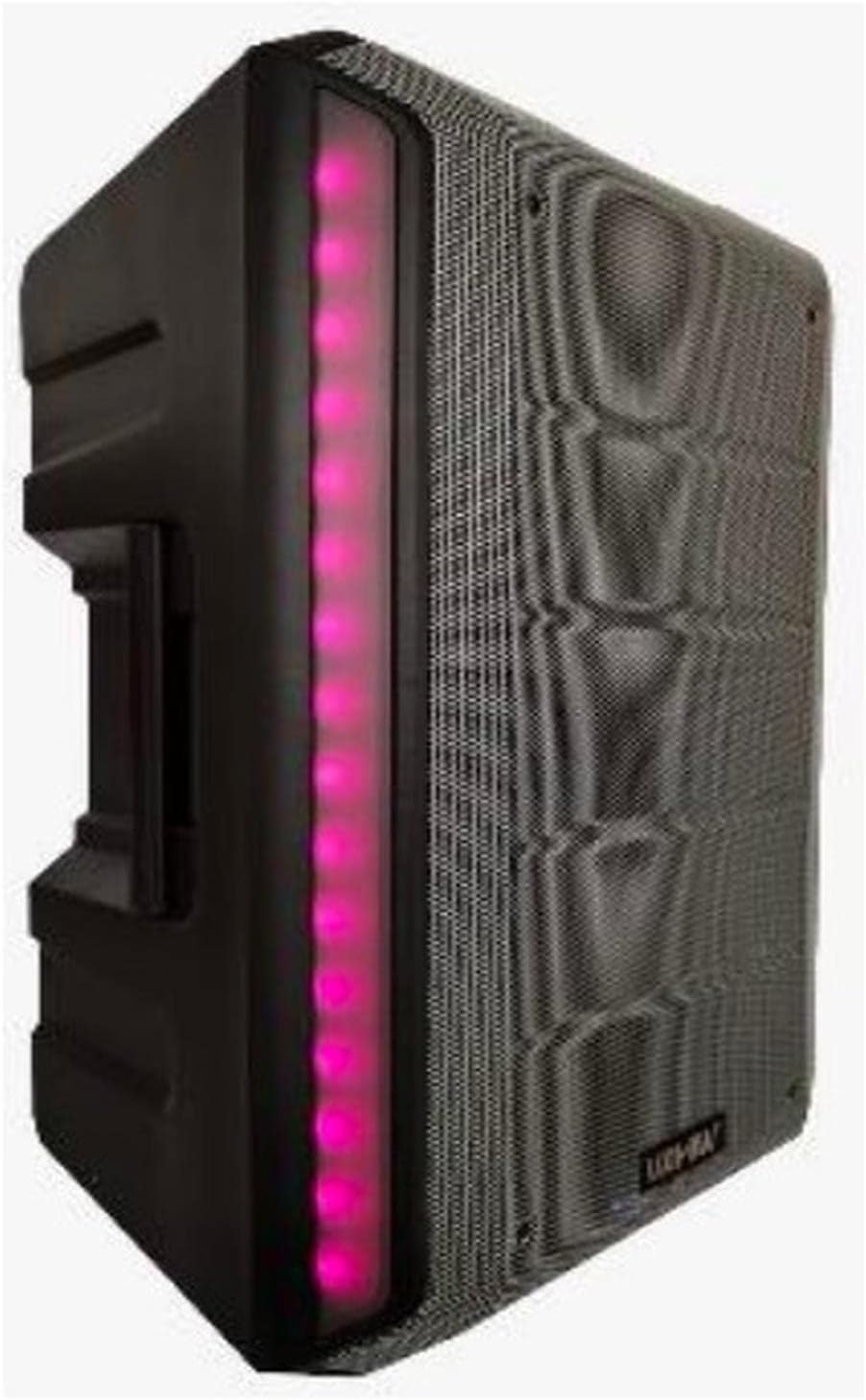
Mynd 4.1: Framan View. This image displays the front of the Vamav Sync 15 speaker, featuring a protective grille over the speaker cone and an illuminated LED strip along the side, indicating power and operational status.
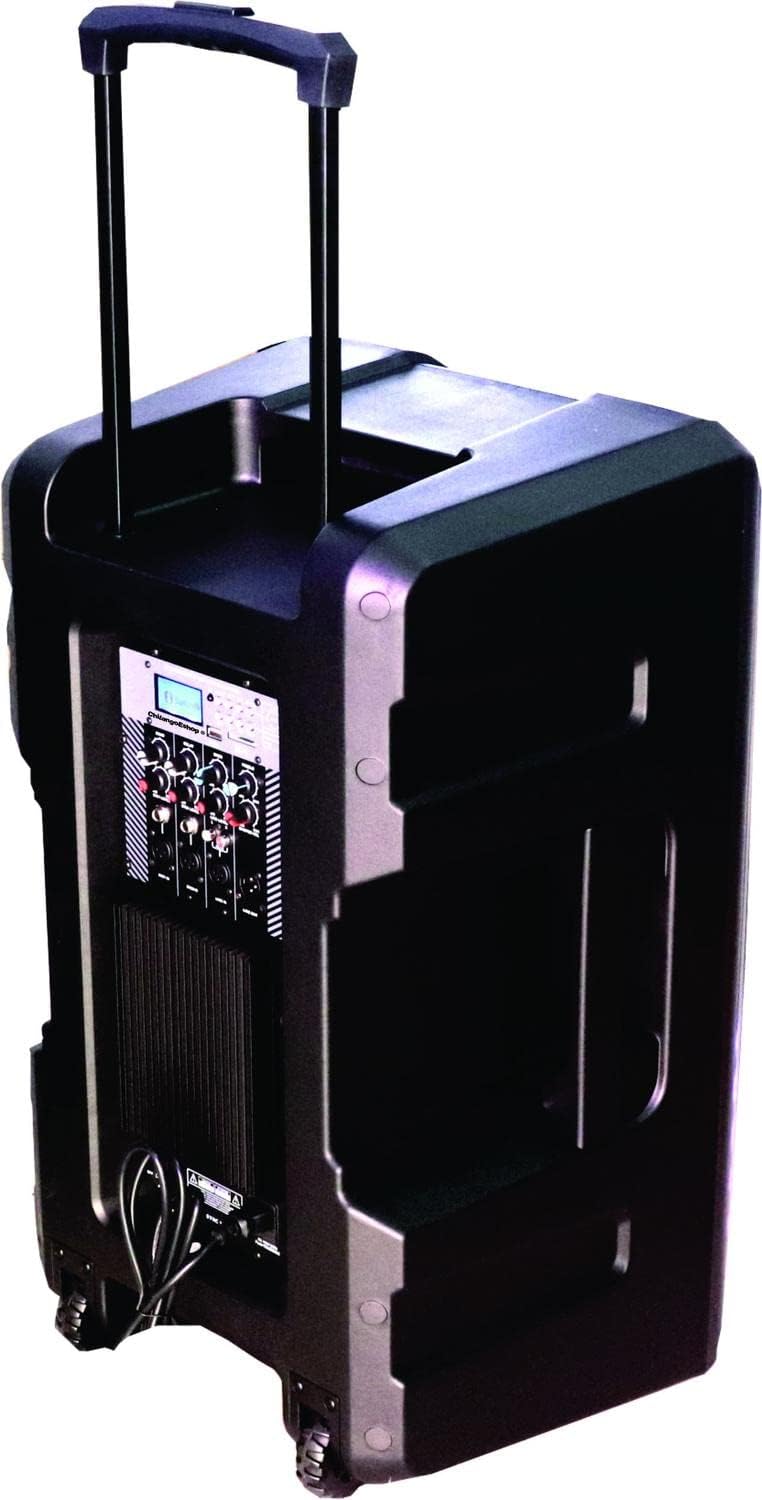
Mynd 4.2: Aftan View. The rear of the speaker is shown, highlighting the retractable handle for portability and integrated wheels at the base, designed for easy transport.

Mynd 4.3: Stjórnborð. A ítarlegt view of the control panel, featuring an MP3 digital display, Bluetooth connectivity indicator, USB and SD card slots, various input ports (XLR, 6.3mm Jack, RCA), and control knobs for Echo, Delay, Bass, Treble, Microphone Levels, Line Level, and Master Volume.

Mynd 4.4: Neðst View. This image illustrates the bottom of the speaker, showing the robust wheels for mobility and a central socket designed for mounting the speaker on a stand.

Figure 4.5: Speaker Dimensions. An illustration indicating the approximate dimensions of the Vamav Sync 15 speaker: 70 cm in height, 35 cm in depth, and 40 cm in width.
5. Uppsetning
- Upptaka: Takið hátalarann og allan fylgihluti varlega úr umbúðunum.
- Staðsetning: Position the speaker on a stable, flat surface or mount it on a compatible speaker stand using the bottom pole mount socket. Ensure adequate space for ventilation.
- Rafmagnstenging: Connect the provided power cable to the speaker's power input and then to a suitable electrical outlet.
- Upphafleg kveikt á: Turn the Master Volume knob to its minimum setting before powering on the unit to avoid sudden loud sounds. Press the power switch to turn on the speaker.
6. Notkunarleiðbeiningar
6.1. Kveikt/slökkt
- To power on, ensure the Master Volume is low, then flip the power switch located on the control panel.
- To power off, turn the Master Volume to minimum, then flip the power switch.
6.2. Bluetooth-tenging
- Turn on the speaker. The display will show the current mode.
- Press the 'MODE' button on the control panel until 'Bluetooth' is selected. The Bluetooth indicator will flash, signifying it is ready for pairing.
- Virkjaðu Bluetooth í snjalltækinu þínu (snjallsíma, spjaldtölvu o.s.frv.) og leitaðu að tiltækum tækjum.
- Select 'CHSYNC 15' from the list of devices. Once connected, the Bluetooth indicator will stop flashing and remain solid.
- You can now play audio from your device through the speaker. The effective Bluetooth range is approximately 10 meters.
6.3. Spilun með USB/SD-korti
- Insert a USB flash drive or SD card into the respective slot on the control panel.
- The speaker will automatically switch to USB/SD mode and begin playing audio files. If not, press the 'MODE' button to select USB or SD.
- Use the playback controls (Play/Pause, Next, Previous) on the control panel to manage your audio.
6.4. Connecting Microphones and Line-in Devices
- Hljóðnemar: Connect microphones to the 'MIC 1 IN' or 'MIC 2 IN' XLR or 6.3mm Jack inputs. Adjust individual microphone levels using the 'MIC 1 LEVEL' and 'MIC 2 LEVEL' knobs.
- Line-in Devices: Connect external audio sources (e.g., mixer, CD player) to the 'LINE IN' RCA inputs or the 6.3mm Jack input. Adjust the input level using the 'LINE LEVEL' knob.
- Lína út: Use the 'LINE OUT' 6.3mm Jack to connect to another amplified speaker or recording device.
6.5. Hljóðstýringar
- EKHO: Stillir bergmálsáhrif fyrir hljóðnema.
- TEFNING: Controls the delay time of the echo effect.
- BASSI: Stillir lágtíðni hljóðútgangsins.
- TRÍBÆLI: Stillir úttak hátíðnihljóðs.
- MASTER VOLG: Stýrir heildarútgangshljóðstyrk hátalarans.
7. Viðhald
- Þrif: Regularly wipe the speaker's exterior with a soft, dry cloth. Do not use abrasive cleaners or solvents.
- Geymsla: Þegar hátalarinn er ekki í notkun í langan tíma skal geyma hann á köldum, þurrum stað, fjarri beinu sólarljósi og miklum hita.
- Kapalumhirða: Inspect power and audio cables periodically for damage. Replace any frayed or damaged cables immediately.
8. Bilanagreining
| Vandamál | Möguleg orsök | Lausn |
|---|---|---|
| Enginn kraftur | Power cable not connected; Power outlet faulty; Power switch off. | Ensure power cable is securely connected; Test outlet with another device; Turn power switch on. |
| Ekkert hljóðúttak | Master Volume too low; Input source not selected; Input device not connected or faulty; Mute activated. | Increase Master Volume; Select correct input mode (Bluetooth, USB, Line In); Check connections of input device; Ensure no mute function is active. |
| Bluetooth tengist ekki | Speaker not in Bluetooth mode; Device too far; Bluetooth not enabled on source device; Already connected to another device. | Press MODE button to select Bluetooth; Move device closer (within 10m); Enable Bluetooth on your device; Disconnect from other devices. |
| USB/SD kort spilar ekki | Rangt file format; USB/SD card faulty or improperly inserted; Speaker not in USB/SD mode. | Tryggja hljóð files are compatible (e.g., MP3); Reinsert USB/SD card; Press MODE button to select USB/SD. |
9. Tæknilýsing
| Eiginleiki | Forskrift |
|---|---|
| Nafn líkans | CHSYNC 15 |
| Tegund hátalara | Fylgjast með, Amplified (Active) |
| Stærð hátalara | 15 tommur |
| Kerfi | Tvíhliða kerfi |
| Raddspólu | 2" KSV |
| Bílstjóri | 34 mm |
| RMS aflgjafi | 150 Watt |
| Þráðlaus tækni | Bluetooth (10 meters distance) |
| Tengitækni | Bluetooth, USB |
| Spilun fjölmiðla | USB tengi, SD kortarauf |
| Hljóðstýringar | Bass, Treble, Echo, Delay, Master Volume, Mic Levels, Line Level |
| Inntak | XLR, 6.3mm Jack (x1), RCA |
| Framleiðsla | 6.3 mm tjakkur |
| Aflgjafi | Rafhlaða |
| Eftirlitsaðferð | Áþreifanleg |
| Efni | Plast |
| Litur | Svartur |
| Vörumál | 35 cm D x 40 cm B x 70 cm H (13.8" Þ x 15.8" B x 27.6" H) |
| Samhæf tæki | Desktop computer, Laptop, Projector, MP3 player, Smartphone, Tablet, Television, Video game console |
10. Ábyrgð og stuðningur
Til að fá upplýsingar um ábyrgð og tæknilega aðstoð, vinsamlegast skoðið skjöl sem fylgdu með kaupunum eða hafið samband við söluaðila. Geymið kaupkvittunina vegna hugsanlegra ábyrgðarkröfu.


