1. Inngangur
This manual provides essential information for the installation, operation, and maintenance of the Cisco Catalyst 9800-L Copper Uplink Wireless LAN Controller (Model C9800-L-C-K9). Please read this manual thoroughly before using the device to ensure proper functionality and safety.
2. Mikilvægar öryggisupplýsingar
Fylgið eftirfarandi öryggisráðstöfunum til að koma í veg fyrir meiðsli og skemmdir á tækinu:
- Gakktu úr skugga um að tækið sé sett upp á vel loftræstum stað til að koma í veg fyrir ofhitnun.
- Notið aðeins aflgjafann sem tilgreindur er fyrir þetta tæki.
- Ekki útsetja tækið fyrir raka eða miklum hita.
- Aftengdu rafmagnið áður en viðhald eða þrif eru framkvæmd.
- Látið alla þjónustu til hæfs þjónustufólks.
3. Innihald pakka
Gakktu úr skugga um að allir hlutir séu til staðar í pakkanum:
- Cisco Catalyst 9800-L Wireless LAN Controller
- Geisladiskur (inniheldur skjöl eða hugbúnað)
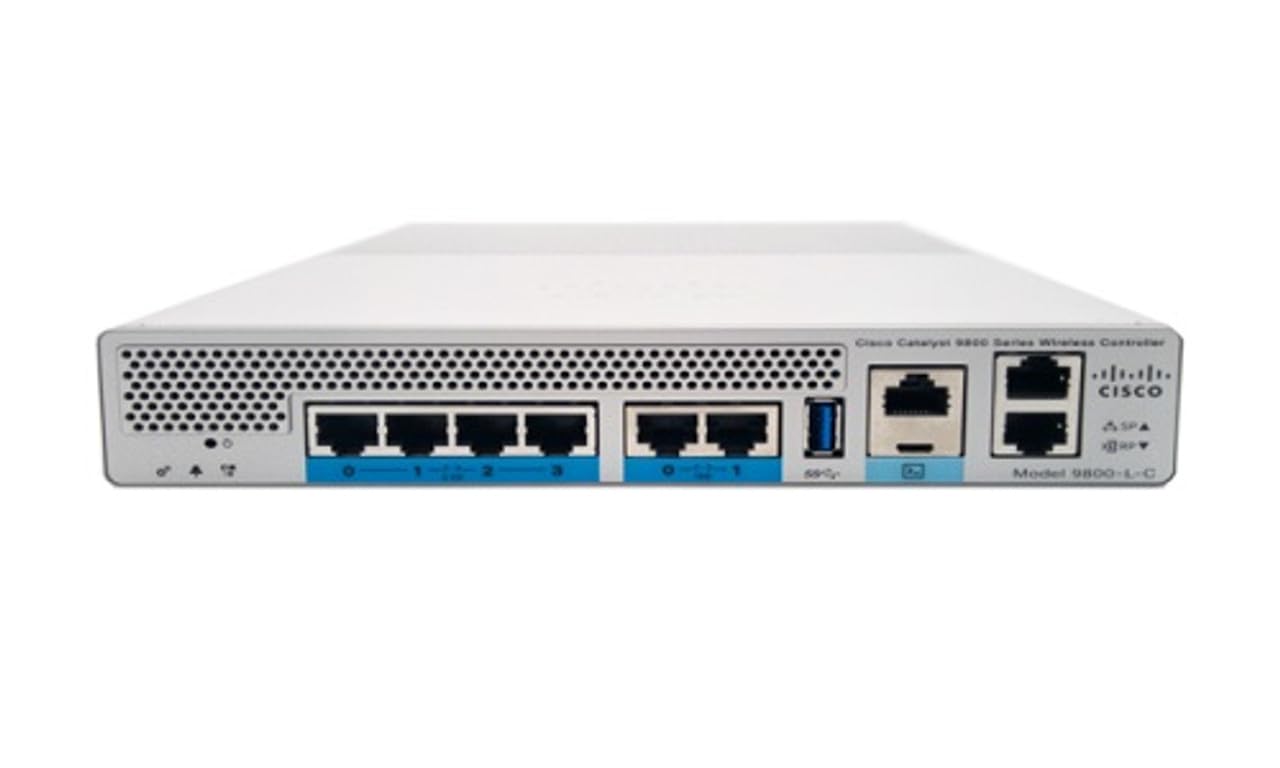
Mynd 1: Framan view of the Cisco Catalyst 9800-L Wireless LAN Controller. This image shows the compact design and port layout of the device.
4. Vöru lokiðview
The Cisco Catalyst 9800-L is a compact, fixed-configuration wireless LAN controller designed for small to medium-sized deployments. It provides centralized control for Cisco Aironet access points, offering robust wireless network management capabilities.
Helstu eiginleikar:
- Managed, Layer 2.5 (Wireless Controller) functionality
- Copper uplink interfaces
- RJ45 interface type
- 11 ports for connectivity
- Designed for desktop environments
5. Uppsetning
5.1 Upptaka og skoðun
- Takið stjórntækið varlega úr umbúðunum.
- Skoðið tækið og leitið að öllum merkjum um skemmdir. Ef skemmdir finnast skal hafa samband við birgja tafarlaust.
5.2 Líkamleg uppsetning
- Place the controller on a stable, flat surface, such as a desktop.
- Ensure adequate clearance around the device for proper airflow and ventilation.
5.3 Rafmagnstenging
- Connect the power cord to the power input on the rear of the controller.
- Plug the other end of the power cord into a grounded electrical outlet (220 Volts).
5.4 Nettenging
- Connect Ethernet cables from your network infrastructure to the RJ45 uplink ports on the controller.
- Connect access points to the appropriate downlink ports as required by your network design.
5.5 Aðgangur að upphaflegri stillingu
- Refer to the included CD or Cisco's official documentation for detailed instructions on initial console access and software configuration.
- Typically, this involves connecting a console cable to the device and using a terminal emulator.
6. Notkun stjórntækisins
6.1 Grunnaðgerð
Once powered on and initially configured, the controller will begin managing connected access points. Monitor the status indicators on the device for operational status.
6.2 Access Point Management
The Cisco Catalyst 9800-L automatically discovers and provisions Cisco Aironet access points. Use the controller's management interface (CLI or GUI) to configure wireless networks, security policies, and guest access.
6.3 Stillingar nets
Detailed network configuration, including VLANs, QoS, and routing, is performed through the controller's operating system. Consult Cisco's official documentation for advanced configuration guides.
7. Viðhaldsleiðbeiningar
- Uppfærsla vélbúnaðar: Regularly check for and apply the latest firmware updates from Cisco to ensure optimal performance and security.
- Þrif: Keep the device clean and free of dust. Use a soft, dry cloth for cleaning. Do not use liquid or aerosol cleaners.
- Umhverfisskilyrði: Ensure the operating environment remains within specified temperature and humidity ranges to prevent hardware failure.
- Stillingar fyrir afritun: Periodically back up your controller's configuration to prevent data loss.
8. Bilanagreining
Þessi hluti fjallar um algeng vandamál sem þú gætir rekist á:
| Vandamál | Möguleg orsök | Lausn |
|---|---|---|
| Stjórnandi kveikir ekki á | Power cable disconnected; Power outlet failure | Check power cable connections; Test power outlet with another device. |
| Access points not connecting | Incorrect network configuration; APs not discovered | Verify network settings on the controller; Ensure APs are on the same network segment or reachable via IP. |
| Slow wireless performance | Interference; Overloaded channels; Outdated firmware | Perform a site survey to identify interference; Optimize channel selection; Update controller and AP firmware. |
9. Tæknilýsingar
| Forskrift | Smáatriði |
|---|---|
| Vörumerki | Cisco |
| Gerðarnúmer | C9800-L-C-K9 |
| Fjöldi hafna | 11 |
| Viðmót | RJ45 |
| Skiptategund | Managed, Layer 2.5 (Wireless Controller) |
| Pallur | Zeta |
| Efnisgerð kassa | Kopar |
| Voltage | 220 volt |
| Samhæf tæki | Skrifborð |
| Litur | Blár |
| Þyngd hlutar | 3.09 kíló |
| UPC | 657768416101 |
| ASIN | B0C3FQPCY4 |
10. Upplýsingar um ábyrgð
This Cisco Catalyst 9800-L Wireless LAN Controller (Renewed) comes with a 90 daga takmörkuð ábyrgð. For specific terms and conditions, please refer to the warranty documentation provided with your purchase or contact your reseller.
11. Þjónustudeild
For technical assistance, troubleshooting, or further inquiries regarding your Cisco Catalyst 9800-L Wireless LAN Controller, please visit the official Cisco support website or contact your authorized Cisco reseller. Ensure you have your model number (C9800-L-C-K9) and serial number available when seeking support.