Inngangur
Amazon Basics handfesta gimbal stöðugleikinn er hannaður til að veita mjúka og stöðuga mynd.tage for your smartphone photography and videography. This manual provides essential information for setting up, operating, maintaining, and troubleshooting your device.

Image: The Amazon Basics Handheld Gimbal Stabiliser with a smartphone attached, ready for use.
Innihald pakka
Áður en þú byrjar skaltu ganga úr skugga um að allir hlutir séu í pakkanum:
- 1N handfesta gimbal með festingu
- 1N hleðslusnúra
- Notendahandbók 1N (þetta skjal)
- 1 Þrífótur
- 1N Hanging belt
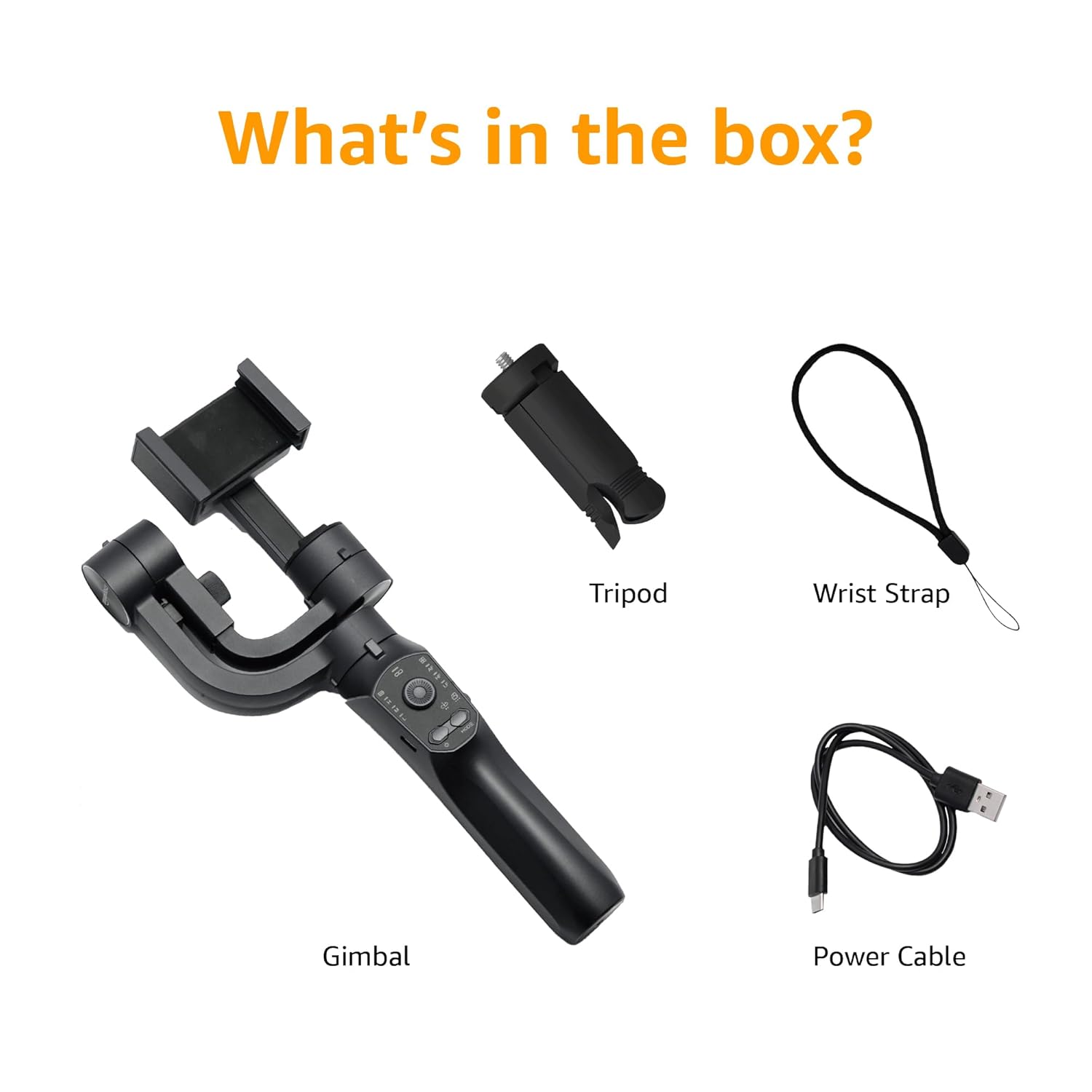
Image: A visual representation of the package contents, including the gimbal, tripod, power cable, and wrist strap.
Vöruhlutir
Familiarize yourself with the different parts of your gimbal stabiliser:
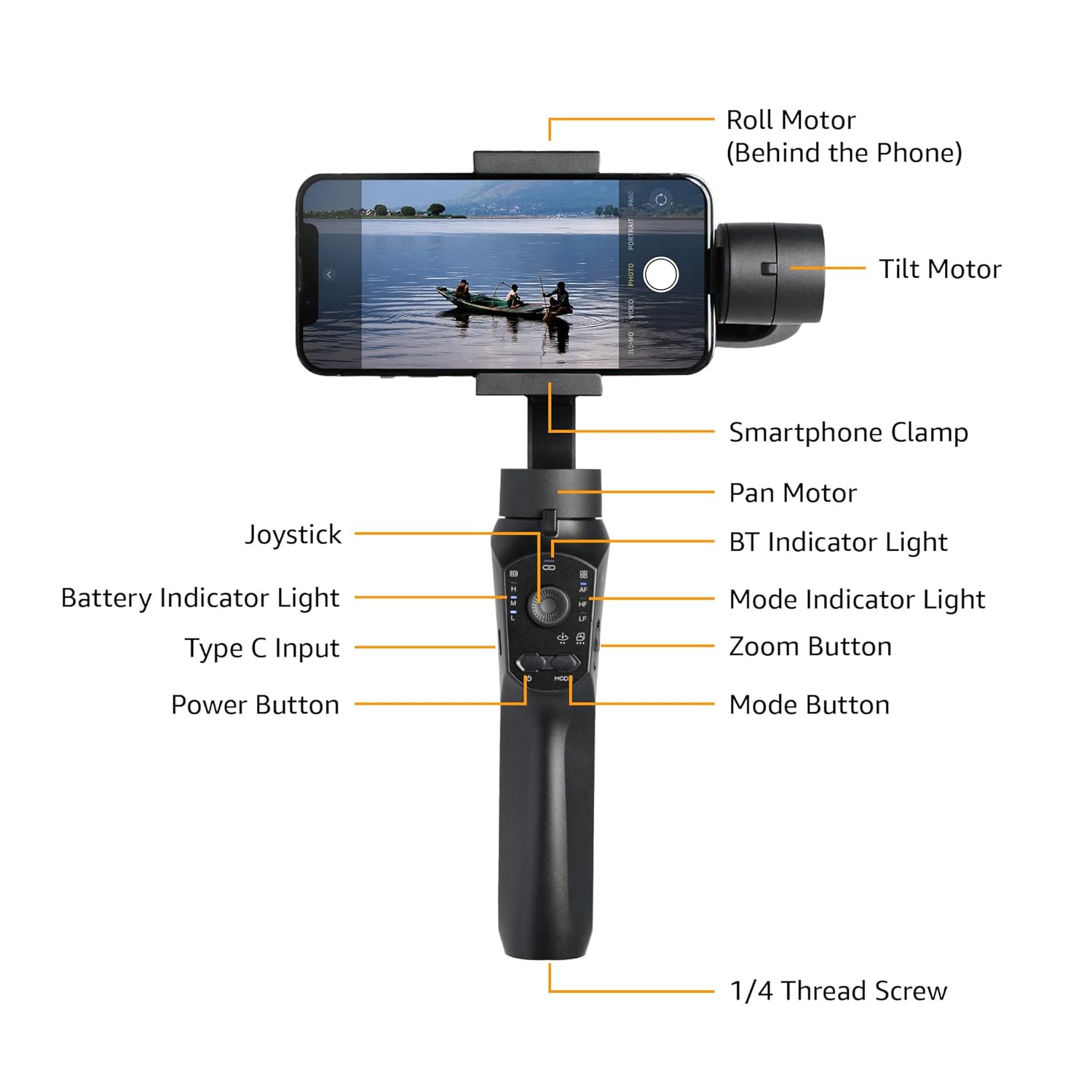
Image: Labeled diagram showing the various components of the gimbal, including the Roll Motor, Tilt Motor, Smartphone Clamp, Pan Motor, BT Indicator Light, Mode Indicator Light, Zoom Button, Mode Button, Power Button, Type C Input, Battery Indicator Light, Joystick, and 1/4 Thread Screw.
- Rúlla mótor: Controls the roll axis (rotation along the lens axis).
- Halla mótor: Controls the tilt axis (up and down movement).
- Snjallsími Clamp: Heldur snjallsímanum þínum örugglega.
- Pan mótor: Controls the pan axis (left and right rotation).
- Stýripinna: For manual control of gimbal movement.
- BT vísirljós: Gefur til kynna stöðu Bluetooth-tengingar.
- Gaumljós rafhlöðu: Sýnir núverandi rafhlöðustöðu.
- Tegund C inntak: Charging port for the gimbal.
- Aflhnappur: Kveikir/slökkvir á gimbalinum.
- Stillingarljós: Sýnir núverandi notkunarham.
- Aðdráttarhnappur: Controls digital zoom (via app).
- Hnappur fyrir ham: Skiptir á milli mismunandi rekstrarhama.
- 1/4 Thread Screw: For attaching accessories like the included tripod.
Uppsetning
- Hleððu gimbalinn: Before first use, fully charge the gimbal using the provided Type-C charging cable. The battery indicator light will show charging status.
- Install the Smartphone:
- Lengdu snjallsímaklefann útamp og settu snjallsímann þinn varlega í miðjuna.
- Ensure the phone is balanced as centrally as possible within the clamp to reduce motor strain.
- Manual Balancing (Crucial):
Important: Do not switch on this Gimbal without manual balancing. Doing so may lead to motor damage and fast battery draining.
- With the smartphone mounted, adjust the position of the phone within the clamp until it remains level when you release it. This minimizes the work the motors need to do.
- Adjust the horizontal arm if necessary to achieve perfect balance.
- Kveikt á: Press and hold the Power Button until the gimbal powers on and stabilizes.
- Sækja appið: Download the "Gimbal Pro" app from your smartphone's app store (available for Android and iOS). This app unlocks advanced features and controls.
- Tengjast í gegnum Bluetooth: Open the Gimbal Pro app and follow the on-screen instructions to connect your gimbal via Bluetooth. The BT Indicator Light will confirm a successful connection.

Image: An illustration demonstrating the three axes of stabilization: Tilt Axis, Roll Axis, and Pan Axis, which work together to keep footage stöðugt.
Notkunarleiðbeiningar
Grunnaðgerð
- Kveikt/slökkt: Ýttu á og haltu rofanum inni.
- Stýripinnastjórnun: Use the joystick to manually control the pan and tilt movements of the gimbal.
- Hnappur fyrir ham: Press the Mode Button to cycle through different operating modes (e.g., Pan Follow, Lock Mode, FPV). The Mode Indicator Light will change accordingly.
- Aðdráttarhnappur: Use the Zoom Button to zoom in or out within the Gimbal Pro app.
- Multifunction Push Key: This key allows you to focus or zoom, providing a more professional photography experience.
Advanced Features (via Gimbal Pro App)
The Gimbal Pro app unlocks a variety of advanced shooting modes and features:
- Facial Tracking: Automatically tracks a subject's face to keep them in frame.
- Tímabilun: Capture stunning time-lapse videos.
- Slow Motion: Record high-frame-rate videos for slow-motion effects.
- Snjall aðdráttur: Provides precise zoom control.
- Hitchcock Mode: Creates a "Dolly Zoom" effect.
- Mad Dog Mode: A dynamic, fast-response mode.
- Upphafsmáti: Rotates the camera 360 degrees along the roll axis.
- FPV ham: Follows the gimbal's orientation for an immersive first-person view.
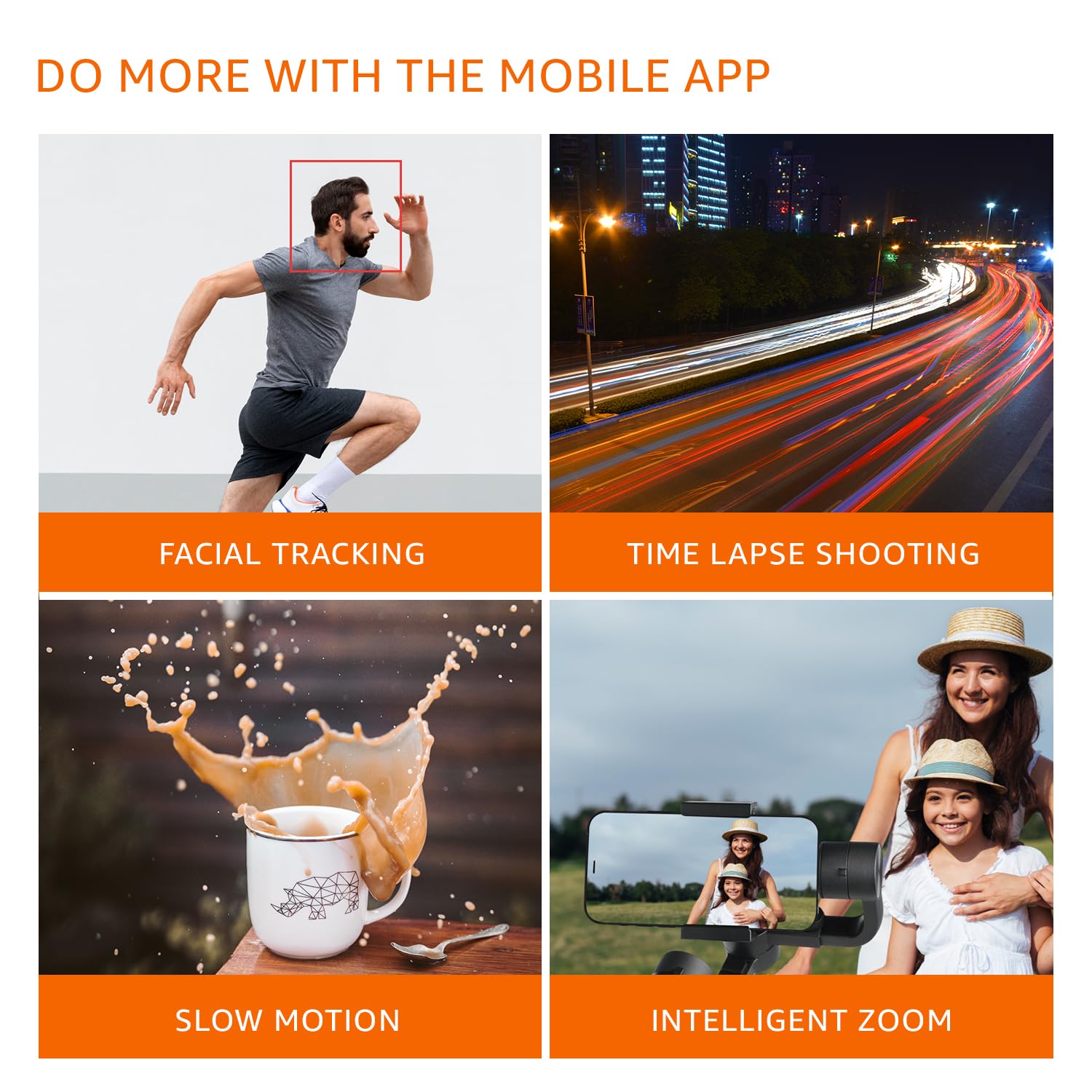
Mynd: Sjónrænt dæmiamples of features available through the mobile app, including Facial Tracking, Time Lapse Shooting, Slow Motion, and Intelligent Zoom.

Image: Icons illustrating various shooting modes such as Mad Dog Mode, Hitchcock Mode, Inception Mode, and FPV Mode, available on the gimbal.
Portrait-to-Landscape Rotation
The gimbal supports effortless rotation between portrait and landscape orientations for versatile shooting.

Image: A three-panel image demonstrating the gimbal's ability to effortlessly rotate a smartphone from portrait to landscape orientation.
Rafhlaða og hleðsla
The gimbal is equipped with a 3600mAh Lithium Ion battery, providing up to 10 hours of operational time.
- Hleðsla: Connect the provided Type-C cable to the gimbal's charging port and a suitable USB power source.
- Power Bank aðgerð: The gimbal can also function as a power bank to charge your smartphone during extended shoots. Connect your smartphone to the gimbal's Type-C port using a compatible cable.
- Rafhlöðuvísir: Monitor the battery level using the Battery Indicator Lights on the control panel.
Viðhald
- Þrif: Notið mjúkan, þurran klút til að þrífa gimblann. Forðist að nota sterk efni eða slípiefni.
- Geymsla: Geymið gimbalinn á köldum, þurrum stað fjarri beinu sólarljósi og miklum hita.
- Umhirða rafhlöðu: For long-term storage, charge the battery to approximately 50-60% to prolong its lifespan. Recharge every 3 months if not in use.
- Forðastu ofhleðslu: Do not mount smartphones heavier than the recommended payload capacity (approx. 180 grams, as per user experience). Overloading can damage the motors.
Úrræðaleit
| Vandamál | Möguleg orsök | Lausn |
|---|---|---|
| Gimbalinn kveikir ekki á sér. | Lítið rafhlaða. | Charge the gimbal fully. |
| Gimbal motors vibrate or do not stabilize properly. | Improper manual balancing. | Ensure the smartphone is perfectly balanced before powering on. Refer to the "Manual Balancing" section under Setup. |
| Gimbal disconnects from phone or app features not working. | Bluetooth connection issue; App malfunction. |
|
| Footage is still shaky. | Improper balancing; Exceeding gimbal's stabilization limits. |
|
Tæknilýsing
| Eiginleiki | Smáatriði |
|---|---|
| Gerðarnúmer | B0C58TDFPR |
| Stöðugleiki | 3-Axis (Pan, Tilt, Roll) |
| Tegund rafhlöðu | Litíum jón |
| Rafhlöðugeta | 3600mAh |
| Rekstrartími | Allt að 10 klst |
| Hleðsluport | Tegund-C |
| Samhæf tæki | Snjallsímar |
| Vörumál (LxBxH) | 10 x 7 x 28.9 cm |
| Þyngd hlutar | 460 g |
| Litur | Svartur |
| Framleiðandi | SHENZHEN JX ROBOT TECHNOLOGY CO. LTD |

Image: A diagram illustrating the dimensions of the gimbal in both folded and extended states.
Ábyrgð og stuðningur
This Amazon Basics Handheld Gimbal Stabiliser comes with a 1 ára takmörkuð ábyrgð frá kaupdegi.
For warranty claims, technical support, or any product-related inquiries, please contact Amazon Basics customer service or refer to the official Amazon support channels.