1. Inngangur
Thank you for choosing the Rimoody 4Core 2G+64G Android Car Radio. This manual provides detailed instructions for the installation, operation, and maintenance of your new car stereo system. Please read this manual thoroughly before installation and use to ensure proper function and to maximize your user experience. Keep this manual for future reference.
2. Vöru lokiðview
The Rimoody Android Car Radio is a feature-rich multimedia system designed to enhance your driving experience. It offers a 10.1-inch touch screen, wireless connectivity, navigation, and entertainment options tailored for your Honda Odyssey.
2.1 Helstu eiginleikar
- Android stýrikerfi: Equipped with 2GB RAM and 64GB ROM for smooth performance.
- 10.1 tommu snertiskjár: High-definition display for clear visuals.
- Þráðlaus Carplay og Android Auto: Seamless integration with iOS and Android smartphones for navigation, music, calls, and more.
- Þráðlaus spegiltenging: Mirror your smartphone screen directly to the car stereo.
- GPS leiðsögn: Built-in GPS with support for online and offline maps via WiFi.
- Bluetooth virkni: Hands-free calling, music playback, and automatic phone book loading.
- FM/RDS útvarp: Clear channel search, low noise, and 18 preset stations.
- AHD Backup Camera Input: Automatic display of reverse image when in reverse gear.
- Stýrisstýring (SWC): Stjórnaðu mikilvægum aðgerðum beint með hnöppum á stýri bílsins.
- Dual USB Input: For media playback and connectivity.
2.2 Innihald pakka
Gakktu úr skugga um að allir hlutir séu til staðar í pakkanum:
- Rimoody Android Car Radio Unit
- Rafmagnssnúra
- RCA Cable
- USB snúrur (x2)
- Inntakskaðall að aftan
- GPS loftnet
- Myndavél
- Hljóðnemi
- Uppsetningartól
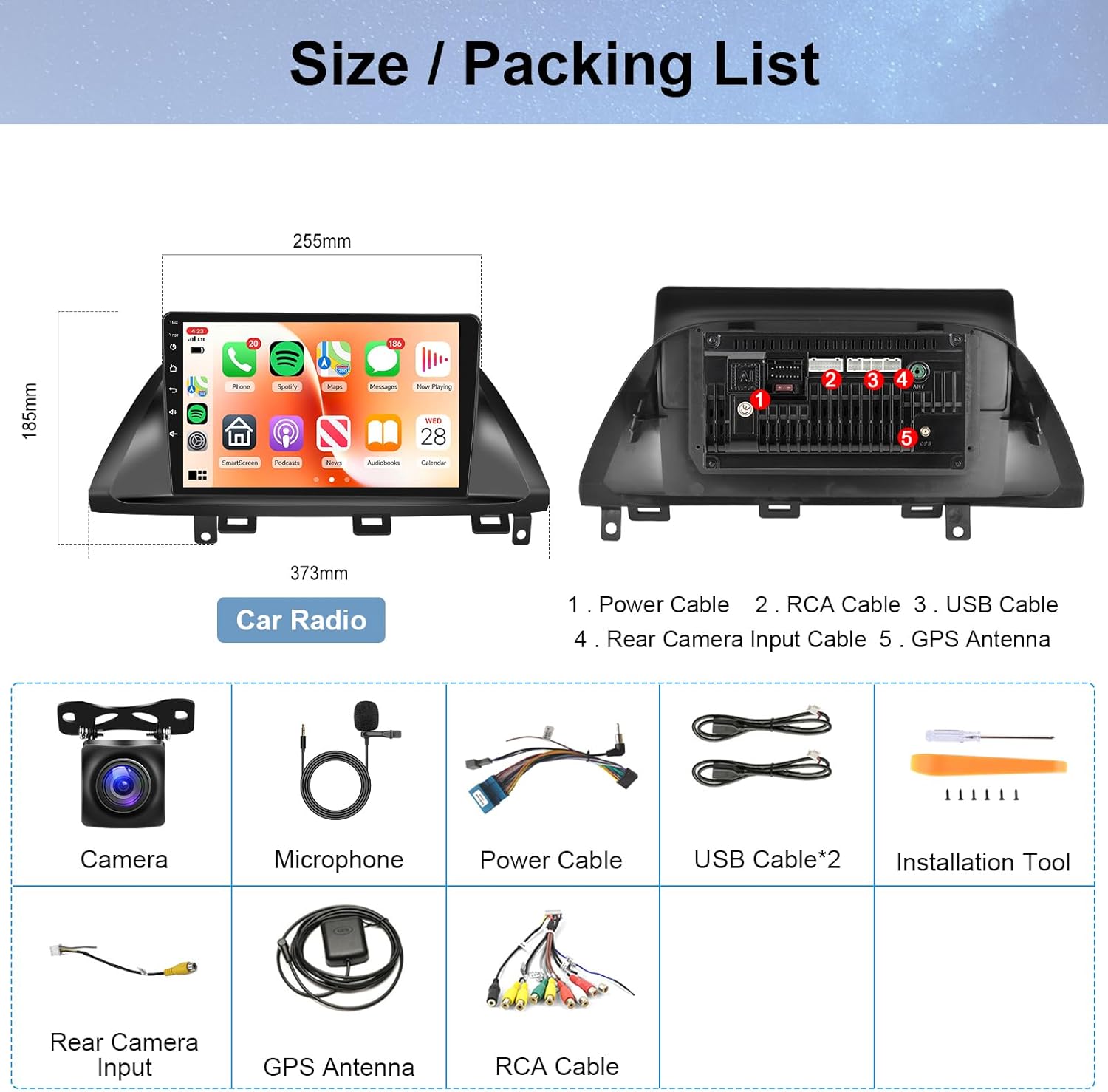
Figure 1: Included components and accessories.
3. Samhæfni ökutækja
This Android Car Radio is specifically designed for Honda Odyssey models from 2005 to 2010. It is important to verify your vehicle's dashboard configuration before installation.

Figure 2: Compatibility check for Honda Odyssey dashboards. This product supports models with a DVD player and does not support models with a large central screen.
4. Uppsetningarhandbók
Professional installation is recommended. Ensure the vehicle's battery is disconnected before starting the installation process.
4.1 Raflagnatengingar
- Rafmagnssnúra: Connect the main power harness to the vehicle's wiring. Ensure correct connections for constant power (yellow), ignition (red), and ground (black).
- RCA snúrur: Connect audio output RCA cables to external amplifiers if used. Connect video input/output cables as needed for external displays or video sources.
- USB snúrur: Connect the provided USB cables for external storage, smartphone connectivity, or charging.
- Inntak aftari myndavélar: Connect the rear camera input cable to the backup camera. Ensure the reverse trigger wire is correctly connected to enable automatic switching.
- GPS loftnet: Setjið GPS-loftnetið á stað þar sem er gott útsýni view himinsins, oftast á mælaborðinu eða undir framrúðunni.
- Hljóðnemi: Connect the external microphone for improved call quality. Position it near the driver for optimal voice pickup.
- Stýrisstýring (SWC): Connect the SWC wires to your vehicle's steering wheel control interface. Refer to your vehicle's wiring diagram for specific connections.
4.2 Einingin sett upp
Carefully insert the car radio into the dashboard opening, ensuring all cables are properly routed and secured. Fasten the unit using the provided screws or mounting brackets.
5. Notkunarleiðbeiningar
5.1 Basic Interface Navigation
The unit features a user-friendly Android interface. Swipe left or right to access different home screens and applications. Tap on icons to launch applications. The side panel provides quick access to essential functions like navigation, music, and settings.
Video 1: Demonstrates the main functions and user interface navigation of the Rimoody Android Car Radio, including switching between home screens and accessing various applications.
5.2 Þráðlaus Carplay og Android Auto
Connect your smartphone wirelessly for an integrated driving experience. This feature allows access to phone contacts, messages, navigation, and music directly from the car stereo display.
- Gakktu úr skugga um að Bluetooth sé virkt í snjallsímanum þínum og bílútvarpinu.
- On the car radio, navigate to the 'Zlink' application.
- Fylgdu leiðbeiningunum á skjánum til að para símann þinn í gegnum Bluetooth.
- Once paired, select either Carplay (for iOS) or Android Auto (for Android) to initiate the connection.
- Grant necessary permissions on your smartphone when prompted.

Mynd 3: Yfirview of wireless Carplay, Android Auto, and Mirror Link functionalities.
Video 2: Detailed guide on connecting Carplay and Android Auto to the car radio.
5.3 GPS leiðsögn
The unit has a built-in GPS module. Connect to a WiFi network to use online maps or download offline maps from the Play Store for navigation without an internet connection.

Mynd 4: GPS leiðsögn og WiFi tenging.
Video 3: Demonstrates the GPS and WiFi features of the Rimoody Android Car Radio.
5.4 Bluetooth and FM/RDS Radio
Utilize Bluetooth for hands-free calls and audio streaming. The FM/RDS radio allows you to listen to local stations with clear reception and preset your favorite channels.

Figure 5: Bluetooth, FM Radio, HiFi Sound, and Steering Wheel Control features.
5.5 Spegiltenging
Mirror Link allows you to display your smartphone's screen on the car radio. This can be done wirelessly or via USB, depending on your phone's operating system.
Video 4: Demonstrates connecting Carplay, Android Auto, and Mirror Link functionalities.
5.6 Inntak fyrir aftari myndavél
The unit supports AHD camera input. When the vehicle is shifted into reverse, the screen will automatically display the rear camera feed, assisting with parking and maneuvering.

Figure 6: AHD Camera Input for reversing assistance.
5.7 Stýrisstýring (SWC)
If your Honda Odyssey is equipped with steering wheel controls, you can configure them to operate the car radio's functions, such as volume, track skipping, and call management. Access the 'SteeringWheelKey' application in the unit's menu to program these controls.
6. Tæknilýsingar
| Eiginleiki | Forskrift |
|---|---|
| Þyngd hlutar | 3.52 pund |
| Stærðir pakka | 15.16 x 7.83 x 4.09 tommur |
| Skjárstærð | 10.1 tommur |
| Skjáupplausn | 1024 x 600 |
| Stýrikerfi | Android |
| vinnsluminni | 2GB |
| ROM | 64GB |
| Tengitækni | Bluetooth, WiFi |
| Sérstakur eiginleiki | Snertiskjár |
| Hljóðútgangsstilling | Stereo |
| Gerð uppsetningar | Festing á mælaborði |
| Tegund korts | Norður Ameríku |
7. Bilanagreining
If you encounter issues with your Rimoody Android Car Radio, refer to the following common problems and solutions:
- Tækið kveikir ekki á sér:
- Check all power connections (constant, ignition, ground) for secure contact.
- Verify vehicle's fuse box for any blown fuses related to the stereo.
- Ekkert hljóð:
- Gakktu úr skugga um að hljóðstyrkurinn sé ekki slökktur á eða stilltur á lágmark.
- Athugaðu tengingar hátalara.
- Verify audio settings (EQ, balance, fader) are correctly configured.
- Vandamál með Bluetooth-tengingu:
- Gakktu úr skugga um að Bluetooth sé virkt bæði í bílútvarpinu og snjallsímanum þínum.
- Eyða fyrri pörunum og reyna að para tækin aftur.
- Endurræstu bæði bílútvarpið og snjallsímann þinn.
- GPS signal loss or inaccuracy:
- Ensure the GPS antenna is mounted in a clear, unobstructed location.
- Verify that the GPS antenna cable is securely connected to the unit.
- Check internet connection for online maps.
- Wireless Carplay/Android Auto not connecting:
- Confirm Bluetooth is connected first.
- Ensure the 'Zlink' application is running on the car radio.
- Check for any pending software updates for the car radio or your smartphone.
8. Ábyrgð og stuðningur
Rimoody is committed to providing high-quality products and excellent customer service.
8.1 Upplýsingar um ábyrgð
- Þessi vara kemur með a 2 árs framleiðandaábyrgð.
- A 30 daga peningaábyrgð er boðið upp á til ánægju þinnar.
- A 12-month replacement policy is available for defective units.
8.2 Tæknileg aðstoð
Við veitum ævi tæknilega aðstoð for your Rimoody Android Car Radio. If you require assistance with installation, operation, or troubleshooting, please contact our support team through the following channels:
- Netfang: [Insert Manufacturer Support Email Here]
- Websíða: Heimsæktu Rimoody Store on Amazon fyrir frekari upplýsingar og stuðningsúrræði.


