Inngangur
This manual provides essential information for the safe and efficient operation of your TECNO Pova 5 Pro 5G smartphone. Please read it thoroughly before using your device to ensure optimal performance and longevity.

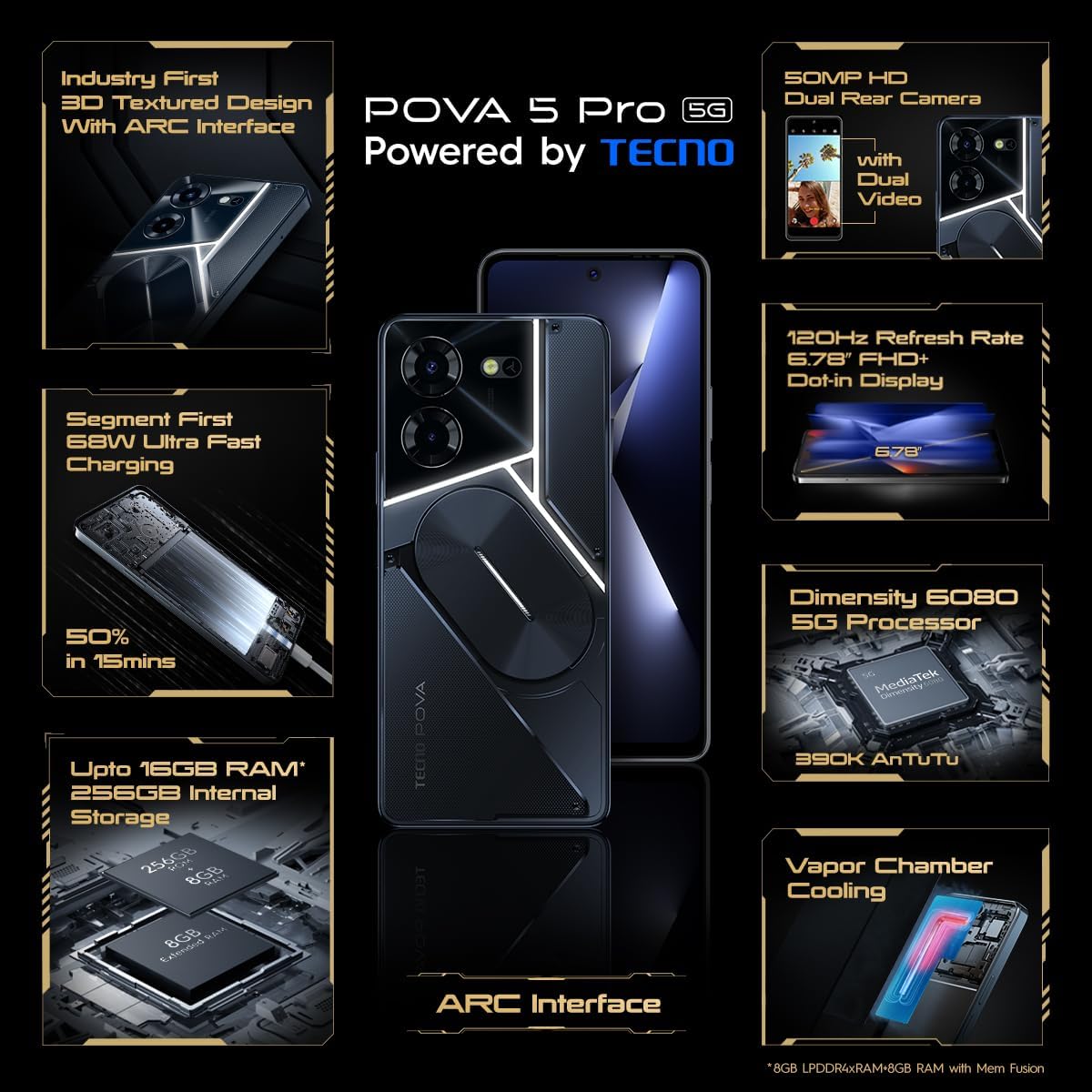
Image: The TECNO Pova 5 Pro 5G smartphone, showcasing its design and key feature of 68W Ultra Fast Charging.
Hvað er í kassanum
Gakktu úr skugga um að allir hlutir séu í umbúðunum:
- Snjallsími
- 68 W aflgjafi
- Type-C kapall
- TPU Cover
- SIM -útkastartæki

Image: A flat lay of the TECNO Pova 5 Pro 5G packaging contents, showing the smartphone, 68W power adapter, USB-C cable, TPU protective cover, and the SIM ejector tool.
Uppsetning
Upphafleg uppsetning
- Settu inn SIM-/SD-kort: Locate the SIM tray on the side of the device. Use the provided SIM ejector tool to open the tray. Insert your Nano-SIM card(s) and/or microSD card into the designated slots. Ensure the tray is fully reinserted.
- Kveikt á: Press and hold the Power button (located on the right side) until the TECNO logo appears.
- Fylgdu leiðbeiningunum á skjánum: The device will guide you through initial setup, including language selection, Wi-Fi connection, Google account setup, and security settings.
Hleður tækið
The TECNO Pova 5 Pro 5G supports 68W Ultra Fast Charging.
- Tengdu Type-C snúruna við hleðslutengið neðst á símanum.
- Tengdu hinn endann á snúrunni við 68W straumbreytinn.
- Stingdu straumbreytinum í innstungu.
- A full charge typically takes approximately 45 minutes, with 50% charge achievable in about 15 minutes.
Mynd: Skýr framhlið view of the TECNO Pova 5 Pro 5G smartphone, highlighting its display and front camera.
Að stjórna tækinu
Grunnleiðsögn
- Snertiskjár: Ýttu til að velja, strjúktu til að fletta, klíptu til að stækka.
- Aflhnappur: Ýttu á til að vekja/svæfa skjáinn. Ýttu og haltu inni til að slökkva á honum eða endurræsa hann.
- Hljóðstyrkshnappar: Stilla hljóðstyrk margmiðlunar, símtals eða hringitóna.
Notkun myndavélar
The device features a 50MP AI Dual Rear Camera and a 16MP Selfie Camera.
- Opnaðu Myndavélaforritið af heimaskjánum eða forritaskúffunni.
- Veldu stillingu (Ljósmynd, Myndband, Andlitsmynd, o.s.frv.).
- Ýttu á lokarahnappinn til að taka myndir eða hefja/stöðva myndbandsupptöku.
- Utilize AI enhancements for optimized scene recognition and image quality.
ARC Interface and Notifications
The TECNO Pova 5 Pro 5G features a unique multi-color ARC interface with backlighting.
- The ARC interface provides customizable light effects for notifications, incoming calls, gaming, and music playback.
- Access settings to personalize the light patterns and colors for different alerts.

Mynd: Aftan view of the TECNO Pova 5 Pro 5G, showcasing its distinctive 3D textured design and the illuminated ARC interface.

Mynd: Ítarleg view of the TECNO Pova 5 Pro 5G's ARC interface, illustrating the multi-color backlighting feature.
Viðhald
- Umhirða rafhlöðu: To prolong battery life, avoid exposing the device to extreme temperatures. Do not fully discharge the battery regularly.
- Þrif: Notið mjúkan, lólausan klút til að þrífa skjáinn og húsið. Forðist að nota sterk efni eða slípiefni.
- Hugbúnaðaruppfærslur: Regularly check for and install system updates to ensure optimal performance, security, and access to new features. Navigate to Settings > System > System update.
- Geymslustjórnun: Hreinsa reglulega óþarfa fileog forrit til að viðhalda nægilegu geymslurými og hraða tækisins.
Úrræðaleit
- Kveikir ekki á tækinu: Ensure the battery is charged. Connect the device to the charger for at least 15 minutes before attempting to power on again. If the issue persists, perform a forced restart by holding the Power button for 10-15 seconds.
- Hleðsluvandamál: Verify that the charging cable and adapter are securely connected and undamaged. Try using a different outlet.
- Forrit hrynur/frýs: Close the problematic app and reopen it. If the issue continues, clear the app's cache and data in Settings > Apps. As a last resort, uninstall and reinstall the app.
- Léleg nettenging: Check if Airplane Mode is off. Restart the device. If using mobile data, ensure your SIM card is properly inserted and your data plan is active.
- Ofhitnun: Avoid using the device in direct sunlight or during intensive tasks for extended periods. Close background applications.
Tæknilýsing
| Eiginleiki | Forskrift |
|---|---|
| Nafn líkans | Pova 5 Pro 5G |
| Stýrikerfi | Android 13.0 |
| Örgjörvi | Dimensity 6080 (2.4 GHz Octa-Core) |
| vinnsluminni | 8 GB (expandable up to 16 GB with Memory Fusion) |
| Innri geymsla | 256 GB (UMCP) |
| Skjár | 6.78-inch FHD+ Dot-in Display |
| Endurnýjunartíðni | 120 Hz |
| Myndavél að aftan | 50 MP tvöföld myndavél með gervigreind |
| Myndavél að framan | 16 MP selfie myndavél |
| Rafhlaða | 5000 mAh litíum-pólýmer |
| Hleðsla | 68W Ultra Fast Charging |
| Mál | 16.9 x 7.7 x 16.9 cm |
| Þyngd | 214 grömm |
| Tengingar | 5G (10 bands supported), NFC, Bluetooth 5.1 |

Image: An internal diagram or view of the TECNO Pova 5 Pro 5G, illustrating its vapor chamber cooling system for efficient heat dissipation.
Ábyrgð og stuðningur
Your TECNO Pova 5 Pro 5G comes with a manufacturer's warranty. Please refer to the warranty card included in your product packaging for specific terms and conditions.
For technical support, service, or warranty claims, please contact TECNO customer service. TECNO maintains a large service network with over 1200 service centers in India.
You can find more information and support resources by visiting the official Tecno store on Amazon: Tecno Store


