1. Inngangur
This manual provides detailed instructions for the setup, operation, maintenance, and troubleshooting of your Xprinter XP-233B Thermal Barcode Printer. The XP-233B is designed for efficient thermal printing of barcodes and labels, utilizing heat-sensitive paper without the need for ink or ribbons.
2. Öryggisleiðbeiningar
- Ensure the printer is connected to a power source with the correct voltage as specified on the power adapter.
- Ekki láta prentarann verða fyrir vatni eða miklum raka.
- Forðist að setja prentarann í beinu sólarljósi eða nálægt hitagjöfum.
- Keep the printer away from dust and debris to prevent damage to internal components.
- Do not attempt to disassemble or repair the printer yourself. Contact qualified service personnel for assistance.
- Use only recommended thermal label rolls to ensure optimal print quality and printer longevity.
3. Innihald pakka
Gakktu úr skugga um að allir hlutir séu til staðar í pakkanum:
- Xprinter XP-233B Thermal Barcode Printer
- Rafmagns millistykki
- USB snúru
- Leiðbeiningar um hraða notkun (ef fylgja með)
- Driver CD (if included, drivers can also be downloaded online)
4. Vöru lokiðview
Familiarize yourself with the main components of the XP-233B printer.

Mynd 4.1: Framhlið view of the Xprinter XP-233B, showing the power switch, control panel, and label output slot.

Mynd 4.2: Aftan view of the Xprinter XP-233B, highlighting the USB, Ethernet, and power input ports.
Aðgerðir stjórnborðs:
- FEED hnappur: Press to feed a blank label. Hold to perform a self-test print.
- PAUSE hnappur: Pauses or resumes printing.
- HÆTTA HNAPPUR: Hættir við núverandi prentverk.
- LED Vísar: Display printer status (e.g., Power, Error, Paper Out). Refer to troubleshooting for specific light patterns.
5. Uppsetning
5.1 Tenging prentarans
- Connect the power adapter to the printer's power input port and then plug it into a wall outlet.
- Connect the USB cable from the printer to your computer. For Ethernet connectivity, connect an Ethernet cable from the printer to your network router or switch.
- Kveikið á prentaranum með rofanum sem er staðsettur á hliðinni.
5.2 Hleðsla merkimiða
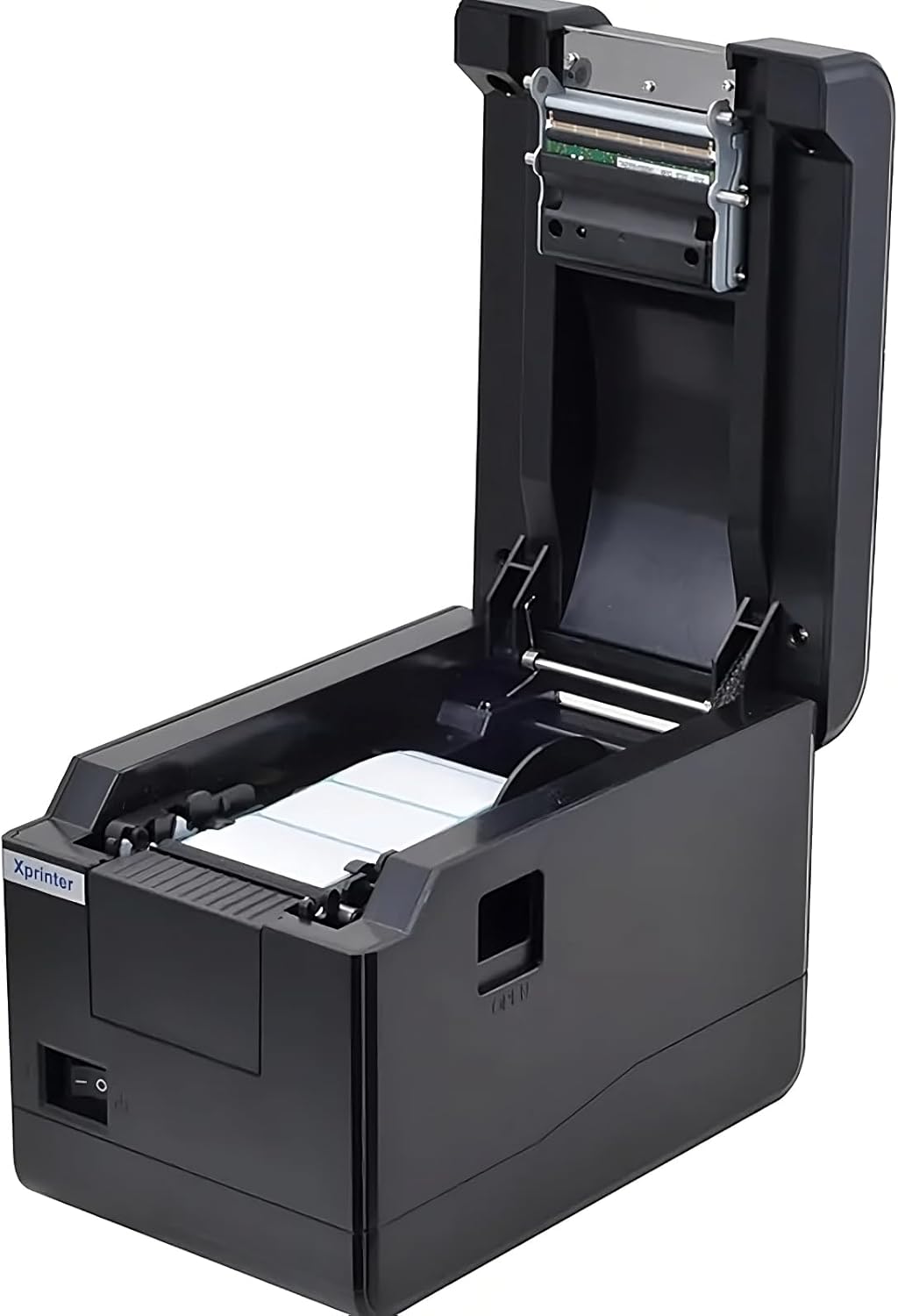
Mynd 5.1: Að ofan view of the Xprinter XP-233B with the cover open, illustrating the label loading area.
- Press the 'OPEN' button on the side of the printer to open the top cover.
- Place the thermal label roll into the label compartment, ensuring the labels feed from the bottom of the roll and the printable side faces upwards.
- Adjust the movable label guides to fit the width of your label roll snugly, without pinching the labels.
- Pull a few labels past the print head and out through the front slot.
- Lokaðu efri hlífinni vandlega þar til hún smellpassar.
- Prentarinn mun sjálfkrafa kvarða og mata nokkra merkimiða til að greina bilið á milli merkimiðanna.
5.3 Bílstjóri uppsetning
Install the printer drivers on your computer. Drivers can typically be found on the included CD or downloaded from the official Xprinter webFylgdu leiðbeiningunum á skjánum til að setja upp.
6. Notkun prentarans
6.1 Grunnprentun
Once the printer is set up and drivers are installed, you can print labels from your application (e.g., label design software, shipping software). Ensure the correct printer model (Xprinter XP-233B) is selected in your application's print settings.
6.2 Self-Test Print
To perform a self-test print:
- Ensure the printer is powered on and labels are loaded.
- Ýttu á og haltu inni FEED button for approximately 3-5 seconds until the printer starts printing.
- The self-test print will display printer information and a test pattern, confirming basic functionality.
7. Viðhald
7.1 Þrif á prenthaus
Regular cleaning of the print head ensures optimal print quality and extends the printer's lifespan. Clean the print head when print quality degrades or after every few rolls of labels.
- Slökktu á prentaranum og aftengdu rafmagnssnúruna.
- Opnaðu topplokið.
- Gently wipe the print head surface with a cotton swab lightly dampened with isopropyl alcohol (70% or higher).
- Allow the print head to dry completely (approximately 2-3 minutes) before closing the cover and turning on the printer.
7.2 Hreinsun að utan
Þurrkaðu ytra byrði prentarans með mjúkum klút.amp klút. Ekki nota sterk efni eða slípiefni.
8. Bilanagreining
| Vandamál | Möguleg orsök | Lausn |
|---|---|---|
| Prentarinn kveikir ekki á sér | Power cord loose; power outlet faulty; power adapter damaged. | Check power connections; try a different outlet; replace power adapter if necessary. |
| Engin merkimiðafóðrun | Labels incorrectly loaded; paper out; label guides too tight. | Reload labels correctly; replace label roll; adjust label guides. |
| Poor print quality (faded, lines) | Print head dirty; low-quality labels; print head damaged. | Clean print head (refer to Section 7.1); use recommended thermal labels; contact support if print head is damaged. |
| Prentarinn svarar ekki prentskipunum | Incorrect driver installed; USB/Ethernet cable loose; printer paused. | Reinstall drivers; check cable connections; press Hlé hnapp til að halda áfram. |
| Labels skipping or misaligning | Incorrect label sensor calibration; label guides not set correctly. | Perform a self-test print to recalibrate; adjust label guides. |
9. Tæknilýsing
| Eiginleiki | Forskrift |
|---|---|
| Nafn líkans | Xprinter - Thermal barcode printer |
| Tegundarnúmer vöru | XP-233B |
| Prentaratækni | Hitauppstreymi |
| Tengitækni | Ethernet, USB |
| Printer Output | Einlita |
| Prentmiðlar | Merki |
| Hámarks blaðrými | 100 (typical for roll capacity, actual sheet capacity depends on label size) |
| Vörumál (D x B x H) | 26.8 x 18 x 17.2 cm |
| Þyngd hlutar | 1.2 kg |
| Litur | Svartur |
10. Upplýsingar um ábyrgð
Xprinter products typically come with a limited manufacturer's warranty. Please refer to the warranty card included with your product or visit the official Xprinter website for specific warranty terms and conditions, including coverage duration and service procedures. Keep your purchase receipt as proof of purchase for warranty claims.
11. Þjónustudeild
For technical assistance, driver downloads, or further inquiries regarding your Xprinter XP-233B, please visit the official Xprinter support website or contact their customer service department. Contact information can usually be found on the Xprinter webvefsíðunni eða í skjölunum sem fylgja prentaranum þínum.


