1. Inngangur
Welcome to the user manual for your KLIM Discover Portable CD Player. This device combines classic CD playback with modern features such as Bluetooth connectivity, FM radio, FM transmission, and SD card support. This manual will guide you through the setup, operation, and maintenance of your new portable CD player to ensure an optimal listening experience.

Image 1.1: The KLIM Discover Portable CD Player, showcasing its compact design and included headphones.
2. Innihald pakka
Vinsamlegast staðfestu að allir hlutir sem taldir eru upp hér að neðan séu innifaldir í pakkanum þínum:
- KLIM Discover CD Player
- KLIM Fusion Wired Headphones
- Ear Accessories (various sizes)
- USB-C hleðslusnúra
- Berðu poki

Image 2.1: All components included with the KLIM Discover Portable CD Player.
3. Vöru lokiðview
Familiarize yourself with the buttons and ports on your KLIM Discover CD Player:

Image 3.1: The KLIM Discover Portable CD Player, showing its front panel and connected headphones.
The KLIM Discover features a clear LCD display and intuitive controls on its front panel. Key components include:
- LCD skjár: Shows track information, mode, battery status, and settings.
- Spilunarstýringar: Buttons for Play/Pause, Stop, Next/Fast Forward, and Previous/Rewind.
- Hnappar fyrir ham: Buttons for changing playback modes (e.g., Repeat, Random), activating FM Radio, FM Transmitter, and Bluetooth.
- EQ/Record Button: For cycling through equalizer presets and initiating recording.
- DIR/Speed Buttons: For changing directories on MP3 CDs and adjusting playback speed.
- Hljóðstyrkur: A dedicated control for adjusting audio output.
- HOLD rofi: A physical switch, typically on the side, to lock all buttons.
Additional ports (typically on the side or back):
- USB-C hleðslutengi: Til að tengja hleðslusnúruna.
- 3.5mm Audio Output (Headphone Jacks): Two ports for connecting headphones or external speakers, allowing two users to listen simultaneously.
- SD kortarauf: For inserting an SD/TF memory card.
4. Uppsetning
4.1. Hleður tækið
The KLIM Discover has a built-in rechargeable battery. Before first use, fully charge the device.
- Connect the supplied USB-C charging cable to the USB-C port on the player.
- Tengdu hinn endann á snúrunni við USB-straumbreyti (fylgir ekki með) eða USB-tengi tölvu.
- The charging indicator on the display will show charging status. A full charge typically provides over 12 hours of playback.

Image 4.1: The KLIM Discover features a long-lasting rechargeable battery.
4.2. Kveikja / slökkva á
To power on the device, slide the power switch (usually located on the side) to the "ON" position. To power off, slide it to "OFF".
4.3. Using the HOLD Function
The HOLD switch locks all buttons to prevent accidental operation. Slide the switch to "HOLD" to activate, and slide it back to deactivate.
5. Notkunarleiðbeiningar
5.1. Geislaspilun
- Opnaðu lokið á geisladiskahólfinu.
- Carefully place a CD (CD, CD-R, CD-RW, HDCD, MP3 CD) onto the spindle, label side up.
- Lokaðu lokinu á geisladiskahólfinu vandlega þar til það smellur.
- Ýttu á Spila / gera hlé hnappinn til að hefja spilun.
- Notaðu Næsta lag/Fljótt áfram og Fyrra lag/spóla til baka hnappar til að vafra um lög.
- Stilltu hljóðstyrkinn með hljóðstyrkstýringunni.
Anti-Shock Protection: The KLIM Discover features an anti-shock chip that buffers 100 seconds of audio to prevent interruptions during movement. This also helps protect your CDs from damage.
5.2. Bluetooth-tenging
The KLIM Discover can connect to Bluetooth headphones or speakers.
- Gakktu úr skugga um að Bluetooth heyrnartólin/hátalarinn séu í pörunarstillingu.
- Ýttu á Bluetooth button on the KLIM Discover. The Bluetooth icon on the display will flash, indicating it's searching for devices.
- Once connected, the Bluetooth icon will become solid.
Note on Car Bluetooth: Bluetooth compatibility varies with car infotainment systems. While the device strives for broad compatibility, some car systems may experience connection issues due to software updates. If you encounter problems, consider using the FM Transmitter or AUX connection options.
5.3. FM útvarp
- Ýttu á FM Radio/Speed - hnappinn til að fara í FM útvarpsstillingu.
- Notaðu MODE/FM (+) og PROG/FM (-) buttons to tune to desired frequencies.
- The included headphones act as the antenna for better reception.
5.4. FM Transmitter (Car Connectivity)
The FM transmitter allows you to play audio from the KLIM Discover through your car's FM radio.
- Ýttu á FM sendir button to activate the feature.
- The display will show an FM frequency.
- Tune your car's FM radio to the same frequency displayed on the KLIM Discover.
- Play your CD or SD card audio, and it will transmit wirelessly to your car's speakers.
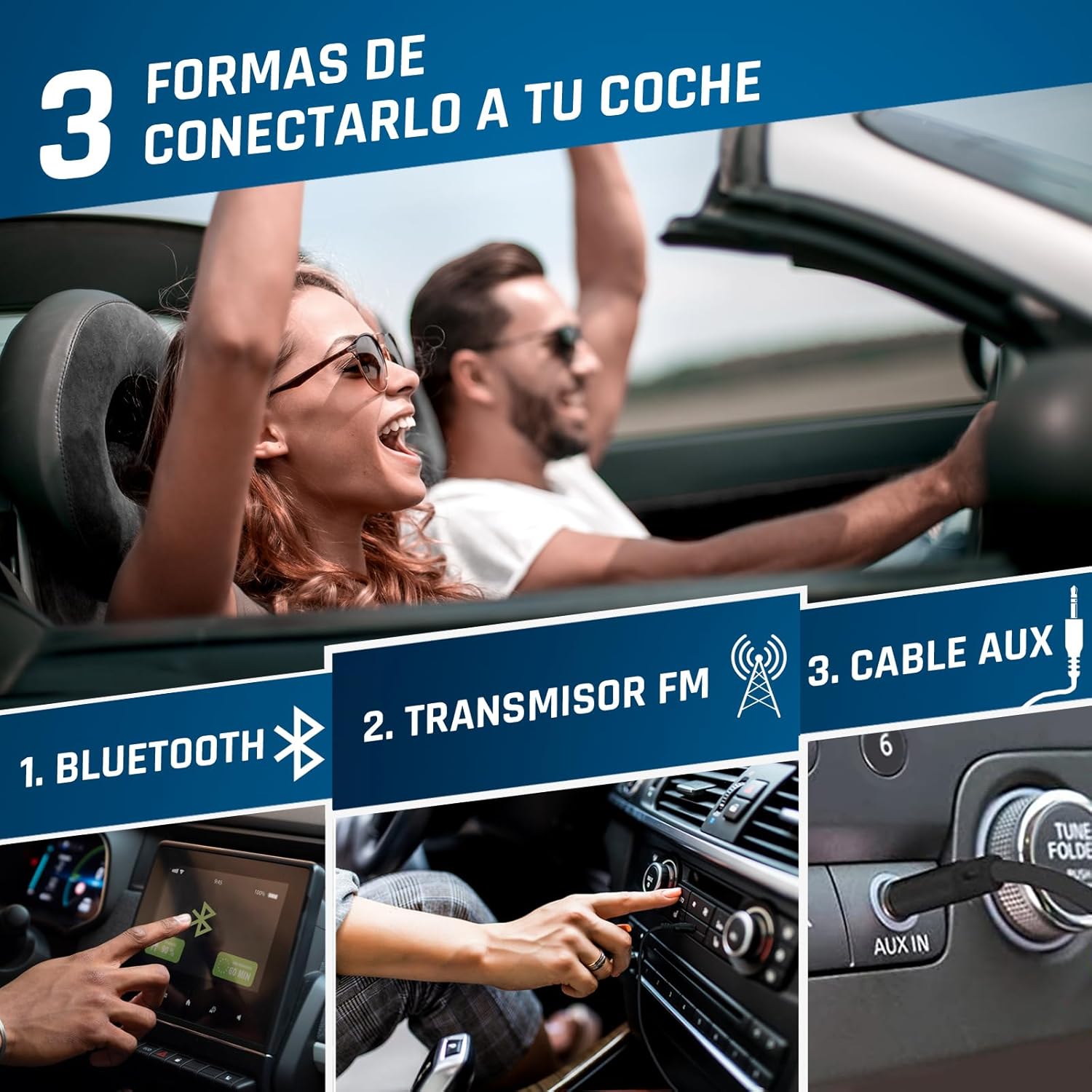
Image 5.1: Connection options for car audio systems: Bluetooth, FM Transmitter, and AUX cable.
Other Car Connection Options:
- AUX kapall: If your car has an AUX input, connect the KLIM Discover using a 3.5mm audio cable (not included).
- Car Bluetooth: Attempt to pair the KLIM Discover with your car's Bluetooth system as described in section 5.2.
5.5. Spilun á SD-korti
- Insert a formatted SD/TF card (up to 32GB) into the SD card slot.
- The player will automatically switch to SD card mode or you may need to press the MODE hnappinn til að velja það.
- Supported audio formats include MP3 and WMA.
- Use the navigation buttons to select and play tracks.
5.6. Upptökuaðgerð
The KLIM Discover supports recording audio onto an inserted SD card. Refer to the on-screen prompts or specific instructions for initiating recording using the EQ/Record hnappinn.
5.7. Equalizer (EQ)
Ýttu á EQ/Record button repeatedly to cycle through different equalizer presets (e.g., Pop, Jazz, Rock, Classic, Bass, Flat) to customize your audio experience.
5.8. Playback Speed Control
Notaðu DIR/Speed + og FM Radio/Speed - buttons to adjust the playback speed of your audio.
6. Viðhald
- Þrif: Use a soft, dry cloth to clean the exterior of the player. For the lens inside the CD compartment, use a specialized CD lens cleaner.
- Geymsla: Geymið spilara á köldum, þurrum stað fjarri beinu sólarljósi og miklum hita.
- Umhirða rafhlöðu: Til að lengja líftíma rafhlöðunnar skaltu forðast að tæma hana alveg oft. Hladdu hana reglulega, jafnvel þótt hún sé ekki í notkun í langan tíma.
- Meðhöndlun geisladiska: Always handle CDs by their edges. Keep them clean and free of scratches to ensure optimal playback.
7. Bilanagreining
| Vandamál | Möguleg orsök | Lausn |
|---|---|---|
| Ekki kveikir á tækinu. | Low battery; Power switch in OFF position. | Charge the device; Slide power switch to ON. |
| Geisladiskurinn spilar ekki eða sleppir. | CD is dirty, scratched, or inserted incorrectly; CD compartment not closed properly. | Clean the CD; Ensure CD is inserted correctly; Close compartment firmly. |
| Ekkert hljóð úr heyrnartólum. | Headphones not connected; Volume too low; Headphones faulty. | Ensure headphones are fully plugged in; Increase volume; Test with different headphones. |
| Vandamál með Bluetooth-tengingu. | Device not in pairing mode; Target device too far or not in pairing mode; Car infotainment system incompatibility. | Ensure both devices are in pairing mode and close to each other; Refer to car manual; Use FM Transmitter or AUX as alternatives. |
| FM Transmitter not working. | Car radio not tuned to correct frequency; Interference. | Ensure car radio matches player's FM frequency; Try a different, clear frequency. |
| SD-kort ekki þekkt. | Card inserted incorrectly; Card not formatted or corrupted; Unsupported file sniði. | Reinsert card; Ensure card is formatted correctly (FAT32); Check for MP3/WMA files. |
If you continue to experience issues, please contact KLIM customer service for assistance.
8. Tæknilýsing
| Eiginleiki | Smáatriði |
|---|---|
| Vörumerki | KLIM |
| Nafn líkans | Uppgötvaðu |
| Gerðarnúmer | KLIM Nomad (KLDIS5373) |
| Tengitækni | Bluetooth |
| Sérstakir eiginleikar | Bluetooth, FM radio, FM transmitter, SD card reader, Recorder |
| Samhæfðar gerðir miðla | CD, SD Card, MP3, WMA |
| Stutt hljóðsnið | MP3, WMA |
| Geymslugeta minni | Up to 32 GB (SD/TF Card) |
| Tuner tækni | FM |
| Skjátækni | LCD |
| Gerð aflgjafa | Battery Powered (Rechargeable Lithium-Cobalt) |
| Meðallíf rafhlöðu | 12+ tímar |
| Vörumál | 14 x 14 x 2.8 cm |
| Þyngd hlutar | 250 g |
| Innifalið íhlutir | KLIM Discover CD Player, KLIM Fusion Wired Headphones, Ear Accessories, USB-C Charging Cable, Carry Pouch |
9. Ábyrgð og stuðningur
The KLIM Discover Portable CD Player comes with a 5-year product support from KLIM Technologies. This ensures long-term assistance for any issues you may encounter.
Additionally, you are covered by a 30 daga skilafrestur, allowing you to return the product for a full refund if you are not satisfied with your purchase.
For technical support, warranty claims, or any questions, please visit the official KLIM website or contact their customer service directly. Contact details can typically be found on the KLIM webá staðnum eða í umbúðaefninu.


