1. Vöru lokiðview
The Vorago BSP-500-V2 is a portable Bluetooth speaker designed for robust performance and durability. It features IPX5 water resistance, making it suitable for various environments, including outdoor adventures and parties. This manual provides detailed instructions for setting up, operating, and maintaining your speaker.
Helstu eiginleikar:
- True Wireless Stereo (TWS) tenging: Connect two BSP-500-V2 speakers for an immersive stereo sound experience.
- Lengri endingartími rafhlöðu: Enjoy up to 7 hours of music playback at 70% volume, thanks to its 2000 mAh battery.
- USB Type-C hleðsla: Convenient and modern USB-C port for charging.
- Fjölhæf tenging: Supports Bluetooth for wireless streaming and a 3.5mm auxiliary input for wired connections.
- IPX5 vatnsþol: Verndað gegn lágþrýstingsvatnsþotum úr hvaða átt sem er.
Innihald pakka:
- Vorago BSP-500-V2 Bluetooth hátalari
- USB Type-C hleðslusnúra
- 3.5 mm hljóðsnúra
- Notendahandbók (þetta skjal)
Vörumynd:

Mynd 1.1: Framan view of the Vorago BSP-500-V2 Bluetooth speaker, showcasing its mesh grille and central Vorago logo.

Mynd 1.2: Hornlaga view of the speaker, highlighting its robust, rectangular design and integrated carrying strap.

Mynd 1.3: Efst view showing the control panel with power, volume down, play/pause, and volume up buttons.
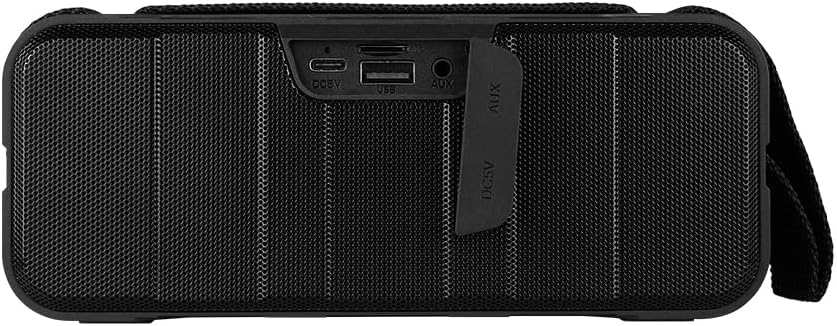
Mynd 1.4: Aftan view of the speaker, showing the protective flap covering the input ports.

Figure 1.5: Close-up of the input ports, including DC 5V (USB-C), USB-A, and AUX (3.5mm) inputs, protected by a rubber cover.
2. Öryggisupplýsingar
- Ekki láta hátalarann verða fyrir miklum hita (heitum eða köldum).
- Forðist að sleppa hátalaranum eða láta hann verða fyrir miklum höggum.
- Haldið hátalaranum frá beinu sólarljósi og hitagjöfum.
- Ekki taka í sundur, gera við eða breyta hátalaranum sjálf/ur. Það felur í sér að ábyrgðin fellur úr gildi.
- Ensure the port cover is securely closed when using the speaker near water to maintain IPX5 water resistance.
- Do not immerse the speaker in water. IPX5 rating protects against splashes and light rain, not submersion.
- Use only the provided charging cable or a certified USB Type-C cable for charging.
- Þrífið hátalarann með mjúkum, þurrum klút. Notið ekki slípiefni eða leysiefni.
3. Uppsetning
3.1 Hleðsla hátalarans
- Open the protective rubber cover on the rear of the speaker to access the charging port.
- Connect the USB Type-C end of the charging cable to the speaker's DC 5V port.
- Tengdu hinn endann á USB snúrunni við USB straumbreyti (fylgir ekki með) eða USB tengi tölvu.
- Hleðsluljósið lýsir á meðan á hleðslu stendur og slokknar þegar það er fullhlaðið.
- Once charging is complete, securely close the protective rubber cover to maintain water resistance.
3.2 Kveikt/slökkt
- Til að kveikja á: Ýttu á og haltu inni Aflhnappur on the top panel for approximately 3 seconds until you hear an audible prompt.
- Til að slökkva á: Ýttu á og haltu inni Aflhnappur for approximately 3 seconds until you hear an audible prompt.
3.3 Bluetooth pörun
- Ensure the speaker is powered on. It will automatically enter Bluetooth pairing mode, indicated by a flashing LED light.
- Virkjaðu Bluetooth í tækinu þínu (snjallsíma, spjaldtölvu, fartölvu) og leitaðu að tiltækum tækjum.
- Select "BSP-500-V2" from the list of found devices.
- Þegar pörun hefur tekist gefur hátalarinn frá sér hljóðmerki og LED-ljósið hættir að blikka og lýsir stöðugt.
- Hátalarinn tengist sjálfkrafa við síðasta paraða tækið þegar hann er kveikt á honum, ef tækið er innan seilingar og Bluetooth er virkt.
3.4 True Wireless Stereo (TWS) pörun
TWS allows you to connect two BSP-500-V2 speakers together for a true stereo sound experience.
- Ensure both BSP-500-V2 speakers are powered on and not connected to any other Bluetooth device.
- Á einum af hátalarunum (þetta verður aðalhátalarinn), ýttu tvisvar á Spila/hlé hnappurHátalarinn fer í TWS-pörunarstillingu.
- The two speakers will automatically search for and connect to each other. You will hear an audible confirmation once they are successfully paired.
- Once TWS is established, connect your device to the primary speaker via Bluetooth as described in Section 3.3.
- To disconnect TWS, double-press the Spila/hlé hnappur á hvorum ræðumanninum.
3.5 Aukatenging (AUX).
For devices without Bluetooth, you can use the 3.5mm audio cable.
- Open the protective rubber cover on the rear of the speaker.
- Tengdu annan endann á 3.5 mm hljóðsnúrunni við AUX-tengi hátalarans.
- Connect the other end of the cable to the audio output jack of your device.
- Hátalarinn skiptir sjálfkrafa yfir í AUX-stillingu.
- Once disconnected, securely close the protective rubber cover.
4. Notkunarleiðbeiningar
4.1 Button Functions:
| Hnappur | Virkni (Stutt ýting) | Aðgerð (Löng ýta) |
|---|---|---|
| Aflhnappur | N/A | Kveikt/slökkt |
| Hnappur fyrir hljóðstyrk | Minnka hljóðstyrk | Fyrra lag |
| Spila/hlé hnappur | Spila/gera hlé á tónlist, svara/ljúka símtali | Reject Call, Double-press for TWS Pairing |
| Hnappur fyrir hljóðstyrk | Auka hljóðstyrk | Næsta lag |
5. Viðhald
- Þrif: Use a soft, dry, lint-free cloth to clean the speaker's surface. For stubborn dirt, slightly dampÞvoið klútinn með vatni. Notið ekki sterk efni, hreinsiefni eða sterk þvottaefni.
- Vatnsþol: Always ensure the rubber port cover on the back of the speaker is fully and securely sealed when using the speaker outdoors or near water. This maintains its IPX5 water resistance. After exposure to water, wipe the speaker dry before opening the port cover for charging or auxiliary connections.
- Geymsla: When not in use for extended periods, store the speaker in a cool, dry place, away from direct sunlight and extreme temperatures. It is recommended to charge the speaker fully before storing and to recharge it every few months to maintain battery health.
- Umhirða rafhlöðu: To prolong battery life, avoid fully discharging the battery frequently. Charge the speaker when the low battery indicator is active.
6. Bilanagreining
| Vandamál | Möguleg orsök | Lausn |
|---|---|---|
| Hátalarinn kviknar ekki. | Lítið rafhlaða. | Charge the speaker fully using the provided USB Type-C cable. |
| Ekki er hægt að para í gegnum Bluetooth. | Speaker is not in pairing mode; Device's Bluetooth is off; Speaker is already connected to another device; Device is too far from speaker. | Ensure speaker is powered on and flashing (pairing mode). Turn on Bluetooth on your device. Disconnect from other devices. Move device closer to speaker (within 10 meters). |
| Ekkert hljóð eða lágt hljóðstyrkur. | Hljóðstyrkur of lágur í hátalara eða tæki; Röng inntaksstilling; Hátalari ekki tengdur. | Increase volume on both speaker and connected device. Ensure correct mode (Bluetooth or AUX) is active. Verify successful Bluetooth pairing or AUX cable connection. |
| Hljóð röskun. | Hljóðstyrkur of hár; Tækið of langt frá hátalaranum; Truflanir. | Reduce volume on speaker and/or device. Move device closer to speaker. Avoid obstacles between speaker and device. |
| TWS-tenging mistekst. | Speakers are already paired to a device; Speakers are too far apart. | Ensure both speakers are disconnected from any Bluetooth devices. Place speakers close to each other during TWS pairing. |
7. Tæknilýsing
| Eiginleiki | Smáatriði |
|---|---|
| Nafn líkans | BSP-500-V2 |
| Tegund hátalara | Margmiðlun |
| Sérstakur eiginleiki | Bluetooth |
| Ráðlagður notkun | Fyrir tónlistarspilara |
| Samhæf tæki | Fartölva, MP3 spilari, snjallsími, spjaldtölva |
| Gerð stjórnanda | Hnappur |
| Surround Sound Channel Stilling | 5.0 |
| Rafhlöðuending | 7 klukkustundir |
| Íhlutir innifalinn | Ræðumaður |
| Vörumál | 5D x 15W x 18H sentimetrar |
| Vöruþyngd | 1 kíló |
| Vatnsheldur | Já (IPX5) |
| Rafhlöðugeta | 2000 mAh |
| Amplíflegri Tegund | Virkur |
| Aflgjafi | Rafhlaða |
| Tíðni svörun | 180 Hz |
| Tengitækni | Bluetooth |
| Hljóðútgangsstilling | Stereo |
| Gerð uppsetningar | Festing fyrir borðplötu |
8. Ábyrgð og stuðningur
The Vorago BSP-500-V2 Bluetooth Speaker comes with a limited warranty. Please refer to the warranty card included with your product for specific terms and conditions, or visit the official Vorago websíða fyrir frekari upplýsingar.
For technical support, troubleshooting assistance, or warranty claims, please contact Vorago customer service through their official channels. You can find more information and contact details on the Vorago Brand Store on Amazon eða embættismann þeirra websíða.
Vinsamlegast geymið kaupkvittunina vegna ábyrgðar.


