1. Inngangur
Thank you for choosing the Defender Enjoy S200 Portable Bluetooth Speaker. This manual provides essential information for setting up, operating, and maintaining your speaker to ensure optimal performance and longevity. Please read this manual thoroughly before use.
The Defender Enjoy S200 is a versatile portable speaker featuring Bluetooth 5.3 connectivity, True Wireless Stereo (TWS) pairing, an integrated FM radio, and MP3 playback capabilities via USB flash drive or microSD card. It also includes an LED light and supports hands-free calling. Designed for portability, it offers up to 9 hours of playback on a single charge and convenient USB Type-C charging.
2. Vöru lokiðview
2.1 Helstu eiginleikar
- Bluetooth 5.3: For stable and efficient wireless audio streaming.
- True Wireless Stereo (TWS): Connect two Enjoy S200 speakers for a stereo sound experience.
- Margar spilunarstillingar: Bluetooth, FM Radio, USB Flash Drive, MicroSD Card (up to 32GB).
- Innbyggt LED ljós: Provides visual ambiance.
- Handfrjáls símtöl: Innbyggður hljóðnemi fyrir símtöl.
- Langur rafhlöðuending: Up to 9 hours of continuous music playback.
- USB Type-C hleðsla: Nútímaleg og þægileg hleðslutengi.
- Færanleg hönnun: Compact and lightweight with a carrying strap.
2.2 Innihald pakka
- Defender Enjoy S200 Portable Bluetooth Speaker
- Type-C hleðslusnúra
- Flýtileiðarvísir
- Burðaról

Image: The Defender Enjoy S200 Portable Bluetooth Speaker, showcasing its compact design and front grille with an illuminated LED ring.

Image: An infographic highlighting key features such as multi-colored LED lighting, True Wireless Stereo (TWS) pairing, Bluetooth 5.3, MP3 player, FM receiver, and hands-free calling.
3. Uppsetning
3.1 Hleðsla hátalarans
- Locate the Type-C charging port on the back of the speaker.
- Connect the provided Type-C charging cable to the speaker and the other end to a USB power adapter (not included) or a computer's USB port.
- LED-ljósið sýnir hleðslustöðu. Full hleðsla tekur venjulega um það bil 3-4 klukkustundir.
- Aftengdu snúruna þegar hún er fullhlaðin.
3.2 Kveikt/slökkt
- To power on, slide the ON/OFF switch located on the back of the speaker to the 'ON' position.
- Til að slökkva á tækinu, rennið ON/OFF rofanum í stöðuna 'OFF'.
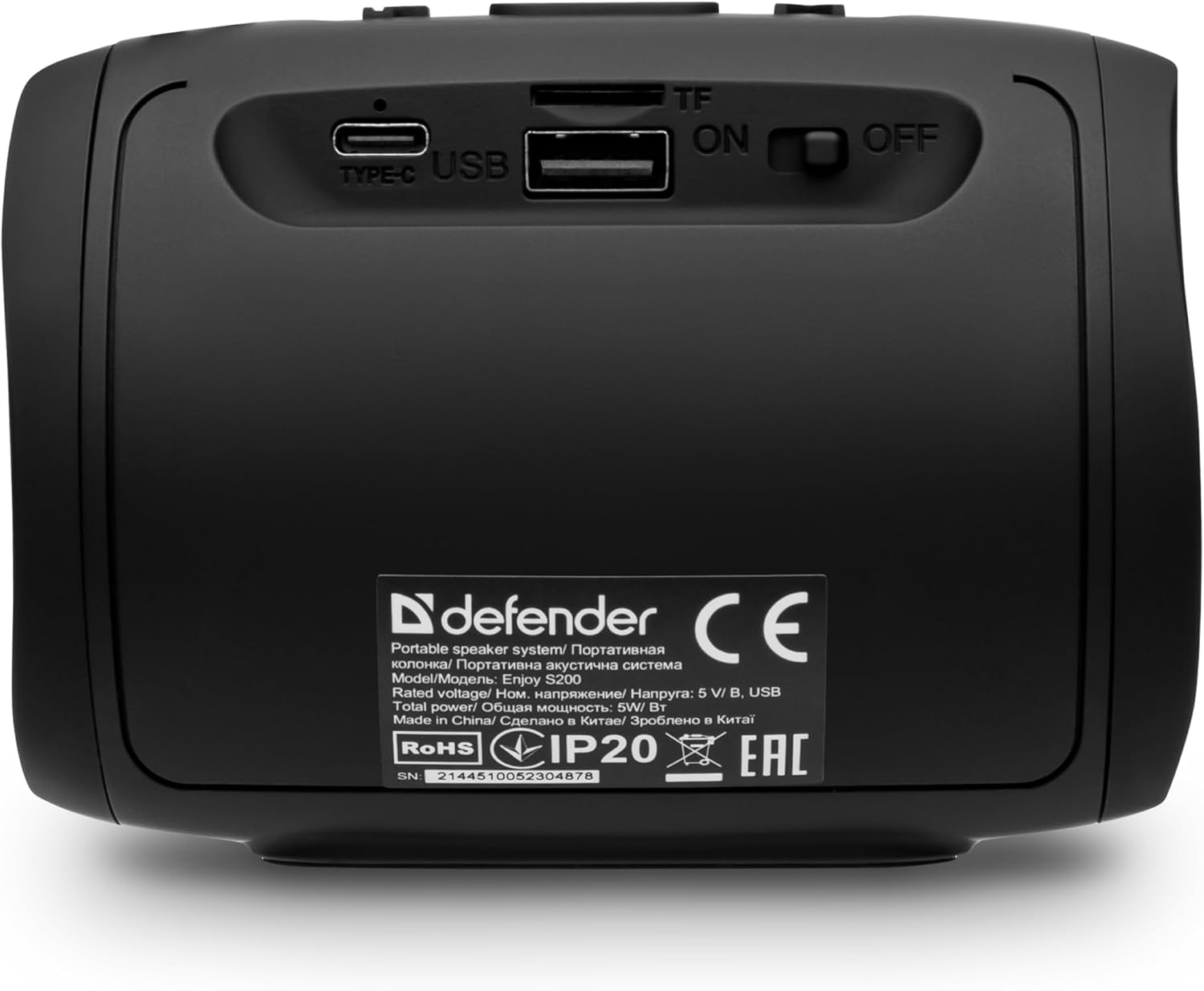
Mynd: Aftan view of the Defender Enjoy S200 speaker, showing the Type-C charging port, USB port, TF (microSD) card slot, and the ON/OFF power switch.
3.3 Bluetooth pörun
- Gakktu úr skugga um að hátalarinn sé kveikt á og í Bluetooth-pörunarstillingu (gefið til kynna með blikkandi LED-ljósi).
- Virkjaðu Bluetooth í tækinu þínu (snjallsíma, spjaldtölvu o.s.frv.) og leitaðu að tiltækum tækjum.
- Select "Defender Enjoy S200" from the list of devices.
- Þegar parað er mun hátalarinn gefa frá sér staðfestingarhljóð og LED-ljósið hættir að blikka.
3.4 True Wireless Stereo (TWS) pörun
To pair two Defender Enjoy S200 speakers for stereo sound:
- Gakktu úr skugga um að báðir hátalararnir séu kveiktir og ekki tengdir við neinn Bluetooth-tæki.
- On one speaker (this will be the primary speaker), press and hold the TWS button (often indicated by a double-arrow icon) until you hear a pairing tone.
- The two speakers will automatically search and connect to each other. A confirmation tone will sound once connected.
- Now, connect your device to the primary speaker via Bluetooth as described in section 3.3. Audio will play in stereo through both speakers.

Image: A visual representation of two Defender Enjoy S200 speakers pairing wirelessly to create a True Wireless Stereo system, alongside icons for Bluetooth 5.3, MP3 player, FM receiver, and hands-free calling.
4. Notkunarleiðbeiningar
4.1 Button Functions (Refer to top panel controls)
- Aflhnappur: Long press to power on/off. Short press to play/pause in music mode, or answer/end calls.
- Hljóðstyrkur (+): Short press to increase volume. Long press for next track/station.
- Hljóðstyrkur (-): Short press to decrease volume. Long press for previous track/station.
- Stillingarhnappur (M): Short press to switch between Bluetooth, FM Radio, USB, and MicroSD modes.
- LED ljósahnappur: Short press to cycle through LED light modes or turn off the LED.
4.2 Bluetooth spilun
After successful Bluetooth pairing (Section 3.3), open your music application on your device and begin playback. Use the speaker's volume buttons or your device's volume controls to adjust the audio level.
4.3 FM útvarpsstilling
- Press the 'M' (Mode) button until you hear the FM radio prompt.
- Long press the Play/Pause button to automatically scan and save available FM stations.
- Use the Volume Up (+) and Volume Down (-) buttons (long press) to navigate between saved stations.
4.4 USB/MicroSD Playback
- Insert a USB flash drive or a microSD card (up to 32GB) containing MP3 audio files í viðeigandi tengi aftan á hátalaranum.
- Press the 'M' (Mode) button until the speaker automatically switches to USB or MicroSD mode and begins playback.
- Use the speaker's control buttons for play/pause, next track, and previous track.
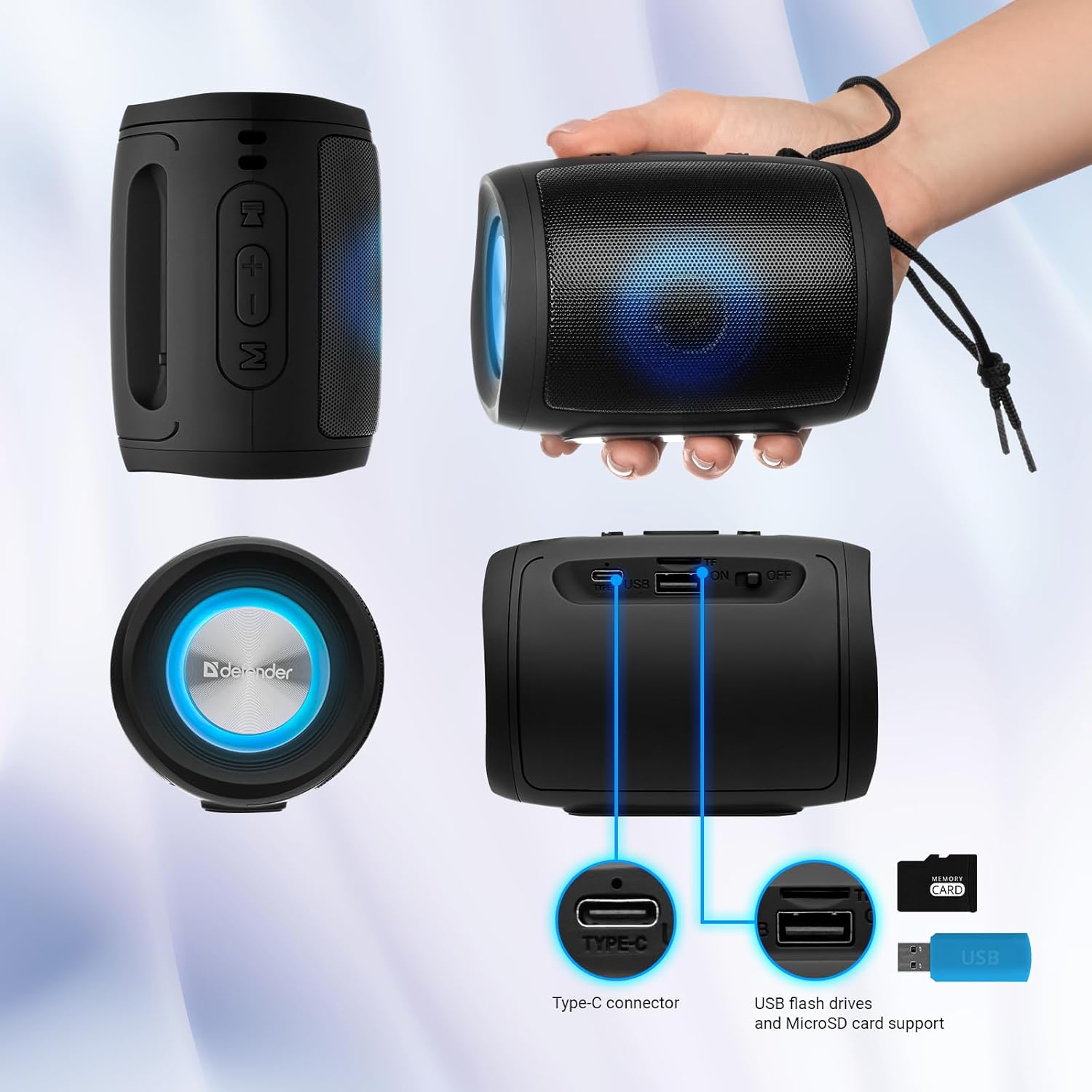
Image: A detailed diagram illustrating the Type-C connector, USB flash drive port, and MicroSD card slot on the Defender Enjoy S200 speaker.
4.5 Handfrjáls símtöl
When connected to your smartphone via Bluetooth, the speaker's built-in microphone allows for hands-free calls.
- Svara símtali: Ýttu stutt á Play/Pause hnappinn.
- Ljúka símtali: Ýttu stutt á Play/Pause hnappinn.
- Hafna símtali: Ýttu lengi á Play/Pause hnappinn.
5. Viðhald
- Þrif: Notið mjúkan, þurran klút til að þrífa yfirborð hátalarans. Notið ekki slípiefni eða leysiefni.
- Geymsla: Geymið hátalarann á köldum, þurrum stað fjarri beinu sólarljósi og miklum hita.
- Vatnsþol: The speaker has an IP20 rating, meaning it is protected against solid objects larger than 12.5mm but has no protection against water. Avoid exposure to rain, splashes, or immersion in water.
- Umhirða rafhlöðu: Til að lengja endingu rafhlöðunnar skal hlaða hátalarann að fullu fyrir fyrstu notkun og hlaða hann að minnsta kosti einu sinni á þriggja mánaða fresti ef hann er ekki notaður reglulega.
6. Bilanagreining
- Enginn kraftur: Ensure the speaker is charged. Connect the Type-C cable and allow it to charge for a few minutes before attempting to power on again.
- Ekkert hljóð: Check the volume levels on both the speaker and your connected device. Ensure the speaker is in the correct mode (Bluetooth, FM, USB, MicroSD).
- Bluetooth pörunarvandamál: Ensure the speaker is in pairing mode. Turn off Bluetooth on your device and turn it back on. Try unpairing and re-pairing the speaker. Move closer to the speaker to ensure you are within the 10-meter range.
- Léleg móttaka FM útvarps: Ensure you are in an area with good signal. The charging cable can sometimes act as an antenna; try connecting it for improved reception.
- USB/MicroSD Not Playing: Tryggðu hljóðið files are in a compatible format (e.g., MP3). Check that the USB drive or microSD card is inserted correctly and is not corrupted.
7. Tæknilýsing
| Nafn líkans | Njóttu S200 |
| Tegundarnúmer vöru | 65200 |
| Vörumerki | Verjandi |
| Tengitækni | Bluetooth 5.3, USB |
| Þráðlaus samskiptatækni | Bluetooth, Radio Frequency |
| Tegund hátalara | Margmiðlun |
| Stærð hátalara | 2 tommur |
| Power Output | 5 Watt |
| Hljóðútgangsstilling | Stereo |
| Aflgjafi | Rafhlaðaknúið (1 litíumjónarafhlaða innifalin) |
| Sérstakir eiginleikar | Integrated Microphone, USB Port, Portable Bluetooth, LED Light, FM Radio, MicroSD Card Support, TWS |
| Vörumál (L x B x H) | 8 x 11 x 8 cm |
| Þyngd | 330 grömm |
| Hámarkssvið | 10 metrar |
| IP einkunn | IP20 |
8. Ábyrgð og stuðningur
8.1 Upplýsingar um ábyrgð
Nánari upplýsingar um ábyrgð eru venjulega að finna í kaupskjölunum eða á opinberu upplýsingablaði framleiðanda. website. Please refer to these resources for information regarding warranty coverage and duration.
8.2 Þjónustuver
For technical assistance, troubleshooting beyond this manual, or inquiries about your Defender Enjoy S200 speaker, please contact Defender Global customer support. Contact information can usually be found on the product packaging, the manufacturer's websíðuna eða kaupkvittunina þína.


