Inngangur
This manual provides detailed instructions for setting up and using your OMOTON Bluetooth Keyboard and Mouse Combo. Designed for seamless compatibility with macOS 11.3 or above, this combo enhances your productivity across various Mac devices, including MacBook, MacBook Air, MacBook Pro, iMac, iMac Pro, Mac Pro, and Mac mini.

Image: The OMOTON Bluetooth Keyboard and Mouse Combo, featuring a full-size keyboard with numeric keypad and a compact, ergonomic mouse.
Innihald pakka
- OMOTON Bluetooth Keyboard
- OMOTON Bluetooth Mouse
- Notendahandbók
Uppsetning
1. Uppsetning rafhlöðu
The keyboard requires two AAA batteries, and the mouse requires one AA battery (batteries are not included).
- Finndu rafhlöðuhólfið neðst á lyklaborðinu og músinni.
- Opnaðu hlífina á rafhlöðuhólfinu.
- Settu rafhlöðurnar í og tryggðu rétta pólun (+/-).
- Lokaðu rafhlöðuhólfinu.
2. Bluetooth Pairing Instructions
Follow these steps to pair your keyboard and mouse with your Mac device.

Image: Visual guide for Bluetooth pairing, showing battery insertion, power switch, Mac Bluetooth settings, and pairing button.
- Pörun lyklaborðs:
- Insert two AAA batteries into the keyboard and slide the power switch to the ON position.
- Press and hold the 'Fn' + 'BT1' keys for 3-5 seconds until the LED indicator flashes blue. This activates pairing mode.
- Farðu á Mac á Mac Kerfisstillingar > Bluetooth og vertu viss um að kveikt sé á Bluetooth.
- Select "OMOTON Keyboard" from the list of available devices to complete the pairing. The blue indicator will turn off upon successful connection.
- Músapörun:
- Insert one AA battery into the mouse and slide the power switch to the ON position.
- Press the 'CONNECT' button on the underside of the mouse. The LED indicator will flash.
- Farðu á Mac á Mac Kerfisstillingar > Bluetooth.
- Select "OMOTON Mouse" from the list of available devices to complete the pairing.
Ábending:
The keyboard supports three independent Bluetooth channels (BT1, BT2, BT3). To pair with additional devices, press and hold 'Fn' + 'BT2' or 'Fn' + 'BT3' to enter pairing mode for the respective channel, then repeat the pairing steps.

Image: Detailed instructions for keyboard pairing, highlighting battery insertion, power switch, and Bluetooth channel selection.
Notkunarleiðbeiningar
Eiginleikar lyklaborðs
- Skipulag í fullri stærð: Includes a numeric keypad for efficient data entry.
- macOS Shortcut Keys: A dedicated row of function keys provides quick access to macOS controls such as brightness, volume, media playback, and Mission Control.
- Scissor-Switch Mechanism: Provides a responsive and quiet typing experience.
- Vistvæn hönnun: The keyboard features a slight tilt for comfortable typing.

Image: Diagram illustrating the multimedia function keys on the keyboard and their corresponding actions for Mac.
Multimedia Key Functions:
- Flýja
- Bright Down (F1)
- Bright Up (F2)
- Open Mission Control (F3)
- Open Launchpad (F4)
- Previous Track (F7)
- Play/Pause (F8)
- Next Track (F9)
- Mute (F10)
- Volume Down (F11)
- Volume Up (F12)
- Kastaðu út

Mynd: Yfirborðsmynd view of the keyboard, highlighting the multimedia keys and their F-key assignments, along with Bluetooth channel indicators.
Músareiginleikar
- Stillanleg DPI: Cycle through 800, 1200, and 1600 DPI settings to adjust cursor sensitivity.
- Hljóðlaus smellur: Hannað fyrir hljóðláta notkun, sem lágmarkar smellhljóð.
- Vistvæn hönnun: Contoured shape for comfortable use.
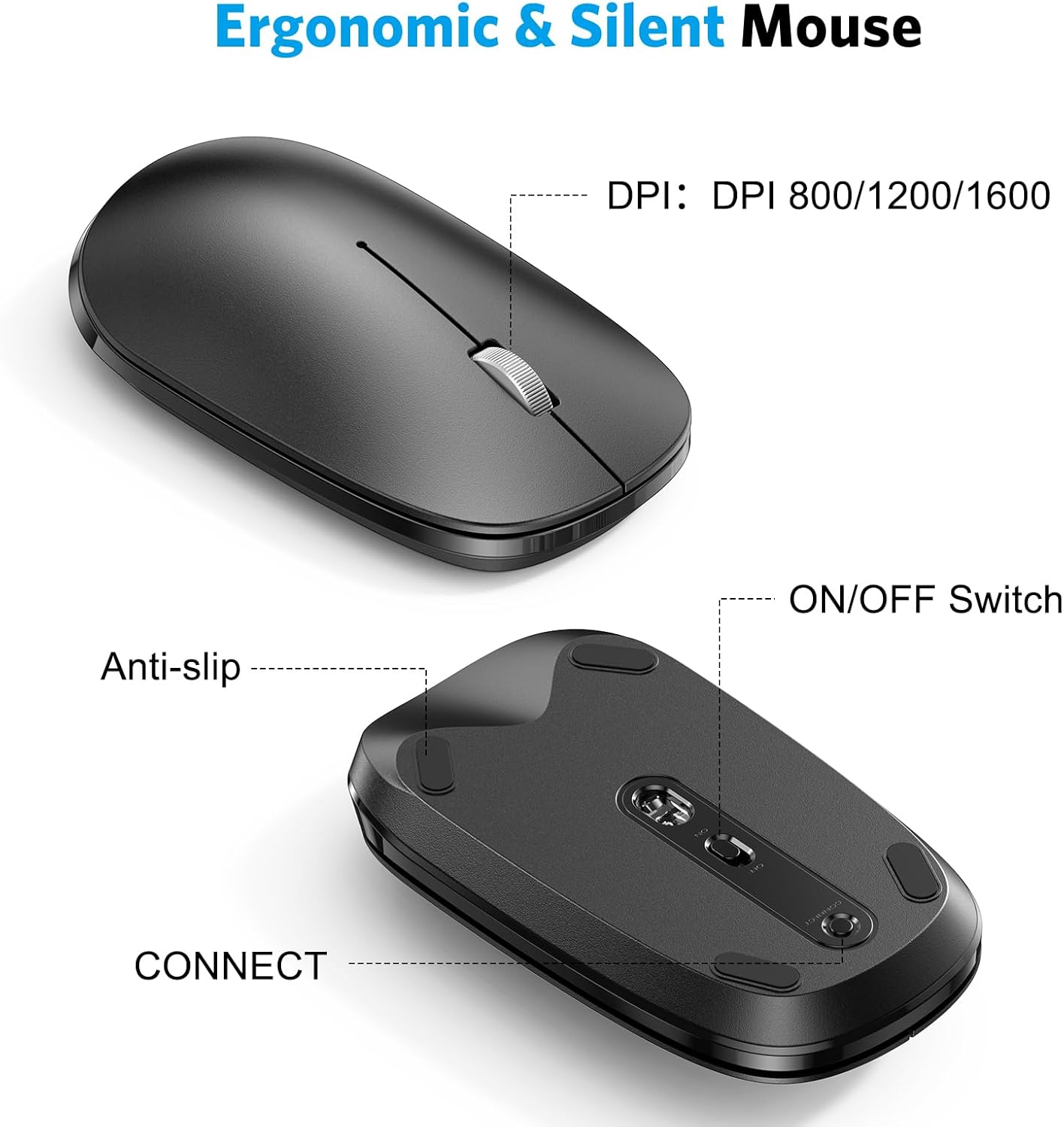
Mynd: Nærmynd views of the mouse, indicating the DPI switch, ON/OFF switch, and CONNECT button, along with anti-slip pads.

Image: Diagram illustrating the three adjustable DPI levels (800, 1200, 1600) for the mouse, controlled by a button near the scroll wheel.
Orkusparnaðarstilling
Both the keyboard and mouse are equipped with an automatic power-saving mode. After a period of inactivity, they will enter sleep mode to conserve battery life. To reactivate, simply press any key on the keyboard or move/click the mouse.
Viðhald
Þrif
- Notið mjúkan, þurran klút til að þurrka yfirborð lyklaborðsins og músarinnar.
- Fyrir þrjósk óhreinindi, örlítið dýftampÞurrkið klútinn með vatni eða mildu, ekki slípandi hreinsiefni. Forðist mikinn raka.
- Notið ekki sterk efni, leysiefni eða slípiefni.
Geymsla
- Geymið tækin á köldum, þurrum stað fjarri beinu sólarljósi og miklum hita.
- Ef geymt er í langan tíma skal fjarlægja rafhlöðurnar til að koma í veg fyrir leka.
Úrræðaleit
Tengingarvandamál
- Ensure Batteries are Fresh: Low batteries can cause intermittent connections or prevent pairing. Replace batteries if necessary.
- Kveikt á: Verify that both the keyboard and mouse are switched ON.
- Bluetooth virkt: Confirm that Bluetooth is enabled on your Mac device.
- Viðgerða para tæki: If connection is lost, try unpairing the devices from your Mac's Bluetooth settings and then re-pairing them following the setup instructions.
- Truflun: Move the devices closer to your Mac and away from other wireless devices that might cause interference.
Keys Not Responding / Mouse Tracking Issues
- Athugaðu rafhlöður: Gakktu úr skugga um að rafhlöður séu ekki tæmdar.
- Reconnection Delay: After entering power-saving mode, there might be a brief delay (a few seconds) for the devices to reconnect when reactivated.
- Hreinsir skynjarar: Fyrir músina skaltu ganga úr skugga um að ljósneminn að neðan sé hreinn og laus við hindranir.
- Yfirborð: Gakktu úr skugga um að músin sé notuð á viðeigandi, endurskinslausu yfirborði.
Tæknilýsing
| Vörumerki | OMOTON |
| Fyrirmynd | B0CQ3RQJ8B |
| Tengitækni | Bluetooth |
| Samhæf tæki | MacBook Pro/Air, iMac, iMac Pro, Mac Mini, Mac Pro (macOS 11.3 or Above) |
| Lyklaborðs rafhlöður | 2 x AAA rafhlöður (fylgir ekki) |
| Rafhlöður músar | 1 x AA rafhlaða (fylgir ekki) |
| DPI-stig músar | 800, 1200, 1600 |
| Stærð lyklaborðs | U.þ.b. 17.1 x 4.76 x 0.86 tommur (434 x 121 x 21.9 mm) |
| Músarmál | U.þ.b. 4.3 x 2.5 x 0.9 tommur (110 x 63 x 23 mm) |
| Þyngd hlutar | 1.61 pund (samanlagt) |

Image: Diagram showing the physical dimensions of both the OMOTON keyboard and mouse.
Ábyrgð og stuðningur
OMOTON products are designed for reliability and performance. For warranty information or technical support, please refer to the contact details provided with your product packaging or visit the official OMOTON websíða.
If you encounter any issues not covered in this manual, please contact OMOTON customer service for assistance.


