1. Inngangur
Thank you for choosing TTQ Open Ear Headphones, Model CT26. These true wireless sports earbuds are designed to provide a comfortable listening experience while allowing you to remain aware of your surroundings. Featuring Bluetooth 5.3 connectivity, IPX7 waterproofing, and crystal-clear call quality, they are ideal for various activities including running, cycling, workouts, and driving. This manual will guide you through the setup, operation, and maintenance of your new headphones.
2. Innihald pakka
Vinsamlegast staðfestu að allir hlutir séu í pakkanum þínum:
- TTQ Open Ear Headphones (Left and Right Earbuds)
- Hleðslutaska
- USB-C hleðslusnúra
- Notendahandbók

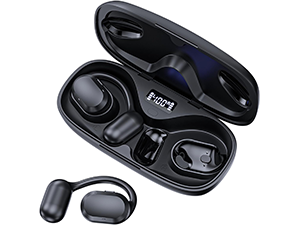
Mynd: The TTQ Open Ear Headphones, Model CT26, displayed within their open charging case. The case features an LED digital power display indicating the battery level of both the case and the individual earbuds.
3. Vöru lokiðview
The TTQ CT26 headphones feature an innovative open-ear design with flexible earhooks, ensuring comfort and stability during extended use. This design allows ambient sounds to be heard, enhancing safety in outdoor environments.

Mynd: A person wearing the TTQ Open Ear Earbuds, demonstrating how the open-ear design sits comfortably outside the ear canal, allowing for situational awareness.

Mynd: Two individuals cycling outdoors, both wearing TTQ Open Ear Headphones. This illustrates the product's suitability for sports and activities where awareness of surroundings is crucial for safety.
4. Uppsetning
4.1 Hleðsla heyrnartólanna og hulstrsins
Before first use, fully charge the headphones and the charging case. Connect the provided USB-C charging cable to the charging port on the case and a power source. The LED display on the charging case will show the battery percentage, and individual earbud charge indicators will light up during charging.
- A full charge provides up to 8 hours of music playtime or 9 hours of call time for the earbuds.
- The charging case extends total playtime to up to 36 hours.

Mynd: The TTQ charging case with its lid open, showcasing the digital LED display that indicates the battery percentage of the case and the charging status of the earbuds. A USB-C charging port is visible at the front.
4.2 Pörun við tækið þitt
- Gakktu úr skugga um að heyrnartólin séu hlaðin.
- Open the charging case. The earbuds will automatically enter pairing mode, indicated by a flashing light (if applicable, refer to product specific light indicators).
- Í tækinu þínu (snjallsíma, spjaldtölvu, tölvu) skaltu fara í Bluetooth-stillingar og kveikja á Bluetooth.
- Leitaðu að available devices and select "CT26" from the list.
- Þegar tenging hefur verið gefin gefa eyrnatólin til kynna að pörunin hafi tekist (t.d. með raddskipun eða stöðugu ljósi).
Heyrnartólin tengjast sjálfkrafa við síðasta paraða tækið þegar þau eru tekin úr hulstrinu, ef Bluetooth er virkt á tækinu.

Mynd: A visual representation of Bluetooth 5.3 technology, showing a smartphone's Bluetooth settings screen with 'CT26' listed as a connected device, illustrating the stable and fast connection capability.
5. Notkunarleiðbeiningar
The TTQ CT26 headphones feature a physical button for easy control of various functions.
Mynd: A diagram illustrating the single button controls on the earbud, detailing actions for pause/play, answer/hang up, rejection, volume adjustment, switching songs, and activating Siri.
5.1 Tónlist spilun
- Spila / gera hlé: Press the button once (x1).
- Næsta lag: Press the button twice (x2).
- Fyrra lag: Press the button three times (x3).
- Hljóðstyrkur upp/niður: Press and hold the button for 2 seconds (Hold 2s).
5.2 Símtalsstjórnun
- Svara/slíta símtali: Press the button once (x1).
- Hafna símtali: Press and hold the button for 2 seconds (Hold 2s).
The headphones feature dual-mic noise-cancelling technology for clearer calls by reducing environmental noise.

Mynd: A man wearing TTQ Open Ear Headphones while holding a smartphone, illustrating the intelligent noise cancellation feature that boosts human voice and reduces environmental noise for clearer calls.
5.3 Raddaðstoðarmaður
- Virkjaðu raddaðstoðarmanninn (Siri, Google aðstoðarmanninn o.s.frv.): Press the button three times (x3).
6. Viðhald
To ensure the longevity and optimal performance of your TTQ Open Ear Headphones, follow these maintenance guidelines:
- Þrif: Þurrkið reglulega eyrnatólin og hleðsluhulstrið með mjúkum, þurrum og lólausum klút. Forðist að nota slípiefni eða sterk efni.
- Vatnsþol: The headphones are IPX7 waterproof, meaning they can withstand submersion in up to 1 meter of water for 30 minutes. They are resistant to sweat and rain, making them suitable for workouts. However, they are not designed for swimming or prolonged submersion. Ensure the charging port is dry before charging.
- Geymsla: Þegar heyrnartólin eru ekki í notkun skal geyma þau í hleðsluhulstri til að vernda þau fyrir ryki og skemmdum. Geymið á köldum, þurrum stað fjarri miklum hita.

Mynd: TTQ Open Ear Headphones and their charging case on a wet surface with water splashes, demonstrating their IPX7 waterproof rating, indicating resistance to rain and sweat.
7. Bilanagreining
If you encounter issues with your TTQ Open Ear Headphones, please refer to the following common solutions:
- Ekkert hljóð/Lágt hljóðstyrkur:
- Gakktu úr skugga um að heyrnartólin séu rétt pöruð og tengd við tækið þitt.
- Athugaðu hljóðstyrkinn bæði í heyrnartólunum og tengda tækinu.
- Gakktu úr skugga um að heyrnartólin séu hlaðin.
- Pörunarvandamál:
- Gakktu úr skugga um að kveikt sé á Bluetooth í tækinu þínu.
- Ensure the headphones are in pairing mode (flashing indicator).
- Slökktu á Bluetooth á öðrum tækjum í nágrenninu sem gætu verið að reyna að tengjast.
- Forget/remove "CT26" from your device's Bluetooth list and try pairing again.
- Restart both your device and the headphones (by placing them back in the case and taking them out).
- Hleðsluvandamál:
- Gakktu úr skugga um að hleðslusnúran sé vel tengd bæði við hulstrið og aflgjafann.
- Prófaðu aðra USB-C snúru og straumbreyti.
- Gakktu úr skugga um að hleðslutengurnar á eyrnatappanum og í hulstrinu séu hreinar og lausar við óhreinindi.
- Tímabundin tenging:
- Ensure your device is within the Bluetooth range (up to 10 meters/33 feet).
- Forðist líkamlegar hindranir á milli heyrnartólanna og tækisins.
- Lágmarka truflanir frá öðrum þráðlausum tækjum.
Ef vandamálið er enn til staðar eftir að hafa prófað þessi skref, vinsamlegast hafðu samband við þjónustuver.
8. Tæknilýsing
| Eiginleiki | Forskrift |
|---|---|
| Nafn líkans | CT26 |
| Tengitækni | Þráðlaust (Bluetooth) |
| Þráðlaus samskiptatækni | Bluetooth 5.3 |
| Bluetooth svið | 10 metrar (33 fet) |
| Vatnsþolsstig | IPX7 vatnsheldur |
| Staðsetning eyrna | Opið eyra |
| Form Factor | Sannkallað þráðlaust |
| Rafhlöðulíftími (heyrnartól) | 8 Hours (Music) / 9 Hours (Calls) |
| Heildarspilunartími með hleðsluhulstri | Allt að 36 klst |
| Gerð hljóðbílstjóra | Dynamic bílstjóri |
| Stærð hljóðbílstjóra | 16.2 millimetrar |
| Tíðnisvið | 20 Hz - 20,000 Hz |
| Hávaðastýring | Virk hávaðadeyfing (fyrir símtöl) |
| Eftirlitsaðferð | Líkamlegur hnappur |
| Hleðsluport | USB-C |
| Þyngd hlutar | 7.8 aura (0.22 kíló) |
| Efni | Plast |
| UPC | 717977781312 |
9. Þjónustudeild
For any questions, concerns, or if you receive a defective product, please do not hesitate to contact TTQ customer support. We are committed to providing solutions within 24 hours.
Please visit the official TTQ store on Amazon for more information and support resources: TTQ Store


