1. Inngangur
This manual provides detailed instructions for the setup, operation, and maintenance of your KTC 32-Inch 2K QHD IPS Monitor, model H32T13. Please read this manual thoroughly before using the monitor to ensure proper functionality and to prevent damage.
The KTC H32T13 monitor features a 32-inch IPS panel with 2K QHD (2560x1440) resolution, a 100Hz refresh rate, and support for FreeSync/G-Sync technologies. It is designed for both office productivity and gaming, offering vibrant colors, wide viewing angles, and eye-care features.
2. Hvað er í kassanum
Gakktu úr skugga um að allir íhlutir séu til staðar í pakkanum:
- KTC 32-Inch 2K QHD IPS Monitor (H32T13)
- Skjástandur (grunnur og háls)
- HDMI snúru
- Rafmagnssnúra
- Rafmagns millistykki
- Skrúfjárn
- Notendahandbók (þetta skjal)

Image: Contents of the KTC H32T13 monitor package.
3. Vöru lokiðview
The KTC H32T13 monitor is designed for a superior visual experience. Key features include:
- 32-inch QHD (2560x1440) IPS Panel: Delivers crisp, detailed images with accurate colors and wide viewing horn.
- 100Hz endurnýjunartíðni: Provides smoother motion for gaming and fast-paced content.
- FreeSync/G-Sync Compatibility: Minnkar skjárif og stam fyrir flæðandi leikupplifun.
- HDR stuðningur: Enhances contrast and color for more realistic visuals.
- Augnverndartækni: Features Flicker-Free and Low Blue Light modes to reduce eye strain during prolonged use.
- Fjölhæf tenging: Equipped with multiple HDMI 2.0 and DisplayPort 1.4 inputs.
- Vistvæn hönnun: Offers tilt adjustment and VESA mount compatibility for flexible positioning.
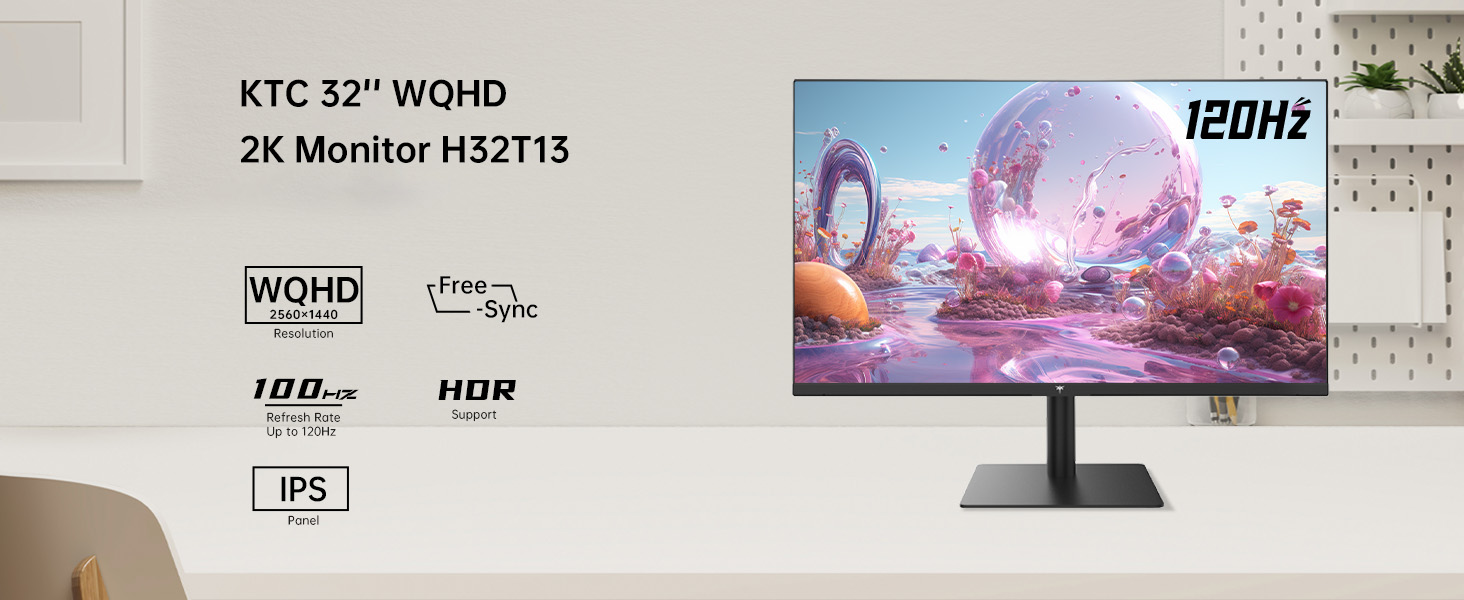
Image: KTC H32T13 monitor showcasing its key display technologies.

Image: The 32-inch screen size of the KTC H32T13 monitor.
4. Uppsetning
4.1 Samsetning standsins
- Fjarlægið skjáinn og standinn varlega úr umbúðunum.
- Attach the stand neck to the monitor panel using the provided screws and screwdriver.
- Festið standfótinn við hálsinn á standinum.
- Setjið samansetta skjáinn á stöðugt, slétt yfirborð.
4.2 VESA-festing (valfrjálst)
The monitor supports VESA 100mm x 100mm mounting. If you wish to use a VESA-compatible arm or wall mount (not included), remove the stand and attach the VESA mount according to its instructions.

Mynd: Aftan view of the monitor with VESA 100x100mm mounting points.
4.3 Tenging við tölvu
- Gakktu úr skugga um að bæði skjárinn og tölvan séu slökkt.
- Connect one end of the provided HDMI cable to an HDMI port on your computer's graphics card.
- Connect the other end of the HDMI cable to one of the HDMI 2.0 ports on the monitor. Alternatively, use a DisplayPort cable to connect to a DP 1.4 port for higher refresh rates and FreeSync/G-Sync functionality.
- Connect the power adapter to the monitor's DC input and then plug the power cord into a power outlet.
- Power on your computer, then power on the monitor.

Image: Monitor connectivity ports (DC, HDMI 1, HDMI 2, DP 1).
5. Notkunarleiðbeiningar
5.1 Kveikt/slökkt
Ýttu á rofann á skjánum til að kveikja eða slökkva á honum. Rafmagnsljósið lýsir þegar skjárinn er kveiktur.
5.2 Val á inntaksuppsprettu
Use the OSD (On-Screen Display) menu buttons to navigate and select your desired input source (HDMI 1, HDMI 2, or DisplayPort).
5.3 Að stilla skjástillingar (OSD valmynd)
The OSD menu allows you to customize various display settings. Typically, buttons are located on the back or bottom of the monitor. Refer to the quick start guide for specific button functions.
- Birtustig / birtuskil: Stilltu heildarbirtu og birtuskilhlutfall.
- Litastillingar: Modify color temperature, gamma, and individual RGB levels. The monitor supports 1.07 billion colors and 103% sRGB.
- Myndastilling: Veldu úr forstilltum stillingum sem eru fínstilltar fyrir mismunandi efni (t.d. Staðlað, Leikur, Kvikmynd, Texti).
- Endurnýjunartíðni: The monitor supports up to 100Hz. Ensure your graphics card settings are configured to match.
- FreeSync/G-Sync: Enable this feature in the OSD menu and your graphics card control panel for adaptive synchronization.
- Eye Care Modes: Activate Flicker-Free and Low Blue Light modes to reduce eye strain.
- HDR: Enable HDR for compatible content and devices.

Image: Monitor displaying enhanced colors and brightness with HDR enabled.

Image: Visual comparison of FreeSync/G-Sync enabled and disabled, demonstrating smoother gameplay.

Image: IPS panel advantages in brightness and color over VA panels.
5.4 Líkamlegar aðlaganir
The monitor stand allows for tilt adjustment from -5° to 15° to optimize your viewing horn.

Image: Monitor tilt adjustment range and eye care features.
Myndband: Yfirview of the KTC 2K IPS Office Monitor, highlighting its features and suitability for office use. This video demonstrates the monitor's visual quality and design.
6. Viðhald
6.1 Þrif á skjánum
- Slökkvið alltaf á skjánum og takið rafmagnssnúruna úr sambandi áður en hann er þrifinn.
- Notaðu létt mjúkan, lólausan klút dampÞvoið með vatni eða mildum, ekki slípandi skjáhreinsiefni.
- Wipe the screen gently to remove dust and smudges. Avoid applying direct pressure to the screen.
- Ekki nota alkóhól, ammoníak-bundin hreinsiefni eða slípiefni, þar sem þau geta skemmt yfirborð skjásins.
- Þrífið skjáinn casing með mjúkum, þurrum klút.
6.2 Geymsla
If storing the monitor for an extended period, ensure it is powered off, unplugged, and stored in a cool, dry place away from direct sunlight and extreme temperatures. Use the original packaging if available for best protection.
7. Bilanagreining
| Vandamál | Möguleg orsök | Lausn |
|---|---|---|
| Engin mynd á skjánum | Monitor not powered on; Incorrect input source; Loose video cable; Computer in sleep mode. | Ensure power is connected and monitor is on. Select correct input source. Check video cable connections. Wake up computer. |
| Myndin er óskýr eða bjöguð | Incorrect resolution; Faulty video cable; Graphics driver issues. | Stilltu skjáupplausnina á 2560x1440. Prófaðu aðra myndsnúru. Uppfærðu skjákortsrekla. |
| Skjár blikkar eða rifur | Refresh rate mismatch; FreeSync/G-Sync not enabled or incompatible. | Ensure refresh rate is set to 100Hz. Enable FreeSync/G-Sync in monitor OSD and graphics card settings. Use DisplayPort for FreeSync/G-Sync. |
| Ekkert hljóð frá heyrnartólum | Headphones not connected properly; Audio output not set to monitor. | Check headphone connection. Set monitor as default audio output in your computer's sound settings. |
| Hnappar svara ekki | OSD lock enabled; Temporary software glitch. | Check if OSD lock is active (refer to quick start guide). Power cycle the monitor. |
8. Tæknilýsing
| Eiginleiki | Smáatriði |
|---|---|
| Gerðarnúmer | H32T13 |
| Skjástærð | 32 tommur |
| Tegund pallborðs | IPS |
| Upplausn | 2560 x 1440 (QHD breið 1440p) |
| Hlutfall | 16:9 |
| Endurnýjunartíðni | 100Hz |
| Birtustig | 350 Candela (typ.) |
| Litasvið | 103% sRGB |
| Litadýpt | 1.07 milljarðar lita |
| HDR stuðningur | Já |
| Adaptive Sync | FreeSync/G-Sync Compatible |
| Tengingar | 2x HDMI 2.0, 1x DisplayPort 1.4 |
| Hallastilling | -5° til 15° |
| VESA Mount | 100mm x 100mm |
| Augnhirðueiginleikar | Flicker-Free, Eye Protection Mode (Low Blue Light) |
| Vörumál | 5.31 x 32.48 x 21.2 tommur |
| Þyngd hlutar | 18.81 pund |
9. Ábyrgð og stuðningur
9.1 Upplýsingar um ábyrgð
KTC products are covered by a limited warranty. Please refer to the warranty card included in your product packaging or visit the official KTC webvefsíðunni fyrir ítarlegar ábyrgðarskilmála. Geymið kaupkvittunina vegna ábyrgðarkröfu.
9.2 Þjónustuver
For technical assistance, troubleshooting not covered in this manual, or warranty inquiries, please contact KTC customer support through the following channels:
- Stuðningur á netinu: Visit the KTC official website for FAQs, driver downloads, and support contact forms.
- Stuðningur við tölvupóst: Refer to your warranty card or the KTC websíðuna fyrir viðeigandi netfang fyrir stuðning.
- Amazon stuðningur: If purchased via Amazon, you can contact the seller directly through your Amazon order history for assistance.
Image: Steps to contact KTC customer support via Amazon.


