1. Inngangur
This manual provides detailed instructions for the setup, operation, and maintenance of your MANBASNAKE Attack Shark X3 Pro 4K/8K Hz Gaming Mouse. Please read this manual thoroughly to ensure optimal performance and longevity of your device.

Image: The MANBASNAKE Attack Shark X3 Pro gaming mouse, shown in red, alongside its wireless USB receiver.
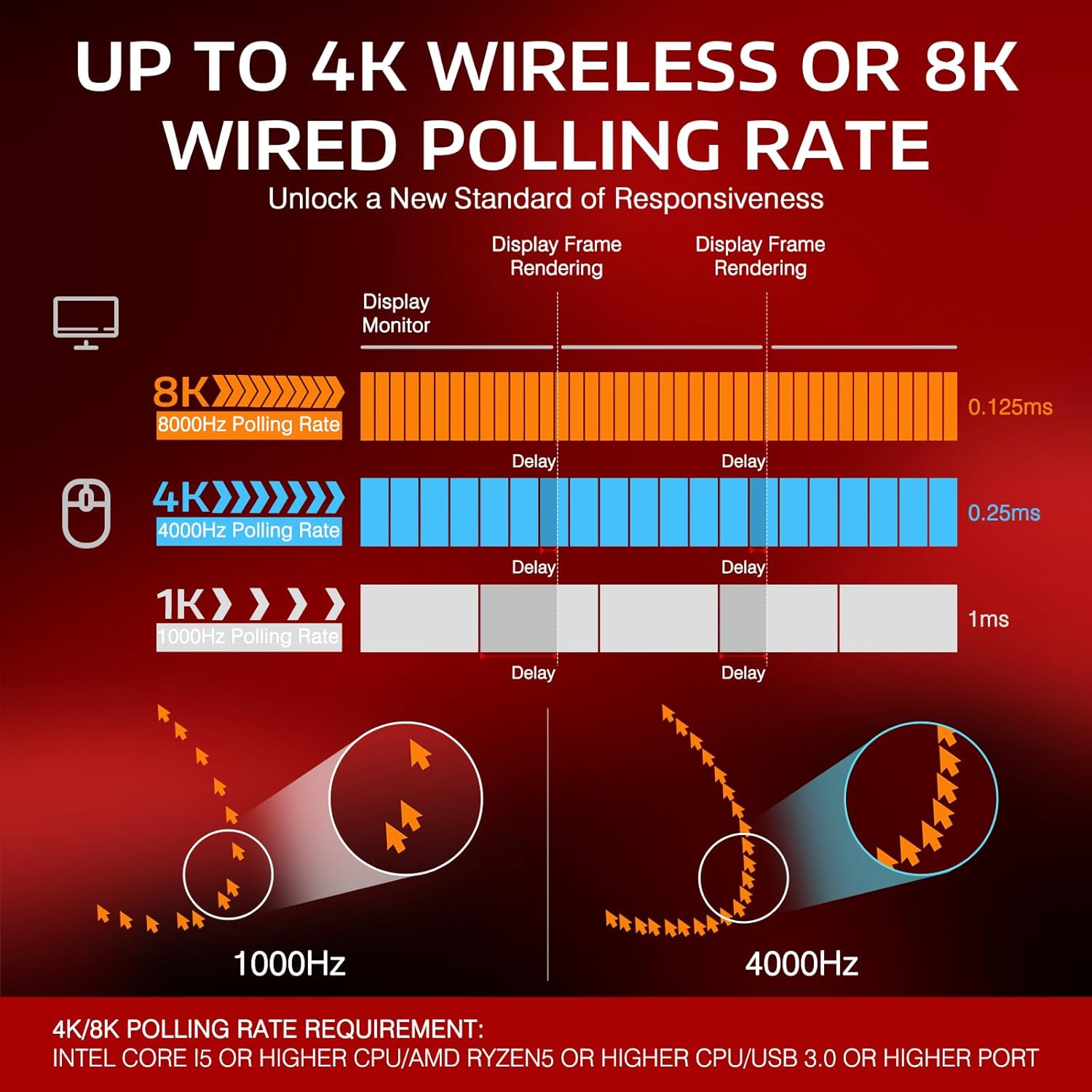
Mynd: Yfirview of the X3 Pro mouse highlighting its key features: ultra-light design, tri-mode connectivity, PixArt PAW3395 sensor, 4K/8K polling rate, and up to 26,000 DPI.
2. Innihald pakka
Gakktu úr skugga um að allir hlutir séu til staðar í pakkanum þínum:
- MANBASNAKE Attack Shark X3 Pro Gaming Mouse
- Wireless USB Receiver (Nano Dongle)
- Ultra-flexible charging cable (USB-C to USB-A)
- Type-C to USB-A Adapter
- Notendahandbók (þetta skjal)
3. Vöru lokiðview
Familiarize yourself with the components of your X3 Pro gaming mouse.

Image: An exploded diagram highlighting key components of the X3 Pro mouse, including the DPI button, mode switch, USB receiver, and charging cable.
- Vinstri smellihnappur: Aðal músarhnappur.
- Hægri smellihnappur: Auka músarhnappur.
- Skrunahjól: Fyrir skrun og miðsmellun.
- DPI hnappur: Adjusts mouse sensitivity (DPI).
- Áfram hnappur: Programmable side button.
- Afturábak hnappur: Programmable side button.
- Stillingarrofi: Toggles between 2.4G, OFF, and Bluetooth modes.
- Stillingarljós: Displays current connection mode and battery status.
- USB-C tengi: Fyrir snúrutengingu og hleðslu.
- USB móttakarahólf: Stores the wireless USB receiver.
- PTFE fætur: Low-friction pads for smooth gliding.

Mynd: Innra view of the mouse showcasing the Kailh GM 8.0 switches and TTC scroll wheel encoder, designed for durability and precise feedback.

Image: A graphic detailing the PixArt PAW3395 sensor's specifications, including 50G acceleration, 26,000 DPI, and 650 IPS.
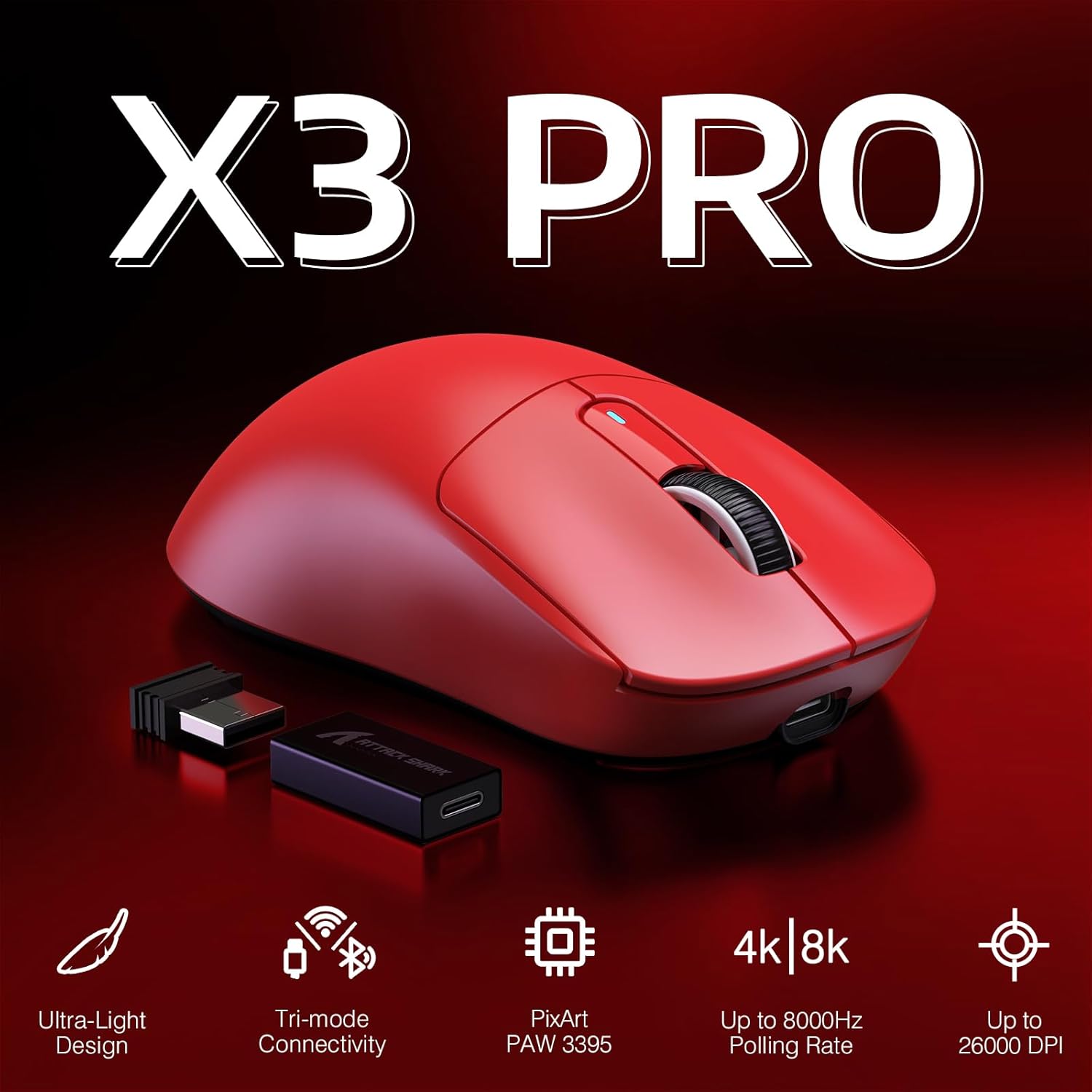
Image: The underside of the mouse, highlighting the 100% Virgin Grade PTFE feet for smooth gliding.
4. Uppsetning
4.1 Hleðsla músarinnar
Before first use, it is recommended to fully charge the mouse. Connect the provided USB-C cable to the mouse's front port and the USB-A end to a power source (e.g., computer USB port, USB wall adapter). The mode indicator light will show charging status.
4.2 Tenging músarinnar
The X3 Pro offers three connectivity options: 2.4G Wireless, Bluetooth, and Wired.

Image: The bottom of the X3 Pro mouse, illustrating the 2.4G/OFF/BT mode switch and the compartment for the USB receiver.
4.2.1 2.4G þráðlaus stilling
- Finndu USB-móttakarann sem er geymdur í hólfinu neðst á músinni.
- Insert the USB receiver into an available USB-A port on your computer.
- Slide the mode switch on the mouse to the "2.4G" position.
- The mouse should connect automatically. The mode indicator light will confirm connection.
4.2.2 Bluetooth-stilling
- Slide the mode switch on the mouse to the "BT" position.
- The mode indicator light will begin to blink, indicating pairing mode.
- Opnaðu Bluetooth-stillingar í tækinu þínu (tölvu, spjaldtölvu, síma) og leitaðu að nýjum tækjum.
- Select "X3 Pro" from the list of available devices to pair.
- The mode indicator light will become solid when connected.
4.2.3 Hlerunarbúnaður
- Tengdu meðfylgjandi USB-C snúru við framtengi músarinnar.
- Tengdu USB-A enda snúrunnar við USB tengi tölvunnar.
- Músin virkar í snúruham og hleðst samtímis.
5. Rekstur
5.1 Að stilla DPI (næmni)
Ýttu á DPI hnappur (located on the underside or top, refer to Product Overview diagram) to cycle through different DPI settings. Each press will change the sensitivity, indicated by the DPI indicator light. The mouse supports up to 26,000 DPI, configurable via software.
5.2 Kosningahlutfall
The X3 Pro supports high polling rates for enhanced responsiveness:
- Þráðlaus stilling (2.4G): Up to 4000Hz polling rate.
- Hlerunarbúnaður: Up to 8000Hz polling rate.
Higher polling rates reduce input lag, providing more precise and immediate cursor movements. Configuration of polling rate typically requires the dedicated driver software.

Image: A graphical representation comparing the response times and cursor tracking at 1000Hz, 4000Hz, and 8000Hz polling rates, illustrating the benefit of higher rates.
Athugið: Achieving 4K/8K Hz polling rates may require a compatible system (e.g., Intel Core i5 or higher CPU, AMD Ryzen 5 or higher CPU, USB 3.0 or higher port).
5.3 forritanlegir hnappar
The X3 Pro features programmable buttons. To customize button functions, DPI settings, polling rate, lift-off distance, and create macros, download and install the official driver software from the MANBASNAKE website. Settings can be saved to the mouse's onboard memory.
5.4 Orkustjórnun
The mouse is equipped with smart auto-sleep functionality to conserve battery life. After 10 minutes of inactivity, the X3 Pro will enter sleep mode. Move the mouse or click a button to wake it up.
6. Viðhald
- Þrif: Notið mjúkan, þurran klút til að þrífa yfirborð músarinnar. Fyrir þrjósk óhreinindi, þurrkið örlítið.amp Hægt er að nota klút og tryggja að raki komist ekki inn í tækið.
- Umhirða skynjara: Keep the optical sensor on the underside of the mouse clean and free from dust or debris for optimal tracking performance.
- Umhirða rafhlöðu: Avoid fully discharging the battery frequently. For long-term storage, charge the mouse to approximately 50% and store it in a cool, dry place.
- Geymsla: When not in use, especially during travel, store the USB receiver in its designated compartment to prevent loss.
7. Bilanagreining
7.1 Músin svarar ekki
- Ensure the mouse is powered on and the mode switch is set correctly (2.4G, BT, or Wired).
- Check battery level. If low, connect the charging cable.
- For 2.4G wireless, ensure the USB receiver is securely plugged into a working USB port. Try a different USB port.
- Fyrir Bluetooth, vertu viss um að Bluetooth sé virkt í tækinu þínu og að músin sé pöruð. Reyndu að para aftur.
- In wired mode, ensure the cable is securely connected to both the mouse and the computer.
7.2 Óregluleg tenging eða töf
- Move the mouse closer to the USB receiver (for 2.4G) or your Bluetooth device.
- Forðist truflanir (t.d. önnur þráðlaus tæki, stóra málmhluti).
- Gakktu úr skugga um að USB-tengi tölvunnar virki rétt.
- Update mouse drivers and your operating system.
- If using high polling rates (4K/8K Hz), ensure your system meets the hardware requirements (CPU, USB port version).
7.3 Mús fer of fljótt í dvalaham
- The mouse is designed to enter sleep mode after 10 minutes of inactivity to save battery. This is normal operation.
- Til að vekja músina skaltu einfaldlega færa hana eða smella á hvaða hnapp sem er.
- If you find this disruptive during specific tasks, ensure the mouse is in an active state or consider using wired mode.
7.4 Buttons or Scroll Wheel Not Functioning
- Ensure the mouse is properly connected and powered.
- Check for any physical obstructions or debris around the buttons or scroll wheel.
- If using custom button assignments, verify settings in the driver software.
8. Tæknilýsing
| Eiginleiki | Smáatriði |
|---|---|
| Fyrirmynd | X3 Pro |
| Vörumerki | MANBASNAKE |
| Tengingar | 2.4G Wireless, Bluetooth 5.2, Wired (USB-C) |
| Skynjari | PixArt PAW3395 Optical Sensor |
| DPI-svið | Up to 26,000 (Programmable) |
| Atkvæðagreiðsluhlutfall | Up to 4000Hz (Wireless), Up to 8000Hz (Wired) |
| Hröðun | 50G |
| Rekja hraði | 650 IPS |
| Rofar | Kailh GM 8.0 (80 million clicks) |
| Kóðari | TTC Scroll Wheel Encoder |
| Þyngd | Um það bil 59 g (2.08 únsur) |
| Mál | 118.5 x 39.7 x 61 mm (4.67 x 2.4 x 0.04 tommur) |
| Rafhlöðuending | Allt að 200 klukkustundir (fer eftir notkun) |
| Efni fætur | 100% pólýetýlen úr ólífuefni |
9. Ábyrgð og stuðningur
MANBASNAKE products are designed and manufactured to the highest quality standards. For detailed warranty information, please refer to the warranty card included with your product or visit the official MANBASNAKE websíða.
For technical support, troubleshooting assistance, or to download the latest driver software, please visit the official MANBASNAKE support page or contact customer service through the contact information provided on their websíða.


