1. Inngangur
This manual provides comprehensive instructions for the installation, operation, and maintenance of your CORSAIR iCUE Link 2500X RGB Small-Tower PC Case. Designed for micro-ATX systems, this dual-chamber case features tempered glass panels and integrates with the iCUE LINK ecosystem for simplified building and cable management.
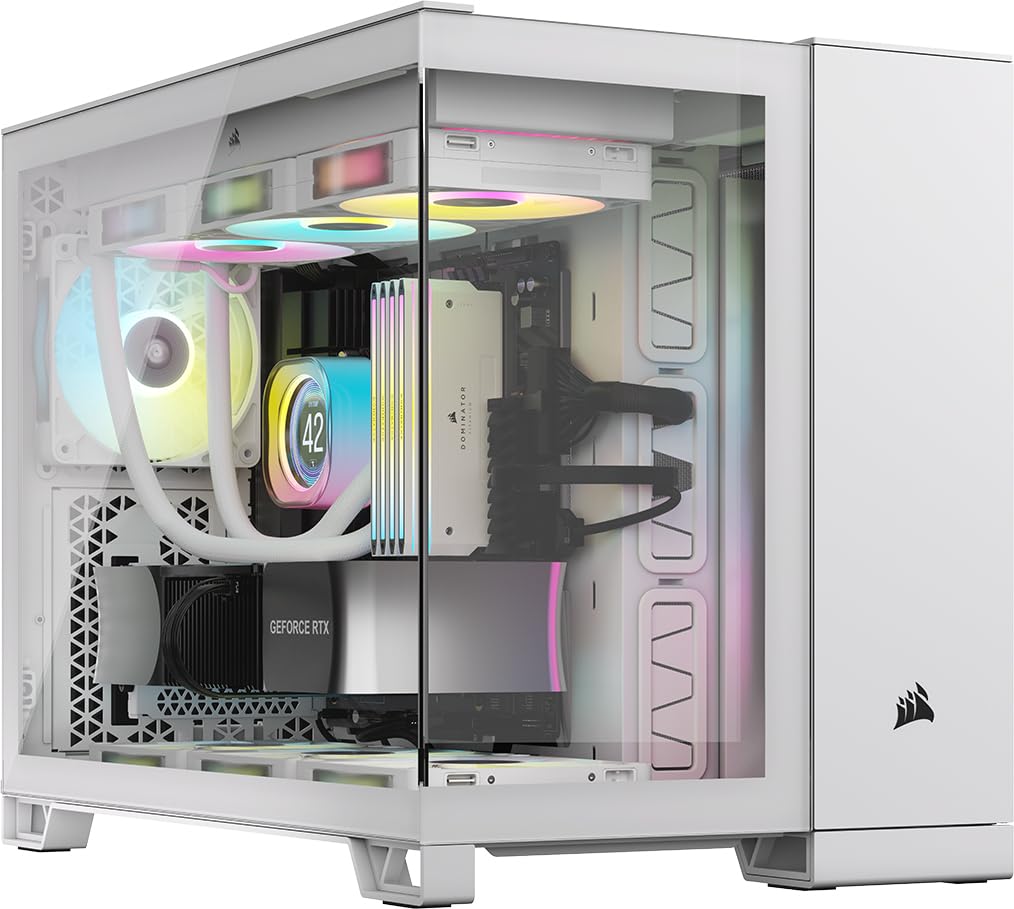
Figure 1.1: CORSAIR iCUE Link 2500X RGB Small-Tower PC Case, White.
The 2500X RGB case is engineered to showcase your small-form-factor build with its dual tempered glass panels. It includes two pre-installed RX120 RGB fans and an iCUE LINK System Hub, facilitating an easy start within the iCUE LINK ecosystem. Its dual-chamber design promotes efficient cooling and a clean aesthetic by separating components from cable routing and power supply.
2. Uppsetning og uppsetning
2.1 Upptaka
Carefully remove the PC case from its packaging. Inspect the case for any signs of damage. Retain the packaging for future transport or storage.
2.2 Dual Chamber Design Overview
The 2500X RGB features a dual-chamber layout. One chamber houses the motherboard, CPU, GPU, and cooling components, while the other is dedicated to cable routing, storage drives, and the power supply unit (PSU). This design optimizes airflow and simplifies cable management.

Figure 2.1: Dual Chamber Design. The left chamber (yellow outline) is for PSU and cables, the right (blue outline) for main components.
2.3 Uppsetning móðurborðs
The case supports Micro ATX motherboards. It is also compatible with reverse connection motherboards (e.g., ASUS BTF, MSI Project Zero), which route connections to the back of the board for a cleaner interior view.
- Remove the side tempered glass panel by gently pulling it off.
- Install the necessary motherboard standoffs if not pre-installed.
- Carefully place your Micro ATX motherboard into the case, aligning it with the standoffs and I/O shield opening.
- Festið móðurborðið með skrúfum.

Figure 2.2: Reverse Connection Motherboard Compatibility. Cables are routed behind the motherboard tray.
2.4 Uppsetning viftu og ofns
The 2500X RGB offers extensive cooling options:
- Up to 9x 120mm fans or 4x 140mm fans.
- Radiator support: up to 360mm in the roof and bottom, and 240mm on the side.
The case comes with two pre-installed CORSAIR RX120 RGB fans.

Figure 2.3: Cooling Options. Illustrates fan and radiator placement for optimal airflow.
2.5 Uppsetning geymsludrifs
The case accommodates up to 2x 3.5-inch or 2x 2.5-inch storage drives using tool-free drive mounts located in the secondary chamber.
2.6 Uppsetning aflgjafa (PSU).
Install your PSU in the dedicated compartment within the secondary chamber. This separation helps maintain a clean main compartment and improves thermal performance.
2.7 Kapalstjórnun
Notaðu ample space and routing options in the secondary chamber to organize cables. This ensures unobstructed airflow and a visually appealing build.
3. Notkunarleiðbeiningar
3.1 Framhlið I/O
Framhliðin veitir þægilegan aðgang að mikilvægum tengjum og stjórntækjum:
- Aflhnappur: Til að kveikja eða slökkva á kerfinu.
- Endurstilla hnappur: Til að endurræsa kerfið.
- 2x USB 3.2 Gen 1 Type-A Ports: Til að tengja USB tæki.
- 1x USB 3.2 Gen 2 Type-C Port: For high-speed USB-C devices.
- 1x 3.5 mm samsett hljóðtengi: Fyrir heyrnartól eða heyrnartól.

Figure 3.1: Front Panel I/O. Details of available ports and buttons.
3.2 iCUE LINK System
The included iCUE LINK System Hub and pre-installed RX120 RGB fans are part of the CORSAIR iCUE LINK ecosystem. This system simplifies fan and RGB lighting control with fewer cables.
- Connect compatible iCUE LINK devices to the hub.
- Install the CORSAIR iCUE software on your PC to customize fan speeds, RGB lighting effects, and monitor system temperatures.

Figure 3.2: iCUE LINK RX120 RGB Fans and System Hub. The hub simplifies connections for multiple iCUE LINK devices.
4. Viðhald
4.1 Þrif
- Að utan: Notaðu mjúkan, damp cloth to clean the exterior surfaces, including the tempered glass panels. Avoid abrasive cleaners.
- Ryksíur: Regularly remove and clean the dust filters located on the side and bottom panels to maintain optimal airflow and prevent dust buildup inside the case.
- Innrétting: Notið þrýstiloft til að fjarlægja ryk af innri íhlutum og viftublöðum. Gangið úr skugga um að kerfið sé slökkt og aftengt áður en það er hreinsað.
4.2 Almenn umönnun
- Forðist að setja þunga hluti ofan á kassann.
- Keep the case in a well-ventilated area to prevent overheating.
- Do not expose the case to extreme temperatures or humidity.
5. Bilanagreining
If you encounter issues with your CORSAIR iCUE Link 2500X RGB case, consider the following:
- Enginn kraftur: Ensure all power cables (PSU to wall, PSU to motherboard, front panel power switch) are securely connected. Verify the PSU switch is in the 'ON' position.
- Viftur snúast ekki/RGB lýsir ekki: Check iCUE LINK connections to the hub and ensure the hub is powered. Verify iCUE software settings.
- Ofhitnun: Ensure all fans are correctly installed and spinning. Clean dust filters. Verify proper airflow within the case.
- USB tengi virka ekki: Check the internal USB header connections from the front panel to the motherboard.
For more complex issues, refer to the CORSAIR support websíðuna eða hafðu samband við þjónustuver þeirra.
6. Tæknilýsing
| Eiginleiki | Forskrift |
|---|---|
| Nafn líkans | iCUE LINK 2500X RGB |
| Tegundarnúmer vöru | CC-9011268-WW |
| Tegund máls | Small-Tower (mATX Dual Chamber) |
| Samhæfni móðurborðs | Ör ATX |
| Efni | Hert gler |
| Litur | Hvítur |
| Mál (LxBxH) | 18.46 x 11.97 x 14.8 tommur (46.89 x 30.40 x 37.59 cm) |
| Þyngd hlutar | 26.2 pund (11.88 kg) |
| Foruppsettir viftur | 2x CORSAIR RX120 RGB Fans |
| Aðdáendastuðningur | Up to 9x 120mm or 4x 140mm |
| Stuðningur við ofn | Up to 360mm (Roof, Bottom), 240mm (Side) |
| Geymslurými fyrir drif | 2x 3.5 tommur eða 2x 2.5 tommur |
| Fram / I / O höfn | 2x USB 3.2 Gen 1 Type-A, 1x USB 3.2 Gen 2 Type-C, 1x 3.5mm Combo Audio, Power, Reset |
| Kæliaðferð | Loft |
| Tegund festingar aflgjafa | Neðsta fjall |
7. Ábyrgð og stuðningur
This CORSAIR product comes with a limited warranty. For detailed warranty terms and conditions, please refer to the official CORSAIR websíðuna eða ábyrgðarkortið sem fylgir vörunni þinni.
For technical support, product registration, or to download the latest drivers and software (such as CORSAIR iCUE), please visit the official CORSAIR support page:


