Inngangur
The Discovery Bright Doodles LCD Art Tablet provides a mess-free and engaging platform for creative expression. Designed for children aged 3 and up, this portable drawing pad allows users to draw, write, and doodle without the need for paper or ink. Its intuitive design and durable construction make it suitable for various environments, from home to travel.
This manual provides essential information on setting up, operating, and maintaining your LCD Art Tablet to ensure optimal performance and longevity.
Öryggisupplýsingar
- This product is intended for children aged 3 years and older. Adult supervision is recommended.
- Ekki láta spjaldtölvuna verða fyrir miklum hita, beinu sólarljósi eða raka.
- Avoid dropping the tablet or subjecting it to strong impacts, as this may damage the LCD screen.
- Only use the provided stylus or a similar non-abrasive, blunt instrument to draw on the screen. Sharp objects can permanently damage the display.
- Geymið rafhlöður þar sem lítil börn ná ekki til. Ef kyngt er skal leita tafarlaust til læknis.
Innihald pakka
Vinsamlegast athugið pakkann til að ganga úr skugga um að allir hlutir séu til staðar:
- 1 x Discovery Bright Doodles LCD Art Tablet
- 1 x Tethered Stylus
- 1 x Leiðbeiningarhandbók (þetta skjal)

Image: The Discovery Bright Doodles LCD Art Tablet shown alongside its retail packaging. The tablet is blue with a black screen displaying colorful doodles, and a green tethered stylus is visible.
Uppsetning
Uppsetning rafhlöðu
The Discovery Bright Doodles LCD Art Tablet requires 2 AAA batteries (not included) for operation. Follow these steps to install them:
- Finndu rafhlöðuhólfið aftan á spjaldtölvunni.
- Opnaðu rafhlöðulokið varlega með litlum skrúfjárni (ekki innifalinn).
- Settu í tvær AAA rafhlöður og gætið þess að pólunin (+/-) sé rétt eins og gefið er til kynna inni í hólfinu.
- Settu hlífina yfir rafhlöðuhólfið aftur og festu það með skrúfunni.
Athugið: Notið alltaf nýjar rafhlöður og fargið gömlum rafhlöðum á ábyrgan hátt. Blandið ekki saman gömlum og nýjum rafhlöðum eða mismunandi gerðum rafhlöðum.
Notkunarleiðbeiningar
Drawing on the Tablet
Use the included tethered stylus to draw or write on the LCD screen. You can also use your fingertip. The screen will display colorful lines as you draw.

Image: A child's hand holding the green stylus and drawing colorful lines on the black screen of the blue Discovery Bright Doodles LCD Art Tablet.
Erasing the Screen
To clear the entire screen and start a new drawing, press the erase button located on the bottom edge of the tablet. The screen will instantly clear.
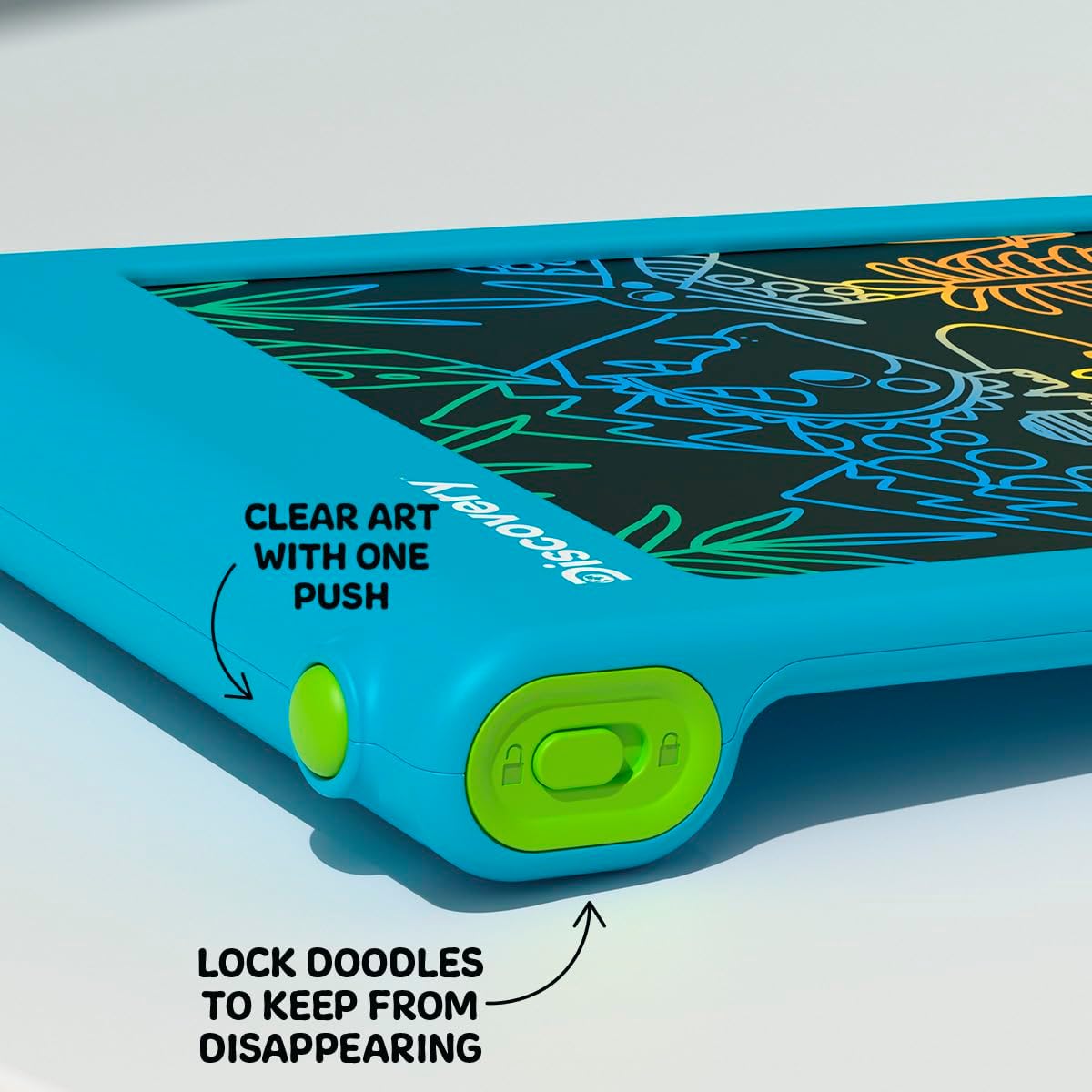
Mynd: Nærmynd view of the bottom edge of the tablet, showing the round green erase button and the rectangular green screen lock switch with an open and closed padlock icon.
Skjálásaðgerð
The tablet features a screen lock switch to prevent accidental erasing. This is useful for preserving artwork or notes.
- Til læsa the screen: Slide the screen lock switch (located next to the erase button) to the position showing a closed padlock icon. While locked, pressing the erase button will not clear the screen.
- Til opna the screen: Slide the screen lock switch to the position showing an open padlock icon. The erase button will now function normally.
Ábending: Always ensure the screen is unlocked before attempting to erase your drawing.
Stylus Storage
The included stylus is tethered to the tablet to prevent loss. When not in use, the stylus can be neatly stored in the designated slot on the side of the tablet.

Mynd: Nærmynd view of the side of the tablet, showing the green tethered stylus inserted into its storage slot.
Viðhald
Þrif
To clean the tablet, gently wipe the screen and casing with a soft, dry, lint-free cloth. Do not use abrasive cleaners, solvents, or chemical sprays, as these can damage the screen or casing.
Skipt um rafhlöðu
If the erase function stops working or the screen becomes dim, it may be time to replace the batteries. Refer to the "Battery Installation" section under Setup for instructions.
Úrræðaleit
- Screen does not clear when erase button is pressed:
- Check if the screen lock switch is in the "locked" position. Slide it to the "unlocked" position.
- Ensure batteries are correctly installed and not depleted. Replace batteries if necessary.
- Drawing lines are faint or inconsistent:
- Þetta gæti bent til þess að rafhlaðan sé lítil. Skiptu um rafhlöður.
- Ensure you are using the stylus or a suitable blunt object with appropriate pressure.
- Stylus is lost:
- The stylus is tethered to the tablet to prevent loss. If it becomes detached, a replacement stylus may be available from the manufacturer or a compatible alternative can be used.
Tæknilýsing
| Gerðarnúmer | 1017870 |
| Vörumerki | Uppgötvun |
| Vörumál | 9.7 x 6.2 x 0.1 tommur |
| Þyngd hlutar | 1.12 pund |
| Ráðlagður aldur | 3 ára og eldri |
| Aflgjafi | 2 x AAA rafhlöður (fylgir ekki) |
| Sérstakur eiginleiki | Upplýstur LCD skjár |
| Framleiðandi | Merchsource |
Ábyrgð og stuðningur
For warranty information or technical support, please refer to the contact details provided on the product packaging or visit the official Discovery brand websíða. Vinsamlegast geymið kaupkvittunina vegna hugsanlegra ábyrgðarkröfu.