1. Inngangur
The Z CAM E2-F8 is a professional-grade full-frame 8K cinema camera designed for high-definition video production. It features a full-frame sensor, 10-bit 4:2:2 color support, and 14 stops of dynamic range. This camera is capable of recording up to 8K resolution at 30 frames per second, with data rates up to 300 Mb/s to CFast 2.0 media. It supports various recording formats including ZRAW, MOV, and MP4, utilizing H.265 for 10-bit and H.264 for 8-bit recording. The E2-F8 offers versatile connectivity and control options for professional videographers.

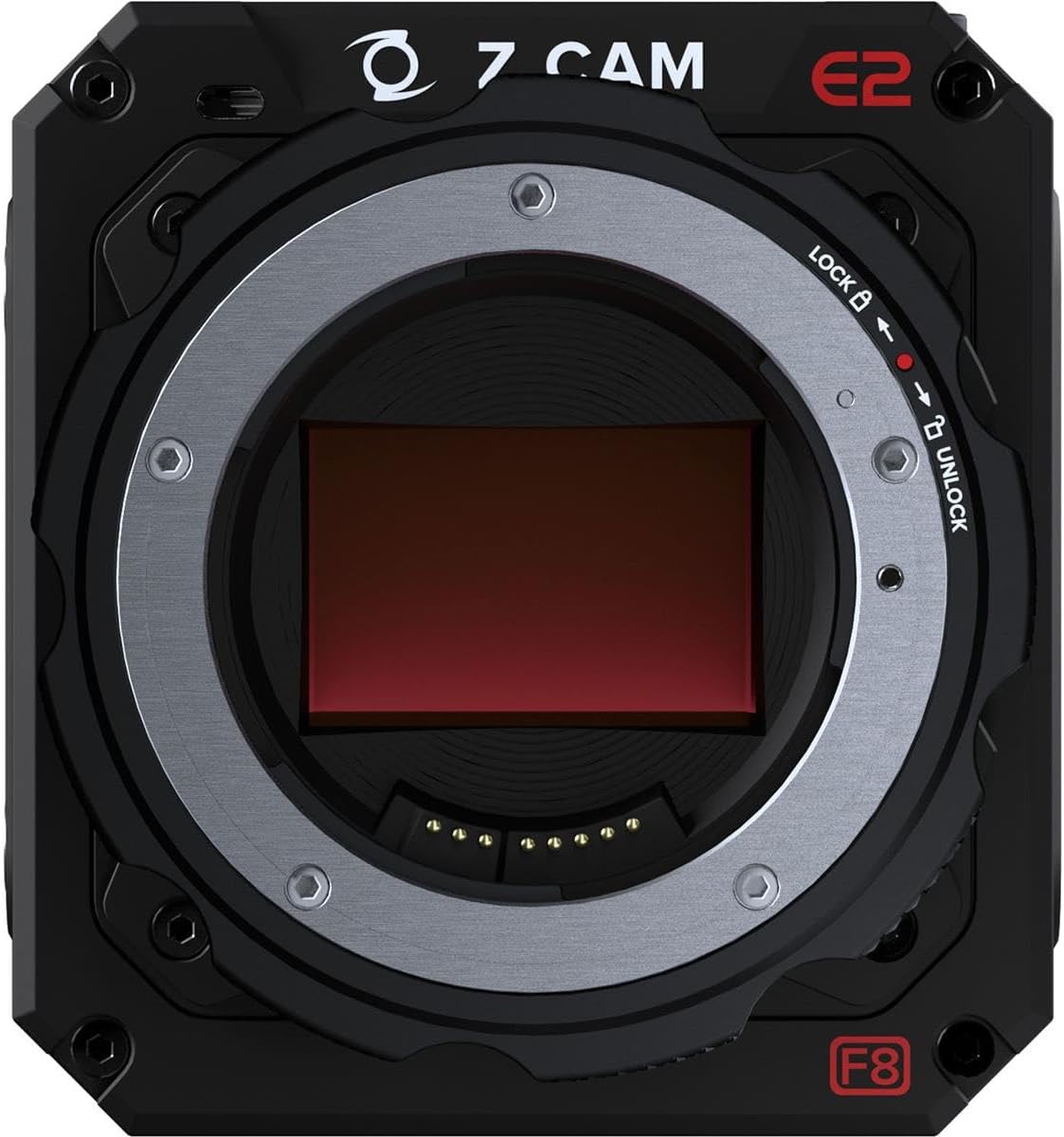
Mynd 1.1: Framan view of the Z CAM E2-F8 camera, showcasing its compact design and PL mount.
2. Öryggisupplýsingar
- Aflgjafi: Use only the specified power adapter and cables. Incorrect power sources can damage the device or cause fire.
- Rekstrarumhverfi: Avoid exposing the camera to extreme temperatures, humidity, dust, or direct sunlight. Operate within the recommended temperature range.
- Meðhöndlun: Handle the camera with care. Do not drop or subject it to strong impacts. Avoid touching the sensor directly.
- Þrif: Aftengdu rafmagnið áður en þú þrífur. Notið mjúkan, þurran klút. Notið ekki fljótandi hreinsiefni eða leysiefni.
- Í sundur: Ekki reyna að taka myndavélina í sundur eða breyta henni. Látið hæft starfsfólk sjá um alla þjónustu.
3. Innihald pakka
Gakktu úr skugga um að allir hlutir séu til staðar í pakkanum:
- Z CAM E2-F8 Camera Body
- PL Mount Cap
- Rafmagns millistykki
- Flýtileiðarvísir
- Ábyrgðarkort
4. Uppsetning
4.1 Að festa linsuna
- Remove the PL mount cap from the camera body.
- Align the red dot on the lens with the red dot on the camera's PL mount.
- Insert the lens into the mount and rotate it clockwise until it clicks into place, securing the lens.

Mynd 4.1: Nærmynd view of the Z CAM E2-F8's PL mount, showing the lock/unlock mechanism and sensor.
4.2 Inserting CFast 2.0 Media
- Locate the CFast 2.0 slot on the side of the camera.
- Insert the CFast 2.0 card with the label facing the correct direction until it clicks into place.
- To eject, press the card gently inward until it springs out.

Mynd 4.2: Hlið view of the Z CAM E2-F8, highlighting the CFast 2.0 media slot and programmable function buttons (F1-F4).
4.3 Að kveikja á myndavélinni
- Connect the power adapter to the camera's DC input port.
- Tengdu straumbreytinn við viðeigandi rafmagnsinnstungu.
- Press and hold the power button (usually red) until the camera powers on and the display illuminates.
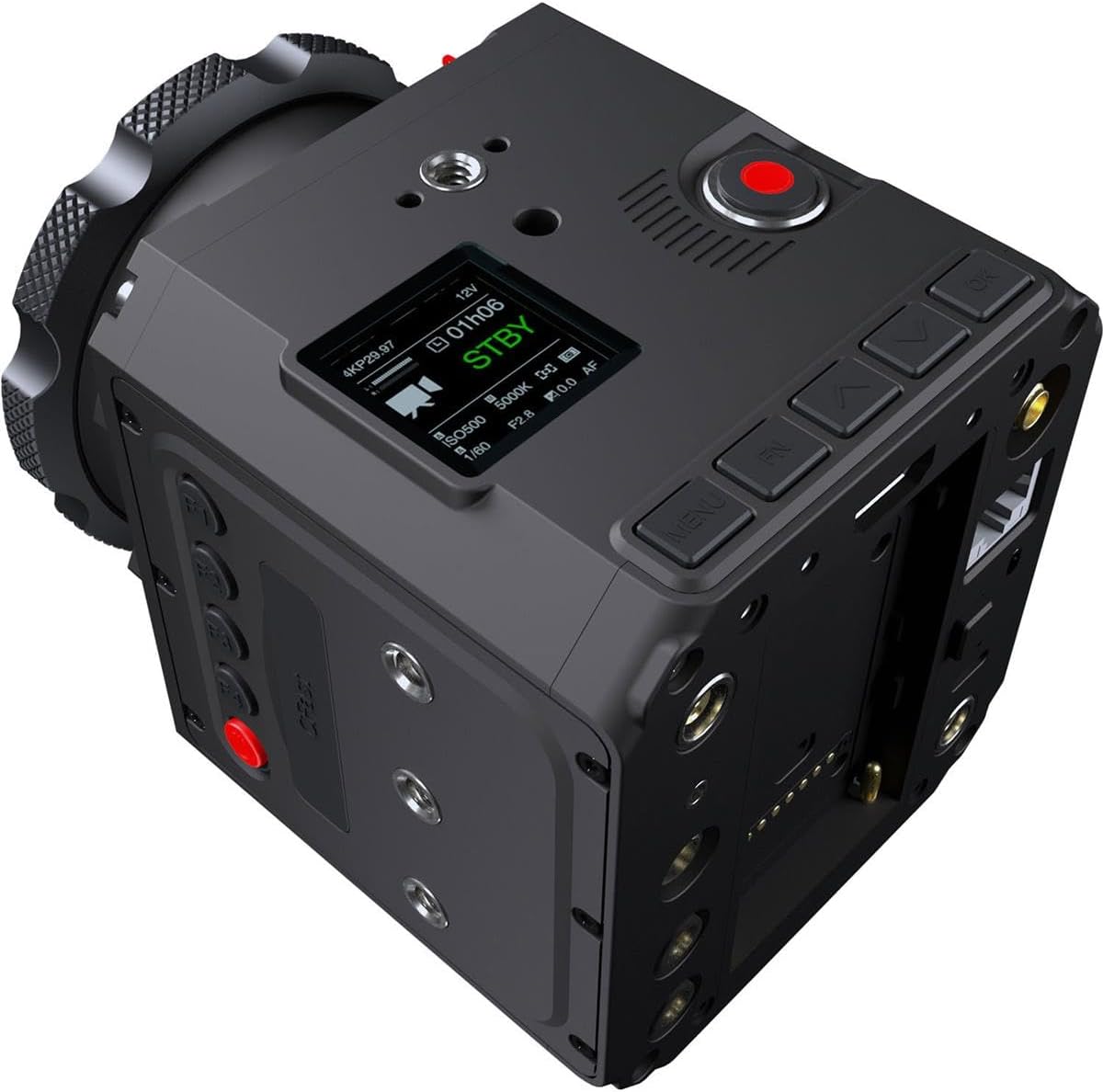
Mynd 4.3: Efst-aftari view of the Z CAM E2-F8, showing the small display screen and various control buttons for menu navigation and settings.
5. Notkun myndavélarinnar
5.1 Grunnupptaka
- Byrja/stöðva upptöku: Press the dedicated record button (often red) to start and stop recording.
- Eftirlit: Connect an external monitor via the HDMI 2.0 port for real-time video output (up to 4K60, 10-bit 4:2:2).
5.2 Valmyndarleiðsögn og stillingar
Use the navigation buttons (MENU, UP, DOWN, LEFT, RIGHT, OK) located on the camera body to access and adjust settings on the integrated display or an external monitor.
- Upplausn og rammahraði: Navigate to the 'Video' settings to select resolutions up to 8K (8192x3456 DCI 2.4:1 or 7680x4320 UHD) and frame rates up to 30fps.
- Dynamic Range and ISO: Adjust dynamic range settings and utilize the dual native ISO (400/1250) for optimal low-light performance.
- Upptökusnið: Select desired recording formats (ZRAW, MOV, MP4) and compression (H.265 for 10-bit, H.264 for 8-bit).
- Hljóðstillingar: Configure audio input (3.5mm stereo jack or 5-pin LEMO for XLR) and format (24-bit 48 kHz AAC or PCM for MOV).
5.3 Tengingar
- Gígabit ethernet: Connect an Ethernet cable for live streaming or remote control.
- Wi-Fi: Use the built-in Wi-Fi to connect to the Z Camera iOS app for remote control and monitoring.
- USB-C: For data transfer and firmware updates.
Mynd 5.1: Aftan view of the Z CAM E2-F8, displaying the HDMI, Ethernet, USB-C, and audio ports.

Mynd 5.2: Önnur hlið view of the Z CAM E2-F8, showing additional mounting points and various input/output ports for accessories and connectivity.
6. Viðhald
- Þrif á myndavélarhúsinu: Notið mjúkan, lólausan klút til að þurrka myndavélarhúsið. Fyrir þrjósk óhreinindi, þurrkið örlítiðampÞvoið klútinn með vatni. Notið ekki sterk efni.
- Þrif á skynjaranum: Sensor cleaning should only be performed by experienced users or professional service centers. Improper cleaning can cause permanent damage.
- Uppfærsla vélbúnaðar: Regularly check the Z CAM official website for the latest firmware updates to ensure optimal performance and access to new features. Follow the provided instructions carefully for firmware installation.
- Geymsla: When not in use, store the camera in a dry, cool place, away from direct sunlight and extreme temperatures. Use a desiccant pack if storing in humid environments.
7. Bilanagreining
| Vandamál | Möguleg orsök | Lausn |
|---|---|---|
| Myndavélin kviknar ekki. | No power, faulty power adapter, or battery (if applicable) is drained. | Ensure power adapter is securely connected and outlet is functional. If using a battery, ensure it is charged. |
| Upptakan stöðvast óvænt. | CFast card full, card speed too slow, or overheating. | Check available space on CFast card. Use a high-speed CFast 2.0 card. Allow camera to cool down if it feels hot. |
| Engin myndútgangur í gegnum HDMI. | Incorrect cable, monitor settings, or camera output settings. | Verify HDMI cable connection. Check monitor input source. Ensure camera's HDMI output settings match monitor capabilities. |
| Vandamál með Wi-Fi tengingu. | Incorrect Wi-Fi settings, interference, or app issues. | Restart camera and mobile device. Reconfigure Wi-Fi settings on camera. Ensure Z Camera iOS app is updated. |
8. Tæknilýsing
| Eiginleiki | Smáatriði |
|---|---|
| Gerðarnúmer | Z CAM E2-F8 |
| Gerð skynjara | Full-Frame CMOS (35.97 x 23.98 mm) |
| Virkir pixlar | 61M |
| Dynamic Range | 14 stopp |
| Native ISO | 400/1250 |
| Hámarksupplausn | 8192x3456 (DCI 8K 2.4:1) @ 30fps, 7680x4320 (8K UHD) @ 30fps |
| Upptökumiðlar | CFast 2.0 |
| Hámarksgagnahraði | 300 Mb/s |
| Myndbandssnið | ZRAW, MOV, MP4 (H.265 10-bit, H.264 8-bit) |
| Hljóðsnið | 24-bit 48 kHz (AAC, PCM for MOV) |
| Myndbandsúttak | HDMI 2.0 (4K60, 10-bit 4:2:2) |
| Tengingar | Gigabit Ethernet, Wi-Fi, USB-C, 3.5mm Stereo Jack, 5-pin LEMO |
| Mál | 10.7 x 8.9 x 5.2 tommur |
| Þyngd | 4.85 pund |
9. Ábyrgð og stuðningur
9.1 Upplýsingar um ábyrgð
The Z CAM E2-F8 Professional Full-Frame 8K Cinema Camera typically comes with a manufacturer's limited warranty covering defects in materials and workmanship for a specified period from the date of purchase. Please refer to the warranty card included in your product package for specific terms, conditions, and duration. Keep your proof of purchase for warranty claims.
9.2 Þjónustuver
For technical assistance, troubleshooting beyond this manual, or warranty service, please contact Z CAM customer support through their official website. You may need to provide your product's serial number and proof of purchase.
Tilföng á netinu: Visit the official Z CAM websíða fyrir:
- Latest firmware updates
- Detailed product documentation
- FAQs and knowledge base
- Samskiptaupplýsingar fyrir aðstoð


