1. Inngangur og yfirview
The Ditec RM-L 1370 is a universal replacement remote control designed for a wide range of Sony Bravia televisions. This remote offers direct compatibility with various Sony LCD, LED, UHD, OLED, and QLED 4K Ultra HD Smart Android TV models, eliminating the need for complex programming or pairing. It features dedicated hotkeys for popular streaming services like YouTube and Netflix for convenient access.

Image: The Ditec RM-L 1370 remote control, highlighting its compatibility as a single remote solution for Sony TVs.
2. Uppsetning og fyrsta notkun
This remote control is designed for immediate use without any setup or programming. Simply insert the required batteries, and it will be ready to operate your compatible Sony TV.
2.1 Uppsetning rafhlöðu
- Finndu rafhlöðuhólfið aftan á fjarstýringunni.
- Renndu lokið á rafhlöðuhólfinu.
- Insert two (2) AAA batteries (not included), ensuring correct polarity (+ and - terminals).
- Lokaðu rafhlöðuhólfinu tryggilega.

Mynd: Aftan view of the remote control, illustrating the battery compartment location.
2.2 Fyrsta notkun
Once batteries are installed, point the remote control towards your Sony TV and press the Power button. The remote should operate your TV without any further configuration.
3. Notkunarleiðbeiningar
The Ditec RM-L 1370 remote control provides all standard functions for your Sony Bravia TV, along with convenient shortcut buttons.
3.1 Grunnaðgerðir
- Aflhnappur: Kveikir eða slekkur á sjónvarpinu.
- Talnahnappar (0-9): Fyrir beint rásval.
- Hljóðstyrkur upp/niður: Stillir hljóðstyrk sjónvarpsins.
- Rás upp/niður: Skiptir um sjónvarpsrásir.
- Leiðsöguhnappur (upp/niður/vinstri/hægri/inngangur): Fyrir valmyndaleiðsögn og val.
- Heimahnappur: Accesses the TV's Smart Home screen or main menu.
- Til baka/til baka hnappur: Fer aftur í fyrri skjá eða valmynd.
- Valkostahnappur: Sýnir samhengisbundinna valkosti.
3.2 Sérstakir eiginleikar
- YouTube Hotkey: Ræsir YouTube forritið beint.
- Netflix Hotkey: Ræsir Netflix forritið beint.
The remote features an enhanced infrared sensor for a farther transmitting distance, allowing effective control up to 50 feet.

Image: The remote control demonstrating its farther distance sensor, capable of operating up to 50 feet.
4. Samhæfni
The Ditec RM-L 1370 universal remote is compatible with a wide range of Sony Bravia LCD, LED, UHD, OLED, and QLED 4K Ultra HD Smart Android TVs. It is designed to replace many original Sony remote models, including but not limited to:
- RMT-TX100U, RMT-TX102U
- RMF-TX200U, RMF-TX201U, RMF-TX220U
- RMT-TX300U, RMF-TX310U
- RMT-TX500U, RMF-TX520U, RMF-TX600U
- And many other Sony TV remote models.
For a comprehensive list of compatible Sony TV remote models, please refer to the image below:
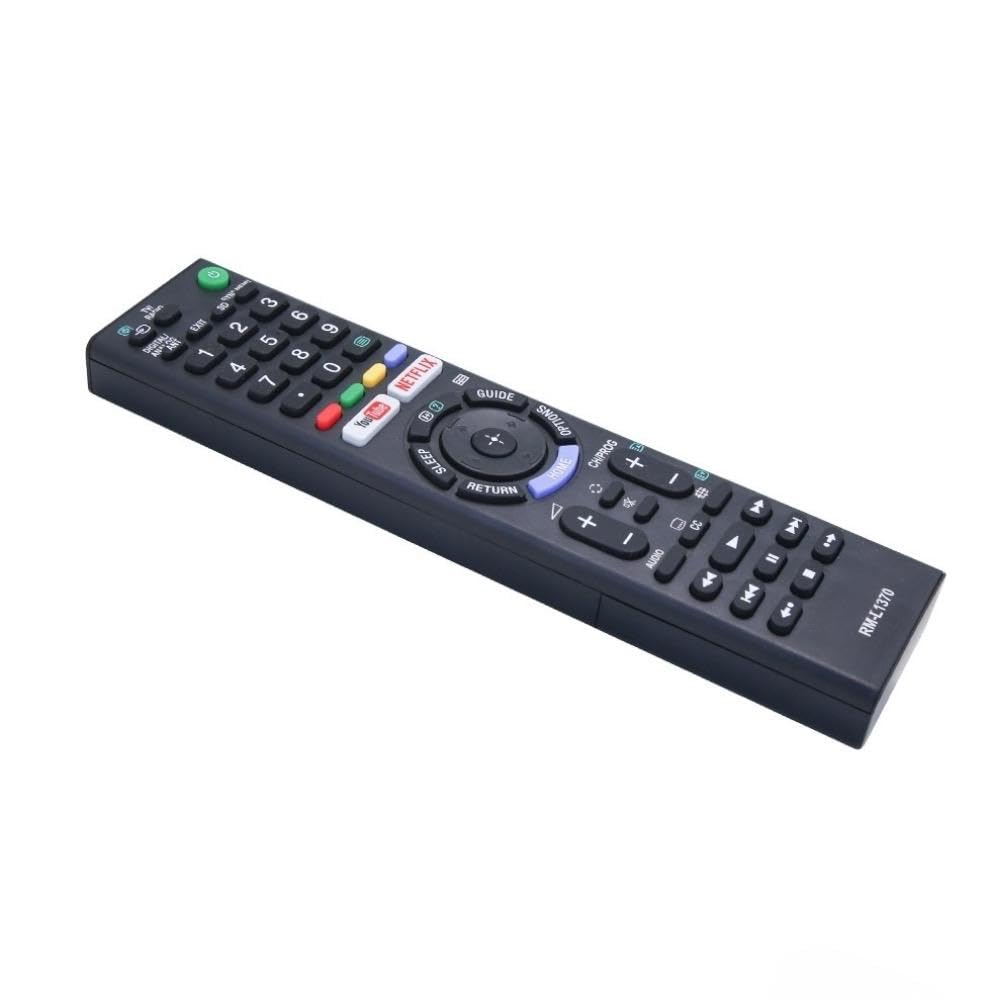
Image: A detailed list of Sony TV remote models that are compatible with the Ditec RM-L 1370.
It is recommended to compare the appearance of this remote with your original remote for visual confirmation of compatibility.
5. Viðhald
5.1 Skipt um rafhlöðu
When the remote control's performance degrades or it stops responding, replace the batteries with two new AAA alkaline batteries. Always replace both batteries at the same time. Do not mix old and new batteries or different types of batteries.
5.2 Þrif
To clean the remote control, use a soft, dry cloth. Do not use liquid cleaners, sprays, or abrasive materials, as these may damage the remote's surface or internal components.
6. Bilanagreining
- Fjarstýring svarar ekki:
- Athugaðu hvort rafhlöðurnar séu rétt settar í með réttri pólun.
- Skiptu um gamlar rafhlöður fyrir nýjar.
- Ensure there are no obstructions between the remote control and the TV's infrared receiver.
- Gakktu úr skugga um að þú sért innan virks rekstrardrægis (allt að 50 fet).
- Sérstakir hnappar virka ekki:
- Some advanced functions or TV-specific features might not be supported by a universal replacement remote.
- Ensure the TV is powered on and functioning correctly.
7. Tæknilýsing
| Eiginleiki | Smáatriði |
|---|---|
| Vörumerki | Ditec |
| Fyrirmynd | RM-L 1370 |
| Samhæf tæki | Sony Bravia LCD, LED, UHD, OLED, QLED 4K Ultra HD Smart Android TVs |
| Tegund tengis | Innrautt (IR) |
| Rafhlöður nauðsynlegar | 2 x AAA (fylgir ekki) |
| Sérstakir eiginleikar | Ergonomic design, YouTube & Netflix Hotkeys |
| Vörumál | 3 x 3 x 12 cm |
| Þyngd hlutar | 80 g |
| Upprunaland | Kína |
8. Stuðningur
For assistance with compatibility or any questions regarding your Ditec RM-L 1370 remote control, you may contact support by sending a picture of your old remote or your device's brand name and model number to +91 9924350801. This will help in verifying compatibility or addressing specific queries.

Image: Information on how to contact support for compatibility checks or questions.


