Inngangur
This manual provides essential information for setting up, operating, maintaining, and troubleshooting your Tecno CAMON 30 5G smartphone. Please read this manual carefully to ensure proper use and to maximize the device's capabilities.
1. Uppsetning
1.1 Úrpakkning og fyrsta skoðun
Þegar pakkinn er opnaður skal ganga úr skugga um að allir íhlutir séu til staðar og óskemmdir. Staðlað innihald pakkans inniheldur:
- Tecno CAMON 30 5G Smartphone
- 70W Flash Charger
- USB snúru
- SIM-bakkaútdráttarbúnaður
- Verndarhulstur (getur verið mismunandi eftir svæðum)
- Flýtileiðarvísir
- Ábyrgðarkort

Figure 1.1: Tecno CAMON 30 5G smartphone, showcasinframskjár þess og aftari myndavélareining.
1.2 Að setja SIM-kortið í
To ensure network connectivity, insert your Nano-SIM card(s) into the device. The Tecno CAMON 30 5G supports dual SIM functionality.
- Finndu SIM-kortaskúffuna á hlið tækisins.
- Settu meðfylgjandi útkastarverkfæri fyrir SIM-kortsskúffuna í litla gatið við hliðina á skúffunni og þrýstu varlega þar til skúffan smellir út.
- Dragðu SIM-kortsskúffuna varlega út.
- Place your Nano-SIM card(s) into the designated slots on the tray, ensuring the gold contacts face downwards and the cut corner aligns correctly.
- Ýttu SIM-kortsskúffunni varlega aftur í tækið þar til hún smellpassar.

Figure 1.2: The SIM tray ejector tool, used for accessing the SIM card slot.
1.3 Hleðsla tækisins
Before first use, it is recommended to fully charge your device. The Tecno CAMON 30 5G supports 70W Flash Charging.
- Connect the USB cable to the 70W Flash Charger.
- Stingdu hleðslutækinu í rafmagnsinnstungu.
- Connect the other end of the USB cable to the USB-C port at the bottom of your phone.
- The charging indicator will appear on the screen. A full charge from 0-50% can be achieved in approximately 19 minutes.

Figure 1.3: The bottom of the Tecno CAMON 30 5G, featuring the USB-C port for charging and data transfer.
1.4 Kveikja og upphafleg uppsetning
Press and hold the Power button (located on the right side of the device) until the Tecno logo appears. Follow the on-screen instructions to complete the initial setup, which includes selecting your language, connecting to Wi-Fi, and setting up your Google account.
2. Notkun tækisins
2.1 Grunnleiðsögn
The Tecno CAMON 30 5G operates on Android 14 with HiOS. Navigation is primarily touch-based:
- Bankaðu á: Veldu hlut eða opnaðu forrit.
- Strjúktu: Fletta í gegnum skjái, lista eða efni.
- Klípaðu til aðdráttar: Stækka eða minnka efni á skjánum.
- Langt ýtt: Opnaðu samhengisvalmyndir eða færðu tákn.
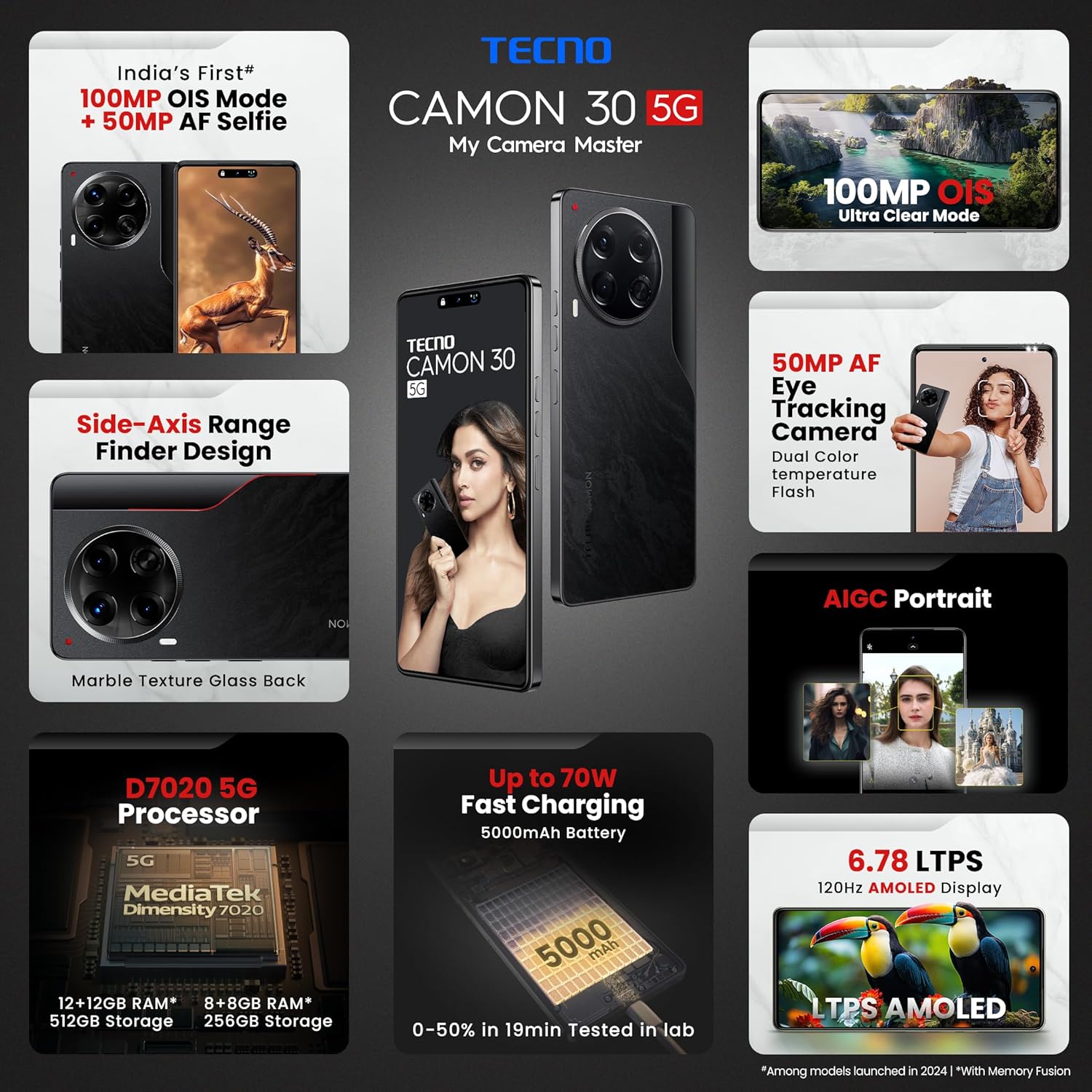
Figure 2.1: The Tecno CAMON 30 5G's vibrant LTPS AMOLED display.
2.2 Skjáreiginleikar
The device features a 6.78-inch FHD+ LTPS AMOLED Dot-in display with a resolution of 1080 x 2436 pixels. Key display features include:
- 1300 nits Peak Brightness: Ensures clear visibility even in bright outdoor conditions.
- 120Hz Adaptive Refresh Rate: Automatically adjusts between 120Hz, 90Hz, and 60Hz for smooth scrolling and power efficiency.
- 2160Hz High-Frequency PWM Dimming: Reduces screen flicker for improved eye comfort.
- TÜV Rheinland Low Blue Light Emission Certified: Protects your eyes from harmful blue light.
- Wet Hand Touch Technology: Allows for smooth navigation even with wet hands.
2.3 Myndavélakerfi
The Tecno CAMON 30 5G is equipped with an advanced camera system for high-quality photography and videography.
- Myndavél að aftan: 100MP OIS (Optical Image Stabilization) main sensor with a 2MP Depth Sensor. Features include Ultra Steady videos (OIS + EIS), 10X Zoom, Twinkle Portrait Filter, Super Night Photography Mode, Sky Shop, and Slow Motion Videos.
- Myndavél að framan: 50MP Auto Focus Selfie camera with Dual Color Temperature Front Flash. Supports DSLR-level portrait system and Video HDR.
- AIGC Portrait (OTA): AI Generative Content for enhanced portrait photography.

Figure 2.2: The distinctive rear camera module of the Tecno CAMON 30 5G.
2.4 Afköst og geymsla
Powered by the MediaTek Dimensity 7020 chipset with a 6nm processor, the device offers robust performance for gaming and multitasking.
- Örgjörvi: MediaTek Dimensity 7020 (6nm) for Ultra 5G Performance.
- vinnsluminni: Up to 24GB* (12GB physical + 12GB Memory Fusion) LPDDR4x RAM.
- Innri geymsla: 512GB UFS 3.1 Storage.
2.5 Audio and Smart Features
- Dolby Atmos: Provides immersive audio experience.
- Ella with ChatGPT: Innbyggður gervigreindaraðstoðarmaður fyrir ýmis verkefni.
- AI Eraser (OTA): Allows for intelligent object removal from photos.
- Innrauð fjarstýring: Supports control of up to 15 types of home appliances.
- Dynamic Pet AOD: Customizable Always-On Display with dynamic pet animations.
3. Viðhald
3.1 Þrif á tækinu
Til að viðhalda útliti og virkni tækisins:
- Notið mjúkan, lólausan klút til að þurrka skjáinn og hlífina.
- Forðist að nota sterk efni, slípiefni eða þrýstiloft.
- Haldið höfnum lausum við ryk og rusl.
3.2 Hugbúnaðaruppfærslur
Athugaðu reglulega hvort hugbúnaðaruppfærslur séu tiltækar og settu upp þær til að tryggja bestu mögulegu afköst, öryggi og aðgang að nýjum eiginleikum. Farðu á Stillingar > Kerfi > Kerfisuppfærsla til að leita að uppfærslum.
3.3 Umhirða rafhlöðu
The device is equipped with a 5000mAh battery. To prolong battery life:
- Forðastu mikinn hita.
- Use only the official Tecno charger and cable.
- Forðastu að tæma rafhlöðuna alveg oft.
3.4 Geymslustjórnun
Regularly manage your device's storage to ensure smooth operation. Delete unnecessary files, clear app caches, and uninstall unused applications. You can check storage usage in Stillingar > Geymsla.
4. Bilanagreining
This section addresses common issues you might encounter with your Tecno CAMON 30 5G.
4.1 Tækið kveikir ekki á sér
- Gakktu úr skugga um að rafhlaðan sé hlaðin. Tengdu hleðslutækið og bíddu í nokkrar mínútur áður en þú reynir að kveikja á því.
- Ýttu á aflrofann og haltu honum inni í að minnsta kosti 10-15 sekúndur til að þvinga fram endurræsingu.
4.2 Hleðslumál
- Gakktu úr skugga um að hleðslutækið og USB-snúran séu vel tengd bæði við símann og rafmagnsinnstunguna.
- Prófaðu að nota annað rafmagnsinnstungu.
- Skoðaðu hleðslutengið fyrir rusl eða skemmdir.
4.3 Vandamál með nettengingu
- Check if Airplane Mode is enabled (swipe down from the top of the screen to access Quick Settings).
- Gakktu úr skugga um að SIM-kortið þitt sé rétt sett í.
- Endurræstu tækið.
- Farðu til Stillingar > Net og internet > Farsímakerfi og vertu viss um að farsímagögn séu virk.
4.4 Forrit sem hrynja eða frjósa
- Lokaðu vandamálaforritinu og opnaðu það aftur.
- Hreinsa skyndiminni forritsins (Stillingar > Forrit > [Nafn forrits] > Geymsla og skyndiminni > Hreinsa skyndiminni).
- Gakktu úr skugga um að appið sé uppfært í nýjustu útgáfu.
- Ef vandamálið er viðvarandi skaltu íhuga að fjarlægja forritið og setja það upp aftur.
4.5 Factory Reset
Ef þú lendir í viðvarandi hugbúnaðarvandamálum gæti endurstilling á verksmiðjustillingum leyst þau. Viðvörun: Þetta mun eyða öllum gögnum í símanum þínum. Taktu öryggisafrit af mikilvægum gögnum áður en þú heldur áfram.
- Farðu til Stillingar > Kerfi > Endurstillingarvalkostir.
- Veldu Eyða öllum gögnum (endurstilla verksmiðju).
- Staðfestu ákvörðun þína og sláðu inn PIN-númer/mynstur/lykilorð ef beðið er um það.
5. Tæknilýsing
Below are the detailed technical specifications for the Tecno CAMON 30 5G (Model: CL7 512+12).
| Eiginleiki | Forskrift |
|---|---|
| Stýrikerfi | Android 14 (HiOS) |
| Örgjörvi | MediaTek Dimensity 7020 (6nm) |
| vinnsluminni | 12GB (expandable up to 24GB with Memory Fusion) |
| Innri geymsla | 512GB UFS 3.1 |
| Skjár | 6.78" FHD+ LTPS AMOLED Dot-in Display, 1080 x 2436 resolution, 120Hz Adaptive Refresh Rate, 1300 nits Peak Brightness, 2160Hz PWM Dimming |
| Myndavél að aftan | 100MP OIS Main Camera + 2MP Depth Sensor |
| Myndavél að framan | 50MP Auto Focus Selfie Camera |
| Rafhlaða | 5000mAh |
| Hleðsla | 70W Flash Charging, 10W Reverse Charging |
| Mál | 16.54 x 0.76 x 0.78 cm |
| Þyngd | 199 g |
| Tengingar | 5G, Wi-Fi, Bluetooth, USB Type-C |
| Skynjarar | In-display Fingerprint Sensor, Accelerometer, Gyroscope, Proximity, Compass |
| Hvað er í kassanum | SIM Tray Ejector (other accessories like charger and cable are typically included but not explicitly listed in 'Whats in the box' field) |
6. Ábyrgð og stuðningur
6.1 Upplýsingar um ábyrgð
Your Tecno CAMON 30 5G comes with a limited manufacturer's warranty. Please refer to the warranty card included in your product package for specific terms, conditions, and duration of coverage. Keep your proof of purchase for warranty claims.
6.2 Þjónustuver
For technical assistance, service, or any inquiries regarding your device, please contact Tecno customer support:
- Gjaldfrjálst númer: 18004190525
- Netfang: Service.india@carlcare.com
- Framleiðandi: G mobiles, Ismartu India Private Limited, D-197 and 198, Sector 63, Noida, Gautam Buddha Nagar, Uttar Pradesh 201301, India.
Tecno provides a robust after-sales service network with over 1300 service centers across more than 1000 towns in India.


