Vara lokiðview
The ELECTROPRIME HOPESTAR A6 Max is a robust and portable Bluetooth speaker designed for outdoor use, featuring IPX6 water resistance. It delivers powerful audio with high-fidelity speakers and supports various playback modes including Bluetooth, AUX, USB disk, and TF card. Its durable design and integrated lanyard make it an ideal companion for travel and outdoor activities.
Helstu eiginleikar
- Bluetooth V5.1 tenging: Ensures stable and efficient wireless audio streaming.
- IPX6 vatnsheld hönnun: Provides protection against strong jets of water, suitable for outdoor parties and rainy conditions.
- High-Fidelity Speakers: Delivers natural and delicate sound reproduction.
- Margar spilunarstillingar: Supports Bluetooth, standard 3.5mm AUX input, USB disk, and TF card playback.
- Hljóðstuðningur: Decodes MP3, WAV, WMA, FLAC, and APE music formats.
- Minni aðgerð: Resumes transmission from breakpoints for seamless playback.
- Stillanleg hljóðstýring: Allows adjustment of microphone volume, microphone reverberation, and master volume.
- Færanleg hönnun: Features a convenient lanyard for easy carrying.
- Langur rafhlöðuending: Equipped with a 12000mAh lithium-ion battery for extended playing time.
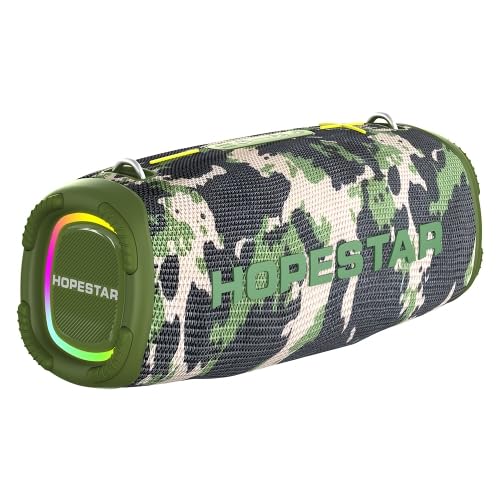
Figure 1: The ELECTROPRIME HOPESTAR A6 Max Portable Bluetooth Speaker, showcasing its camouflage design and integrated RGB lighting.
Innihald pakka
Vinsamlegast athugið innihald pakkans þegar þið takið hann úr kassanum til að ganga úr skugga um að allir hlutir séu til staðar og í góðu ástandi.
- ELECTROPRIME HOPESTAR A6 Max Bluetooth Speaker
- USB hleðslusnúra
- 3.5 mm AUX hljóðsnúru
- Notendahandbók
Uppsetning
1. Hleðsla hátalarans
- Tengdu meðfylgjandi USB hleðslusnúruna við hleðslutengi hátalarans.
- Connect the other end of the USB cable to a 5V 2A USB power adapter (not included) or a computer's USB port.
- Hleðsluljósið lýsir á meðan á hleðslu stendur og slokknar þegar það er fullhlaðið.
- Full hleðsla tekur venjulega um það bil 6-7 klukkustundir.
2. Kveikja / slökkva á
- Til að kveikja á: Ýttu á og haltu inni aflrofann í nokkrar sekúndur þar til þú heyrir hljóðmerki og vísirljósin kvikna.
- Til að slökkva á: Ýttu á aflrofann aftur og haltu honum inni í nokkrar sekúndur þar til þú heyrir hljóðmerki og vísirljósin slokkna.
3. Pörun Bluetooth
- Ensure the speaker is powered on and in Bluetooth pairing mode (indicated by a flashing blue light). If not, briefly press the Mode button to switch to Bluetooth mode.
- Virkjaðu Bluetooth í snjalltækinu þínu (snjallsíma, spjaldtölvu o.s.frv.) og leitaðu að tiltækum tækjum.
- Select "HOPESTAR A6 Max" from the list of found devices.
- Once successfully paired, you will hear a confirmation sound, and the Bluetooth indicator light will remain solid blue.
- Hátalarinn tengist sjálfkrafa við síðasta paraða tækið þegar hann er kveikt á honum, ef tækið er innan seilingar og Bluetooth er virkt.
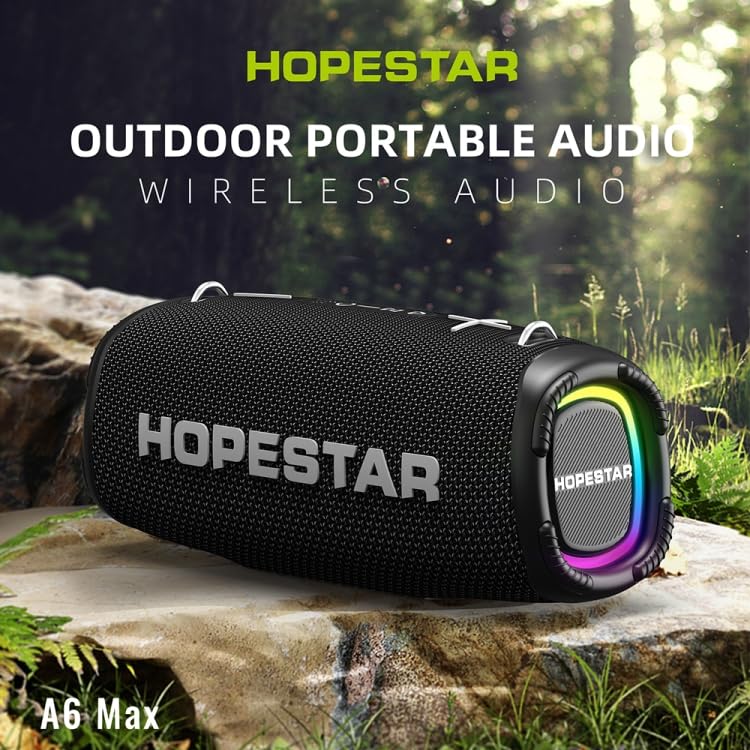
Figure 2: The HOPESTAR A6 Max speaker positioned outdoors, highlighting its portability and suitability for various environments.
Notkunarleiðbeiningar
1. Bluetooth spilun
After successful Bluetooth pairing, you can play audio from your connected device. Use your device's controls or the speaker's buttons for playback control.
2. AUX inntak
- Tengdu annan endann á 3.5 mm AUX hljóðsnúrunni við AUX inntak hátalarans.
- Connect the other end to the audio output jack of your external audio device (e.g., MP3 player, computer).
- Hátalarinn skiptir sjálfkrafa yfir í AUX-stillingu, eða þú gætir þurft að ýta á Mode-hnappinn til að velja AUX.
3. USB Disk / TF Card Playback
- Insert a USB flash drive or a TF (microSD) card containing MP3, WAV, WMA, FLAC, or APE audio files into the respective port on the speaker.
- The speaker will automatically detect the storage device and begin playing music. If not, press the Mode button to switch to USB/TF card mode.
4. Þráðlaus stereótenging (TWS)
To achieve a stereo sound experience, you can pair two HOPESTAR A6 Max speakers together.
- Gakktu úr skugga um að báðir hátalararnir séu kveiktir og ekki tengdir við neinn Bluetooth-tæki.
- Á einum hátalaranum (þetta verður aðalhátalarinn) skaltu halda inni TWS hnappinum (oft táknað með tveimur samtengdum hringjum eða svipuðu tákni) þar til þú heyrir fyrirmæli.
- Aðalhátalarinn mun leita að aukahátalaranum. Þegar tengingin er komin upp heyrist staðfestingarhljóð.
- Tengdu nú snjalltækið þitt við aðalhátalarann í gegnum Bluetooth eins og lýst er í hlutanum „Bluetooth-pörun“. Hljóðið mun spilast í gegnum báða hátalarana í steríó.
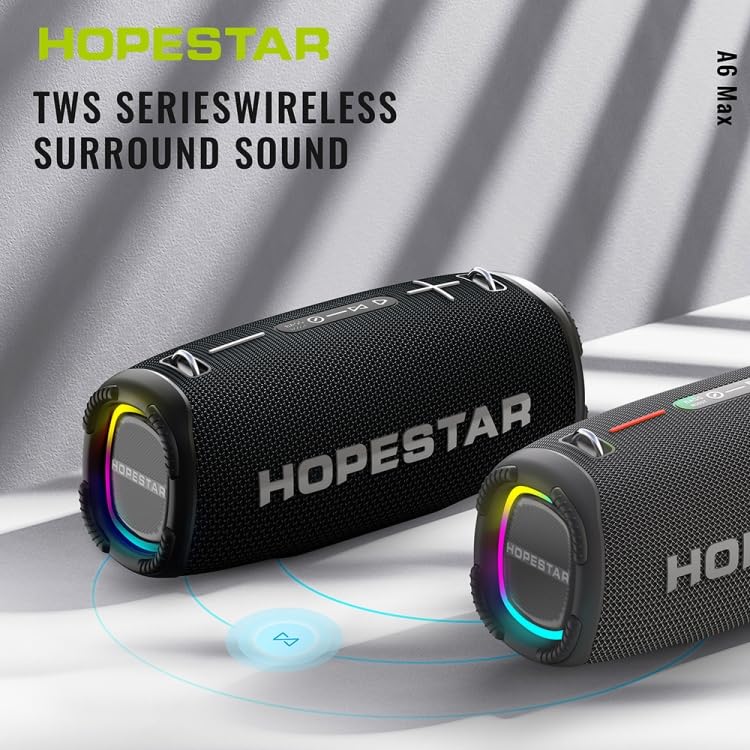
Figure 3: Two HOPESTAR A6 Max speakers wirelessly connected, illustrating the True Wireless Stereo (TWS) function for enhanced audio.
5. Símtalsstjórnun
- Svara símtali: Briefly press the Play/Pause button when an incoming call rings.
- Ljúka símtali: Briefly press the Play/Pause button during a call.
- Hafna símtali: Ýttu á og haltu inni spilunar-/hléhnappinum í 2 sekúndur meðan á símtali stendur.
6. Hljóðstyrkur og lagastýring
- Hækka: Briefly press the "+" button.
- Hljóðstyrkur niður: Briefly press the "-" button.
- Næsta lag: Ýttu á og haltu inni „+“ hnappinum.
- Fyrra lag: Ýttu á og haltu inni „-“ hnappinum.
Viðhald
Rétt viðhald tryggir langlífi og bestu mögulegu afköst hátalarans.
1. Þrif
- Wipe the speaker's surface with a soft, damp klút.
- Notið ekki slípiefni, alkóhól, bensen eða önnur efnaleysiefni, þar sem þau geta skemmt yfirborðið eða innri íhluti.
- Ensure all ports are dry before charging or connecting cables after exposure to water.
2. Geymsla
- Geymið hátalarann á köldum, þurrum stað fjarri beinu sólarljósi og miklum hita.
- If storing for an extended period, charge the battery to approximately 50% every few months to preserve battery health.
3. Vatnsheldni (IPX6)
- The speaker is rated IPX6, meaning it is protected against powerful water jets. It is suitable for use in rainy conditions or near splashes.
- Ekki gera það immerse the speaker in water.
- Ensure the charging port and other covers are securely closed before exposing the speaker to water.
Úrræðaleit
Ef þú lendir í vandræðum með hátalarann þinn, vinsamlegast skoðaðu eftirfarandi algeng vandamál og lausnir:
| Vandamál | Möguleg orsök | Lausn |
|---|---|---|
| Hátalarinn kviknar ekki. | Lítil rafhlaða; Ekki er rétt ýtt á aflgjafahnappinn. | Charge the speaker fully. Press and hold the Power button firmly for a few seconds. |
| Ekki er hægt að para í gegnum Bluetooth. | Speaker not in pairing mode; Device Bluetooth off; Too far from speaker; Interference. | Ensure speaker is in Bluetooth pairing mode (flashing blue light). Enable Bluetooth on your device. Move device closer to speaker. Avoid strong electromagnetic interference. |
| Ekkert hljóð frá hátalaranum. | Hljóðstyrkur of lágur; Rangur inntaksstilling; Tækið spilar ekki hljóð. | Increase speaker and device volume. Press Mode button to select correct input (Bluetooth, AUX, USB/TF). Ensure audio is playing on your connected device. |
| Hljóð röskun. | Of hátt hljóð; Lítil rafhlaða; Léleg hljóðuppspretta. | Reduce volume on both speaker and device. Charge the speaker. Try a different audio source or file. |
| TWS-tenging mistekst. | Speakers already paired to a device; Too far apart. | Ensure both speakers are disconnected from any Bluetooth devices. Place speakers close to each other during TWS pairing. |
Tæknilýsing
Detailed technical specifications for the ELECTROPRIME HOPESTAR A6 Max Bluetooth Speaker:
| Bluetooth útgáfa | V5.1 |
| Sendingarfjarlægð | Allt að 10 metrar (33 fet) |
| Output Power | 50W x 1 (main speaker), 15W x 2 (side speakers) |
| Leiktími | 6-7 klukkustundir (við meðalhljóðstyrk) |
| Tíðnisvið | 80Hz - 15kHz |
| Uppsetning hátalara | 1 x 119mm (4 ohm 50W), 2 x 78mm (4 ohm 15W) |
| Inntaksstyrkur | DC 5V 2A |
| Tegund rafhlöðu | 18650 Lithium-ion rafhlaða |
| Rafhlöðugeta | 12000mAh |
| Viðmót hljóðinngangs | Standard 3.5mm Headphone Jack (Stereo) |
| Supported Playback Modes | U disk, TF card, AUX, Bluetooth |
| Stutt tónlistarsnið | MP3, WAV, WMA, FLAC, APE |
| Mál (L x B x H) | 162 mm x 380 mm x 146 mm (6.38 tommur x 14.96 tommur x 5.75 tommur) |
| Þyngd | Um það bil 4.50 kg (9.93 lb) |
| Vatnsheld einkunn | IPX6 |
Ábyrgð og stuðningur
ELECTROPRIME products are manufactured with high-quality standards. This product comes with a standard manufacturer's warranty against defects in materials and workmanship from the date of purchase.
For warranty claims, technical support, or any inquiries, please contact your retailer or the ELECTROPRIME customer service team. Please retain your proof of purchase for warranty validation.
Note: Warranty terms and conditions may vary based on region and retailer. Please refer to the specific warranty information provided at the time of purchase.
Samskiptaupplýsingar:
- Framleiðandi: ELECTROGADGETSSTORE
- Netfang: support@electroprime.com (Example email, please refer to actual product documentation for official contact.)
- Websíða: www.electroprime.com (Example website, please refer to actual product documentation for official contact.)