1. Inngangur
This manual provides comprehensive instructions for the safe and efficient use of the Creality Space PI Filament Dryer Plus and the Creality PLA Plus Filament. Please read this manual thoroughly before operating the device or using the filament to ensure optimal performance and longevity of your products.

Image 1.1: Creality Space PI Filament Dryer Plus and Creality PLA Plus Filament. This image displays the filament dryer unit alongside a spool of rainbow-colored PLA Plus filament and a 3D printed dragon model.
2. Öryggisupplýsingar
Fylgið alltaf eftirfarandi öryggisráðstöfunum til að koma í veg fyrir meiðsli eða skemmdir á vörunni:
- Ekki láta tækið verða fyrir vatni eða raka.
- Gakktu úr skugga um rétta loftræstingu meðan á notkun stendur.
- Geymið þar sem börn og gæludýr ná ekki til.
- Notaðu aðeins meðfylgjandi straumbreyti.
- Do not open or attempt to repair the device yourself. Contact authorized service personnel.
- The heating element can become hot. Avoid direct contact during operation.
3. Innihald pakka
Gakktu úr skugga um að allir hlutir séu til staðar í pakkanum:
- Creality Space PI Filament Dryer Plus Unit
- Rafmagns millistykki
- PTFE Tubes (2x)
- Creality PLA Plus Filament (1KG Rainbow)
- Notendahandbók (þetta skjal)
4. Vöru lokiðview
4.1. Dryer Components
Familiarize yourself with the main components of the Creality Space PI Filament Dryer Plus:
- LCD snertiskjár: Displays temperature, time, and filament type settings. Used for interaction and control.
- Stjórnhnappar: Til að vafra um valmyndir og stilla stillingar.
- Filament Outlets: Two openings on the top for feeding filament to a 3D printer.
- Heating Chamber: Internal compartment where filament spools are placed for drying.
- PTC Heater: Efficient heating element for uniform drying.
- Innri vifta: Circulates hot air 360° for consistent drying.
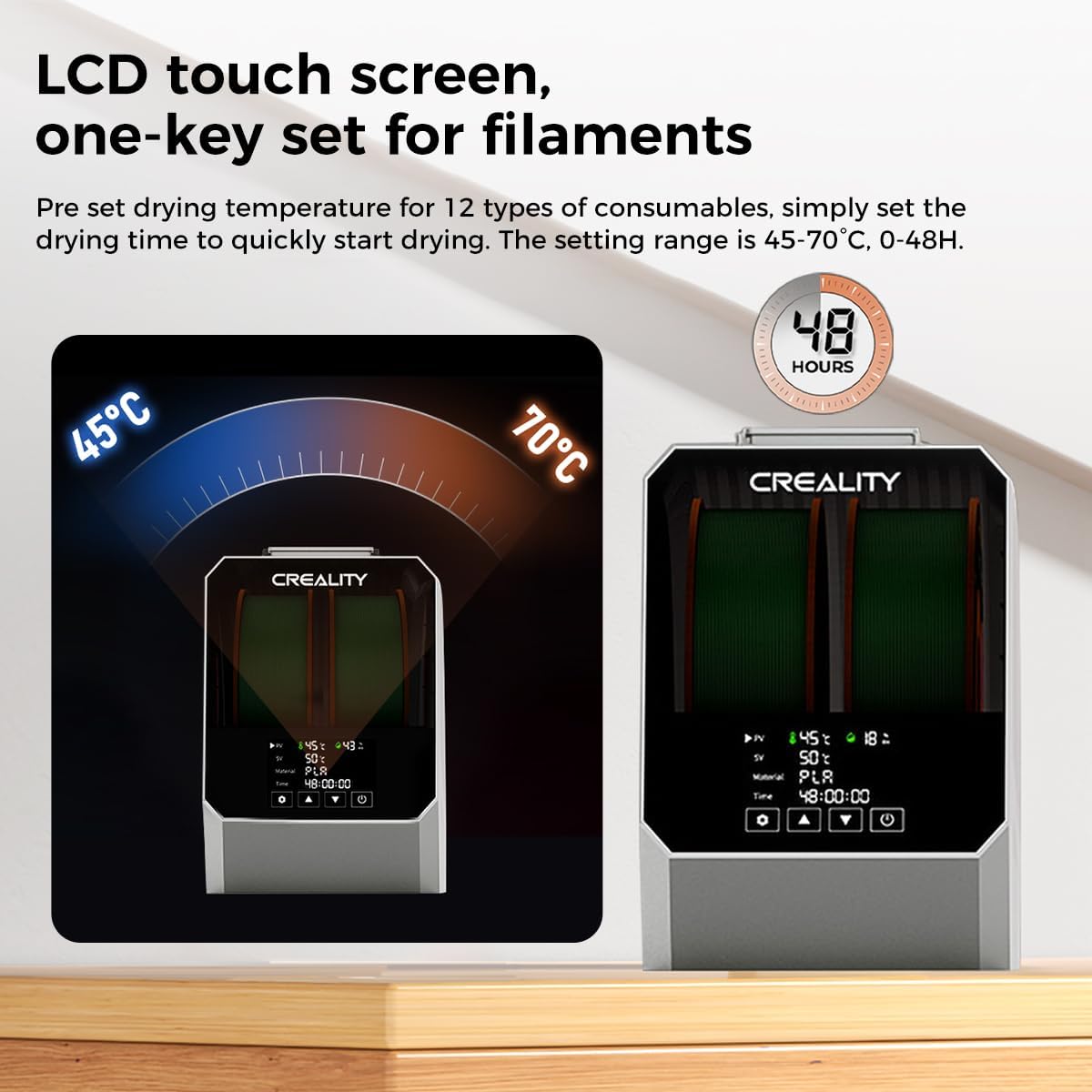
Image 4.1: LCD Touch Screen and Controls. This image highlights the dryer's LCD touch screen interface, showing temperature and time settings, and indicating one-key set functionality for various filaments.
5. Uppsetning
5.1. Upptaka
Fjarlægið alla íhluti varlega úr umbúðunum. Geymið umbúðirnar til síðari geymslu eða flutnings.
5.2. Rafmagnstenging
Connect the provided power adapter to the dryer unit and then plug it into a suitable power outlet.
5.3. Hleðsla þráða
The Space PI Filament Dryer Plus supports up to two 1KG filament spools simultaneously.
- Open the lid of the dryer unit.
- Place one or two filament spools onto the internal rollers. Ensure the filament unwinds smoothly.
- Thread the filament through the designated holes on the top of the dryer.
- Insert the PTFE tubes into the filament outlets to guide the filament to your 3D printer(s).
- Lokaðu lokinu örugglega.
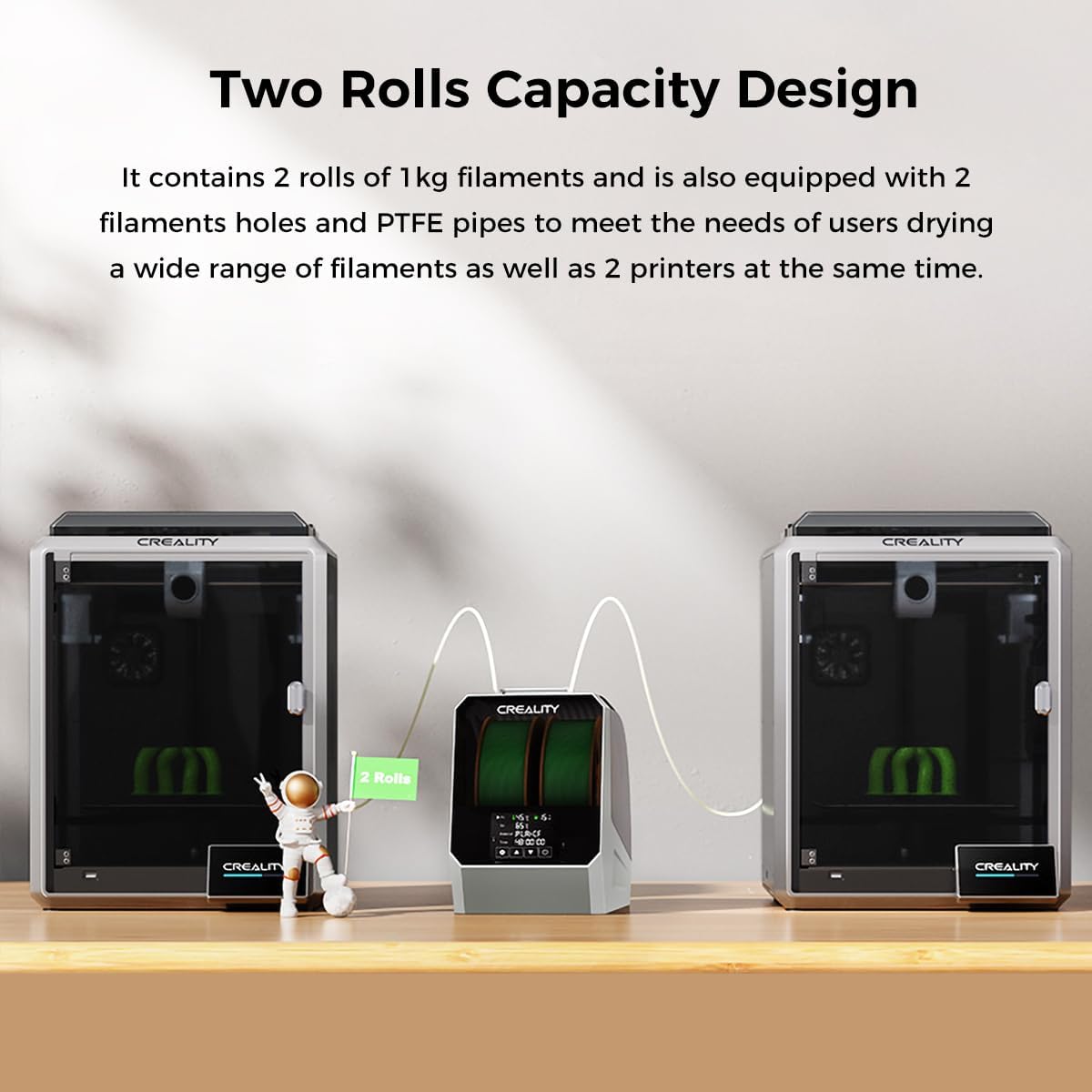
Image 5.1: Two Rolls Capacity Design. This image illustrates the dryer's capability to hold two 1KG filament spools, with filament being fed out through PTFE tubes to two separate 3D printers.
6. Rekstur
6.1. Kveikja / slökkva á
Press the power button to turn the dryer on or off. The LCD screen will illuminate upon powering on.
6.2. Basic Drying Process
The dryer features one-key temperature settings for various filament types and allows for custom adjustments.
- Select Filament Type: On the LCD touch screen, choose the appropriate filament type from the pre-set options. The dryer supports up to 12 types, including PLA, ABS, TPU, PETG, PP, PC, PA, PET, PLA-CF, PA-CF, PETG-CF, and ASA.
- Stilla hitastig: The adjustable temperature range is 45°C to 70°C. You can use the pre-set values or manually adjust to your desired temperature.
- Stilltu teljara: The timer setting range is 0 to 48 hours. Select the recommended drying time for your filament or set a custom duration.
- Byrjaðu að þurrka: Confirm your settings to begin the drying process. The PTC heater and internal fan will activate, circulating hot air 360° for uniform drying.
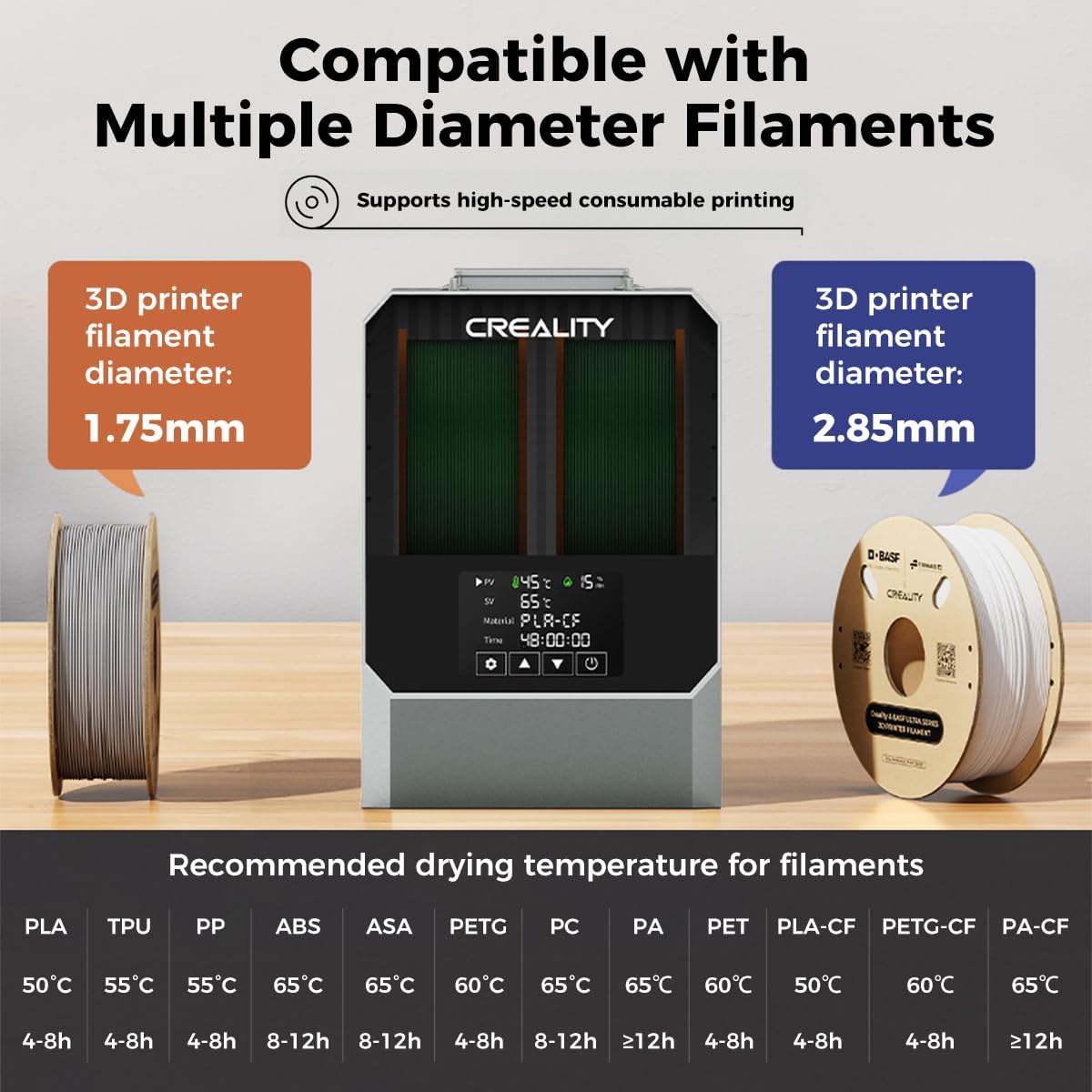
Image 6.1: Filament Compatibility and Recommended Drying Temperatures. This image displays the dryer's compatibility with 1.75mm and 2.85mm filaments and provides a table of recommended drying temperatures and times for various filament types.
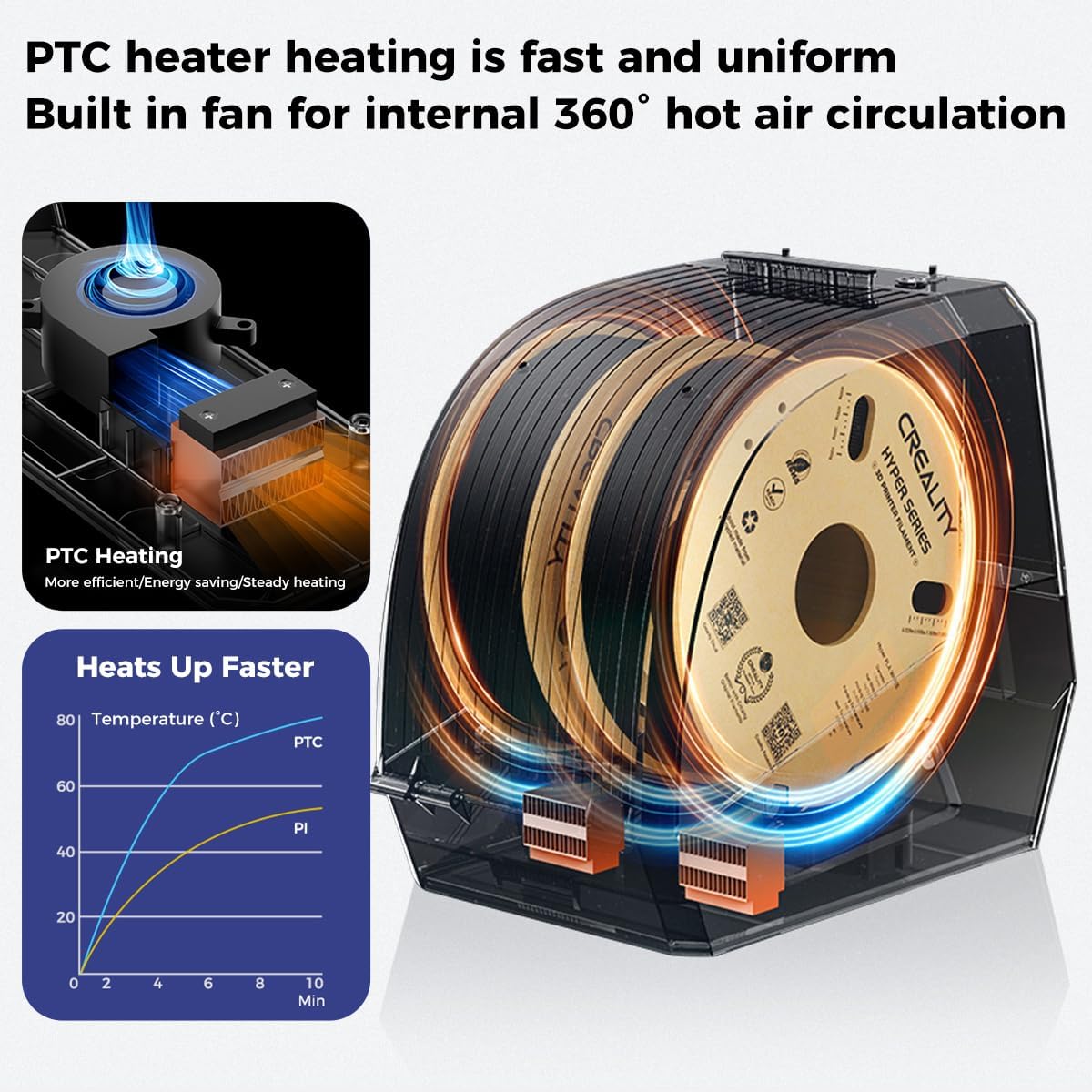
Image 6.2: PTC Heater and 360° Hot Air Circulation. This image illustrates the internal PTC heating element and the fan-driven 360-degree hot air circulation system, designed for efficient and uniform filament drying.
6.3. Drying Multiple Filaments
When drying two spools, ensure both filaments are properly loaded and threaded through their respective PTFE tubes to their printers. The dryer will apply the selected settings to both spools.
7. Creality PLA Plus Filament Usage
7.1. Filament Characteristics
Creality Ender-PLA+ filament offers enhanced toughness and improved printing performance compared to standard PLA. Key characteristics include:
- Stronger Toughness: Less susceptible to breakage, allowing for repeated bending.
- Neat Winding: Full mechanical winding ensures tidy spools, reducing tangling and potential snaps.
- Improved Print Quality: Designed to minimize odor, bubbles, tangling, clogging, and cracking during printing.

Image 7.1: Creality PLA Plus Filament Benefits. This image lists the advantages of using Creality PLA Plus filament, including 'No Odor', 'No Bubble', 'No Tangling', 'No Clog', and 'No Cracking'.

Image 7.2: High Strength and Better Toughness. This image visually compares the flexibility and strength of Creality Ender PLA+ filament (shown bending without breaking) against common PLA filament (shown breaking easily).

Image 7.3: Neat Winding of Filament. This image demonstrates the precise and neat winding of the filament on the spool, highlighting an accuracy of ±0.02mm for the 1.75mm diameter.
7.2. Recommended Printing Parameters for PLA Plus
For optimal results with Creality PLA Plus filament, consider the following printing parameters:
- Extruder Temperature: 190-230°C
- Hotbed Temperature: No heating - 60°C
- Prenthraði: 40-100 mm/s

Image 7.4: Recommended Print Parameters for PLA Plus. This image displays the recommended extruder temperature (190-230°C), hotbed temperature (No heating - 60°C), and printing speed (40-100mm/s) for Creality Ender-PLA+ filament.
8. Viðhald
8.1. Þrif
To maintain the dryer's performance and appearance:
- Gakktu úr skugga um að slökkt sé á tækinu og tekið úr sambandi áður en það er hreinsað.
- Þurrkaðu að utan með mjúkum, þurrum klút.
- Ekki nota slípiefni eða leysiefni.
- Periodically check the filament path for any debris and clear as needed.
8.2. Geymsla
When not in use, store the dryer in a cool, dry place away from direct sunlight. If storing for extended periods, consider using the original packaging.
9. Bilanagreining
Ef þú lendir í vandræðum skaltu vísa til eftirfarandi algengra vandamála og lausna:
| Vandamál | Möguleg orsök | Lausn |
|---|---|---|
| Dryer does not power on | No power supply; Faulty power adapter | Check power connection; Try a different outlet; Contact support if adapter is faulty. |
| Þráðurinn þornar ekki á réttan hátt | Incorrect temperature/time settings; Overly saturated filament | Verify settings against recommended values (Section 6.2); Extend drying time. |
| Filament tangling inside dryer | Improper loading; Filament cross-wound | Ensure filament is loaded correctly and unwinds freely; Manually untangle if necessary. |
| Skjárinn svarar ekki | Tímabundinn hugbúnaðargalli | Slökktu á og endurræstu tækið. |
10. Tæknilýsing
10.1. Creality Space PI Filament Dryer Plus
- Stærð: 2 rolls of 1KG filament spools
- Gerð hitari: 110W PTC hitari
- Loftrás: 360° hot air circulation with built-in fan
- Hitastig: 45°C - 70°C
- Tímamælir svið: 0 - 48 klukkustundir
- Filament samhæfni: Supports 12 types including PLA, ABS, TPU, PETG, PP, PC, PA, PET, PLA-CF, PA-CF, PETG-CF, ASA. Compatible with 1.75mm and 2.85mm diameter filaments.
- Þyngd hlutar: Approximately 2.2 pounds (unit only)
10.2. Creality PLA Plus Filament (1KG Rainbow)
- Efni: Polylactic Acid (PLA+)
- Nettóþyngd: 1 kíló
- Þvermál: 1.75mm (typical, check spool for exact)
- Diameter Accuracy: ±0.02 mm
- Litur: Regnbogi
11. Ábyrgð og stuðningur
For warranty information, technical support, or service inquiries, please contact Creality customer support through their official websíðuna eða söluaðilann þar sem varan var keypt. Vinsamlegast hafið vörugerðina og kaupdagsetninguna tiltæka þegar þið hafið samband við þjónustuver.


