1. Inngangur
The Mastech MS8233B is a compact, handheld digital multimeter designed for measuring AC/DC voltage, DC current, resistance, diode, continuity, and temperature. It features a 2000-count display, data hold function, and low battery indication, making it suitable for various electrical testing applications in domestic and electronics environments.
2. Öryggisupplýsingar
To ensure safe operation and service of the meter, please read this manual thoroughly before use. Failure to observe safety warnings can result in severe injury or death.
- Gakktu alltaf úr skugga um að mælirinn sé í góðu ástandi fyrir notkun.
- Notið ekki meira en metið rúmmáltage, which is 600V CAT III.
- Farið varlega þegar unnið er með voltagspenna yfir 30V AC RMS, 42V peak eða 60V DC, þar sem þetta getur valdið rafstuðshættu.
- Aftengdu alltaf prófunarleiðslurnar frá rafrásinni áður en skipt er um virkni.
- Skiptu um rafhlöðu strax þegar vísirinn fyrir lága rafhlöðu birtist.
- Do not operate the meter if the battery cover is not properly closed.
- Fylgdu staðbundnum og landsbundnum öryggisreglum.
3. Vöru lokiðview
The Mastech MS8233B Digital Multimeter features a clear display, a rotary function switch, and dedicated input jacks for various measurements.

Mynd 3.1: Framan view of the Mastech MS8233B Digital Multimeter. This image displays the LCD screen, rotary function switch, input jacks, and control buttons.
3.1 Íhlutir
- LCD skjár: Sýnir mælingar, einingar og virknivísa.
- Virkni snúningsrofi: Used to select the desired measurement function (e.g., V~, V-, A-, Ω, Diode, Continuity, Temp).
- HOLD hnappur: Frystir núverandi mælingu á skjánum.
- Baklýsingahnappur: Virkjar baklýsingu skjásins til að bæta sýnileika við litla birtu.
- VΩmA Input Jack: Jákvætt inntak fyrir rúmmáltage, resistance, diode, continuity, and current measurements up to 200mA.
- COM inntakstengi: Sameiginlegt (neikvætt) inntak fyrir allar mælingar.
- 10A inntakstengi: Positive input for high current measurements (up to 10A).
4. Uppsetning
4.1 Uppsetning rafhlöðu
The MS8233B requires 2 LR44 batteries for operation. Ensure the batteries are installed correctly before first use or when replacing them.
- Slökktu á fjölmælinum og aftengdu allar prófunarleiðslur.
- Finndu rafhlöðuhólfið aftan á mælinum.
- Notaðu skrúfjárn til að opna lokið á rafhlöðuhólfinu.
- Insert the 2 LR44 batteries, observing the correct polarity (+ and -).
- Settu hlífina yfir rafhlöðuhólfið aftur og festu það með skrúfunni.
5. Notkunarleiðbeiningar
Before taking any measurements, ensure the test leads are properly connected to the meter and the circuit under test.
5.1 Almennur rekstur
- Turn the rotary switch from the "OFF" position to the desired measurement function.
- Connect the test leads to the appropriate input jacks and the circuit.
- Lesið mælingargildið á LCD skjánum.
- To turn off the meter, rotate the switch back to the "OFF" position.
5.2 DC Voltage Measurement (V-)
- Stilltu snúningsrofann á óskaða jafnstraumsspennutage range (e.g., 200mV, 2V, 20V, 200V, 600V).
- Tengdu rauðu prófunarsnúruna við VΩmA tengið og svörtu prófunarsnúruna við COM tengið.
- Tengdu prófunarleiðslurnar yfir íhlutinn eða rafrásina sem á að mæla.
5.3 AC Voltage Mæling (V~)
- Stilltu snúningsrofann á óskaða AC-styrkleikatage-svið (t.d. 200V, 600V).
- Tengdu rauðu prófunarsnúruna við VΩmA tengið og svörtu prófunarsnúruna við COM tengið.
- Tengdu prófunarleiðslurnar yfir riðstraumsspennunatage uppspretta.
5.4 DC Current Measurement (A-)
- Stilltu snúningsrofann á það jafnstraumssvið sem óskað er eftir (t.d. 200µA, 2mA, 20mA, 200mA, 10A).
- For currents up to 200mA, connect the red test lead to the VΩmA jack. For currents up to 10A, connect the red test lead to the 10A jack. Always connect the black test lead to the COM jack.
- Connect the meter in series with the circuit to measure the current.
- Varúð: Do not attempt to measure currents exceeding 200mA through the VΩmA jack or 10A through the 10A jack.
5.5 Viðnámsmæling (Ω)
- Set the rotary switch to the desired Resistance range (e.g., 200Ω, 2kΩ, 20kΩ, 200kΩ, 2MΩ).
- Tengdu rauðu prófunarsnúruna við VΩmA tengið og svörtu prófunarsnúruna við COM tengið.
- Connect the test leads across the resistor or component to be measured. Ensure the circuit is de-energized.
5.6 Díóða próf
- Stillið snúningsrofann á díóðutáknið.
- Tengdu rauðu prófunarsnúruna við VΩmA tengið og svörtu prófunarsnúruna við COM tengið.
- Tengdu rauða prófunarleiðsluna við anóðuna og svarta prófunarleiðsluna við katóðu díóðunnar. Skjárinn mun sýna framspennuna.tage dropi.
- Reverse the leads. An open circuit (OL) reading indicates a good diode. A reading in both directions or no reading indicates a faulty diode.
5.7 Samfellupróf
- Stillið snúningsrofann á táknið fyrir samfelldni.
- Tengdu rauðu prófunarsnúruna við VΩmA tengið og svörtu prófunarsnúruna við COM tengið.
- Connect the test leads across the circuit or component. If the resistance is less than approximately 60Ω, the buzzer will sound, indicating continuity.
5.8 Hitastigsmæling
While the product title mentions temperature, the MS8233B model's detailed specifications do not explicitly list a temperature function. If your specific unit includes this feature, typically you would:
- Set the rotary switch to the Temperature function (usually marked with °C or °F).
- Connect a K-type thermocouple (if included) to the VΩmA and COM jacks, observing polarity.
- Place the thermocouple probe at the point where temperature needs to be measured.
5.9 Gagnahaldsaðgerð
- Press the "HOLD" button to freeze the current reading on the display.
- Press the "HOLD" button again to release the reading and resume live measurements.
5.10 Baklýsingarvirkni
- Press the backlight button (often marked with a sun symbol) to turn on the display backlight.
- Press the button again to turn off the backlight.
6. Viðhald
6.1 Skipt um rafhlöðu
When the low battery indicator appears on the display, replace the batteries as described in Section 4.1. Always use 2 new LR44 batteries.
6.2 Þrif
Þurrkaðu málið með auglýsinguamp klút og milt þvottaefni. Notið ekki slípiefni eða leysiefni. Gangið úr skugga um að mælirinn sé alveg þurr fyrir notkun.
7. Bilanagreining
- Engin/Daufur skjár: Athugið hvort rafhlöðurnar séu ísettar og hlaðnar. Skiptið um rafhlöður ef þörf krefur.
- „OL“ eða „1“ á skjánum: Indicates an over-range condition or open circuit. Select a higher range or check connections.
- Rangar lestur: Ensure correct function selection, proper lead connection, and that the circuit is de-energized for resistance/diode tests.
- Engin samfelldni-bjöllu: Check if the resistance is above 60Ω or if the function is correctly selected.
8. Tæknilýsing
The following table outlines the technical specifications for the Mastech MS8233B Digital Multimeter.
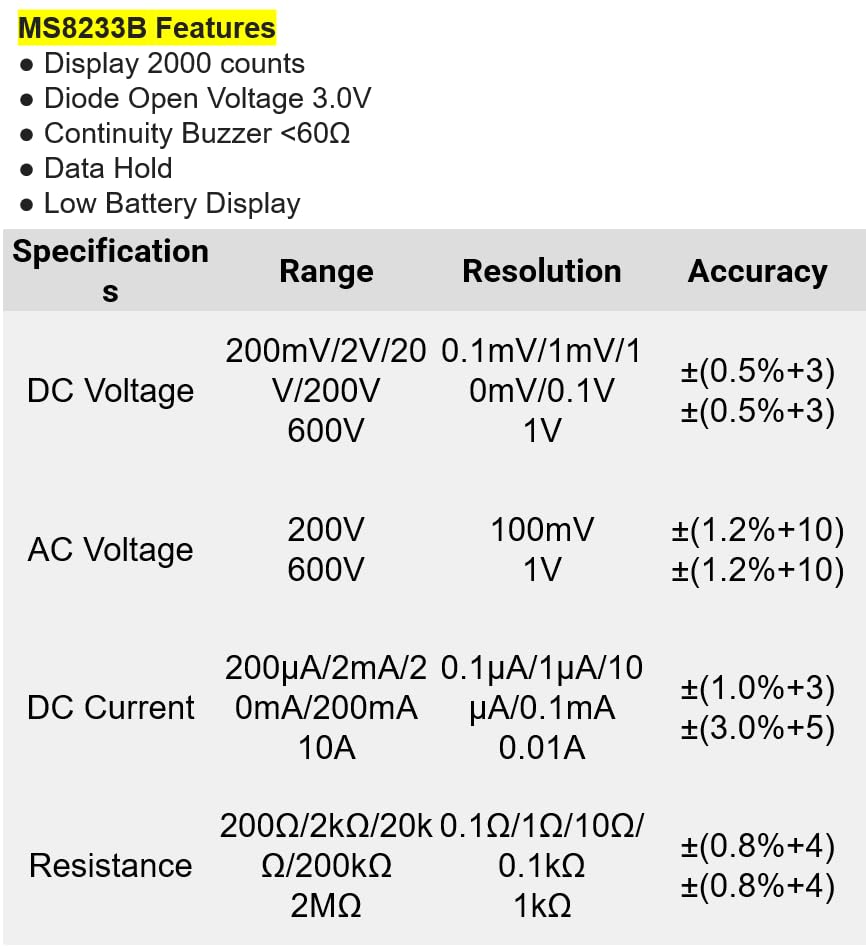
Mynd 8.1: Detailed specifications for the Mastech MS8233B, including ranges, resolutions, and accuracies for various measurements.
| Forskrift | Gildi |
|---|---|
| Skjár | 2000 talningar |
| Díóða opið rúmmáltage | 3.0V |
| Samfelld suðari | <60Ω |
| Gagnahald | Já |
| Skjár með litla rafhlöðu | Já |
| DC binditage Svið | 200mV, 2V, 20V, 200V, 600V |
| AC Voltage Svið | 200V, 600V |
| DC núverandi svið | 200µA, 2mA, 20mA, 200mA, 10A |
| Viðnámssvið | 200Ω, 2kΩ, 20kΩ, 200kΩ, 2MΩ |
| Öryggiseinkunn | CAT III 600V |
| Aflgjafi | 2 x LR44 Batteries (included) |
| Vörumál | 20 x 15 x 25 cm |
| Þyngd hlutar | 1 kíló |
| Framleiðandi | MASTECH |
| Tegundarnúmer vöru | YQ-MS8233B |
| Upprunaland | Taívan |

Mynd 8.2: A comparison table showing features across various Mastech digital multimeter models, including the MS8233B.
9. Ábyrgð og stuðningur
For warranty information, technical support, or service inquiries, please refer to the documentation provided with your purchase or contact your retailer. Keep your purchase receipt as proof of purchase for any warranty claims.


