1. Inngangur
Welcome to the user manual for the GekoGear Orbit C110 7" Infotainment Display. This device integrates a high-definition display with advanced dash cam and backup camera functionalities, designed to enhance your driving experience and safety. Please read this manual thoroughly before operating the device to ensure proper installation and usage.
2. Helstu eiginleikar
- 7-Inch IPS Touchscreen: A vibrant 7-inch IPS display provides clear visuals and intuitive touch control for all functions.
- Þráðlaus Apple CarPlay og Android Auto: Seamlessly integrate your smartphone for navigation, music, calls, and more, wirelessly.
- Front and Rear 1080p Dashcams: Capture high-definition video recordings from both the front and rear of your vehicle, providing comprehensive coverage for security and evidence.
- Backup Camera with Reverse Assist: The included backup camera displays a clear view of the rear, complete with guidelines for safe and easy parking.
- Margir uppsetningarvalkostir: Flexible installation with options for dashboard or windshield mounting using an adhesive pad or suction cup.
3. Innihald pakka
Vinsamlegast staðfestu að allir hlutir séu í pakkanum þínum:
- GekoGear Orbit C110 Infotainment Display
- Front Dash Camera (integrated)
- Rear Backup Camera
- Rafmagnssnúra
- Adhesive Pad for mounting
- Sogskálarfesting
- Notendahandbók (þetta skjal)
4. Uppsetning og uppsetning
4.1 Val á uppsetningarstað
Select a location on your dashboard or windshield that does not obstruct your view of the road or interfere with airbag deployment. Ensure the chosen spot allows for easy access to the touchscreen.

Figure 4.1: Multiple mounting options for the Orbit C110, including an adhesive pad for dashboard placement and a suction cup for windshield mounting.
4.2 Setja upp aðaleininguna
- Clean the chosen mounting surface thoroughly to ensure proper adhesion.
- Attach the adhesive pad to the base of the main unit's stand, or secure the suction cup mount to the windshield.
- Press the unit firmly onto the prepared surface.
4.3 Tenging bakmyndavélarinnar
The rear camera provides a view of the area behind your vehicle, especially useful for parking. It typically connects to the main unit via a cable and can be mounted near the license plate or on the rear window.

Figure 4.2: The backup camera view displayed on the Orbit C110, showing parking guidelines for assistance.
4.4 Rafmagnstenging
Connect the provided power cable to the Orbit C110 and then to your vehicle's 12V power outlet (cigarette lighter socket). Ensure the cable is routed safely and does not interfere with driving controls.
5. Notkunarleiðbeiningar
5.1 Kveikt/slökkt
The device will typically power on automatically when your vehicle starts. To manually power off, press and hold the power button located on the side of the unit.
5.2 Að sigla um snertiskjáviðmótið
The 7-inch IPS touchscreen allows for intuitive control. Tap icons to select applications, swipe to navigate menus, and pinch-to-zoom on maps (where applicable).

Figure 5.1: Interacting with the 7-inch IPS touchscreen for navigation and other functions.
5.3 Þráðlaus Apple CarPlay og Android Auto
Til að tengja snjallsímann þráðlaust:
- Gakktu úr skugga um að kveikt sé á Bluetooth og Wi-Fi í snjallsímanum þínum.
- On the Orbit C110, select the "CarPlay" or "Android Auto" icon.
- Fylgdu leiðbeiningunum á skjánum til að para tækið þitt.

Figure 5.2: The main interface of the Orbit C110, highlighting connectivity options like Apple CarPlay and Android Auto.
5.4 Dash Cam Operation
The integrated front and rear dashcams automatically begin recording when the device powers on. Recordings are saved to a microSD card (not included). Ensure a compatible microSD card is inserted for continuous recording.

Figure 5.3: The dual-channel display of the Orbit C110, showing simultaneous views from the front and rear dash cameras.
5.5 Backup Camera Activation
Þegar bíllinn er settur í bakkgír skiptir skjárinn sjálfkrafa yfir í bakkmyndavélina. view, showing real-time footage and dynamic parking guidelines.
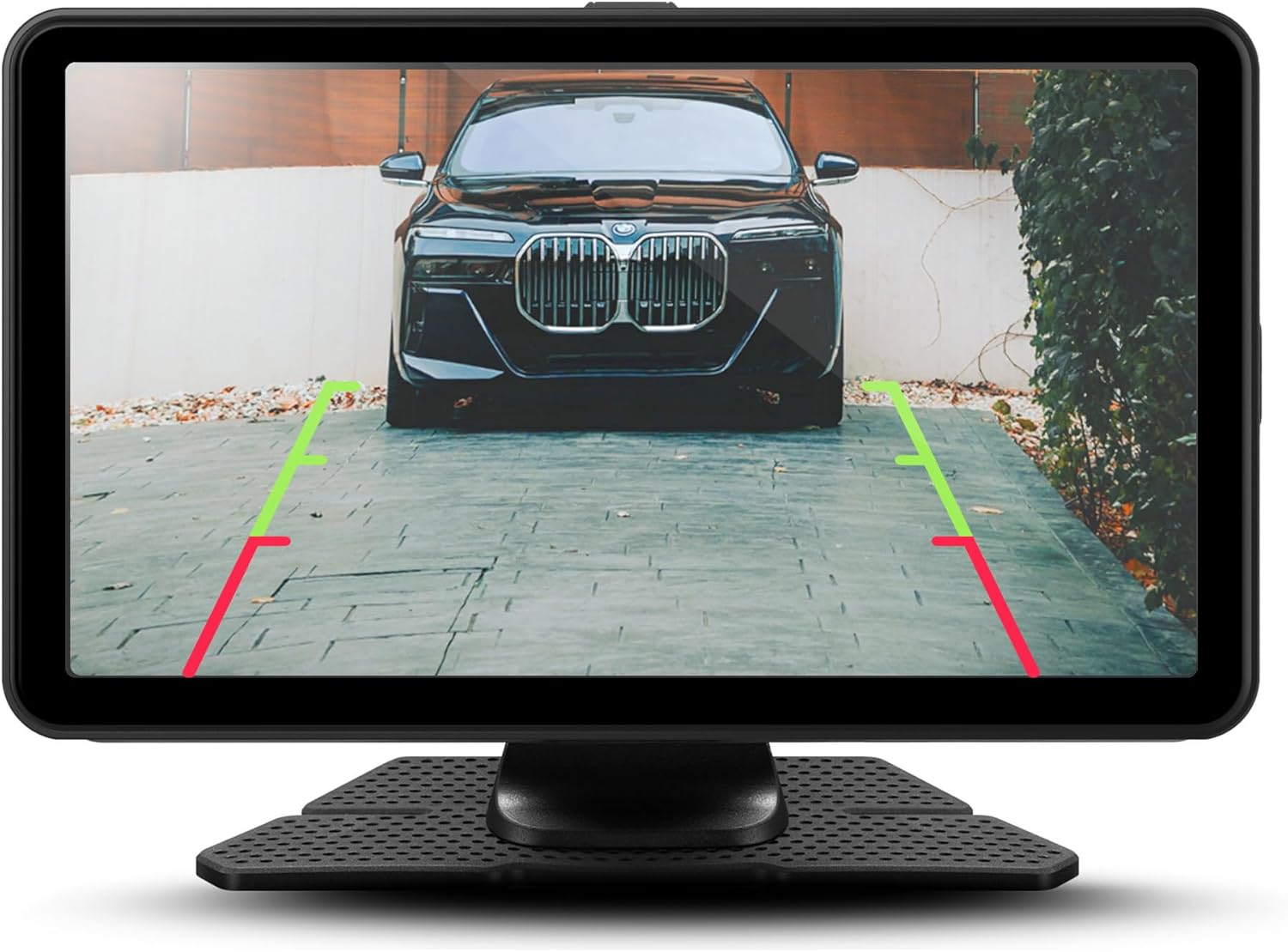
Mynd 5.4: Ítarleg view of the backup camera feed on the Orbit C110, assisting with precise parking.
6. Viðhald
- Að þrífa skjáinn: Notið mjúkan, lólausan klút til að þrífa snertiskjáinn. Notið ekki slípiefni eða leysiefni.
- MicroSD kort: Periodically format the microSD card (at least once a month) to ensure optimal recording performance and prevent data corruption. Back up any important footage áður en það er formatað.
- Myndavélalinsur: Keep the front and rear camera lenses clean from dust and smudges for clear video quality.
7. Bilanagreining
| Vandamál | Möguleg orsök | Lausn |
|---|---|---|
| Ekki kveikir á tækinu. | Engin rafmagnstenging eða biluð rafmagnssnúra. | Check power cable connection to the device and vehicle's 12V outlet. Ensure the vehicle's ignition is on. |
| Mælaborðsmyndavélin tekur ekki upp. | No microSD card, full microSD card, or corrupted card. | Insert a compatible microSD card. Format the card. Replace the card if corrupted. |
| Þráðlaus CarPlay/Android Auto tengist ekki. | Bluetooth/Wi-Fi off on phone, incorrect pairing, or software glitch. | Ensure Bluetooth and Wi-Fi are on. Re-pair the device. Restart both the Orbit C110 and your smartphone. |
| Bakkmyndavélin sýnir ekki. | Rear camera cable disconnected or faulty camera. | Check the connection of the rear camera cable to the main unit. Ensure the vehicle is in reverse. |
8. Tæknilýsing
| Eiginleiki | Smáatriði |
|---|---|
| Fyrirmynd | Orbit C110 |
| Skjárstærð | 7 tommur |
| Skjár Tegund | IPS LCD Touchscreen |
| Dash Cam Resolution | 1080p (framan og aftan) |
| Tengingar | Þráðlaust Apple CarPlay, þráðlaust Android Auto |
| Mál (vara) | 7 x 1.5 x 4.5 tommur |
| Þyngd hlutar | 3.45 pund |
| Framleiðandi | Adesso, Inc. |
9. Ábyrgð og stuðningur
For warranty information and technical support, please refer to the official myGEKOgear webvefsíðu eða hafðu samband við þjónustuver þeirra beint. Geymdu kaupkvittunina sem sönnun fyrir kaup vegna ábyrgðarkröfu.
Opinbert vörumyndband:
Myndband 9.1: Opinbert vörusýningarmyndbandasing the features and functionality of the myGEKOgear ORBIT C110 7-inch Infotainment Display with Dash Cam and Backup Cam.


