Inngangur
This manual provides detailed instructions for the Keychron K10 Max Wireless Custom Mechanical Keyboard. It covers initial setup, operational procedures, maintenance guidelines, troubleshooting tips, and product specifications. Please read this manual thoroughly to ensure proper use and optimal performance of your keyboard.
Innihald pakka
Gakktu úr skugga um að allir hlutir séu til staðar í pakkanum þínum:
- Keychron K10 Max þráðlaust sérsniðið vélrænt lyklaborð
- Gerð-A til Type-C kapall
- Tegund A 2.4 GHz móttakari
- Keycap Puller
- Hex Key & Screwdriver
- Viðbótar Windows lyklaborð

Image: The Keychron K10 Max keyboard displayed with its accessories, including the USB-C cable, 2.4GHz receiver, keycap puller, hex key, screwdriver, and extra keycaps.
Uppsetning
1. Upphafsuppsetning
Before first use, it is recommended to fully charge the keyboard using the provided Type-A to Type-C cable. Connect the USB-C end to the keyboard and the USB-A end to a power source (e.g., computer USB port, USB wall adapter).
2. Tengistillingar
The K10 Max supports three connectivity options: 2.4 GHz wireless, Bluetooth 5.1, and wired USB-C.

Image: The Keychron K10 Max keyboard on a desk, illustrating its three connectivity options: USB Wired, 2.4GHz, and Bluetooth 5.1, connecting to a monitor, tablet, and smartphone.
2.1. Þráðlaus 2.4 GHz tenging
- Locate the 2.4 GHz receiver (USB-A dongle) included in the package.
- Plug the 2.4 GHz receiver into an available USB-A port on your computer.
- On the keyboard, slide the mode switch (located on the back or side) to the "2.4G" position.
- The keyboard should automatically connect. The 2.4 GHz connection provides a 1000 Hz polling rate for responsive performance.
2.2. Bluetooth 5.1 tenging
- On the keyboard, slide the mode switch to the "BT" (Bluetooth) position.
- Ýttu á og haltu inni fn+1 (eða fn+2 / fn+3) key combination for 4 seconds until the backlight flashes rapidly. This indicates the keyboard is in pairing mode.
- Virkjaðu Bluetooth í tækinu þínu (tölvu, spjaldtölvu, snjallsíma) og leitaðu að nýjum tækjum.
- Select "Keychron K10 Max" from the list of available devices to pair.
- The keyboard can store up to three Bluetooth devices. Switch between them by pressing fn+1, fn+2, eða fn+3.
2.3. USB-C tenging með snúru
- Connect the provided Type-A to Type-C cable to the keyboard's USB-C port and to a USB-A port on your computer.
- Slide the mode switch on the keyboard to the "Cable" position.
- The keyboard will function as a wired device. This mode also supports a 1000 Hz polling rate.
3. Operating System Toggle
The K10 Max is compatible with both macOS and Windows/Linux operating systems. Use the OS toggle switch located on the back or side of the keyboard to select the appropriate layout.

Image: A close-up of the Keychron K10 Max keyboard's side, showing the physical toggle switch to select between Windows/Android and macOS modes, along with the connectivity switch for Cable or Bluetooth.
- Mac/iOS: Use this setting for Apple devices. The keyboard includes Mac multimedia keys and specific keycaps.
- Win/Android: Use this setting for Windows and Android devices. Additional Windows keycaps are provided for customization.
Notkunarleiðbeiningar
1. Key Remapping and Customization (QMK Firmware & Keychron Launcher)
The K10 Max is powered by QMK open-source firmware, allowing for extensive customization of key functions, macros, and lighting effects. The Keychron Launcher web application provides an intuitive interface for these customizations.
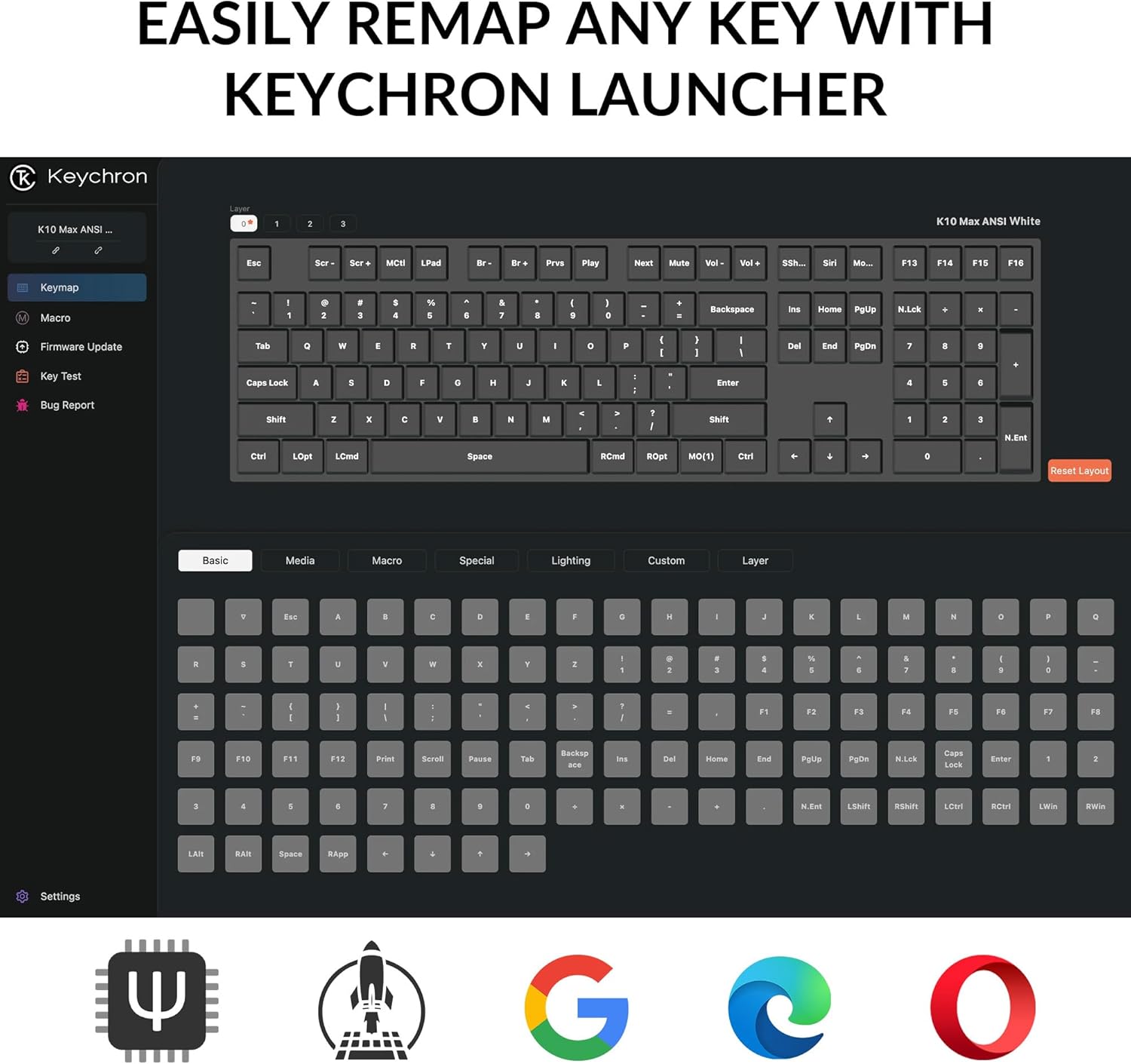
Image: A screenshot of the Keychron Launcher web application, showing the graphical interface for remapping keys and configuring keyboard settings.
- Access the Keychron Launcher web app through your web vafra.
- Connect your keyboard to your computer via the USB-C cable.
- Follow the on-screen instructions in the Launcher to remap keys, create macros, and adjust lighting.
- Save your changes to the keyboard's firmware.
2. Baklýsingastjórnun
The keyboard features a south-facing white LED backlight. Use the following key combinations to control the backlight:
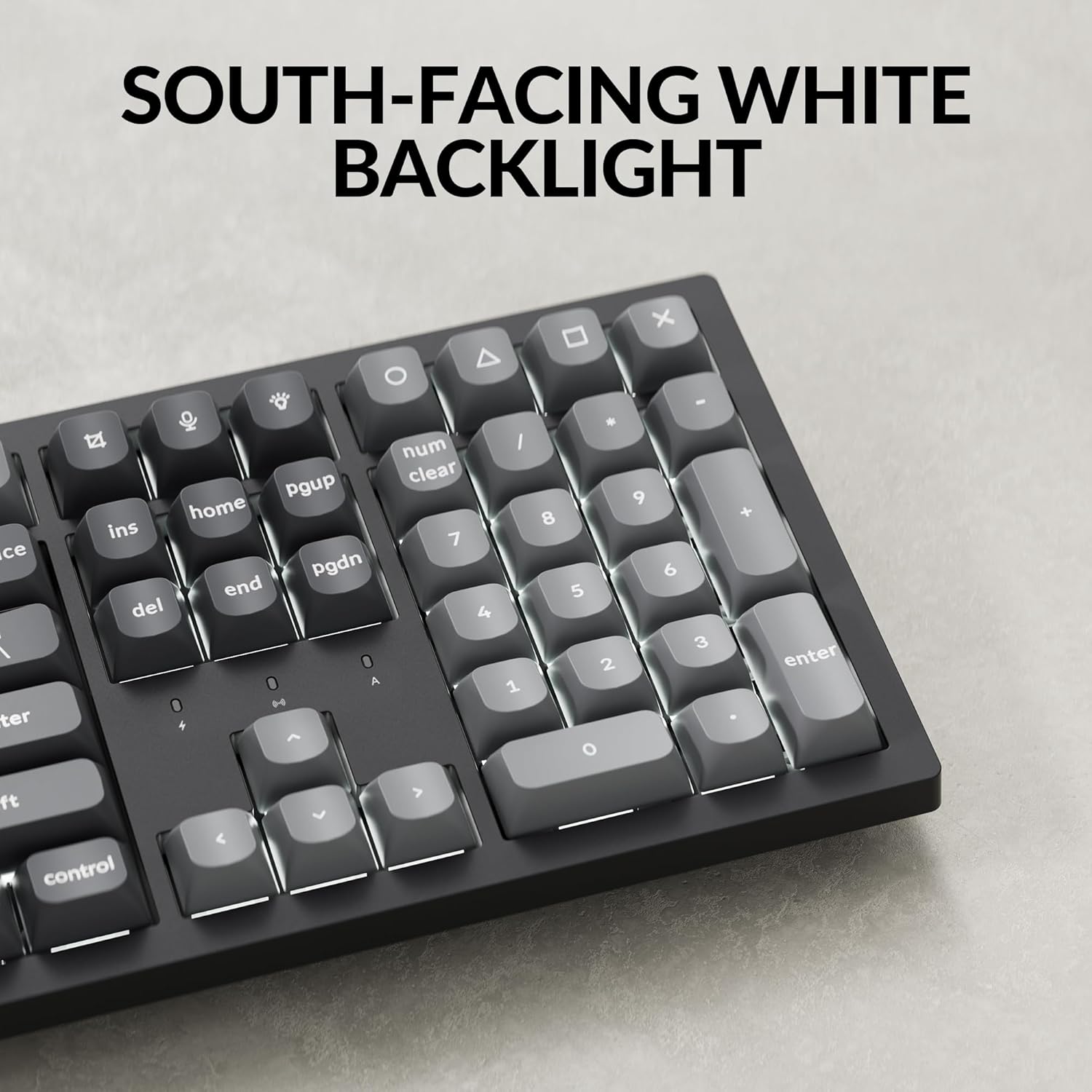
Mynd: Nærmynd view of the Keychron K10 Max keyboard's number pad and arrow keys, showcasing the south-facing white LED backlight illuminating the key legends.
- Fn + Light Key (usually F5 or a dedicated key): Cycle through backlight effects.
- Fn + Arrow Up/Down: Stilltu birtustig baklýsingu.
- Fn + Arrow Left/Right: Adjust backlight effect speed (if applicable).
3. Rafhlöðustjórnun
The K10 Max is equipped with a 4000 mAh rechargeable battery. To maximize battery life:
- Turn off the backlight when not needed.
- Use the wired connection when possible to conserve battery.
- The keyboard can last up to 190 hours with the backlight off and approximately 100 hours at the lowest brightness setting.
- A low battery indicator (usually a flashing LED) will notify you when charging is required.
Viðhald
1. Þrif
Regluleg þrif hjálpa til við að viðhalda útliti og virkni lyklaborðsins.
- Aftengdu lyklaborðið frá öllum aflgjöfum og tækjum áður en þú þrífur það.
- Notaðu mjúkan, lólausan klút örlítið dampened with water or a mild cleaning solution to wipe the keycaps and frame. Avoid excessive moisture.
- Notið þrýstiloft eða lítinn bursta til að fjarlægja ryk og rusl á milli lyklaborðanna.
- The PBT keycaps are durable and oil-resistant, making them easy to clean.
2. Keycap Removal
To remove keycaps for cleaning or replacement:

Image: A close-up of the Keychron K10 Max keyboard, showing several double-shot PBT keycaps removed, revealing their construction and the underlying switches.
- Notaðu meðfylgjandi lyklakipputrekkjara.
- Gently hook the puller onto the sides of the keycap.
- Pull straight up with even pressure to remove the keycap. Avoid twisting or excessive force to prevent damage to the switch.
- Þegar þú festir lyklaborðið aftur skaltu samstilla það við rofastilkinn og þrýsta fast niður þar til það smellpassar.
Úrræðaleit
- Lyklaborðið svarar ekki:
- Gakktu úr skugga um að lyklaborðið sé hlaðið.
- Check the connectivity mode switch (2.4G, BT, Cable) is set correctly.
- For 2.4 GHz, ensure the receiver is securely plugged in.
- For Bluetooth, re-pair the device or try a different Bluetooth slot (Fn+1/2/3).
- For wired, ensure the USB-C cable is properly connected to both the keyboard and the computer.
- Prófaðu að tengja við aðra USB tengi á tölvunni þinni.
- Lyklar skrá sig ekki eða eru tvíslegnir:
- Hreinsið í kringum viðkomandi lyklaborð til að fjarlægja allt rusl.
- Gakktu úr skugga um að lyklakippan sé rétt sett á rofann.
- If using wireless, ensure there is no interference and the keyboard is within range.
- Consider updating the keyboard firmware via the Keychron Launcher.
- Baklýsing virkar ekki:
- Gakktu úr skugga um að rafhlaðan í lyklaborðinu sé nægilega hlaðin.
- Stilla birtustig með því að nota Fn + Ör upp.
- Fletta á milli baklýsingaráhrifa með því að nota Fn + Light Key.
- OS layout issues (e.g., Alt/Cmd keys swapped):
- Verify the OS toggle switch on the keyboard is set to the correct operating system (Mac/iOS or Win/Android).
Tæknilýsing
| Nafn líkans | K10 hámark |
| Gerðarnúmer | K10M-A3 |
| Skipulag | 100% Full-sized, 108 Keys |
| Tengingar | 2.4 GHz Wireless, Bluetooth 5.1, USB-C Wired |
| Atkvæðagreiðsluhlutfall | 1000 Hz (2.4 GHz og með snúru), 90 Hz (Bluetooth) |
| Lyklakippur | Double-shot PBT (non-shine-through) |
| Baklýsing | South-facing White LED |
| Rofar | Keychron Super Mechanical Switch (Super Red Switch) |
| Stöðugleikar | Screw-in PCB Stabilizers |
| Firmware | QMK (Open-source), Keychron Launcher compatible |
| Rafhlöðugeta | 4000 mAh |
| Rafhlöðuending | Up to 190 hours (backlight off), approx. 100 hours (lowest brightness) |
| Samhæft stýrikerfi | macOS, Windows, Linux |
| Efni ramma | ABS |
| Vörumál | 13.94 x 4.89 x 0.64 tommur (447.37 x 139.82 mm) |
| Þyngd hlutar | 1.1 pounds (1530 g ± 10 g) |
| N-Key Rollover (NKRO) | Já |
Ábyrgð og stuðningur
Fyrir upplýsingar um ábyrgð og tæknilega aðstoð, vinsamlegast vísið til opinberu Keychron vefsíðna. website or contact Keychron customer service. Details regarding warranty periods and service procedures are available through these channels.
Opinber lyklakippur Websíða: www.keychron.com


