1. Mikilvægar öryggisleiðbeiningar
Vinsamlegast lesið þessa handbók vandlega áður en tækið er notað og geymið hana til síðari viðmiðunar. Ef þessum leiðbeiningum er ekki fylgt getur það valdið raflosti, eldsvoða eða alvarlegum meiðslum.
- Tengdu rakatækið alltaf við jarðtengda rafmagnsinnstungu.
- Ekki nota tækið með skemmda rafmagnssnúru eða kló.
- Haldið tækinu frá vatni og öðrum vökvum. Ekki sökkva því í vatn.
- Tryggið góða loftræstingu í kringum tækið. Ekki loka fyrir loftinntak eða úttak.
- Aftengdu rakatækið áður en þú þrífur það eða framkvæmir viðhald.
- Þetta tæki er ekki ætlað til notkunar af einstaklingum (þar á meðal börnum) með skerta líkamlega, skynræna eða andlega getu, eða skort á reynslu og þekkingu, nema þeir hafi fengið eftirlit eða leiðbeiningar um notkun tækisins af einstaklingi sem ber ábyrgð á öryggi þeirra.
- Notið ekki tækið á svæðum þar sem eldfimar lofttegundir eða gufur eru til staðar.
- Operate the unit within the specified temperature range of 5-32 °C.
2. Vöru lokiðview
The SENCOR SDH 3028WH is a portable smart dehumidifier designed to efficiently remove excess moisture from your indoor environment. It features Wi-Fi connectivity for app control, multiple operating modes, and a large water tank capacity.
Helstu eiginleikar:
- Dehumidification Capacity: 30 liters per day (at 30 °C, 80% Relative Humidity).
- Water Tank Capacity: 6 liters.
- Control: Wi-Fi enabled with Sencor HOME app (iOS and Android).
- Dehumidification Settings: Adjustable from 35% to 85% Relative Humidity, or Continuous operation.
- Operating Modes: Dehumidification, Fan, Laundry Drying.
- Fan Speeds: High and Low.
- Display: Precise humidity indication.
- Timer: 0-24 hours.
- Safety Features: Full tank indicator, Child safety lock, Automatic defrost function, Automatic restart function.
- Convenience: Removable and washable filter, Integrated handles and wheels for easy portability, 1-meter drain hose for continuous drainage.
- Quiet Operation: Noise level 43/41 dB.
- Suitable Room Size: 30 to 89 m².
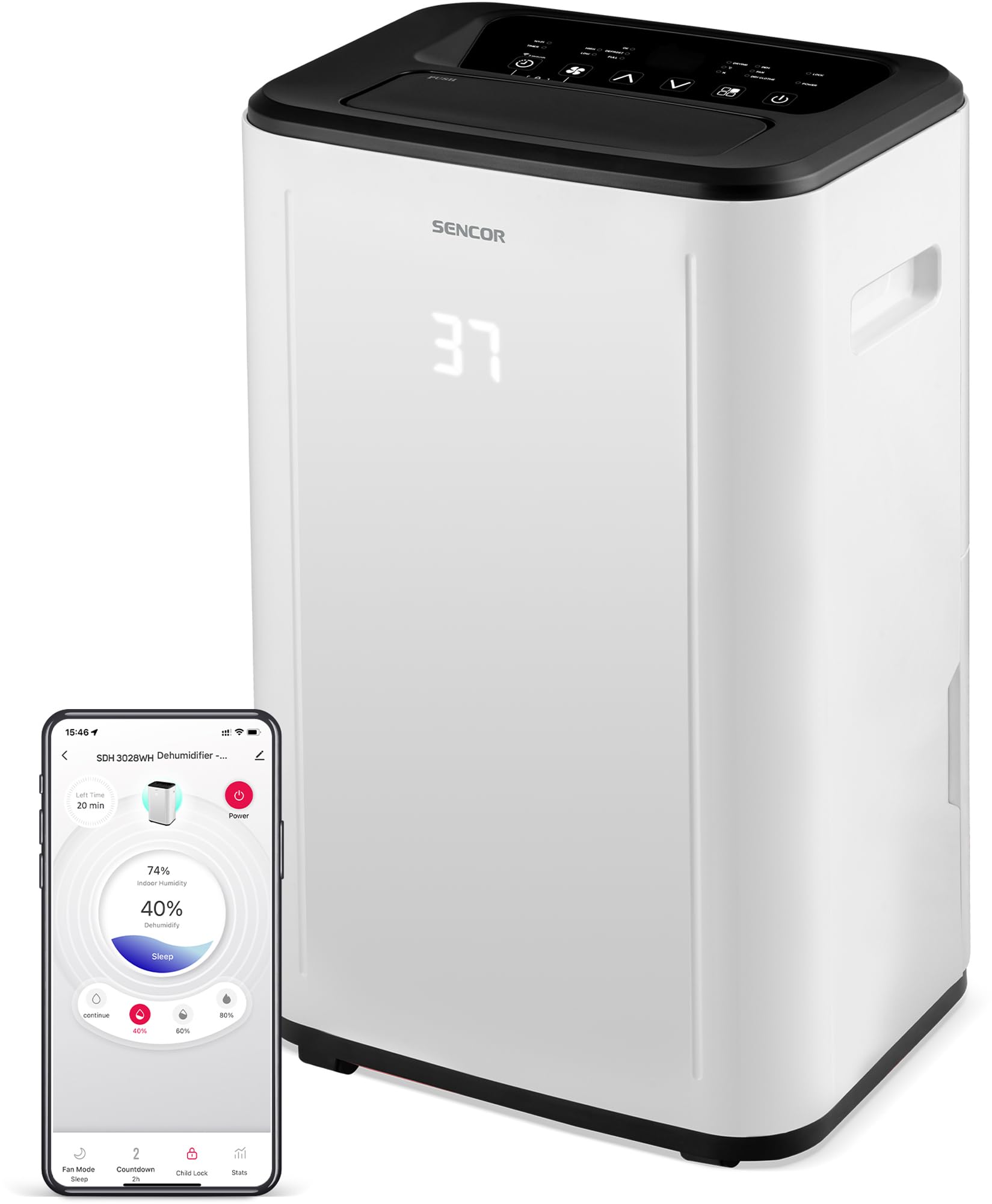
Mynd 1: Framan view of the SENCOR SDH 3028WH Portable Dehumidifier.
3. Innihald pakka
Þegar þú pakkar upp skaltu ganga úr skugga um að allir hlutir séu til staðar og í góðu ástandi:
- SENCOR SDH 3028WH Portable Dehumidifier
- Leiðbeiningarhandbók
- Drain Hose (1 meter)

Figure 2: Packaging of the SENCOR SDH 3028WH, illustrating key features.
4. Uppsetning
4.1 Staðsetning
Place the dehumidifier on a firm, level surface in the area where dehumidification is desired. Ensure there is at least 20 cm (8 inches) of clear space around the air inlets and outlets for optimal airflow.
4.2 Rafmagnstenging
Plug the power cord into a suitable grounded electrical outlet (220-240V, 50Hz). The unit will enter standby mode.
4.3 Wi-Fi Setup (Sencor HOME App)
- Download the Sencor HOME app from the App Store (iOS) or Google Play Store (Android).
- Búðu til reikning eða skráðu þig inn.
- Follow the in-app instructions to add your SDH 3028WH dehumidifier. This typically involves putting the dehumidifier into pairing mode (refer to the app or device display for specific instructions) and connecting it to your home Wi-Fi network.
- Once connected, you can control the dehumidifier remotely and monitor its status via the app.
5. Notkunarleiðbeiningar
5.1 Stjórnborð
The control panel on top of the unit allows you to manage all functions. The digital display shows the current humidity level or timer settings.
5.2 Kveikt/slökkt
Ýttu á Kraftur hnappinn til að kveikja eða slökkva á tækinu.
5.3 Stilling á æskilegum rakastigi
- Ýttu á Raki hnappinn.
- Notaðu Upp/niður arrows to adjust the desired humidity level between 35% and 85% RH in 5% increments.
- Tækið mun virka þar til stillt rakastig er náð og síðan kveikja og slekka á sér til að viðhalda því.
- To enable continuous dehumidification, select the 'Continuous' setting (usually indicated by 'CO' or similar on the display).
5.4 Rekstrarstillingar
Ýttu á Mode hnappur til að fletta á milli tiltækra stillinga:
- Rakahreinsunarstilling: Standard operation to remove moisture.
- Aðdáandi háttur: Hreinsar loftið án þess að raka það.
- Þurrkunarstilling fyrir þvottahús: Optimized for drying clothes faster by continuously running the fan and dehumidifier.
5.5 viftuhraði
Ýttu á Viftuhraði button to switch between High and Low fan speeds.
5.6 Tímamæliraðgerð
- Ýttu á Tímamælir hnappinn.
- Notaðu Upp/niður arrows to set the desired operating duration from 0 to 24 hours.
- The unit will automatically turn off or on after the set time.
5.7 Barnalás
Til að virkja barnalæsinguna skaltu halda inni Barnalás button (or a combination of buttons as indicated on the control panel) for a few seconds. This prevents accidental changes to settings. Repeat the action to deactivate.
6. Viðhald
Reglulegt viðhald tryggir bestu mögulegu afköst og lengir líftíma rakatækisins.
6.1 Að tæma vatnstankinn
- When the water tank is full, the unit will stop operating, and the 'Full Tank' indicator will illuminate.
- Carefully pull out the water tank from the back or side of the unit.
- Tæmið safnaða vatnið.
- Reinsert the empty tank firmly into its position. The unit will resume operation.
6.2 Stöðug frárennsli
For continuous operation without needing to empty the tank, you can use the included drain hose.
- Locate the continuous drain outlet on the back of the dehumidifier.
- Fjarlægið gúmmítappann (ef hann er til staðar).
- Connect one end of the 1-meter drain hose to the outlet.
- Direct the other end of the hose to a suitable drain or larger container, ensuring it is lower than the dehumidifier's drain outlet for gravity flow.
6.3 Þrif á loftsíu
- It is recommended to clean the air filter every two weeks or more frequently depending on usage.
- Slökktu á rakatækinu og taktu það úr sambandi.
- Finndu og fjarlægðu loftsíuna (venjulega að aftan eða á hliðinni).
- Þvoið síuna með volgu vatni og mildu þvottaefni. Skolið vandlega.
- Leyfðu síunni að loftþorna alveg áður en hún er sett aftur í tækið. Ekki nota þurrkara eða beinan hita.
6.4 Hreinsun að utan
Þurrkaðu ytra byrði einingarinnar með mjúku, damp klút. Notið ekki sterk efni, slípiefni eða leysiefni.
7. Bilanagreining
Áður en þú hefur samband við þjónustuver viðskiptavina skaltu skoða eftirfarandi algeng vandamál og lausnir:
| Vandamál | Möguleg orsök | Lausn |
|---|---|---|
| Eining kviknar ekki. | Engin aflgjafi. Rafmagnssnúra ekki rétt tengd. | Athugaðu hvort tækið sé tengt við virkan innstungu. Gakktu úr skugga um að rafmagnssnúran sé tryggilega tengd. |
| Rakaþurrka safnar ekki vatni. | Loftsía er stífluð. Herbergishitastigið er of lágt (undir 5°C). Stilling rakastigs er of há. Vatnstankurinn er ekki rétt settur í. | Hreinsaðu loftsíuna. Ensure room temperature is within 5-32°C. Lækkaðu rakastigið sem þú vilt. Reinsert the water tank correctly. |
| Unit is noisy or vibrating excessively. | Unit is on an uneven surface. Loftsía er stífluð. | Settu eininguna á slétt, stöðugt yfirborð. Hreinsaðu loftsíuna. |
| "Full Tank" indicator is on, but tank is not full. | Vatnstankurinn er ekki rétt settur. Float switch is stuck. | Fjarlægið vatnstankinn og setjið hann aftur fast á sinn stað. Check the float switch inside the tank for obstructions. |
| Vandamál með Wi-Fi tengingu. | Rangt Wi-Fi lykilorð. Rakaþurrka of langt frá leiðaranum. Vandamál með leiðara. | Staðfestu Wi-Fi lykilorð. Move dehumidifier closer to the router. Restart your Wi-Fi router. Re-attempt pairing process. |
8. Tæknilýsing
| Eiginleiki | Smáatriði |
|---|---|
| Vörumerki | SENCOR |
| Gerðarnúmer | SDH 3028WH |
| Rafmagn getu | 30 Liters/day (at 30 °C, 80% RH) |
| Stærð vatnstanks | 6 lítrar |
| Orkunotkun | 420 Watt |
| Rekstrarhitasvið | 5-32 °C |
| Ráðlögð herbergisstærð | 30-89 m² |
| Hávaðastig | 43/41 dB |
| Mál (L x B x H) | 26 x 33.5 x 53 cm |
| Þyngd | 15.3 kg |
| Efni | Plast |
| Sérstakir eiginleikar | Digital display, Automatic defrost, Timer, Portable, Wi-Fi control, Child lock, Auto restart |
| Lengd frárennslislöngu | 1 metri |
9. Ábyrgð og stuðningur
SENCOR products are manufactured to the highest quality standards. For warranty information, please refer to the warranty card included with your product or visit the official SENCOR website. For technical support or service inquiries, please contact SENCOR customer service through their official channels.
Varahlutaframboð: 5 ár.


