1. Inngangur
This user manual provides detailed instructions for the Baseus 17-in-1 Docking Station (Model: B0D78WFLST). This versatile docking station is designed to expand the connectivity of your laptop or compatible device, offering multiple ports for display, data transfer, networking, and power delivery. Please read this manual thoroughly before using the product to ensure proper operation and to maximize its capabilities.
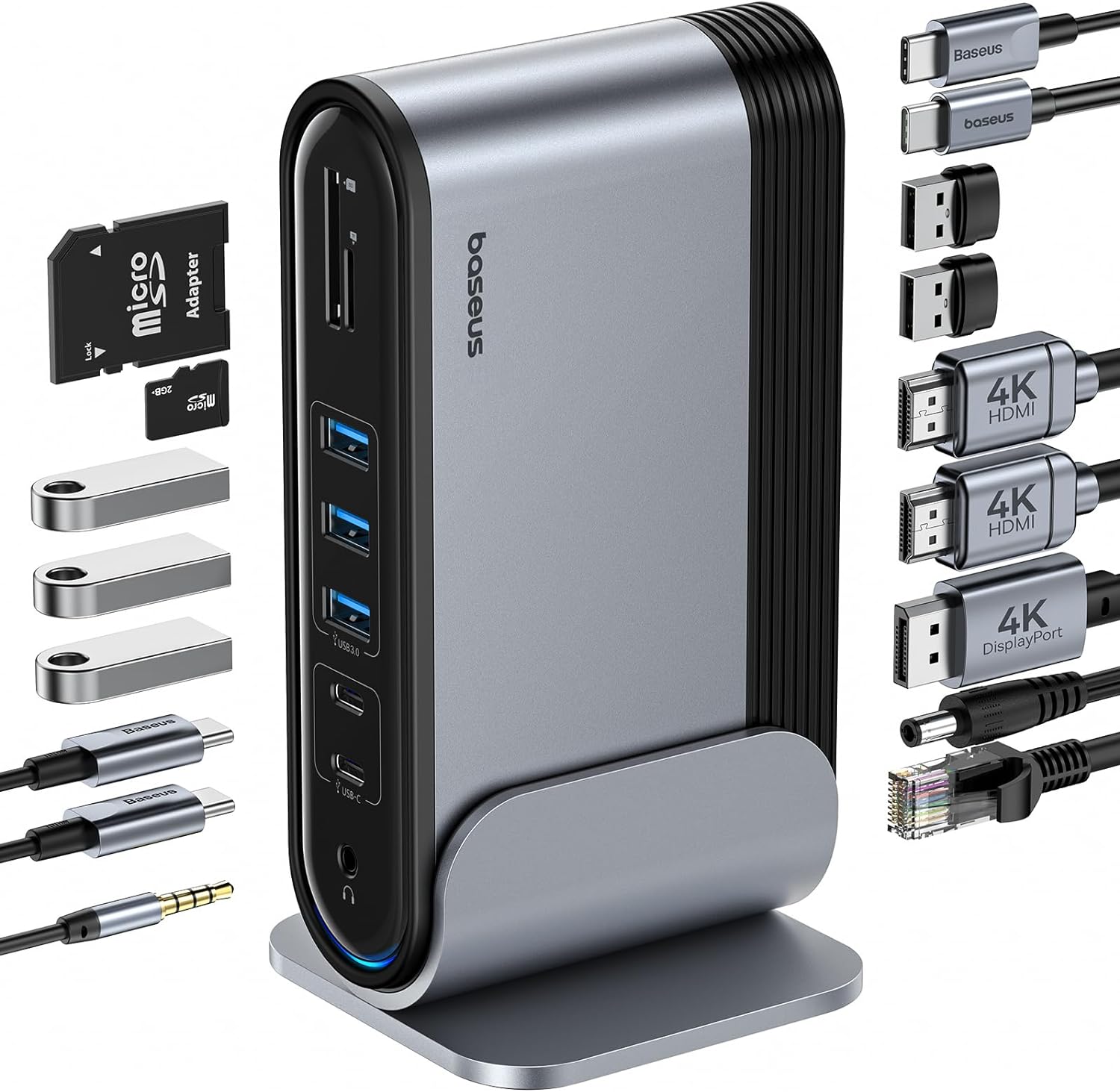
Figure 1: Baseus 17-in-1 Docking Station and included accessories.
2. Helstu eiginleikar
The Baseus 17-in-1 Docking Station offers comprehensive connectivity solutions:
- 17-í-1 tengistækkun: Integrates a wide array of ports for diverse connectivity needs.
- Triple Monitor Support: Connect up to three external monitors for enhanced productivity.
- Háupplausn skjár: Supports 4K@60Hz resolution for single and dual displays, and 1080P@60Hz for triple displays on Windows systems.
- Hratt gagnaflutningur: Features USB 3.0 ports with 5Gbps transfer speeds and USB 2.0 ports for peripherals.
- 100W aflgjafi: Provides up to 85W power output to charge your laptop (100W input required).
- Gígabit ethernet: Ensures stable and high-speed wired network connection up to 1Gbps.
- SD/TF kortalesari: Convenient access to memory cards with speeds up to 104 MB/s.
- Hljóðtenging: Integrated 3.5mm audio jack for headphones or speakers.
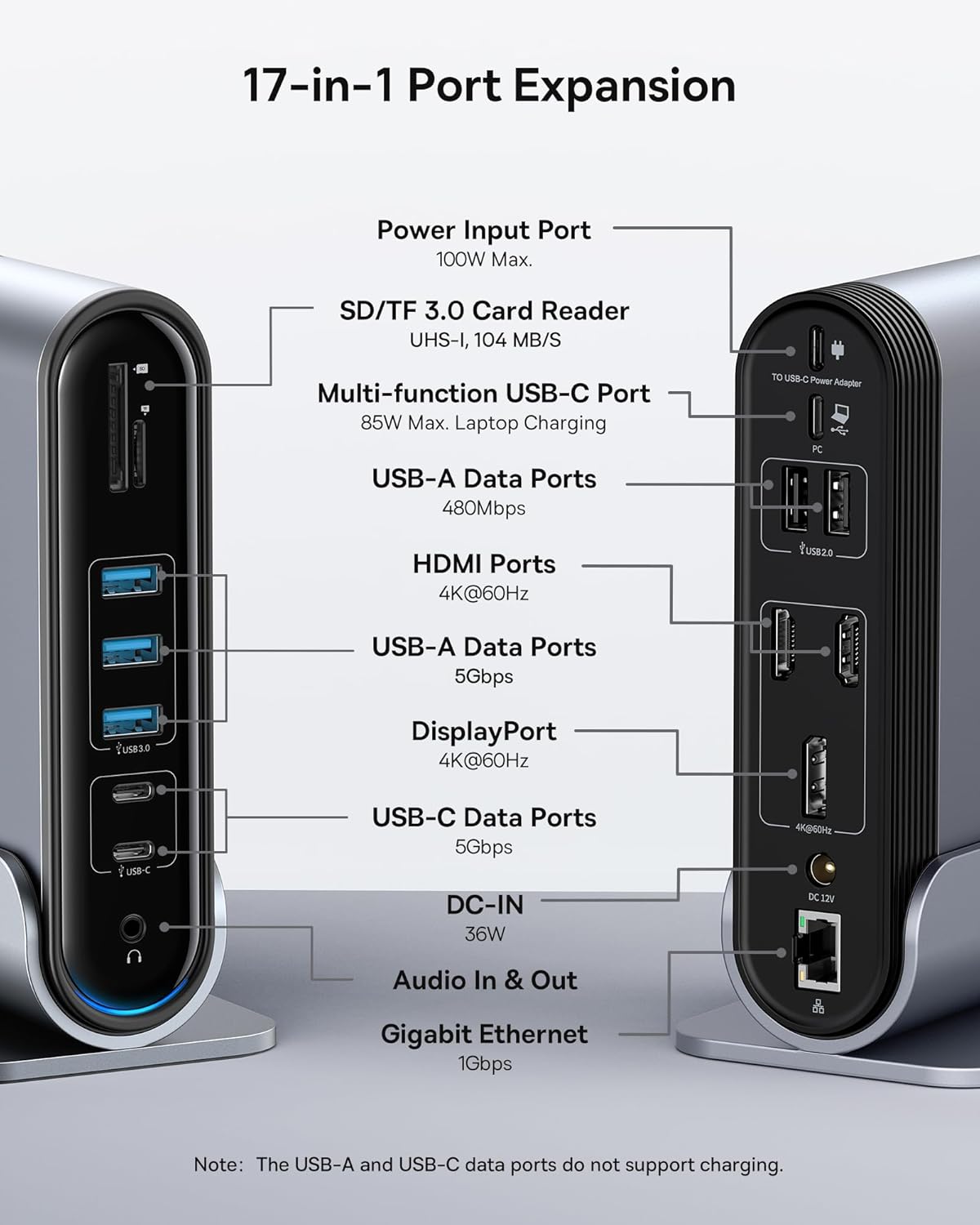
Figure 2: Detailed port layout and specifications of the docking station.
3. Innihald pakka
Vinsamlegast staðfestið að allir hlutir séu í pakkanum:
- Baseus UnionJoy 17-port þriggja skjás tengikví
- Bryggjustandur
- Rafmagns millistykki
- USB-C til USB-C snúru
- US Adapter Plug
- ESB millistykki
- UK Adapter Plug
- Notendahandbók

Mynd 3: Hvað fylgir kassanum.
4. Uppsetningarleiðbeiningar
Follow these steps to set up your Baseus 17-in-1 Docking Station:
- Tengdu rafmagn:
Connect the provided power adapter to the DC-IN port (36W) on the docking station. Use the appropriate regional adapter plug (US, EU, or UK) for your power outlet. For laptop charging, ensure a 100W PD charger (not included) is connected to the Power Input Port (100W Max.) on the docking station.

Figure 4: Power connection for the docking station and laptop charging.
- Tengjast við hýsiltæki:
Use the included USB-C to USB-C cable to connect the docking station's Multi-function USB-C Port (85W Max. Laptop Charging) to your laptop or compatible host device.
- Tengdu skjái:
Connect your external monitors to the HDMI Ports (4K@60Hz) and/or DisplayPort (4K@60Hz) on the docking station using appropriate cables. Refer to the "Operating Instructions" section for display mode configurations.
- Tengja jaðartæki:
Connect your USB devices (keyboard, mouse, external drives, etc.) to the available USB-A Data Ports (5Gbps or 480Mbps) and USB-C Data Ports (5Gbps). Insert SD or TF cards into the respective card reader slots.
- Tengja net (valfrjálst):
For a wired network connection, connect an Ethernet cable from your router/modem to the Gigabit Ethernet port (1Gbps) on the docking station.
- Tengdu hljóð (valfrjálst):
Connect headphones or speakers to the 3.5mm Audio In & Out jack.
5. Notkunarleiðbeiningar
5.1 Sýna stillingar
The docking station supports various display configurations depending on your operating system and the number of connected monitors.
Fyrir Windows kerfi:
- Spegilstilling (A+A+A): Displays the same content on all connected monitors and the laptop screen. Supports 1080P@60Hz.
- Extend Mode (A+B+C): Extends your desktop across multiple monitors, allowing different content on each screen. Supports 1080P@60Hz for triple display.
Fyrir macOS kerfi:
- Spegilstilling (A+A+A): Displays the same content on all connected monitors and the laptop screen. Supports 4K@60Hz.
- Extend Mode (A+B+B): Extends your desktop across external monitors, but macOS typically mirrors content across multiple external displays when using a single MST hub. Supports 4K@60Hz.
- Note: macOS does not support triple extended display (A+B+C) through a single MST hub.

Figure 5: Display mode configurations for Windows and macOS.

Figure 6: Detailed resolution capabilities for various display configurations and DP versions.
5.2 Gagnaflutningur
Tengikvíin býður upp á hraða gagnaflutningsgetu:
- USB 3.0 (5 Gbps): Ideal for external hard drives, SSDs, and other high-bandwidth devices.
- USB 2.0 (480 Mbps): Suitable for keyboards, mice, printers, and other standard peripherals.
- SD/TF kortalesari: Quickly transfer photos and videos from memory cards.

Figure 7: Illustrating super-fast data transfer via the docking station.
5.3 Aflgjafi
The docking station supports Power Delivery (PD) to charge your laptop:
- Connect a 100W PD charger (not included) to the dedicated Power Input Port on the docking station.
- The docking station will then provide up to 85W of power to your connected laptop via the USB-C host connection.
Note: The USB-A and USB-C data ports on the front of the docking station do not support charging.
6. Viðhald og umönnun
To ensure the longevity and optimal performance of your docking station, follow these guidelines:
- Haldið tækinu hreinu með því að þurrka það með mjúkum, þurrum klút. Forðist að nota slípandi hreinsiefni eða leysiefni.
- Ekki láta tengikvíina verða fyrir vatni, raka eða miklum hita.
- Forðist að missa tækið eða láta það verða fyrir miklum höggum.
- Tryggið góða loftræstingu í kringum tengikvíina til að koma í veg fyrir ofhitnun.
- Disconnect all cables when the device is not in use for extended periods.
7. Bilanagreining
If you encounter issues with your Baseus 17-in-1 Docking Station, refer to the following common problems and solutions:
7.1 No Display Output / Flickering Screen
- Athugaðu kapaltengingar: Ensure all HDMI/DisplayPort cables are securely connected to both the docking station and the monitors.
- Verify Host Connection: Confirm the USB-C cable connecting the docking station to your laptop is firmly plugged in.
- Aflgjafi: Make sure the docking station is receiving adequate power from its power adapter.
- Sýna stillingar: Check your computer's display settings (e.g., Windows Display Settings, macOS System Preferences > Displays) to ensure the external monitors are detected and configured correctly (Extend, Mirror).
- Bílstjóri uppfærslur: Gakktu úr skugga um að grafíkreklar og USB-C reklar fartölvunnar séu uppfærðir.
- Samhæfni upplausnar: Verify that the selected resolution and refresh rate are supported by your monitors and the docking station. Refer to the "Multiple Display Modes" table in Section 5.1.
- macOS Triple Display: Remember that macOS does not support triple extended display (A+B+C) through a single MST hub.
7.2 USB Devices Not Working
- Reconnect Device: Unplug and re-plug the USB device from the docking station.
- Prófaðu aðra höfn: Test the USB device in another USB port on the docking station or directly on your laptop to isolate the issue.
- Aflgjafi: Ensure the docking station has sufficient power, especially for power-hungry USB devices.
- Vandamál ökumanns: Check if the USB device requires specific drivers and ensure they are installed on your computer.
7.3 Laptop Not Charging
- 100W PD Charger: Confirm you are using a 100W Power Delivery charger connected to the dedicated Power Input Port on the docking station. The docking station itself does not generate power for your laptop.
- USB-C snúru: Ensure the USB-C cable connecting the docking station to your laptop supports power delivery.
- Fartölvusamhæfi: Verify your laptop supports charging via its USB-C port.
7.4 Vandamál með Ethernet-tengingu
- Kapalathugun: Gakktu úr skugga um að Ethernet-snúran sé vel tengd bæði við tengikvíina og beininn/mótaldið.
- Netstillingar: Athugaðu netstillingar tölvunnar til að ganga úr skugga um að Ethernet-millistykkið sé virkt og rétt stillt.
- Beinir/Módel: Verify your router/modem is functioning properly.
8. Tæknilýsing
| Eiginleiki | Forskrift |
|---|---|
| Fyrirmynd | B0D78WFLST |
| Vörumerki | Baseus |
| Heildarfjöldi tengi | 17 |
| HDMI tengi | 2 (4K við 60Hz) |
| DisplayPort | 1 (4K við 60Hz) |
| USB-A gagnatengi | 7 (3x 5Gbps, 4x 480Mbps) |
| USB-C gagnatengi | 2 (5 Gbps) |
| Aflgjafi (inntak) | 100W Max (via dedicated PD port) |
| Power Output (to Laptop) | 85W Max (via Multi-function USB-C Port) |
| Ethernet tengi | 1 (1Gbps Gigabit Ethernet) |
| Kortalesari | SD/TF (UHS-I, 104 MB/s) |
| Hljóð Jack | 3.5mm Audio In & Out |
| Samhæf tæki | Dell, HP, Mac, Lenovo, Steam Deck, etc. |
| Mál | 9.29 x 8.27 x 2.28 tommur |
| Þyngd hlutar | 1.9 pund |
9. Ábyrgð og stuðningur
Fyrir upplýsingar um ábyrgð og tæknilega aðstoð, vinsamlegast vísið til opinberu Baseus website or contact Baseus customer service directly. Keep your purchase receipt as proof of purchase for warranty claims.
Baseus opinbert Websíða: www.baseus.com
Til að fá frekari aðstoð getur þú einnig haft samband við seljandann í gegnum þann vettvang þar sem þú keyptir vöruna.


