1. Inngangur
This manual provides detailed instructions for the MESWAO 15.6 Inch Android 14 Tablet, model MES-B3. It covers essential information regarding product features, setup, operation, maintenance, and troubleshooting to ensure optimal performance and user experience. Please read this manual thoroughly before using your device.
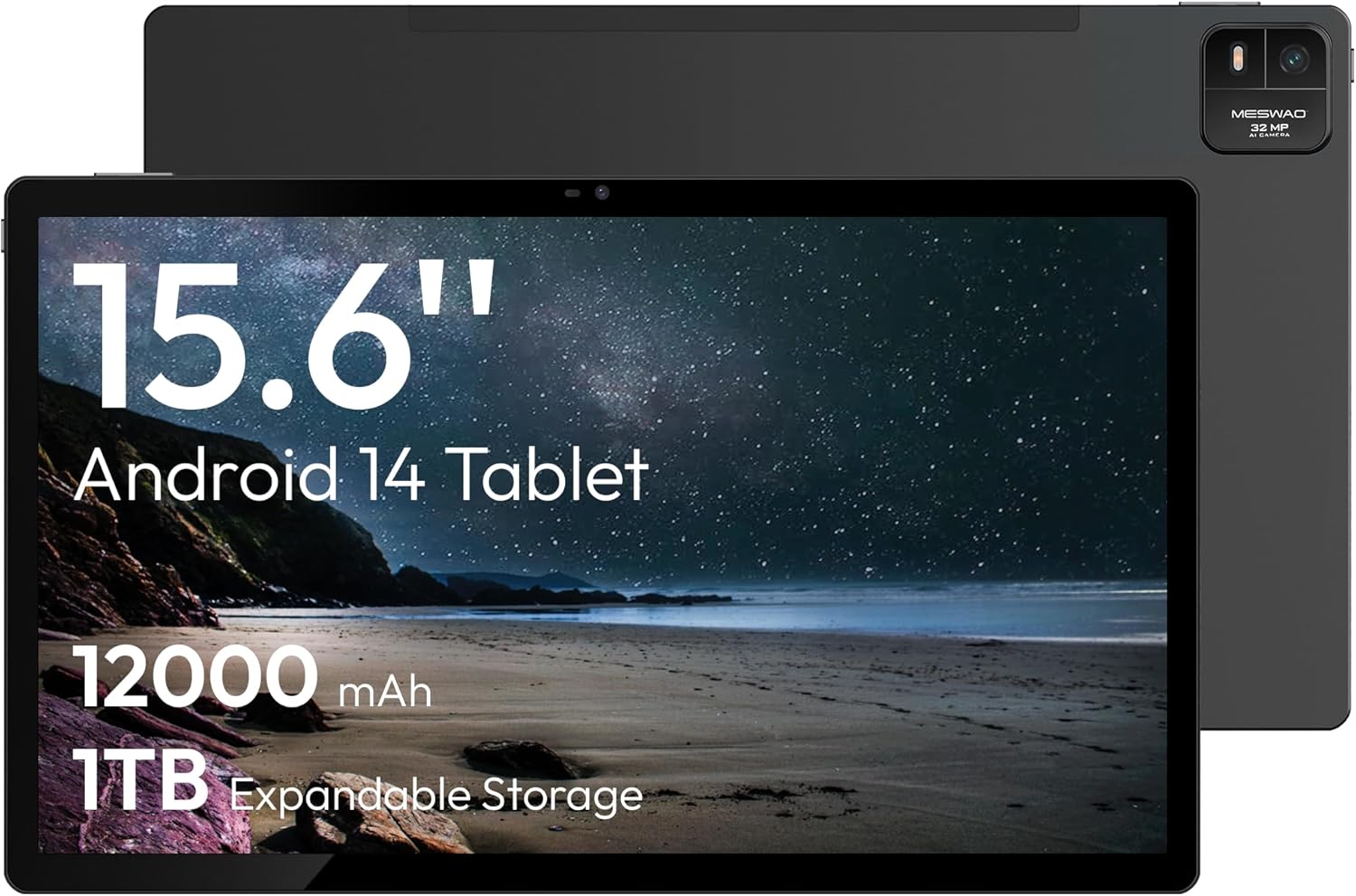
Figure 1.1: MESWAO 15.6 Inch Android 14 Tablet. This image displays the front and back view of the tablet, highlighting its large screen and rear camera module.
2. Öryggisupplýsingar
Til að koma í veg fyrir skemmdir á tækinu þínu eða meiðsli á þér eða öðrum skaltu fylgja eftirfarandi varúðarráðstöfunum:
- Ekki láta spjaldtölvuna verða fyrir miklum hita, beinu sólarljósi eða miklum raka.
- Forðist að missa spjaldtölvuna eða láta hana verða fyrir miklum höggum.
- Notið aðeins viðurkennd hleðslutæki og fylgihluti.
- Ekki reyna að taka spjaldtölvuna í sundur eða gera við hana sjálfur.
- Haldið töflunni frá vatni og öðrum vökvum.
- Observe all local regulations regarding the use of electronic devices.
3. Innihald pakka
Gakktu úr skugga um að allir hlutir séu til staðar í pakkanum:
- 15.6-inch Tablet x1
- 15W Charger x1
- Type-C to 3.5mm Adapter x1
- USB-A to Type-C Adapter x1
- Stuck Pin x1 (for SIM/TF card tray)
4. Tæki lokiðview
Familiarize yourself with the physical components of your MESWAO tablet.
4.1. Líkamleg einkenni
- Myndavél að framan: Located at the top center of the screen when held horizontally.
- Myndavél að aftan með flassi: Located on the back, typically in a corner.
- Aflhnappur: Usually on the side, used to power on/off or wake/sleep the device.
- Hljóðstyrkshnappar: Stilla hljóðstyrk.
- USB-C tengi: Fyrir hleðslu og gagnaflutning.
- TF kortarauf: Fyrir stækkanlegt geymslurými.
- Hátalarar: Quad speakers with 8 sound chambers for audio output.

Mynd 4.1: Yfirview of MESWAO Tablet's physical features. This image illustrates the location of stereo speakers, power and volume buttons, front camera, rear camera with flashlight, Type-C port, and TF card slot.
5. Uppsetning
5.1. Upphafleg hleðsla
Before first use, fully charge the tablet using the provided 15W charger and USB-C cable. Connect the charger to the USB-C port on the tablet and plug it into a power outlet. The battery indicator on the screen will show charging progress.

Figure 5.1: Tablet charging illustration. This image shows the tablet connected to a charger, displaying a charging icon and indicating 100% charge in 3.5 hours.
5.2. Kveikja / slökkva á
- Til að kveikja á: Press and hold the Power button until the MESWAO logo appears.
- Til að slökkva á: Ýttu á og haltu inni aflrofanum þar til valmyndin fyrir aflgjafavalkosti birtist og veldu síðan „Slökkva“.
- Að sofa/vaka: Ýttu stuttlega á rofann.
5.3. Upphafleg stilling
Upon first power-on, follow the on-screen prompts to set up your tablet:
- Veldu tungumálið sem þú vilt.
- Tengstu við Wi-Fi net.
- Skráðu þig inn með Google reikningnum þínum eða stofnaðu nýjan.
- Review og samþykkja skilmálana.
- Settu upp skjálás (PIN-númer, mynstur eða lykilorð).
5.4. Inserting a TF Card
To expand storage, insert a TF (microSD) card:
- Finndu TF-kortaraufina á hlið spjaldtölvunnar.
- Use the provided stuck pin to gently eject the card tray.
- Place the TF card into the tray with the gold contacts facing down.
- Carefully reinsert the tray into the tablet.

Figure 5.2: Tablet storage capabilities. This image highlights the 128GB ROM and support for up to 1TB expandable storage via TF card.
6. Notkunarleiðbeiningar
6.1. Grunnleiðsögn
The MESWAO tablet uses Android 14, offering intuitive touch-based navigation:
- Bankaðu á: Veldu hlut eða opnaðu forrit.
- Strjúktu: Fletta í gegnum skjái eða lista.
- Klípaðu til aðdráttar: Stækka eða minnka efni á skjánum.
- Langt ýtt: Opnaðu samhengisvalmyndir eða færðu tákn.

Figure 6.1: Android 14 operating system interface. This image displays various application icons and highlights features like smooth multitasking, parental control, and enhanced privacy.
6.2. Tengist Wi-Fi
- Farðu til Stillingar > Net og internet > Wi-Fi.
- Kveikja á Wi-Fi On.
- Veldu netið sem þú vilt af listanum.
- Sláðu inn lykilorðið ef beðið er um það og pikkaðu síðan á Tengdu.
6.3. Umsjón með forritum
- Settu upp forrit: Download from the Google Play Store.
- Fjarlægðu forrit: Long-press an app icon, then drag it to "Uninstall" or go to Stillingar > Forrit.
- Loka forritum: Swipe up from the bottom of the screen and swipe away the app card.
6.4. Notkun myndavélar
The tablet features a 32MP rear camera with flash and a 5MP front camera.
- Opnaðu Myndavél umsókn.
- Ýttu á lokarahnappinn til að taka mynd.
- Skiptu á milli fram- og aftari myndavélar með því að nota myndavélarrofatáknið.
- Access settings for flash, modes, and other options.
6.5. Rafhlöðustjórnun
12000mAh rafhlaðan býður upp á langvarandi notkun. Til að hámarka endingu rafhlöðunnar:
- Stilltu birtustig skjásins.
- Lokaðu ónotuðum forritum.
- Virkja rafhlöðusparnaðarstillingu í Stillingar > Rafhlaða.
6.6. Tengingar
- Bluetooth: Pair with wireless headphones, speakers, or other devices via Stillingar > Tengd tæki > Bluetooth.
- USB-C: Tengist við tölvu fyrir file transfer or use with compatible USB-C accessories.
- Þráðlaus skjávarpi: Share your tablet's screen to a compatible smart TV or monitor. Access this feature from the Quick Settings panel or Stillingar > Tengd tæki > Leikarar.
6.7. Hljóðstillingar
Adjust volume and audio output options:
- Use the physical volume buttons on the side of the tablet.
- Access detailed settings in Stillingar > Hljóð & titringur.
- The tablet supports multiple audio options, including USB-C audio and 3.5mm via the provided adapter.
7. Viðhald
7.1. Þrif á spjaldtölvunni
Til að þrífa spjaldtölvuna skal nota mjúkan, lólausan klút. Fyrir þrjósk bletti skal þurrka örlítið.ampÞurrkið klútinn með vatni eða skjáhreinsiefni sem er hannað fyrir raftæki. Forðist sterk efni eða slípiefni.
7.2. Hugbúnaðaruppfærslur
Athugaðu reglulega hvort hugbúnaðaruppfærslur séu tiltækar og settu upp þær til að tryggja bestu mögulegu afköst, öryggi og aðgang að nýjum eiginleikum. Farðu á Stillingar > Kerfi > Kerfisuppfærsla.
7.3. Geymslustjórnun
To maintain performance, periodically manage your tablet's storage:
- Delete unnecessary apps and files.
- Færa stórt files to the TF card or cloud storage.
- Hreinsa skyndiminni fyrir forrit í Stillingar > Forrit > [Nafn forrits] > Geymsla og skyndiminni.
8. Bilanagreining
Vísaðu til eftirfarandi algengra vandamála og lausna:
| Vandamál | Lausn |
|---|---|
| Spjaldtölvan kviknar ekki á. | Gakktu úr skugga um að rafhlaðan sé hlaðin. Tengdu hleðslutækið og bíddu í nokkrar mínútur áður en þú reynir að kveikja aftur. |
| Get ekki tengst Wi-Fi. | Check if Wi-Fi is enabled. Verify the Wi-Fi password. Restart your router and the tablet. |
| Forrit eru að hrynja eða frjósa. | Close background apps. Clear the app's cache. Restart the tablet. Ensure the app is updated. |
| Hæg frammistaða. | Free up storage space. Close unused apps. Restart the tablet. |
| Rafhlaða tæmist fljótt. | Reduce screen brightness. Disable unused features like Bluetooth or GPS. Close background apps. Check battery usage in settings. |
9. Tæknilýsing
Key technical specifications for the MESWAO 15.6 Inch Android 14 Tablet (MES-B3):
| Eiginleiki | Smáatriði |
|---|---|
| Vörumerki | MESWAO |
| Nafn líkans | MES-B3 |
| Stýrikerfi | Android 14 |
| Skjástærð | 15.6 tommur |
| Skjáupplausn | 1920 x 1080 pixlar (IPS HD) |
| Örgjörvi | Octa-Core (MediaTek Helio G99, up to 2.2 GHz) |
| Grafískur hjálpargjörvi | Mali-G57 |
| RAM (Memory Storage Capacity) | 6GB (DDR3 SDRAM) |
| Internal Storage (Flash Memory Size) | 128 GB |
| Stækkanlegt geymsla | Allt að 1TB með TF korti |
| Upplausn myndavélar að aftan | 32 MP |
| Upplausn myndavélar að framan | 5 MP |
| Rafhlöðugeta | 12000mAh |
| Meðal rafhlöðuending | 12 klukkustundir |
| Þráðlaus gerð | 802.11a/b/g/n/ac (Wi-Fi 5) |
| Litur | Grátt |
| Þyngd hlutar | 2.35 pund |
| Vörumál (LxBxH) | 14.53 x 8.78 x 0.43 tommur |

Figure 9.1: Processor and performance details. This image highlights the Helio G99 Octa-Core chipset, 6nm process, 950MHz GPU, and smooth gaming/streaming capabilities.
10. Ábyrgð og stuðningur
10.1. Upplýsingar um ábyrgð
The MESWAO 15.6 Inch Android 14 Tablet comes with a 12 mánaða ábyrgð sem nær yfir framleiðslugalla. Vinsamlegast geymið kaupkvittunina vegna ábyrgðarkröfu.
10.2. Þjónustudeild
For technical assistance, troubleshooting, or warranty inquiries, please contact MESWAO customer support. They offer 24 tíma þjónustuver og hafa local service centers in the US, EU, and Japan.
- Tengiliðaaðferð: Refer to the contact information provided with your product packaging or visit the official MESWAO websíða.
- Lausn vandamáls: Issues reported are typically responded to within 24 hours, with problems resolved or replaced according to policy.

Figure 10.1: MESWAO customer support and warranty details. This image highlights the 12-month warranty, 24-hour customer support, local after-sales centers, and quick response flow.