1. Inngangur
This manual provides detailed instructions for the setup, operation, and maintenance of your Haomuren K67 Series USB Microphone. Please read this manual thoroughly before using the product to ensure optimal performance and longevity.
2. Hvað er í kassanum
- 1 x Haomuren K67 RGB USB Microphone
- 1 x Stable and Durable Metal Microphone Stand Base
- 1 x U-Shaped Arm Bracket with 5/8" Jack (for boom arm compatibility)
- 1 x 70.9-inch USB Audio Cable (Type-C to USB-A)
- 1 x Type-C Adapter (for iPhone 15, Type-C Phones, iPads, Android Tablets)
- 1 x USB Adapter (for iPhone, iPad)
- 1 x Notendahandbók

Image: All components included in the Haomuren K67 Series USB Microphone package.
3. Vöru lokiðview
3.1 Stýringar og tengi
- RGB hnappur: Touch to cycle through 5 static colors, dynamic 5-color gradient, and sequential 5-color mode. Touch and hold to toggle lights on/off.
- Þagga hnappur: Tap to mute/unmute. Hold to activate/deactivate noise cancellation (default is off). Red light indicates mute, green light indicates noise cancellation active.
- Mic/Monitor Volume Knob: Two-in-one knob. Press to switch between monitor mode and mic volume adjustment. Small icons light up to indicate selection.
- Echo Control Knob: Stillir styrk bergmálsáhrifa.
- Tegund C tengi: For connecting the microphone to compatible devices.
- 3.5mm Earphone Interface: For zero-latency monitoring with headphones.
- Inside Button: Located on the bottom, allows capturing accompanying music from your phone or computer during recording.

Mynd: Framan og aftan view of the microphone highlighting its controls and connection ports.
4. Uppsetning
4.1 Samsetning
- Attach the microphone to the metal stand base by screwing it securely.
- Alternatively, use the U-shaped arm bracket to attach the microphone to a compatible boom arm (boom arm not included).
4.2 Connectivity (Plug and Play)
The Haomuren K67 Series USB Microphone is designed for plug-and-play operation, requiring no additional drivers or software for most devices.
- For Computers (PC, Laptop, Desktop, Mac OS): Connect the USB-A end of the provided 70.9-inch USB audio cable to your computer's USB port and the Type-C end to the microphone's Type-C interface.
- For iPhone 15, Type-C Phones/Tablets: Use the provided Type-C adapter. Connect the USB-A end of the cable to the adapter, then plug the adapter into your device's Type-C port.
- For iPhone (Lightning port), iPad: Use the provided USB adapter for iPhone/iPad. Connect the USB-A end of the cable to the adapter, then plug the adapter into your device's Lightning port.
- Fyrir PS4/PS5: Connect the USB-A end of the cable to an available USB port on your console and the Type-C end to the microphone.

Image: Plug-and-play setup with various compatible devices.
Video: Demonstrates the plug-and-play functionality of the Haomuren K67 Series USB Microphone.
5. Notkunarleiðbeiningar
5.1 RGB lýsingarstýring
The microphone features customizable RGB lighting:
- Breytingaráhrif: Tap the RGB button to cycle through 5 selectable static colors, a dynamic 5-color gradient, and a sequential 5-color mode.
- Kveikja/slökkva: Touch and hold the RGB button to turn the lights on or off.
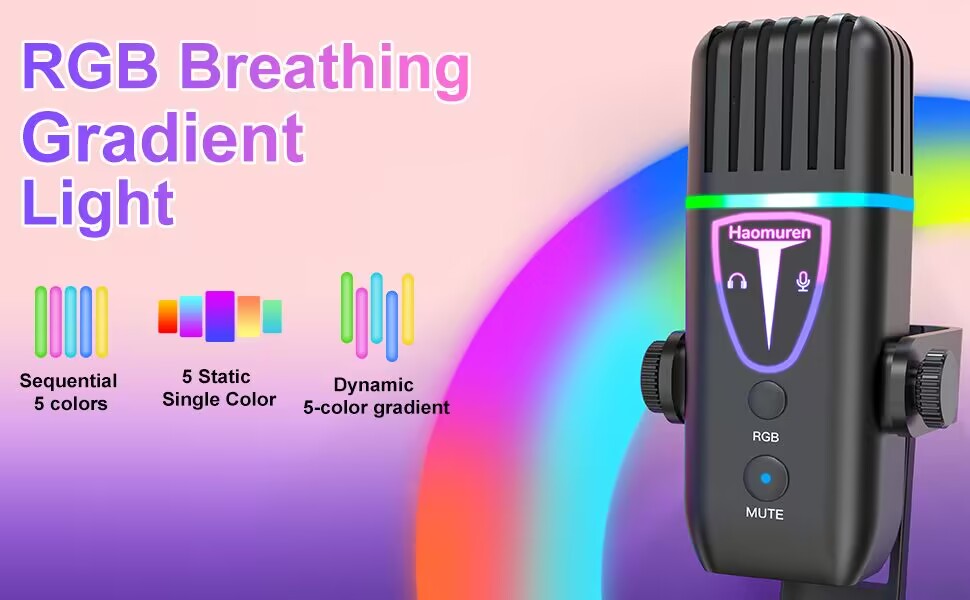
Image: RGB lighting modes on the microphone.
Myndband: Sýningasing the eye-catching RGB lights and sound quality of the microphone.
5.2 Mic Gain and Echo Control
- Mic/Monitor Volume: The two-in-one volume knob allows you to switch between adjusting the microphone input volume and the headphone monitor volume. Press the knob to toggle between these modes.
- Bergmálsvirkni: Use the dedicated Echo control knob to adjust the level of the echo effect. This can be deactivated as needed.
- Inside Button: The 'inside' button on the bottom of the microphone enables you to capture accompanying music from your connected phone or computer during recording sessions.
5.3 Tap-to-Mute and Noise Cancellation
- Snertilaus hljóðlausn: A simple tap on the mute button (located directly on the microphone) will silence your audio. The RGB light will turn red when muted.
- Niðurfelling hávaða: This feature is OFF by default. To activate noise cancellation, press and hold the mute button until the light turns green.
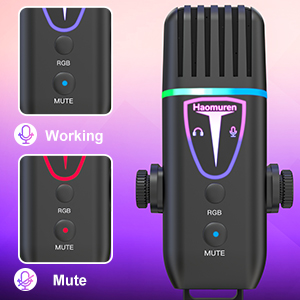
Image: Visual indicators for working, mute, and noise cancellation modes.
5.4 Besta notkun
For best sound quality, position the microphone between 6 to 12 inches from your mouth. The cardioid polar pattern is designed to effectively minimize background noise and focus on sound directly in front of the microphone.
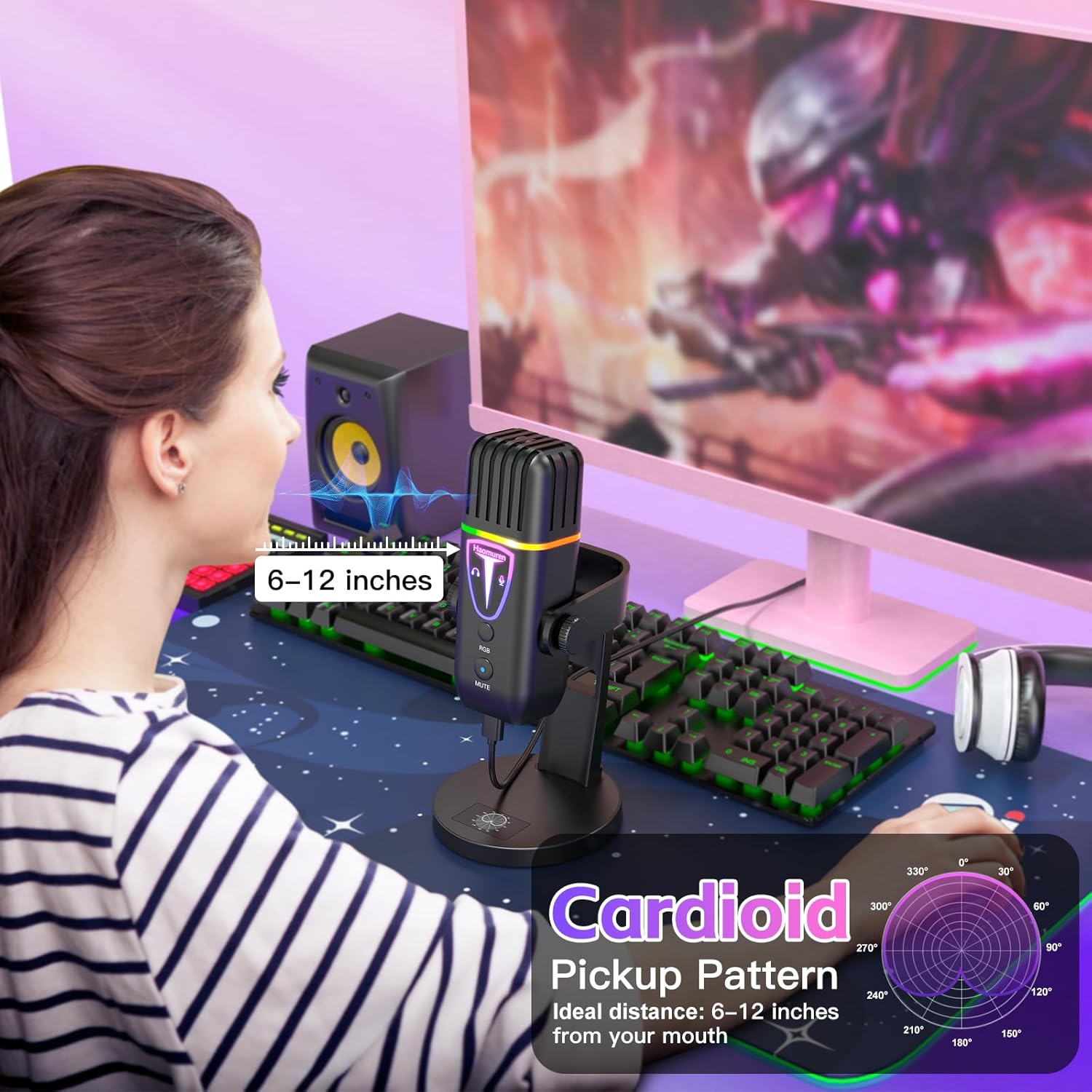
Image: Recommended microphone distance for optimal audio capture.
Video: Demonstrates the actual sound quality of the Haomuren K67 Series USB Microphone.
6. Viðhald
- Haldið hljóðnemanum hreinum með því að þurrka hann með mjúkum, þurrum klút.
- Avoid exposing the microphone to liquids, extreme temperatures, or high humidity.
- Geymið hljóðnemann á öruggum stað þegar hann er ekki í notkun til að koma í veg fyrir skemmdir.
7. Bilanagreining
- Q: Why does it not work with my Android phone but function well with my iPhone 15?
A: Please ensure that your Android device supports OTG and verify that it's enabled in the settings before use. (Leitaðu að "OTG" in the settings and enable it.) - Q: As an ASMR artist, I am experiencing excessive noise with this microphone, how can you help me resolve it?
A: The noise-canceling function is OFF by default. To activate noise cancel, press and hold the mute button until it turns green. - Q: What is the recommended distance to keep when using this desktop cardioid microphone?
A: The recommended distance to keep when using this microphone is generally between 6 to 12 inches from your mouth. But it's best to experiment with different distances to find the optimal one for your needs.
8. Tæknilýsing
| Eiginleiki | Forskrift |
|---|---|
| Hljóð Næmni | 45 desibel |
| Þyngd hlutar | 14.4 aura |
| Viðnám | 2.2 kílóómmar |
| Formstuðull hljóðnema | Skrifborð hljóðnemi |
| Aflgjafi | Rafmagn með snúru |
| Efni | Akrýlónítríl bútadíen stýren, málmur |
| Merki-til-hávaða hlutfall | 85 dB |
| Samhæfni við vélbúnaðarpalla | iPhone/iPad/Type C sími og spjaldtölva, fartölva/tölva/MacBook/Chromebook, PS4 og PS5 |
| Fjöldi rása | 1 |
| Tíðni svörun | 48 KHz |
| Tengitækni | Type C & Smartphone Jack & 3.5mm Headphone Jack, USB |
| Sérstakur eiginleiki | Echo Control, Mic Gain Knob, Mute with Indicator, Noise Cancel, Volume Control |
| Polar mynstur | Eináttar (hjartalínurit) |
9. Ábyrgð og stuðningur
The Haomuren K67 Series USB Microphone comes with free and responsive support for any inquiries or issues. Please refer to the contact information provided in your product packaging for assistance.


