1. Inngangur
The Flashpoint R2 Nano Remote is a compact and advanced wireless flash trigger designed for Panasonic and Olympus camera systems. It offers precise control over your flash settings through an intuitive touchscreen interface and OLED display, enhancing your photography experience with seamless integration and reliable performance.
Helstu eiginleikar eru:
- Óaðfinnanlegur samþætting: Full TTL compatibility with Olympus/Panasonic cameras for optimal exposure.
- Ultimate Reliability: Stable 2.4 GHz radio frequency with 32 channels, ensuring consistent triggering up to 328 feet (100 meters).
- Háhraða samstilling (HSS): Achieve sync speeds up to 1/8000s for creative effects and motion freezing.
- Innsæi snertiskjástýring: Responsive interface for quick and easy adjustments.
- Versatile Group Control: Manage up to 16 groups (A-F, 0-9) independently for complex lighting setups.
2. Hvað er í kassanum
Upon unboxing your Flashpoint R2 Nano, please verify that all components are present:
- Flashpoint R2 Nano Remote
- USB-C hleðslusnúra
- Geymslupoki
- Notendahandbók (þetta skjal)
3. Vöru lokiðview
Familiarize yourself with the components and controls of your R2 Nano remote.
Mynd 3.1: Framhlið og hlið View of the R2 Nano with Key Components Labeled.
- Snertiskjár: Main interface for settings and control.
- Veldu hringingu: Til að fletta í gegnum valmyndir og stilla gildi.
- Rofi: Kveikir/slökkvið á tækinu.
- Prófunarhnappur: Kveikir á prufublikki.
- Að setja upp/aftengja hnapp: Releases the remote from the hotshoe.
- Festingar rauf: Tengist við blitskó myndavélarinnar.
- USB-C hleðslutengi: Til að hlaða rafhlöðu.

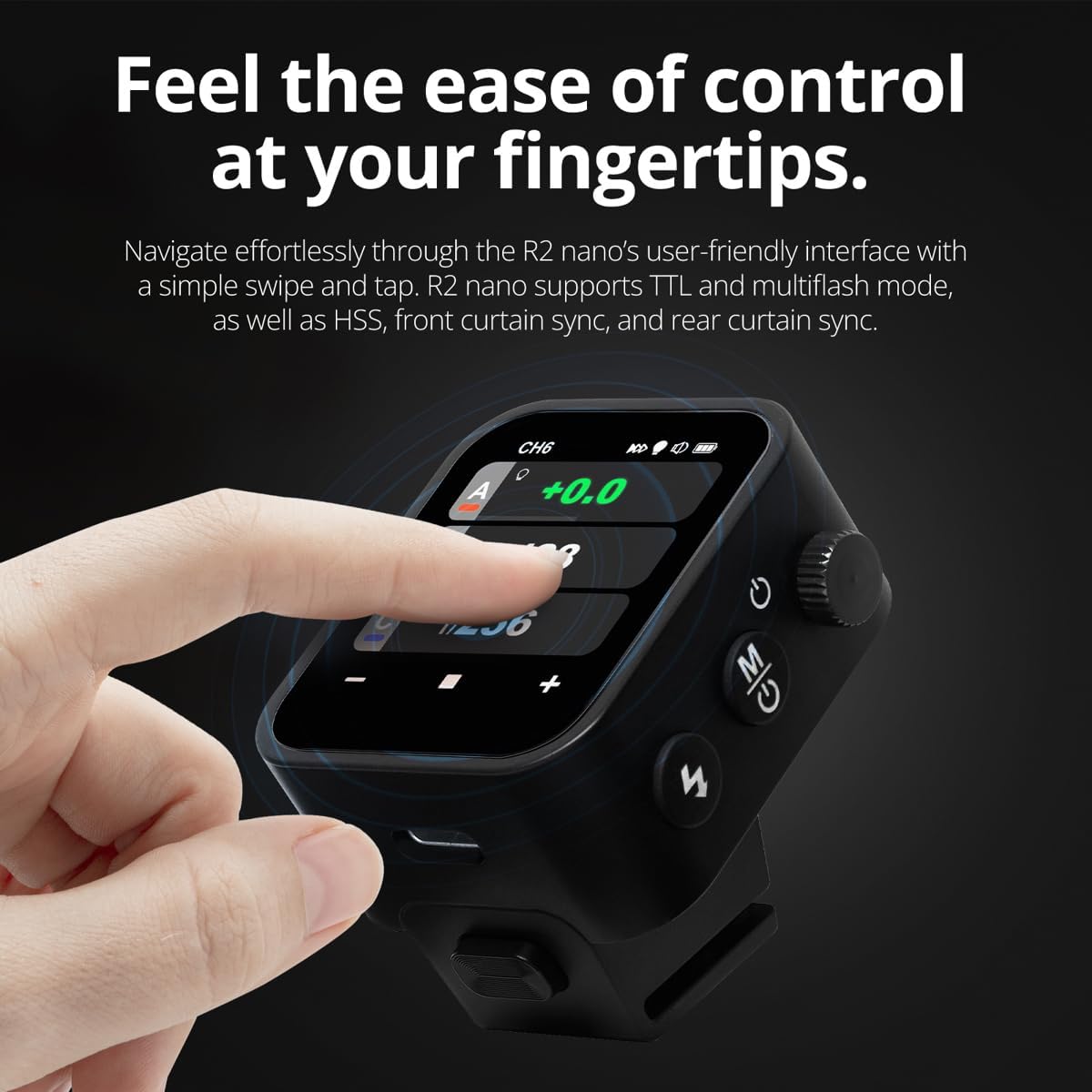
Figure 3.2: R2 Nano Touchscreen Interface Details.
- Rás (CH): Displays the current wireless channel (e.g., CH6).
- Group (A, B, C, etc.): Indicates the active flash groups.
- Úttaksstyrkur: Shows the flash power setting (e.g., +0.0, 1/128).
- Parameters - / +: Touch controls for decreasing/þrepasing gildi.
- Samstillingarstillingar: Icons indicating sync modes (e.g., HSS, front curtain, rear curtain).
- Líkan Lamp: Icon for modeling lamp stöðu.
- Rafhlöðuvísir: Sýnir núverandi rafhlöðustig.
4. Uppsetning
4.1 Hleðsla rafhlöðunnar
The R2 Nano is equipped with a built-in rechargeable lithium battery. Before first use, fully charge the device.
- Locate the USB-C charging port on the side of the R2 Nano.
- Tengdu meðfylgjandi USB-C hleðslusnúruna við tengið.
- Tengdu hinn endann á snúrunni við USB-straumbreyti (fylgir ekki með) eða USB-tengi tölvu.
- The battery indicator on the screen will show charging status. A full charge from 0% to 100% typically takes approximately 2 hours.

Figure 4.1: Charging the R2 Nano via USB-C.
4.2 Festing á myndavél
The R2 Nano features an easy-mounting, durable hotshoe design for secure attachment to your camera.
- Gakktu úr skugga um að myndavélin þín sé slökkt.
- Slide the R2 Nano's mounting slot onto your camera's hotshoe.
- Gently push until it clicks into place, ensuring a secure connection.
- To detach, press the Installing/Detaching Button and slide the remote off.

Figure 4.2: Mounting the R2 Nano on a Camera Hotshoe.
5. Notkunarleiðbeiningar
5.1 Kveikt/slökkt
- To power on, press and hold the Power Switch until the screen illuminates.
- To power off, press and hold the Power Switch until the screen turns off.
5.2 Að sigla um snertiskjáviðmótið
The R2 Nano features a responsive touchscreen and a select dial for intuitive control.

Figure 5.1: High Definition OLED Screen Interface.
- Snertivirkni: Tap on a group (A, B, C, etc.) to select it for adjustment. Tap on parameters like power level to modify them.
- Veldu hringingu: Rotate the dial to scroll through options or adjust values. Press the dial to confirm selections.
- Stilling á færibreytum: Use the on-screen '-' and '+' buttons or the Select Dial to change flash power, exposure compensation, or other settings.

Figure 5.2: Touchscreen Interaction for Settings Adjustment.
5.3 Setting Channels and Groups
To avoid interference and control multiple flashes, set appropriate channels and groups.
- Access the channel settings through the touchscreen menu. Select a channel from 1 to 32. Ensure your flash units are set to the same channel.
- Assign flash units to different groups (A-F, 0-9) to control them independently. The R2 Nano allows control of up to 16 groups.
5.4 Flash Modes (TTL, Manual, Multi-flash)
The R2 Nano supports various flash modes to suit different shooting scenarios.
- TTL (í gegnum linsuna): Automatically adjusts flash output for correct exposure. Ideal for fast-paced shooting where lighting conditions change frequently.
- Handbók (M): Allows precise control over flash power output (e.g., 1/1 to 1/256). Suitable for consistent lighting setups and creative control.
- Multi-flash (Stroboscopic): Skýtur af stað röð af hröðum blikkum í einni lýsingu til að fanga margar hreyfingar viðfangsefnis.
5.5 Sync Modes (HSS, Front Curtain, Rear Curtain)
Select the appropriate sync mode based on your shutter speed and desired effect.
- HSS (Háhraða samstilling): Enables flash synchronization at shutter speeds faster than the camera's native sync speed (up to 1/8000s). Useful for overpowering ambient light or using wide apertures in bright conditions.
- Samstilling framhliðartjalds: The flash fires at the beginning of the exposure. This is the standard sync mode.
- Samstilling á afturtjaldi: The flash fires just before the second curtain closes. This creates a streaking effect behind moving subjects, giving a sense of motion.
6. Viðhald
Proper maintenance ensures the longevity and optimal performance of your R2 Nano remote.
- Þrif: Use a soft, dry cloth to clean the exterior of the device. For the touchscreen, use a microfiber cloth specifically designed for electronics. Avoid using harsh chemicals or abrasive materials.
- Geymsla: When not in use, store the R2 Nano in its provided storage bag to protect it from dust and scratches. Store in a cool, dry place away from direct sunlight and extreme temperatures.
- Umhirða rafhlöðu: Til að viðhalda heilbrigði rafhlöðunnar skal forðast að tæma hana alveg oft. Ef hún er geymd í langan tíma skal hlaða rafhlöðuna upp í um það bil 50% á nokkurra mánaða fresti.
- Tengiliðir fyrir heita skó: Keep the hotshoe contacts clean and free of debris to ensure reliable communication with your camera.
7. Bilanagreining
If you encounter issues with your Flashpoint R2 Nano, refer to the following common problems and solutions.
| Vandamál | Möguleg orsök | Lausn |
|---|---|---|
| Ekki kveikir á tækinu. | Rafhlaðan er tæmd. | Hleðdu tækið með USB-C snúrunni. |
| Flassbúnaðurinn blikkar ekki. | Incorrect channel or group settings. | Ensure the R2 Nano and flash units are set to the same channel and correct groups. |
| Flassbúnaðurinn blikkar ekki. | Remote not securely mounted. | Ensure the R2 Nano is fully seated in the camera's hotshoe. |
| Inconsistent flash triggering. | Umhverfisröskun. | Change the wireless channel to one with less interference. Ensure no obstructions between remote and flash. |
| Snertiskjár svarar ekki. | Tímabundin hugbúnaðarvilla. | Slökktu á tækinu, bíddu í nokkrar sekúndur og kveiktu síðan aftur á því. |
| HSS not working. | Camera or flash not set to HSS mode. | Verify HSS is enabled on both the R2 Nano and your compatible flash unit. Ensure camera shutter speed is above sync speed. |
8. Tæknilýsing
| Eiginleiki | Smáatriði |
|---|---|
| Fyrirmynd | Flashpoint R2 Nano |
| Samhæfni | Panasonic and Olympus Cameras |
| Þráðlaus tíðni | 2.4 GHz |
| Rásir | 32 |
| Hópar | 16 (AF, 0-9) |
| Wireless Range | Allt að 100 metrar (328 fet) |
| Samstillingarhraði | Allt að 1/8000 sekúndur (HSS) |
| Skjár | Touchscreen OLED |
| Rafhlaða | Innbyggð hleðslurafhlöðu |
| Hleðsluport | USB-C |
| Vörumál | 5.25 x 4.25 x 2.5 tommur |
| Þyngd hlutar | 6.4 aura |
| Framleiðandi | Blampapunktur |
| Dagsetning fyrst í boði | 19. júní 2024 |
9. Ábyrgð og stuðningur
Vörur frá Flashpoint eru hannaðar með áreiðanleika og afköst að leiðarljósi. Fyrir upplýsingar um ábyrgð, tæknilega aðstoð eða fyrirspurnir um þjónustu, vinsamlegast vísið til opinberu vefsíðna Flashpoint. websíðuna eða hafið samband við viðurkenndan söluaðila.
Vinsamlegast geymið kaupkvittunina vegna hugsanlegra ábyrgðarkrafna.


