1. Inngangur
This manual provides essential instructions for the safe and efficient use of your Meizu Note 21 Pro smartphone. Please read this manual thoroughly before operating the device and retain it for future reference.
2. Hvað er í kassanum
- Meizu Note 21 Pro Smartphone
- Rafmagns millistykki
- (Other accessories such as USB cable, SIM ejector tool, and documentation may vary by region.)
3. Skipulag tækis
Familiarize yourself with the physical components of your Meizu Note 21 Pro.
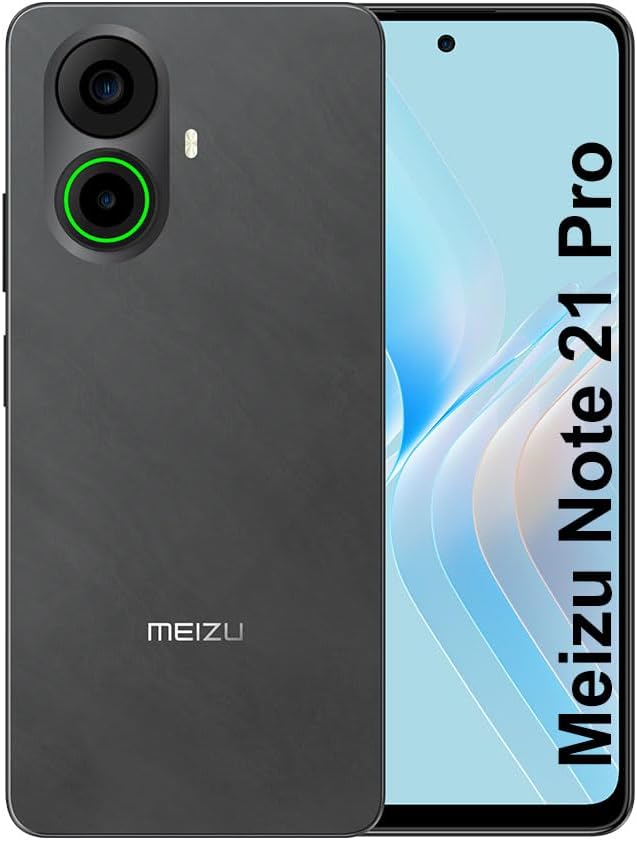
Mynd 3.1: Framan og aftan view of the Meizu Note 21 Pro. The front displays the screen with a punch-hole camera. The rear shows the dual camera module with a green accent ring on one lens, a flash, and the "MEIZU" logo at the bottom.
- Framhlið skjár: 6.78-inch FHD+ screen with a 120Hz refresh rate.
- Myndavél að framan: Staðsett efst í miðju skjásins.
- Myndavélar að aftan: Dual camera system, including a 64MP main camera.
- Fingrafaraskynjari á hlið: Integrated for secure access.
- USB tengi: Fyrir hleðslu og gagnaflutning.
- 3.5 mm hljóðtengi: Fyrir heyrnartól.
- SIM/MicroSD kortaskúffa: Supports Dual Nano SIM and MicroSD cards.
4. Uppsetning
4.1. Að setja inn SIM- og microSD-kort
- Finndu SIM-kortaskúffuna á hlið tækisins.
- Settu SIM-kortsúttakið í litla gatið við hliðina á bakkanum og ýttu varlega þar til bakkinn smellir út.
- Place your Nano SIM card(s) and/or MicroSD card into the designated slots on the tray. Ensure the gold contacts face downwards.
- Settu bakkann varlega aftur í tækið þar til hann smellpassar.
4.2. Fyrsta ræsing og uppsetning
- Press and hold the Power button until the Meizu logo appears.
- Fylgdu leiðbeiningunum á skjánum til að velja tungumál, tengjast Wi-Fi neti og setja upp Google reikninginn þinn.
- During setup, you will be guided to configure security features such as a PIN, pattern, or password.
4.3. Uppsetning fingrafaragreiningar
- Siglaðu til Stillingar > Öryggi og næði > Fingrafaraopnun.
- Follow the on-screen instructions to register your fingerprint by repeatedly touching the side-mounted sensor.
- Gakktu úr skugga um að fingurinn hylji allt skynjarasvæðið meðan á skráningu stendur til að hámarka virkni.
5. Notkun tækisins
5.1. Skjár og leiðsögn
- The 6.78-inch FHD+ display operates at a 120Hz refresh rate for smooth visuals.
- Navigate the Android 14 operating system using touch gestures: tap, swipe, pinch-to-zoom.
- Fáðu aðgang að flýtistillingum með því að strjúka niður frá efri hluta skjásins.
5.2. Myndavélavirkni
- Opnaðu myndavélarforritið af heimaskjánum eða forritaskúffunni.
- The rear camera system features a 64MP main sensor for high-resolution photos and a 2MP depth-of-field camera for portrait effects.
- The 13MP front-facing camera is suitable for selfies and video calls.
- Tap on the screen to focus, and use the on-screen shutter button to capture images. Explore various modes like Portrait, Night, and Pro within the camera app.
5.3. Afköst og geymsla
- The MediaTek G99 Octa Core processor ensures efficient performance for applications and multitasking.
- The device comes with 256GB of internal storage and 8GB of RAM.
- Storage can be expanded using a MicroSD card (sold separately).
5.4. Rafhlaða og hleðsla
- The Meizu Note 21 Pro is equipped with a 5000mAh battery.
- Use the provided Power Adapter for 30W fast charging.
- To charge, connect the USB cable to the phone's USB port and the power adapter, then plug the adapter into a wall outlet.
5.5. Tengingar
- 4G LTE: Supports various LTE FDD and TDD bands for cellular data. Note: This international version works on T-Mobile in the USA and globally with other carriers.
- Wi-Fi 5: Tengstu þráðlausum netum til að fá aðgang að internetinu.
- Bluetooth: Paraðu við þráðlausa fylgihluti eins og heyrnartól og hátalara.
- NFC: Fyrir snertilausar greiðslur og fljótlega tengingu við samhæf tæki.
- GPS: Fyrir staðsetningarþjónustu og leiðsögn.
6. Viðhald
- Þrif: Notið mjúkan, lólausan klút til að þrífa skjáinn og tækið. Forðist sterk efni eða slípiefni.
- Umhirða rafhlöðu: Avoid extreme temperatures. Do not fully discharge the battery frequently. For optimal battery longevity, keep the charge between 20% and 80%.
- Hugbúnaðaruppfærslur: Athugaðu reglulega hvort kerfisuppfærslur séu tiltækar og settu upp þær til að tryggja bestu mögulegu afköst og öryggi. Farðu á Stillingar > Kerfi > Kerfisuppfærsla.
7. Bilanagreining
| Útgáfa | Möguleg lausn |
|---|---|
| Ekki kveikir á tækinu | Ensure the battery is charged. Connect the device to the power adapter and try again. If unresponsive, press and hold the Power button for 10-15 seconds to force a restart. |
| Lélegt netmerki | Check if the SIM card is correctly inserted. Move to an area with better network coverage. Restart the device. Verify with your carrier that your plan is active. |
| Forrit eru hæg eða hrynja | Lokaðu bakgrunnsforritum. Hreinsaðu skyndiminni forritsins (Stillingar > Forrit > veldu forrit > Geymsla og skyndiminni > Hreinsaðu skyndiminni). Restart the device. Ensure sufficient storage space. |
| Fingrafaraskynjari virkar ekki | Ensure your finger and the sensor are clean and dry. Re-register your fingerprint in settings. |
8. Tæknilýsing
- Gerð: Meizu Note 21 Pro
- Stýrikerfi: Android 14
- Örgjörvi: MediaTek G99 Octa Core (2.2GHz)
- Skjár: 6.78 inches FHD+ (1080 x 2160 resolution), 120Hz Refresh Rate
- vinnsluminni: 8 GB
- Innri geymsla: 256 GB
- Myndavél að aftan: 64MP aðalmyndavél + 2MP dýpt
- Myndavél að framan: 13MP
- Rafhlaða: 5000mAh, 30W hraðhleðsla
- Tengingar: 4G LTE (FDD:1,2,3,4,5,7,8,12,17,18,19,20,26,28,66; TDD:38,40,41), 3G WCDMA, 2G Quad Band, Wi-Fi 5, Bluetooth, NFC, GPS
- Hljómtæki: 3.5 mm
- Stærðir: 6.64 x 2.96 x 0.33 tommur
- Þyngd: 1.1 pund
9. Ábyrgð og stuðningur
For warranty information and technical support, please refer to the warranty card included with your product or visit the official Meizu webGeymið kaupkvittunina vegna ábyrgðarkröfu.
For further assistance, you may contact Meizu customer service through their official channels.


