1. Inngangur
This manual provides detailed instructions for the safe installation, operation, and maintenance of your PHORUS 48-inch Modern White Ceiling Fan with Lights and Remote/APP Control. Please read all instructions carefully before beginning installation and retain this manual for future reference.
2. Öryggisupplýsingar
- Gangið úr skugga um að rafmagnið sé aftengt við rofann áður en uppsetning eða viðhald fer fram.
- Allar raflagnir verða að vera í samræmi við innlendar og staðbundnar rafmagnsreglur. Ef þú ert ókunnugur raflögnum skaltu ráðfæra þig við löggiltan rafvirkja.
- The fan must be mounted with a minimum of 7 feet (2.1 meters) clearance from the floor to the blade trailing edge.
- Festingargrindin verður að geta borið þyngd viftunnar (um það bil 13.4 pund).
- Ekki beygja blaðhaldarana við uppsetningu eða þrif.
- Þessi aðdáandi er hannaður til notkunar inni.
3. Innihald pakka
Gakktu úr skugga um að allir íhlutir séu til staðar áður en uppsetning hefst:
- Viftumótorsamsetning
- Hengiborð
- 5 viftublöð
- LED Lampskugga
- Fjarstýring (með 2 AAA rafhlöðum)
- Skrúfur og festingarbúnaður
- Leiðbeiningarhandbók

4. Tæknilýsing
| Eiginleiki | Forskrift |
|---|---|
| Vörumerki | PHORUS |
| Nafn líkans | #8907 |
| Stærð | 48 tommur |
| Litur | Hvítur |
| Efni | Akrýl, plast |
| Tegund mótor | Jafnstraumsmótor (30W) |
| Ljósgjafi | LED (28W) |
| Ljósir litir | 3 (White, Warm, Neutral) |
| Dimmsvið | Þrepalaust (10%-100%) |
| Vindhraði | 6 |
| Eftirlitsaðferð | Fjarstýring, APP-stýring |
| Sérstakir eiginleikar | Reversible Function, 2-Hour Timer, Memory Function |
| Hljóðstig | Undir 35 dB |
| Vörumál | 48" L x 48" B x 10.83" H |
| Þyngd hlutar | 13.4 pund |
5. Uppsetning og uppsetning
5.1 Gátlisti fyrir uppsetningu
- Ensure the power supply is turned off at the main circuit breaker.
- Confirm you have all necessary tools (screwdriver, drill, wire strippers, etc.).
- Verify that the ceiling junction box is securely mounted and capable of supporting the fan.
5.2 Uppsetning skref fyrir skref
- Attach Blades to Motor Assembly: Secure each of the five fan blades to the motor assembly using the provided screws. Ensure the 'THIS SIDE UP' marking on the blade attachment is facing upwards.
- Install LED Light Board: Carefully place the LED light board into the designated area on the motor assembly and secure it with screws. Connect the LED wires.
- Attach LED Lampskugga: Settu LED lampshade over the light board and twist it clockwise until it is securely fastened.
- Mount Hanging Board: Secure the hanging board to your ceiling junction box using appropriate screws. Ensure it is firmly attached.
- Tengja raflögn: Connect the fan's electrical wires to your household wiring. The typical connections are: Black (Live) to Black (Live), White (Neutral) to White (Neutral), and Yellow/Green (Ground) to Green (Ground). Use the provided wire connectors.
- Secure Fan to Hanging Board: Lift the fan assembly and attach it to the hanging board, ensuring all wires are tucked safely inside the canopy. Secure the fan with the provided screws.
6. Notkunarleiðbeiningar
6.1 Aðgerðir fjarstýringar
The included remote control allows for convenient operation of your ceiling fan:
- Kveikt/slökkt: Ýttu á rofann til að kveikja eða slökkva á viftunni og ljósinu.
- Viftuhraði: Select from 6 wind speeds (1-6) to adjust airflow.
- Ljós kveikt/slökkt: Control the light independently from the fan.
- Litahitastig: Cycle through 3 light colors: White (6000K), Neutral (4500K), and Warm (3000K).
- Dimming: Stilltu birtustig ljóssins frá 10% upp í 100%.
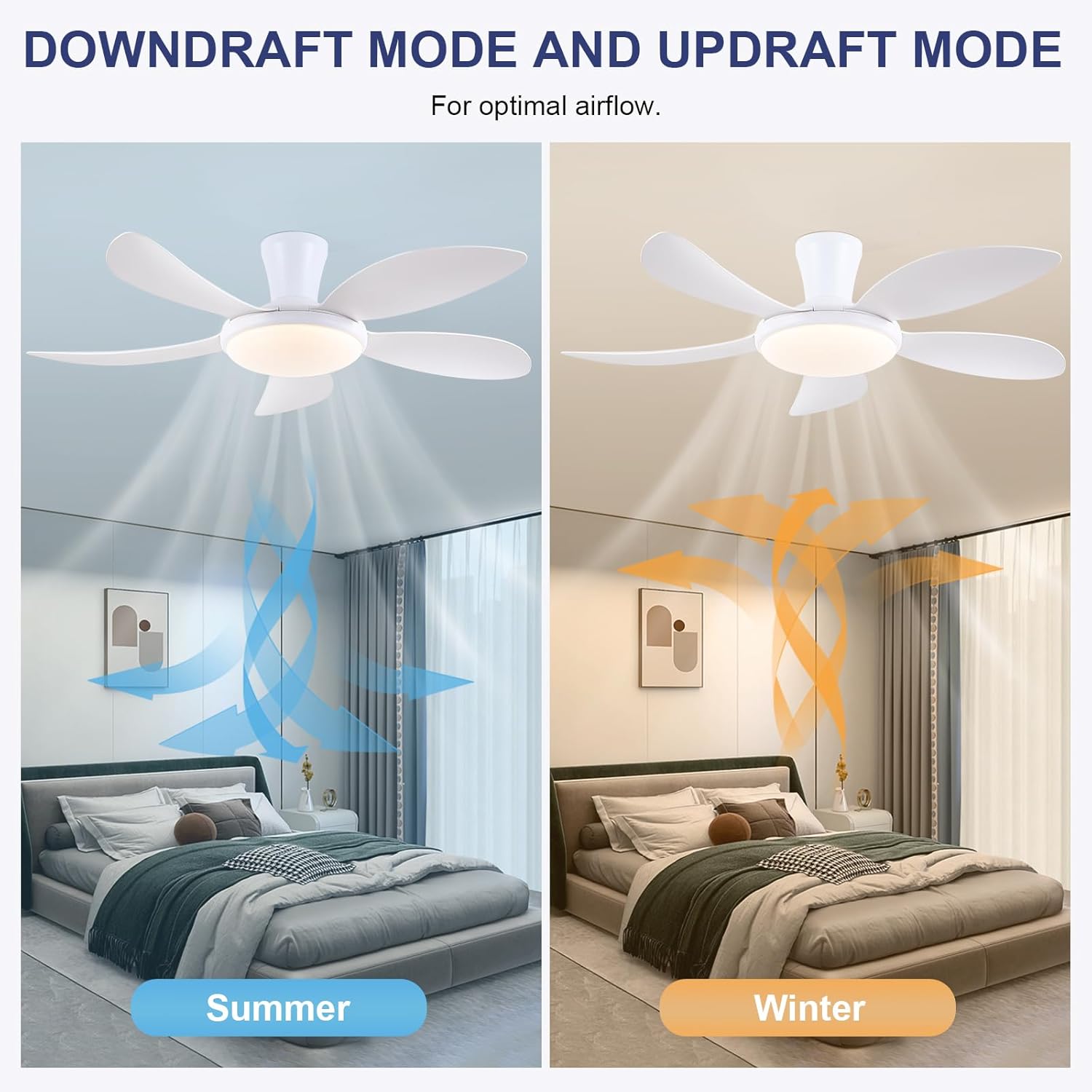
- Afturkræf virkni: Press the F/R key to change the blade rotation direction for summer (downdraft) or winter (updraft) modes. The fan will stop briefly before reversing.
- Tímamælir: Set a 2-hour timer for automatic shutdown.
- Næturstilling: Activates a low-speed fan and dim light setting.

6.2 Remote Code Pairing
If the remote control is not responding, it may need to be paired:
- Turn off the main power supply to the fan for one minute.
- Turn on the main power supply and simultaneously long-press the 'Code Key' button on the remote control for 3-5 seconds.
- The fan light will blink 2-3 times, indicating successful code matching. The remote can now be operated normally.
6.3 APP stjórna
Control your fan using the 'Fan Lamp Pro' mobile application:
- Sækja APP: Skannaðu QR kóðann sem er að finna á myndunum af vörunni eða leitaðu að „Fan L“.amp „Pro“ í appversluninni þinni.
- Tengjast í gegnum Bluetooth: Gakktu úr skugga um að Bluetooth sé virkt í símanum þínum.
- Para tæki: Open the app, add a new device, and follow the on-screen instructions to connect to your fan. The fan light will blink twice upon successful connection.
- Aðgerðir: The app allows control over fan speeds, light colors, dimming, reverse function, and timer settings, similar to the remote control.
6.4 Fan Speed and Airflow
- Stig 1-2: Low Comfortable Wind, suitable for sleep.
- Stig 3-4: Medium Natural Wind, suitable for daily life.
- Stig 5-6: High Cooling Wind, suitable for hot weather.

6.5 Ljósastillingar
- The LED light source supports stepless dimming and memory function, retaining your last brightness and color temperature setting.
- Choose from 3 color temperatures: 3000K (Warm Light), 4500K (Natural Light), and 6000K (White Light).

6.6 Afturkræf virkni
The reversible DC motor allows you to change the direction of the fan seasonally:
- Sumarstilling (niðurstreymi): Blades rotate counter-clockwise, pushing cool air downwards.
- Vetrarstilling (uppstreymi): Blades rotate clockwise, drawing cool air up and circulating warm air downwards.
7. Viðhald
- Þrif: Til að þrífa viftuna skal þurrka hana með mjúkum klút.amp klút. Ekki nota slípiefni eða leysiefni.
- Umhirða blaðs: The ABS blades are designed to be easy to clean and resistant to deformation.
- Reglulegar athuganir: Periodically check all connections and screws to ensure they are secure.
8. Bilanagreining
Ef þú lendir í vandræðum með viftuna þína skaltu skoða eftirfarandi algeng vandamál og lausnir:
- Vifta virkar ekki: Check power supply, ensure all wiring connections are secure, and verify remote control pairing.
- Ljósið virkar ekki: Check power supply, ensure light wires are connected, and verify remote control pairing.
- Vifta er hávær: Ensure all screws are tightened, especially on the blades and mounting bracket. Check for any obstructions.
- Fjarstýring virkar ekki: Replace batteries, ensure line of sight to the fan, and re-pair the remote control as per section 6.2.
- Vandamál með tengingu við app: Ensure Bluetooth is on, the app is updated, and try re-pairing the device.
9. Ábyrgð og stuðningur
PHORUS provides a one-year quality warranty for this product. For any damage or quality problems, free replacement service is offered. If you have any questions or require assistance, please contact PHORUS customer service. You will receive a satisfactory answer within 24 hours.
For additional support and resources, please visit the official PHORUS websíðuna eða vísaðu til tengiliðaupplýsinganna sem fylgja kaupunum.


