1. Inngangur
Welcome to your new Amazon Fire TV 55-inch 4-Series 4K UHD Smart TV. This manual provides essential information for setting up, operating, maintaining, and troubleshooting your television. Your Fire TV combines stunning 4K Ultra HD visuals with the intelligence of Alexa, offering a seamless entertainment experience.

Mynd: Framan view of the Amazon Fire TV 4-Series 55-inch TV, showcasinmeð mjóum rammum og standi.

Image: A graphic highlighting key features of the Fire TV 4-Series: 4K Resolution, HDR10+ display, Ambient Experience, and Alexa integration.
2. Uppsetning
2.1 Upptaka og skoðun
Fjarlægið alla íhluti varlega úr umbúðunum. Skoðið sjónvarpið og fylgihlutina til að athuga hvort einhver merki séu um skemmdir. Geymið umbúðirnar til síðari flutnings eða viðgerðar.
2.2 Samsetning stands (valfrjálst)
If you are not wall-mounting your TV, attach the included TV stand legs:
- Setjið sjónvarpsskjáinn með niður á mjúkan, hreinan flöt til að koma í veg fyrir rispur.
- Stilltu hverri fæti standsins saman við samsvarandi raufar neðst á sjónvarpinu.
- Secure each leg using the provided screws (4 screws total).
The distance between the TV legs is approximately 43.3 inches.
2.3 Veggfesting (valfrjálst)
For wall mounting, use a VESA-compatible mount that supports a 300 mm x 300 mm standard. Consult a professional for installation if you are unsure.
2.4 Tengja jaðartæki
Tengdu tækin þín við sjónvarpið með tiltækum tengi:
- HDMI tengi: 3 HDMI 2.0 ports and 1 HDMI 2.1 port with eARC for high-definition audio and video devices (e.g., gaming consoles, Blu-ray players, soundbars).
- USB tengi: 1 USB 3.0 port for connecting external storage devices.
- Stafrænn ljósleiðari hljóðtengi: 1 port for connecting to external audio systems.
- Ethernet tengi: 1 port for a wired internet connection.
Gakktu úr skugga um að allar snúrur séu tryggilega tengdar.
2.5 Rafmagnstenging
Stingdu rafmagnssnúrunni í rafmagnsinntak sjónvarpsins og síðan í vegginnstungu.
2.6 Uppsetning fjarstýringar
Insert the two included AAA batteries into the Alexa Voice Remote Enhanced. The remote will automatically pair with your TV upon initial setup.
2.7 Fyrsta ræsing og netuppsetning
Press the power button on the remote. Follow the on-screen instructions to:
- Veldu tungumálið þitt.
- Connect to your Wi-Fi network (supports Wi-Fi 6) or use the Ethernet connection.
- Skráðu þig inn með Amazon reikningnum þínum.
- Complete the guided setup for your Fire TV experience.
3. Rekstur
3.1 Kveikt/slökkt
Press the power button on the Alexa Voice Remote Enhanced to turn the TV on or off. The TV may enter a sleep mode rather than fully powering down, allowing for quick startup and Ambient Experience features.
3.2 Alexa Voice Remote Enhanced
Your TV comes with an Alexa Voice Remote Enhanced, designed for intuitive control:
- Raddstýring: Press and hold the Alexa button and speak naturally to find content, manage smart home devices, or ask questions.
- Forstillta hnappar: Use the dedicated app buttons for quick access to your favorite streaming services.
- Leiðsögn: Use the directional pad and select button to navigate the Fire OS interface.
Alternatively, you can use the free Fire TV app on your smartphone (available for Fire OS, Android, and iOS) for voice control and navigation.

Image: The Fire TV interface showing the Alexa search bar and icons for popular streaming applications, demonstrating voice control capabilities.
3.3 Fire OS Interface and Content Access
The Fire OS provides a personalized home screen where you can easily find and launch apps, movies, TV shows, and live TV. Navigate through categories and recommendations to discover new content. You can access over 1.8 million movies and TV episodes, including over 400,000 episodes of free content. Subscription fees may apply for certain services.
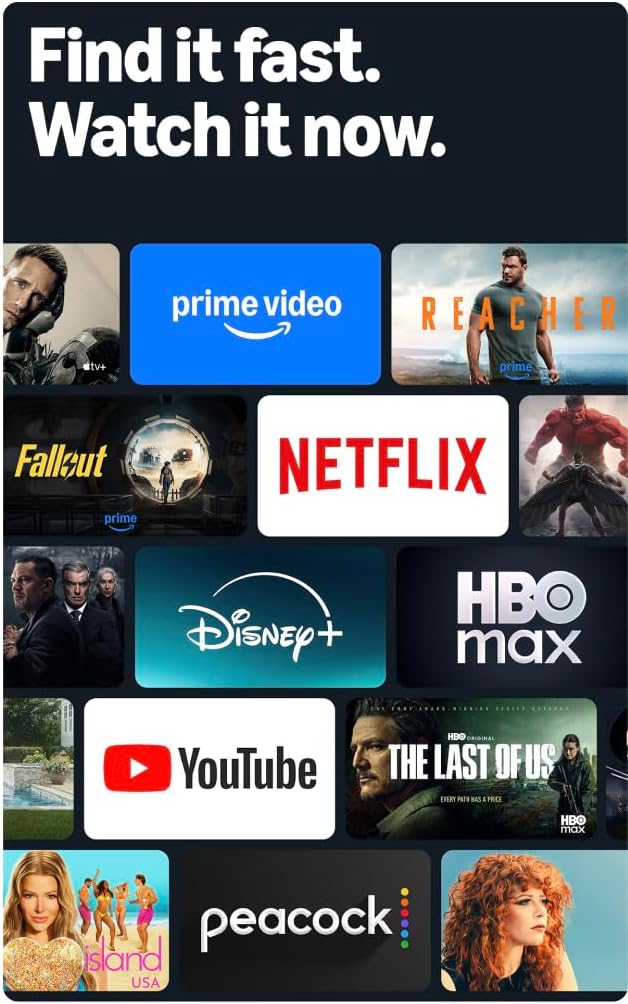
Image: A collage of streaming service logos and content thumbnails on the Fire TV screen, illustrating the wide range of available entertainment.
3.4 Myndgæði
Experience vivid visuals with 4K Ultra HD resolution and HDR10+ support. This technology delivers bright, crisp images with enhanced contrast, ensuring details are visible even in dark scenes.

Image: A visual comparison demonstrating the superior detail and clarity of 4K resolution compared to HD, using a close-up of a chameleon.
3.5 Hljóð
The TV features Dolby Digital Plus audio support with passthrough of Dolby-encoded audio, providing clear and immersive sound. The integrated speakers offer 10W + 10W audio power.
3.6 Ambient Experience
Utilize the custom Omnisense technology. Built-in sensors wake the display when you enter the room, allowing it to show your favorite artwork or quickly resume watching content.

Image: The Fire TV screen displaying vibrant abstract art, illustrating the Ambient Experience feature that activates when motion is detected.
3.7 Leikir
Download free games from the Appstore or stream games from the cloud with Amazon Luna, offering a versatile gaming experience directly on your TV.
4. Viðhald
4.1 Þrif á sjónvarpinu þínu
- Skjár: Þurrkaðu skjáinn varlega með mjúkum, þurrum og lólausum klút. Ef þrjósk blettir eru til staðar skaltu þurrka létt.ampÞurrkið klútinn með vatni eða skjáhreinsilausn sem er sérstaklega hönnuð fyrir raftæki. Ekki úða vökva beint á skjáinn.
- Casing: Notið mjúkan, þurran klút til að þurrka sjónvarpið.asing. Forðist slípiefni eða leysiefni.
Taktu sjónvarpið alltaf úr sambandi við rafmagn áður en þú þrífur það.
4.2 Hugbúnaðaruppfærslur
Your Fire TV receives automatic software security updates. Ensure your TV is connected to the internet to receive these updates, which improve performance and security. This device receives guaranteed software security updates until at least four years after the device is last available for purchase as a new unit on our websíður.
5. Bilanagreining
If you encounter issues with your Amazon Fire TV, refer to the following common troubleshooting steps:
- Enginn kraftur: Gakktu úr skugga um að rafmagnssnúran sé vel tengd bæði við sjónvarpið og virkan vegginnstungu. Prófaðu aðra innstungu.
- Engin mynd/hljóð: Verify that all HDMI cables are correctly connected to both the TV and your external devices. Check the input source on your TV.
- Fjarstýring svarar ekki: Replace the AAA batteries in the Alexa Voice Remote Enhanced. Ensure there are no obstructions between the remote and the TV.
- Vandamál með nettengingu: Check your Wi-Fi router and ensure it is functioning correctly. Restart your router and the TV. If using a wired connection, ensure the Ethernet cable is securely connected.
- Hægur árangur: Restart your TV by unplugging it from the power outlet for 30 seconds and then plugging it back in. Clear cache for apps if necessary.
Fyrir ítarlegri úrræðaleit eða viðvarandi vandamál, farðu á þjónustusíðu Amazon Fire TV websíðuna eða hafðu samband við þjónustuver.
6. Tæknilýsing
| Eiginleiki | Smáatriði |
|---|---|
| Skjástærð | 55 inches (54.6 inches viewfær) |
| Upplausn | 4K UHD (3840 x 2160) |
| High Dynamic Range (HDR) | HDR10+, HDR10, HLG |
| Tegund bakljóss | Bein LED |
| Endurnýjunartíðni | 60Hz |
| HDMI tengi | 3 HDMI 2.0 + 1 HDMI 2.1 með eARC |
| USB tengi | 1 USB 3.0 |
| Stafrænt sjónrænt hljóðúttak | 1 höfn |
| Tengingar | Wi-Fi 6 + 1 Ethernet port |
| Raddstuðningur | Alexa Voice Remote Enhanced (included) or Fire TV app |
| Hljóðstuðningur | Dolby Digital Plus |
| Hljóðstyrkur | 10W + 10W |
| Stýrikerfi | Fire stýrikerfið |
| Stærð vöru með standi | 48.3" x 31.3" x 11.3" |
| Þyngd með standi | 22.0 pund |
| Product Size without Stand | 48.3" x 28.2" x 3.2" |
| Þyngd án stands | 21.5 pund |
| Fjarlægð milli sjónvarpsfóta | 43.3” |
| Vörunúmer | 4K43N402 |
| VESA veggfestingarstaðall | 300 mm x 300 mm |
| Rafhlöður í fjarstýringu | 2 AAA (innifalið) |
| Fjarstýringartækni | Bluetooth 5.0 |
7. Ábyrgð og stuðningur
7.1 Vöruábyrgð
Your Amazon Fire TV 4-Series includes a 1-year limited warranty and service. Optional 3-Year and 4-Year Extended Warranties are available for U.S. customers and are sold separately.
The Alexa Voice Remote Enhanced included with your TV has a 90-day limited warranty and service.
Notkun Fire TV er háð skilmálum sem finnast á Amazon. websíða.
7.2 Þjónustuver
For technical assistance, warranty claims, or additional support, please visit the official Amazon support websíðuna eða hafið samband við þjónustuver Amazon.
8. Aðgengiseiginleikar
The Amazon Fire TV 4-Series includes several accessibility features to enhance the user experience:
- RöddView Skjálesari: Provides spoken feedback for navigation and on-screen text, assisting users who are blind or visually impaired.
- Skjástækkunartæki: Allows users to zoom in and out, and pan around the screen for better visibility of content.
- Textaborði: Sameinar texta á skjánum í sérsniðinn borða.
- Lokaður texti: Displays text captions for dialogue and sounds in supported videos and TV shows.
- Hljóðlýsing: Provides verbal descriptions of visual elements on the screen, such as actions, facial expressions, and scene changes, for supported content.
- Bluetooth heyrnartæki: Styður hljóðstreymi fyrir valin samhæf Bluetooth heyrnartæki og tæki fyrir einkarekna hlustunarupplifun. Einnig er hægt að nota samhæf Bluetooth heyrnartól.
Note: Captions and audio descriptions are not available for all content. "Hearing aids" refers to compatible Bluetooth hearing devices such as traditional hearing aids, cochlear implants, and bone conduction hearing devices.


