1. Inngangur
This manual provides essential instructions for the safe and efficient use of your DALI IO-8 Wireless/Wired Hi-Fi Headphones. Please read this manual thoroughly before using the product and retain it for future reference. The DALI IO-8 headphones are designed to deliver a high-fidelity audio experience with advanced features such as Active Noise Cancellation (ANC), Bluetooth AptX Adaptive connectivity, and a long-lasting battery.
2. Vöru lokiðview
Familiarize yourself with the components and controls of your DALI IO-8 headphones.

Mynd 2.1: Framan view of the DALI IO-8 headphones, showcasing the caramel and white color scheme and overall design.

Mynd 2.2: Að ofan view of the DALI IO-8 headphones, highlighting the earcups and visible control buttons on the side.
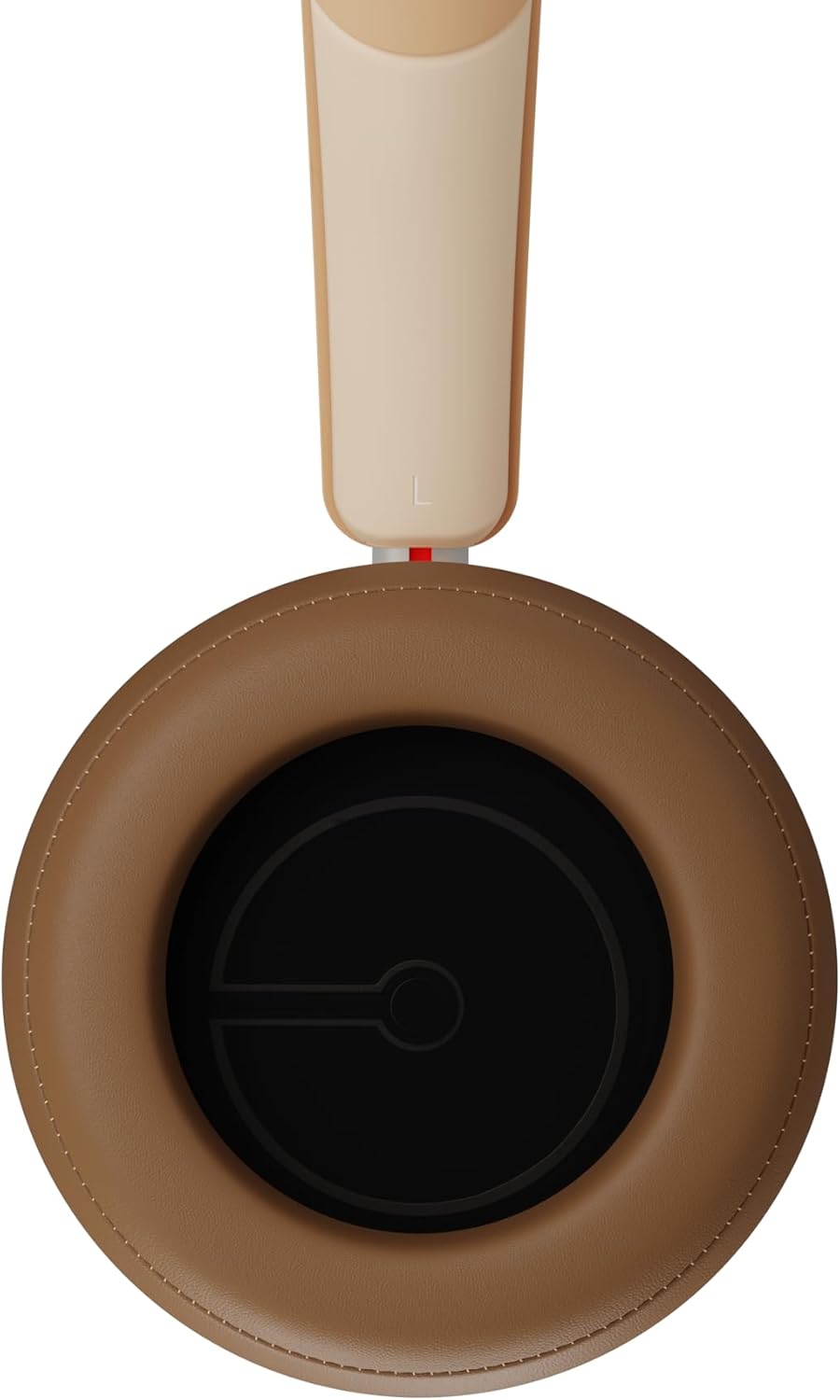
Mynd 2.3: Innrétting view of a DALI IO-8 earcup, showing the soft padding and driver grille, designed for comfort and sound delivery.

Mynd 2.4: Nærmynd view of the DALI IO-8 earcup, showing the USB-C charging port and other control buttons.
2.1 Innihald pakka
- DALI IO-8 heyrnartól
- USB-C hleðslusnúra
- 3.5 mm hljóðsnúra
- Travel Case (if included)
- Notendahandbók (þetta skjal)
2.2 Íhlutir heyrnartóla

Mynd 2.5: Sprungið view illustrating the internal components of the DALI IO-8 headphones, including the 50mm driver, circuitry, and earcup structure.
- Headband (Adjustable)
- Earcups (Over-ear design with genuine leather)
- 50mm Driver (SMC Driver Technology)
- Control Buttons (Power, Volume, ANC, Multifunction)
- USB-C Port (Charging and Wired Audio)
- 3.5mm Audio Jack (Wired Audio)
- Microphones (for ANC and calls)
3. Uppsetning
3.1 Hleðsla heyrnartólanna
Before initial use, fully charge your DALI IO-8 headphones.
- Connect the supplied USB-C cable to the USB-C port on the headphone earcup.
- Tengdu hinn enda USB-C snúrunnar við samhæfan USB-aflgjafa (t.d. USB-tengi tölvu, USB-millistykki).
- The LED indicator will show charging status. A full charge provides up to 35 hours of playback with ANC enabled.
- Þegar hún er fullhlaðin skaltu aftengja snúruna.
3.2 Kveikt/slökkt
- Til að kveikja á: Press and hold the Power button for approximately 2 seconds until the LED indicator illuminates.
- Til að slökkva á: Ýttu á og haltu inni aflrofann í um það bil 3 sekúndur þar til LED-ljósið slokknar.
3.3 Bluetooth pörun
The DALI IO-8 supports Bluetooth AptX Adaptive for high-quality wireless audio.
- Gakktu úr skugga um að slökkt sé á heyrnartólunum.
- Haltu inni aflrofanum í um það bil 5 sekúndur þar til LED-ljósið blikkar hratt blátt. Þetta gefur til kynna pörunarstillingu.
- Virkjaðu Bluetooth á hljóðtækinu þínu (snjallsíma, spjaldtölvu, tölvu) og leitaðu að tiltækum tækjum.
- Select "DALI IO-8" from the list of found devices.
- Once paired, the LED indicator will glow solid blue or flash slowly.
- Heyrnartólin munu sjálfkrafa reyna að tengjast við síðasta paraða tækið þegar þau eru kveikt á.
3.4 hlerunarbúnaðartenging
The DALI IO-8 can be used with a wired connection via the 3.5mm audio jack or USB-C.
- 3.5 mm hljóðsnúra: Connect one end of the supplied 3.5mm audio cable to the headphone's 3.5mm jack and the other end to your audio source's headphone output. The headphones can be used passively in this mode, or actively with ANC and amplification if powered on.
- USB-C hljóð: Connect the supplied USB-C cable to the headphone's USB-C port and the other end to a compatible USB audio output on your computer or device. This mode allows for digital audio transmission and charging simultaneously.
4. Notkun heyrnartólanna
4.1 Virk hávaðamyndun (ANC)
The DALI IO-8 features three distinct ANC modes and wind noise suppression.
- Press the dedicated ANC button to cycle through the available modes:
- ANC á: Maximum noise cancellation.
- Gagnsæi háttur: Allows ambient sounds to pass through for situational awareness.
- ANC slökkt: Active noise cancellation is disabled.
- Wind noise suppression is automatically engaged in ANC modes to reduce interference from wind.
4.2 hljóðstillingar
Customize your listening experience with two sound profiles.
- Press the Sound Mode button (if available, or refer to specific button on device) to switch between:
- Hi-Fi Mode: Delivers a balanced and neutral sound signature.
- Basshamur: Enhances low-frequency response for a more impactful bass.
4.3 Playback and Volume Control
Use the control buttons on the earcup for media playback and volume adjustments.
- Hækka: Ýttu á '+' hnappinn.
- Hljóðstyrkur niður: Ýttu á '-' hnappinn.
- Spila / gera hlé: Ýttu einu sinni á Multifunction hnappinn.
- Næsta lag: Ýttu tvisvar á fjölnotahnappinn.
- Fyrra lag: Ýttu þrisvar á fjölnotahnappinn.
4.4 Símtalsstjórnun
Manage phone calls when connected via Bluetooth.
- Svara/slíta símtali: Ýttu einu sinni á Multifunction hnappinn.
- Hafna símtali: Haltu Multifunction takkanum inni í 2 sekúndur.
- Virkja raddaðstoðarmann: Press and hold the Multifunction button for 2 seconds (when not on a call).
5. Viðhald
5.1 Þrif
- Þurrkið heyrnartólin með mjúkum, þurrum og lólausum klút.
- Notið ekki slípiefni, leysiefni eða efnaúða.
- Strjúkið eyrnatappa varlega með örlítið þurrum klút.amp klút ef þörf krefur og þurrkaðu síðan strax.
- Gætið þess að raki komist ekki inn í tengi eða op.
5.2 Geymsla
- When not in use, store the headphones in their protective travel case to prevent damage.
- Forðist að láta heyrnartólin verða fyrir miklum hita, raka eða beinu sólarljósi.
6. Bilanagreining
| Vandamál | Möguleg orsök | Lausn |
|---|---|---|
| Enginn kraftur | Rafhlaðan er tæmd. | Hleðdu heyrnartólin með meðfylgjandi USB-C snúru. |
| Ekki er hægt að para í gegnum Bluetooth | Heyrnartól ekki í pörunarstillingu; slökkt á Bluetooth tækisins; of langt frá tækinu. | Ensure headphones are in pairing mode (rapid blue LED flash). Turn on Bluetooth on your device. Move headphones closer to the device. Forget "DALI IO-8" on your device and re-pair. |
| Ekkert hljóð | Volume too low; incorrect input source; headphones not connected. | Increase volume on headphones and source device. Check Bluetooth connection or wired cable. Ensure the correct audio output is selected on your device. |
| ANC virkar ekki á skilvirkan hátt | ANC mode off; poor earcup seal. | Ensure ANC is enabled. Adjust headphones for a proper seal around your ears. |
7. Tæknilýsing
| Eiginleiki | Smáatriði |
|---|---|
| Nafn líkans | DALI IO-8 |
| Vörumerki | DALI |
| Tengitækni | Hlerunarbúnaður, þráðlaus (Bluetooth) |
| Þráðlaus samskiptatækni | Bluetooth (AptX Adaptive) |
| Noise Cancellation | Active Noise Suppression (ANC) with Wind Noise Suppression |
| Staðsetning eyrna | Yfir-eyra |
| Stærð bílstjóra | 50mm (SMC Driver Technology) |
| Viðnám | 25 ohm |
| Heyrnartólstengi | 3.5 mm |
| Rafhlöðuending | Allt að 35 klukkustundir (með ANC) |
| Efni | Genuine Leather (earcups) |
8. Öryggisupplýsingar
Please observe the following safety guidelines to ensure safe operation and prevent damage to your headphones or injury to yourself.
- Do not expose the headphones to water, rain, or moisture.
- Forðastu mikinn hita.
- Do not disassemble, repair, or modify the headphones. This voids the warranty.
- Hlustaðu á hóflegum hljóðstyrk til að koma í veg fyrir heyrnarskaða.
- Geymið þar sem börn ná ekki til.
- Fargið vörunni á ábyrgan hátt í samræmi við staðbundnar reglur.
9. Ábyrgð og stuðningur
DALI products are manufactured to high standards and are covered by a limited warranty. For specific warranty terms and conditions, please refer to the warranty card included with your product or visit the official DALI website. For technical support, troubleshooting assistance, or service inquiries, please contact your authorized DALI dealer or DALI customer support.

Mynd 9.1: A person wearing the DALI IO-8 headphones, demonstrating their comfortable fit and use in a real-world environment.


