1. Inngangur
Welcome to the user manual for your new ECHO Rainbow Pro S Smartwatch. This elegant and functional smartwatch is designed to enhance your daily life with integrated AI assistance, Bluetooth calling, comprehensive health sensors, and various sports modes. It comes with two interchangeable straps for maximum flexibility and is IP68 waterproof for worry-free use. This manual will guide you through the setup, operation, maintenance, and troubleshooting of your device.
2. Hvað er í kassanum
Vinsamlegast athugið innihald pakkans til að ganga úr skugga um að allir hlutir séu til staðar:
- ECHO Rainbow Pro S Smartwatch (Rose Gold)
- Silicone Strap (Rose Gold)
- Nylon Strap (Bordeaux)
- Segulhleðslusnúra
- Notendahandbók (þetta skjal)
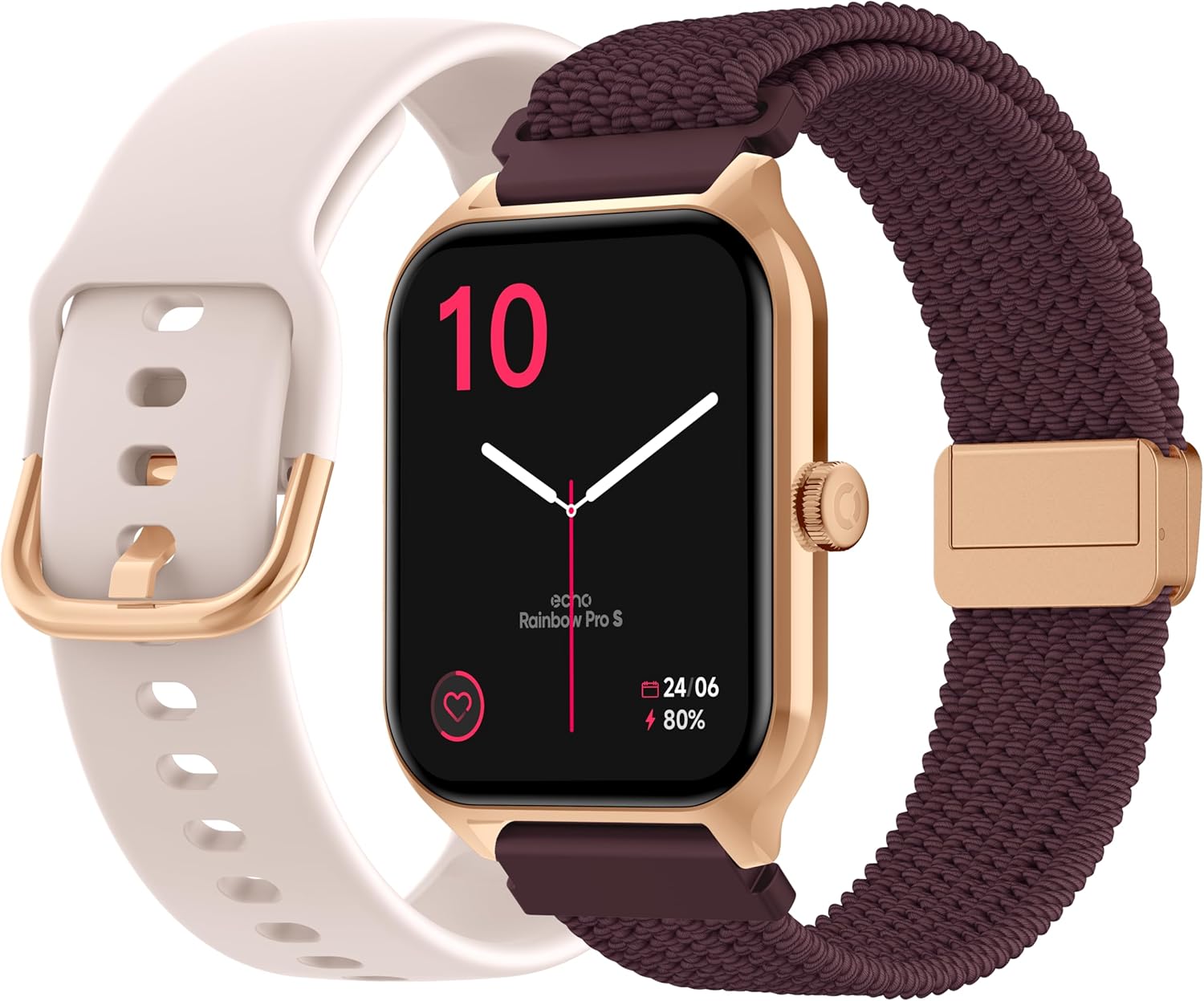
Image: The ECHO Rainbow Pro S Smartwatch, showcasing its rose gold finish, accompanied by both the rose gold silicone strap and the bordeaux nylon strap, along with the magnetic charging cable.
3. Uppsetning
3.1 Hleðsla tækisins
Before first use, fully charge your smartwatch. Connect the magnetic charging cable to the charging points on the back of the watch and plug the USB end into a standard USB power adapter (not included) or a computer's USB port. A full charge takes approximately 2.5 hours.
3.2 Uppsetning Da Fit appsins
The ECHO Rainbow Pro S Smartwatch works with the Da Fit application. Download the Da Fit app from the Apple App Store (for iOS devices) or Google Play Store (for Android devices).
- Scan the QR code in the watch's manual or on the watch screen (if available) or search for "Da Fit" in your app store.
- Settu upp forritið á snjallsímann þinn.
3.3 Pörun við snjallsímann þinn
To unlock the full potential of your smartwatch, pair it with the Da Fit app:
- Gakktu úr skugga um að kveikt sé á Bluetooth á snjallsímanum þínum.
- Opnaðu Da Fit appið.
- Follow the on-screen instructions to add a new device. The app will search for your ECHO Rainbow Pro S.
- Select your watch from the list of found devices. Confirm the pairing request on both your phone and the watch.
- Þegar úrið hefur verið parað saman mun það samstilla gögn við appið.

Image: The ECHO Rainbow Pro S Smartwatch, showing the watch body, both the silicone and nylon straps, and the magnetic charging cable, illustrating the components for setup.
4. Notkun snjallúrsins
4.1 Að sigla um viðmótið
The ECHO Rainbow Pro S features an intuitive 1.96-inch touchscreen. Swipe left, right, up, or down to access different functions and menus. The side button typically serves as a power button or a return-to-home screen button.
4.2 Heilbrigðiseftirlit
Your smartwatch is equipped with advanced sensors to track your well-being:
- Hjartsláttur: Fylgist stöðugt með hjartsláttartíðni þinni allan daginn.
- Súrefni í blóði (SpO2): Mælir súrefnismettun í blóði þínu.
- Blóðþrýstingur: Gefur mat á blóðþrýstingi þínum.
- Svefnmæling: Greinir svefnmynstur þitt, þar á meðal djúpan og léttan svefntages.
Hægt er að fá allar heilsufarsupplýsingar viewed in detail within the Da Fit app, allowing you to track trends and progress over time.

Mynd: Aftan view of the ECHO Rainbow Pro S Smartwatch, highlighting the optical sensors used for heart rate, SpO2, and blood pressure monitoring.

Image: The ECHO Rainbow Pro S Smartwatch screen showing various health metrics, including heart rate (BPM), SpO2 percentage, and activity data, demonstrating its health tracking capabilities.
4.3 Samskiptaeiginleikar
Vertu tengdur beint frá úlnliðnum:
- Bluetooth símtöl: Hringdu og taktu við símtölum beint úr úrinu þínu þegar það er tengt við snjallsímann þinn.
- Tilkynningar: Fáðu tilkynningar um símtöl, skilaboð og tilkynningar í forritum úr pöruðum snjallsíma.

Image: The ECHO Rainbow Pro S Smartwatch displaying incoming call and message notifications, illustrating its communication features when paired with a smartphone.
4.4 Aðstoðarmaður gervigreindar
The ECHO Rainbow Pro S integrates an AI assistant for convenient voice commands and information retrieval. Simply activate the AI feature on your watch and speak your query or command.

Image: The ECHO Rainbow Pro S Smartwatch screen showing the AI assistant interface, ready to receive voice commands or queries.
4.5 Sports Modes & Coaching
With over 100 sports modes and integrated training programs, your smartwatch is an ideal companion for your fitness journey. Select your activity from the watch's menu to track performance metrics such as calories burned, distance, and duration. The Da Fit app provides personalized tracking and allows you to follow your course using your smartphone's GPS.

Image: The ECHO Rainbow Pro S Smartwatch displaying various sports modes and training exercises, with accompanying smartphone app screenshots showing detailed workout plans and GPS tracking.
4.6 Sérsnið
Sérsníddu snjallúrsupplifun þína:
- Horfa á andlit: Choose from over 100 downloadable watch faces via the Da Fit app to match your style.
- Skiptanlegar ólar: Easily swap between the included silicone and nylon straps to suit your activity or outfit.
Image: The ECHO Rainbow Pro S Smartwatch, showcasing its rose gold finish, accompanied by both the rose gold silicone strap and the bordeaux nylon strap, highlighting the interchangeable design.
5. Viðhald
5.1 Þrif
To keep your smartwatch in optimal condition, clean it regularly. Wipe the screen and body with a soft, lint-free cloth. For stubborn smudges, slightly dampÞvoið klútinn með vatni. Forðist að nota sterk efni eða slípiefni.
5.2 Vatnsheldni (IP68)
The ECHO Rainbow Pro S is IP68 rated, meaning it is resistant to water up to 1 meter deep for 30 minutes. This makes it suitable for daily activities like hand washing, rain, or accidental splashes. However, it is not recommended for swimming, diving, or high-pressure water activities. Avoid exposing the watch to hot water, steam, or corrosive liquids.
5.3 Ending rafhlöðunnar
The smartwatch offers up to 5 days of battery life with typical usage. To optimize battery performance:
- Minnka birtustig skjásins.
- Slökkvið á stöðugri hjartsláttarmælingu ef ekki er þörf á henni.
- Takmarkaðu fjölda tilkynninga í forritum.
6. Bilanagreining
If you encounter any issues with your ECHO Rainbow Pro S Smartwatch, please refer to the following common problems and solutions:
| Vandamál | Lausn |
|---|---|
| Úrið kviknar ekki | Gakktu úrið úr fullhlaðið. Tengdu það við segulhleðslusnúruna og aflgjafa í að minnsta kosti 30 mínútur. |
| Ekki er hægt að para við snjallsíma | 1. Gakktu úr skugga um að Bluetooth sé virkt í símanum þínum. 2. Gakktu úr skugga um að úrið sé innan seilingar símans þíns. 3. Endurræstu bæði úrið og símann. 4. Hreinsaðu Bluetooth skyndiminnið í símanum þínum (Android) eða gleymdu tækinu og paraðu það aftur (iOS/Android). 5. Ensure the Da Fit app has necessary permissions. |
| Ónákvæmar heilsulestur | 1. Gakktu úrið úr því að sitja þétt á úlnliðnum, ekki of þröngt né of laust. 2. Hreinsið skynjarana aftan á úrinu. 3. Forðist óhóflega hreyfingu við mælingar. 4. Note that these readings are for reference and not for medical diagnosis. |
| Tilkynningar ekki mótteknar | 1. Ensure the watch is paired and connected to your phone. 2. Check notification settings in the Da Fit app and on your phone (e.g., app permissions, DND mode). 3. Make sure the Da Fit app is running in the background. |
| Stuttur rafhlaðaending | 1. Minnkaðu birtustig skjásins. 2. Disable continuous heart rate monitoring if not needed. 3. Limit background app refresh for the Da Fit app. 4. Ensure no apps are constantly running on the watch. |
7. Tæknilýsing
| Eiginleiki | Smáatriði |
|---|---|
| Vörumerki | EKKI |
| Fyrirmynd | Rainbow Pro S |
| Gerðarnúmer | bd279646-58a1-4a95-ab0c-0847dc2ca4e6 |
| Litur | Rósagull |
| Skjástærð | 1.96 tommur |
| Skjár Tegund | OLED or LED |
| Tengingar | Bluetooth |
| Samhæf tæki | Snjallsími, spjaldtölva |
| Samsetning rafhlöðu | Litíum-fjölliða |
| Rafhlöðulíftími (dæmigerður) | 5 dagar |
| Hleðslutími | 2.5 klukkustundir |
| Vatnsþol | IP68 (allt að 1 metri í 30 mínútur) |
| GPS | Enginn GPS |
| Lögun | Umferð |
| Samhæfni forrita | Da Fit |
| Upprunaland | Kína |
8. Ábyrgð og stuðningur
8.1 Vöruábyrgð
Your ECHO Rainbow Pro S Smartwatch is covered by a standard manufacturer's warranty against defects in materials and workmanship. The specific duration and terms of the warranty may vary based on your region and point of purchase. Please refer to your purchase documentation or contact your retailer for detailed warranty information.
8.2 Þjónustuver
For technical assistance, troubleshooting beyond this manual, or warranty claims, please contact the retailer or manufacturer directly. Have your product model number (bd279646-58a1-4a95-ab0c-0847dc2ca4e6) and proof of purchase ready when contacting support.


