Inngangur
This manual provides detailed instructions for the setup, operation, maintenance, and troubleshooting of your ciciglow WL Electronic Eyepiece Telescope Camera. This device is designed to capture 16MP photos and HD videos through compatible optical instruments, enhancing your viewreynslu af upptökum og vinnslu.
Öryggisupplýsingar
- Do not expose the device to extreme temperatures, moisture, or direct sunlight for extended periods.
- Forðist að missa tækið eða láta það verða fyrir miklum höggum.
- Haltu tækinu í burtu frá sterkum segulsviðum.
- Ekki reyna að taka tækið í sundur eða breyta því. Það ógildir ábyrgðina.
- Notaðu aðeins meðfylgjandi USB snúru til að hlaða.
- Ensure the device is securely attached to your telescope or other optical instrument to prevent accidental falls.
Innihald pakka
Gakktu úr skugga um að allir hlutir séu til staðar í pakkanum þínum:
- 1 x WL Electronic Eyepiece Telescope Camera
- 1 x USB Type-C hleðslusnúra
- 1 x Leiðbeiningarhandbók (þetta skjal)
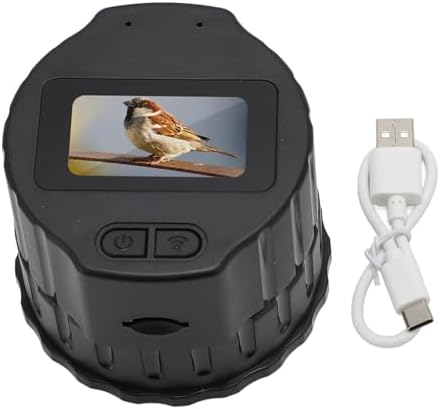
Image: The electronic eyepiece camera shown next to its USB Type-C charging cable, representing the typical package contents.
Vara lokiðview
The ciciglow WL Electronic Eyepiece is a compact digital camera designed to attach to various optical instruments. It features a 1.5-inch screen for direct viewing and can connect to smartphones via Wi-Fi for remote control, live viewing og deila.
Helstu eiginleikar:
- Hágæða upptaka: Records 16MP photos and HD videos.
- Breið samhæfni: Fits 28mm to 50mm monocular, binoculars, microscopes, and astronomical telescopes.
- Þráðlaus tenging: Built-in Wi-Fi for smartphone connection via the Viidure app.
- Dual Device Viewing: Styður samtímis viewing on up to two mobile phones.
- Færanleg hönnun: Létt og nett fyrir auðveldan flutning.
- Langur rafhlöðuending: Integrated 1000mAh battery provides up to 150 minutes of continuous use.
- Stækkanlegt geymsla: Supports memory cards up to 256GB (not included).

Image: A visual representation of the electronic eyepiece camera in use, connected to a telescope, with the live feed displayed on two mobile phones simultaneously. This highlights its photo and video recording capabilities.
Uppsetning
1. Hleður tækið
Before first use, fully charge the electronic eyepiece camera. Connect the provided USB Type-C cable to the camera's power port and the other end to a standard USB power adapter (not included) or a computer USB port.
- Charging time: Approximately 1 hour.
- The device can be used while charging with an external power source like a power bank for extended operation.

Image: The electronic eyepiece camera with its USB Type-C port highlighted, indicating where to connect the charging cable. A battery icon suggests charging status.
2. Minniskort sett í
The device supports a memory card (MicroSD, not included) up to 256GB for storing photos and videos. Locate the memory card slot and gently insert the card until it clicks into place.
3. Attaching to an Optical Instrument
The electronic eyepiece is compatible with optical instruments (monoculars, binoculars, microscopes, astronomical telescopes) that have an eyepiece diameter between 28mm and 50mm.
- Ensure your optical instrument's eyepiece falls within the 28mm to 50mm range.
- Gently rotate the electronic eyepiece onto the optical instrument's eyepiece until it is securely fitted. Do not overtighten.
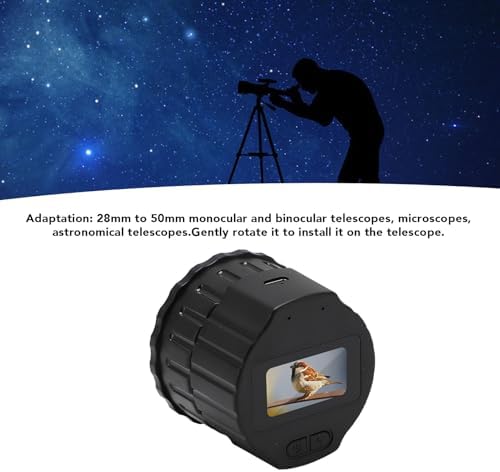
Image: The electronic eyepiece camera positioned to be attached to a telescope, illustrating the installation process and compatibility range.
4. Uppsetning appa og Wi-Fi tenging
To utilize advanced features and remote control, download the 'Viidure' application on your smartphone.
- Scan the QR code provided in the original product packaging or search for 'Viidure' in your smartphone's application store (e.g., Google Play Store, Apple App Store).
- Settu upp forritið.
- On the electronic eyepiece camera, power on the device and enable its Wi-Fi function.
- On your smartphone, enable Wi-Fi and connect to the camera's Wi-Fi network (SSID will typically start with 'Viidure' or similar).
- Open the Viidure app. Ensure your phone has internet permissions enabled for the app to function correctly.
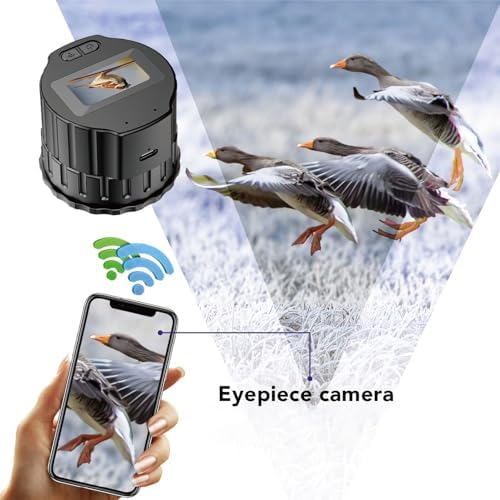
Image: The electronic eyepiece camera transmitting a live image to a smartphone via Wi-Fi, demonstrating the app connectivity.
Notkunarleiðbeiningar
Kveikt/slökkt
Press and hold the power button on the device to turn it on or off. The 1.5-inch screen will activate upon power-on.
Að taka myndir og myndbönd
Once connected to your smartphone via the Viidure app:
- Open the Viidure app to view lifandi strauminn frá myndavélinni.
- Use the controls within the app to capture photos or start/stop video recording.
- Captured media will be saved to the inserted memory card and can be accessed through the app.
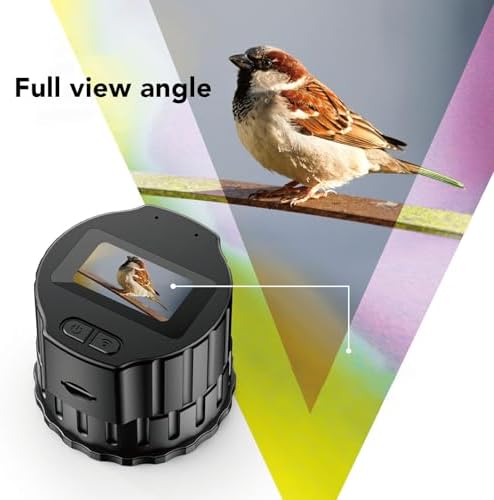
Image: The 1.5-inch screen of the electronic eyepiece camera showing a clear image, indicating its direct viewing getu.
Samtímis Viewing
The Viidure app allows up to two smartphones to connect and view the live feed from the electronic eyepiece simultaneously. Follow the Wi-Fi connection steps on both devices.

Image: A person observing the night sky through a telescope equipped with the electronic eyepiece, demonstrating its use for astronomical photography.
Viðhald
- Þrif: Use a soft, dry cloth to clean the exterior of the device. For the lens and screen, use a specialized lens cleaning cloth and solution if necessary. Avoid abrasive materials.
- Geymsla: When not in use, store the device in a cool, dry place, away from dust and direct sunlight.
- Umhirða rafhlöðu: Til að lengja líftíma rafhlöðunnar skal forðast að tæma hana alveg oft. Ef hún er geymd í langan tíma skal hlaða rafhlöðuna upp í um 50% á nokkurra mánaða fresti.
Úrræðaleit
Kveikir ekki á tækinu
- Gakktu úr skugga um að rafhlaðan sé hlaðin. Tengdu tækið við aflgjafa með USB-C snúrunni.
- Haltu rofanum inni í nokkrar sekúndur.
Cannot Connect to Wi-Fi / App
- Verify that the camera's Wi-Fi is enabled.
- Ensure your smartphone's Wi-Fi is on and connected to the camera's network.
- Check if the 'Viidure' app has necessary permissions (e.g., internet access) on your phone.
- Restart both the camera and your smartphone, then try connecting again.
Léleg myndgæði
- Ensure the optical instrument (telescope, etc.) is properly focused.
- Check if the camera lens or the optical instrument's eyepiece is clean.
- Verify that the camera is securely attached and aligned with the optical instrument's eyepiece.
Device Does Not Fit My Optical Instrument
- Confirm that your optical instrument's eyepiece diameter is between 28mm and 50mm. This device is not compatible with eyepieces outside this range.
Tæknilýsing
| Tegund vöru | WL Electronic Eyepiece |
| Efni | ABS |
| Litur | Svartur |
| Rafhlaða | Built-in Li Battery 1000mAh |
| Skynjari | CMOS |
| Pixels | 16MP |
| Skjár | 1.5 tommur |
| Lárétt horn linsu | 5° |
| Minniskortarauf | Maximum 256GB (memory card not included) |
| Aflhöfn | USB Type-C |
| Notkunartími | 150 mínútur |
| Hleðslutími | Um það bil 1 klst |
| Þyngd | 4.9 aura (u.þ.b. 139g) |
| Mál | 3.94 x 3.94 x 2.76 tommur (u.þ.b. 10 x 10 x 7 cm) |
| Samhæfni | 28mm to 50mm Monocular, Binoculars, Microscopes, Astronomical Telescopes |
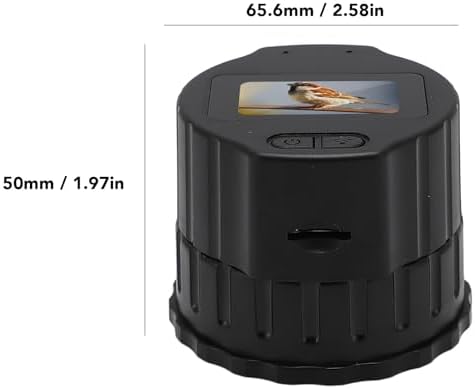
Image: A diagram illustrating the physical dimensions of the electronic eyepiece camera.
Upplýsingar um ábyrgð
This product comes with a standard manufacturer's warranty. Please refer to the warranty card included in your original packaging for specific terms and conditions, including warranty period and coverage details. Keep your proof of purchase for warranty claims.
Þjónustudeild
For technical assistance, troubleshooting not covered in this manual, or warranty inquiries, please contact ciciglow customer support through the retailer's platform where you purchased the product or visit the official ciciglow websíða fyrir upplýsingar um tengiliði.