1. Inngangur
This manual provides detailed instructions for the installation, operation, and maintenance of your LICHIFIT Drone Airdrop System. This device is designed to enable payload delivery for compatible DJI Mini series drones, including Mini 4K, Mini 3 Pro, Mini 3, Mini 2, Mini 2 SE, and Mini SE. Please read this manual thoroughly before use to ensure safe and effective operation.
2. Öryggisupplýsingar
- Ensure the drone's total takeoff weight, including the airdrop system and payload, does not exceed the drone's maximum takeoff weight limit. The maximum recommended payload for this system is 100g.
- Operate the drone and airdrop system in clear, open areas, away from people, animals, and obstacles.
- Do not use the airdrop system in strong winds or adverse weather conditions.
- Always check the system and drone for any damage before each flight.
- Ensure the payload is securely attached before flight to prevent accidental drops.
- Adhere to all local aviation regulations and laws regarding drone operation and payload delivery.
3. Innihald pakka
Gakktu úr skugga um að allir hlutir séu til staðar í pakkanum þínum:
- 1x Air-dropping System Unit
- 1x Base (for Mini 3/Mini 3 Pro only)
- 1x hleðslusnúra
- 1x Velcro ól
- 1x Release Line
- 1x Notendahandbók (þetta skjal)
4. Tæknilýsing
| Eiginleiki | Forskrift |
|---|---|
| Efni | ABS plast |
| Litur | Grátt |
| Stærð | 5.5 x 4.1 x 3 cm |
| Þyngd | Um það bil 30 g (1.06 únsur) |
| Rafhlöðugeta | 82mAh |
| Hámarks hleðslugeta | ≤100g |
| Hleðslustraumur | 1A |
| Hleðsla Voltage | 5V |
| Hleðslutími | 1 klst |
| Operations per Charge | Um það bil 400 sinnum |
| Samhæfðir drónar | DJI Mini 4K, Mini 3 Pro, Mini 3, Mini 2, Mini 2 SE, Mini SE |
5. Uppsetningarleiðbeiningar
Follow these steps to properly install the airdrop system on your DJI Mini series drone.
- 1. Install the Base (for Mini 3 and Mini 3 Pro only): If you have a DJI Mini 3 or Mini 3 Pro, clip the provided base onto the Air-Dropping System unit. This base is not required for other compatible Mini models.
- 2. Fix the Magic Tie: Secure the Velcro strap (Magic Tie) onto the designated hole position on one side of the Air-Dropping System unit.
- 3. Attach to Drone: Fix the Air-Dropping System to the bottom of your drone. Align it with the central hole position on the drone's underside.
- 4. Secure the System: Wrap the Magic Tie around the top of the drone, passing it through the hole on the other side of the Air-Dropping System. Then, tighten the Magic Tie to firmly fix the system onto the drone's fuselage.

Image: Detailed visual guide for installing the airdrop system, illustrating each step from attaching the base to securing the unit on the drone.

Image: A visual comparison showing the drone's ground clearance before and after the airdrop system installation, highlighting its function as additional landing gear.
6. Notkunarleiðbeiningar
Understand the functions and operation of your LICHIFIT Airdrop System.
6.1. Hluti yfirview

Mynd: Ítarleg view of the airdrop system unit, indicating the Magic Tie attachment point, the release hook, the USB-C charging port, and the power/function button.
6.2. Hleðsla kerfisins
Connect the provided charging cable to the charging port on the airdrop system and a 5V USB power source. The red indicator light will be continuously on during charging. Once fully charged, the red light will turn off. A full charge takes approximately 1 hour and allows for about 400 release operations.

Image: Visual guide for charging the airdrop system, showing the red indicator light status during charging and when complete.
6.3. Power On and Calibration
To power on the system, briefly press the switch button. The green indicator light will flash. Gently shake the unit to calibrate its posture. If the green light remains continuously on, the calibration is successful and the system is ready for use.
Image: Steps for powering on the airdrop system, including pressing the button, shaking for calibration, and observing the green light for successful calibration.
6.4. Adjusting the Hook
While the system is powered on, press and hold the switch button for 3 seconds. Then, continue to press and hold the switch button to adjust the hook's rotation direction. Release the button when the hook is in the desired upward position, and it will stop rotating.
Image: Instructions for adjusting the hook's position by pressing and holding the power button.
6.5. Payload Release
To release the payload, ensure your drone is hovering stably in normal flight mode. Rotate the drone in place in the same direction for 10 seconds. The airdrop system will detect this specific rotation pattern and trigger the release mechanism. This method eliminates the need for additional remote controllers.
Image: Visual representation of the drone rotating in place to trigger the payload release.
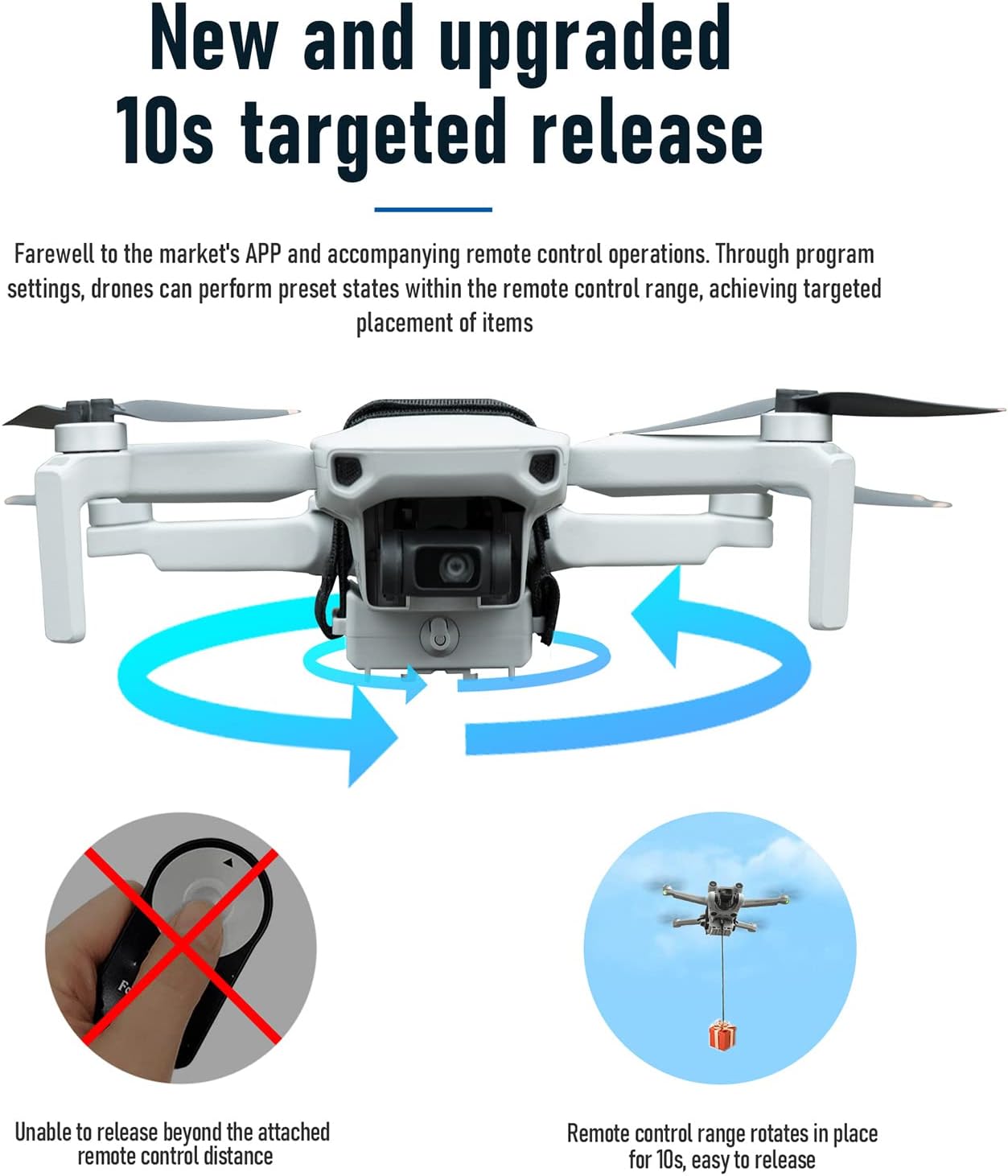
Image: An illustration of the drone executing the 10-second rotation for targeted payload release, demonstrating the system's operational method.

Mynd: Dæmiamples of how the airdrop system can be used for different purposes, such as special deliveries or fishing, with payloads up to 60g.
6.6. Slökkt
To power off the system, double-click and hold the switch button for 2 seconds. The Air-dropping system will turn off, and the green light will extinguish.
7. Viðhald
- Keep the airdrop system clean and free from dust and debris. Use a soft, dry cloth for cleaning.
- Geymið kerfið á köldum og þurrum stað þegar það er ekki í notkun.
- Avoid exposing the system to extreme temperatures or direct sunlight for prolonged periods.
- Regularly inspect the Velcro strap and release mechanism for wear and tear. Replace if necessary.
8. Bilanagreining
| Vandamál | Möguleg orsök | Lausn |
|---|---|---|
| Kerfi kveikir ekki á. | Lítil rafhlaða eða engin hleðsla. | Charge the system fully (refer to Section 6.2). |
| Green light not solid after power on. | Calibration failed or incomplete. | Gently shake the unit again after powering on to complete calibration (refer to Section 6.3). |
| Payload does not release. | Incorrect drone rotation or insufficient duration. | Ensure the drone is hovering stably and rotate it consistently in one direction for a full 10 seconds (refer to Section 6.5). Verify the system is powered on and calibrated. |
| System falls off drone during flight. | Velcro strap not securely fastened. | Re-install the system, ensuring the Velcro strap is tightly secured around the drone's fuselage (refer to Section 5). |
9. Vörumyndband
Video: An official product video demonstrating the installation and operation of the LICHIFIT Drone Airdrop System on a DJI Mini drone, including payload release.
10. Ábyrgð og stuðningur
For warranty information or technical support, please refer to the retailer's policy where the product was purchased or contact LICHIFIT customer service through their official channels. Keep your proof of purchase for warranty claims.