1. Inngangur
This instruction manual provides essential information for the safe and effective use of your GT POWER AC Adapter, model 602. This power supply is designed to be compatible with the Verizon WNC-CR200A Gateway Router. Please read this manual thoroughly before use and retain it for future reference.
2. Öryggisupplýsingar
WARNING: To reduce the risk of electric shock, fire, or injury, observe the following safety precautions:
- Ensure the power adapter is used with devices that match its voltage og núverandi forskriftir.
- Ekki láta millistykkið verða fyrir vatni, rigningu eða miklum raka.
- Ekki taka í sundur eða breyta millistykkinu. Látið hæft starfsfólk sjá um alla þjónustu.
- Avoid placing the adapter in areas with poor ventilation or near heat sources.
- Inspect the adapter and cable for damage before each use. Do not use if damaged.
- Geymið þar sem börn ná ekki til.
- Taktu millistykkið úr sambandi við rafmagnið þegar það er ekki í notkun í langan tíma.
This adapter features Over Voltage Protection (OVP), Over Current Protection (OCP), and Short Circuit Protection (SCP) to ensure safe operation.
3. Innihald pakka
- 1 x GT POWER AC Adapter (Model 602)
4. Vöru lokiðview
The GT POWER AC Adapter is a compact and reliable power supply designed for specific networking equipment. It converts standard AC wall power to the DC power required by your device.

Mynd 4.1: Framan view of the GT POWER AC Adapter, showing the power prongs and the output cable.

Mynd 4.2: Hlið view of the GT POWER AC Adapter, highlighting the barrel connector at the end of the output cable.
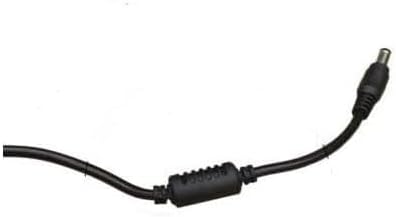
Mynd 4.3: Nærmynd view of the barrel connector, which plugs into the compatible device.
5. Uppsetning
Follow these steps to properly connect your GT POWER AC Adapter to your Verizon WNC-CR200A Gateway Router.
- Staðfestu samhæfni tækja: Before connecting, ensure your device is a Verizon WNC-CR200A Gateway Router. The adapter is specifically designed for this model. You can often find the model number on a label at the bottom or back of your router.

Mynd 5.1: Example of a Verizon WNC-CR200A Gateway Router's bottom label, indicating the model number for compatibility verification.
- Tengjast tæki: Insert the barrel connector of the GT POWER AC Adapter firmly into the power input port of your Verizon WNC-CR200A Gateway Router.
- Tengdu við rafmagnsinnstungu: Stingdu AC-töngunum á millistykkinu í venjulega 100-240V AC-innstungu.
- Kveikt á: Once connected, your Verizon WNC-CR200A Gateway Router should power on automatically or can be turned on using its power button, if available.
6. Rekstur
The GT POWER AC Adapter operates automatically once connected. It provides a stable power supply to your compatible device. No user interaction is required for its operation beyond initial connection.
- Ensure the adapter is always connected to a functioning power outlet.
- Avoid disconnecting the adapter during critical operations of your router to prevent data loss or system instability.
7. Viðhald
Proper maintenance ensures the longevity and safe operation of your AC adapter.
- Þrif: Disconnect the adapter from the power outlet and the device before cleaning. Use a soft, dry cloth to wipe the exterior. Do not use liquid cleaners or solvents.
- Geymsla: Þegar millistykkið er ekki í notkun skal geyma það á köldum, þurrum stað, fjarri beinu sólarljósi og miklum hita. Forðist að vefja snúruna þétt saman til að koma í veg fyrir skemmdir.
- Kapalumhirða: Ekki beygja, snúa eða toga snúruna of mikið. Forðist að setja þunga hluti á snúruna.
8. Bilanagreining
If you encounter issues with your GT POWER AC Adapter, refer to the following common problems and solutions:
| Vandamál | Möguleg orsök | Lausn |
|---|---|---|
| Tæki kveikir ekki á. |
|
|
| Millistykkið er óvenju heitt. |
|
|
9. Tæknilýsing
| Eiginleiki | Smáatriði |
|---|---|
| Gerðarnúmer | 602 |
| Vörumerki | GT POWER |
| Inntak Voltage | AC 100-240V (50/60Hz) |
| Output Voltage | DC 12V |
| Úttaksstraumur | 3A |
| Hvaðtage | 36 Watt |
| Tegund tengis | Tunna |
| Lengd snúru | 59 tommur (u.þ.b. 1.5 metrar) |
| Verndareiginleikar | OVP (Over Voltage-vörn), OCP (yfirstraumsvörn), SCP (skammhlaupsvörn) |
| Samhæf tæki | Verizon WNC-CR200A Gateway Router CR200A WiFi6 NKR-LV65C-T3 |
10. Ábyrgð og stuðningur
This GT POWER AC Adapter comes with a Eins árs ábyrgð frá kaupdegi. Að auki, a 30 daga peningaábyrgð er boðið upp á.
For technical support, warranty claims, or further assistance, please contact your retailer or the manufacturer directly. Please have your purchase information and product model number (602) available when contacting support.
For more information, you may refer to the seller's contact details provided at the point of purchase.


