1. Inngangur
The TOPDON ArtiDiag EU-BBA is a specialized full-system diagnostic tool designed for Mercedes-Benz, BMW, and V.A.G group vehicles. This manual provides detailed instructions for setting up, operating, and maintaining your device to ensure accurate and efficient vehicle diagnostics and maintenance.
2. Vöru lokiðview og hvað er í kassanum
The ArtiDiag EU-BBA is a compact and powerful diagnostic scanner. Before starting, please verify all components are present.

Image: The ArtiDiag EU-BBA device, diagnostic cable, charging cable, carrying case, quick user guide, and user manual.
Innihald kassa:
- 1 x ArtiDiag EU-BBA Diagnostic Tool
- 1 x Diagnostic Cable (OBD2)
- 1 x hleðslusnúra
- 1 x burðartaska
- 1 x Fljótleg notendahandbók
- 1 x Notendahandbók (þetta skjal)
3. Uppsetningarleiðbeiningar
3.1 Upphafshleðsla
The device contains a 3000mAh Lithium Ion battery. For initial use, it is recommended to fully charge the device using the provided charging cable. The device can also charge when connected to a vehicle's OBD2 port.
3.2 Tenging við ökutæki
- Finndu OBD2 tengið á bílnum, venjulega undir mælaborðinu ökumannsmegin.
- Connect the diagnostic cable to the ArtiDiag EU-BBA device.
- Plug the other end of the diagnostic cable into the vehicle's OBD2 port.
- Turn the vehicle's ignition to the 'ON' position (engine off).
- The ArtiDiag EU-BBA will power on automatically.
3.3 Software Updates and Language Selection
The ArtiDiag EU-BBA supports lifetime free updates. Connect the device to a Wi-Fi network to download the latest software and vehicle data. Updates can be performed with a single click from the device's main menu. The device supports 11 languages, which can be selected in the settings menu.
4. Notkunarleiðbeiningar
The ArtiDiag EU-BBA features a 4-inch touchscreen display for intuitive navigation. The main interface provides access to various diagnostic and service functions.

Image: The ArtiDiag EU-BBA displaying diagnostic trouble codes for a BMW vehicle.
4.1 Heildar kerfisgreining
This function allows for a comprehensive scan of all available electronic control units (ECUs) in the vehicle. It covers systems such as Engine (ECM), Transmission (TCM), Anti-lock Braking System (ABS), Supplemental Restraint System (SRS), Tire Pressure Monitoring System (TPMS), ESP, Immobilizer, Gateway, Steering, and Radio.

Image: The ArtiDiag EU-BBA connected to a vehicle, illustrating its capability for full system diagnostics.
To perform a full system diagnostic:
- From the main menu, select 'Diagnostics'.
- The device will automatically identify the vehicle's VIN (Vehicle Identification Number). Confirm the vehicle information.
- Select 'Full System Scan' to initiate a scan of all accessible modules.
- Review the displayed fault codes and system status.
4.2 Bi-Directional Control (Active Tests)
Bi-directional control allows you to send commands to vehicle ECUs to test specific components. This helps in accurately pinpointing issues without disassembling parts.

Mynd: Dæmiamples of bi-directional control, including throttle modulation, window operation, fuel pump activation, and AC clutch testing.
Examples of components that can be tested include:
- Modulating throttle
- Opening/closing windows
- Activating the fuel pump
- Turning the AC clutch on/off
- Wiper activation
4.3 ECU Online Coding
ECU Online Coding enables customization of vehicle settings, activation of hidden features, disabling unwanted functions, and component matching. This function allows for optimization of vehicle performance and personalization.

Image: The ArtiDiag EU-BBA demonstrating ECU coding options for vehicle customization.
Consult your vehicle's service manual or a qualified technician before performing ECU coding to avoid unintended consequences.
4.4 All Service Functions
The ArtiDiag EU-BBA provides a comprehensive suite of service functions for routine maintenance and repairs. These functions help reset and initialize vehicle systems after component replacement or service.

Image: A selection of maintenance service functions available on the ArtiDiag EU-BBA.
Helstu þjónustuhlutverk eru meðal annars:
- Olíu endurstilla
- Endurstilling rafrænnar handbremsu (EPB)
- Endurstilling rafhlöðustjórnunarkerfis (BMS)
- Throttle Learning
- Fyrirsögnamp Leiðréttingar
- Power Window Normalization
- Endurnýjun dísil svifryks (DPF)
- Anti-lock Braking System (ABS) Bleeding
- Endurstilling stýrishornsskynjara (SAS)
- Tire Pressure Monitoring System (TPMS) Reset
- Gírkassasamsvörun
- Samsvörun fjöðrunar
- Sunroof Initializing
- Inndælingarkóði
- AdBlue endurstilling
4.5 Full OBD2 Modes
The device supports all 10 OBD2 test modes for comprehensive engine diagnostics on compliant vehicles.

Image: An illustration of the full OBD2 diagnostic modes available.
Þessar stillingar innihalda:
- Read and Clear Diagnostic Trouble Codes (DTCs)
- View Gagnastraumur í beinni
- View Frystu rammagögn
- Staða I/M tilbúinleika
- O2 skynjarapróf
- Innbyggt skjápróf
- EVAP kerfispróf
- Read Vehicle Information (VIN, CID, CVN)
4.6 Viðbótaraðgerðir
The ArtiDiag EU-BBA includes several practical functions to streamline diagnostics:
- Smart AutoVIN: Automatically identifies vehicle information upon connection.
- VAG Guided Function: Provides step-by-step instructions for V.A.G vehicles.
- Data Report and Share: Generate and share diagnostic reports.
- Graphic Live Data: Visualize live sensor data for easier analysis.
- Viðbrögð notenda: Submit feedback directly from the device.
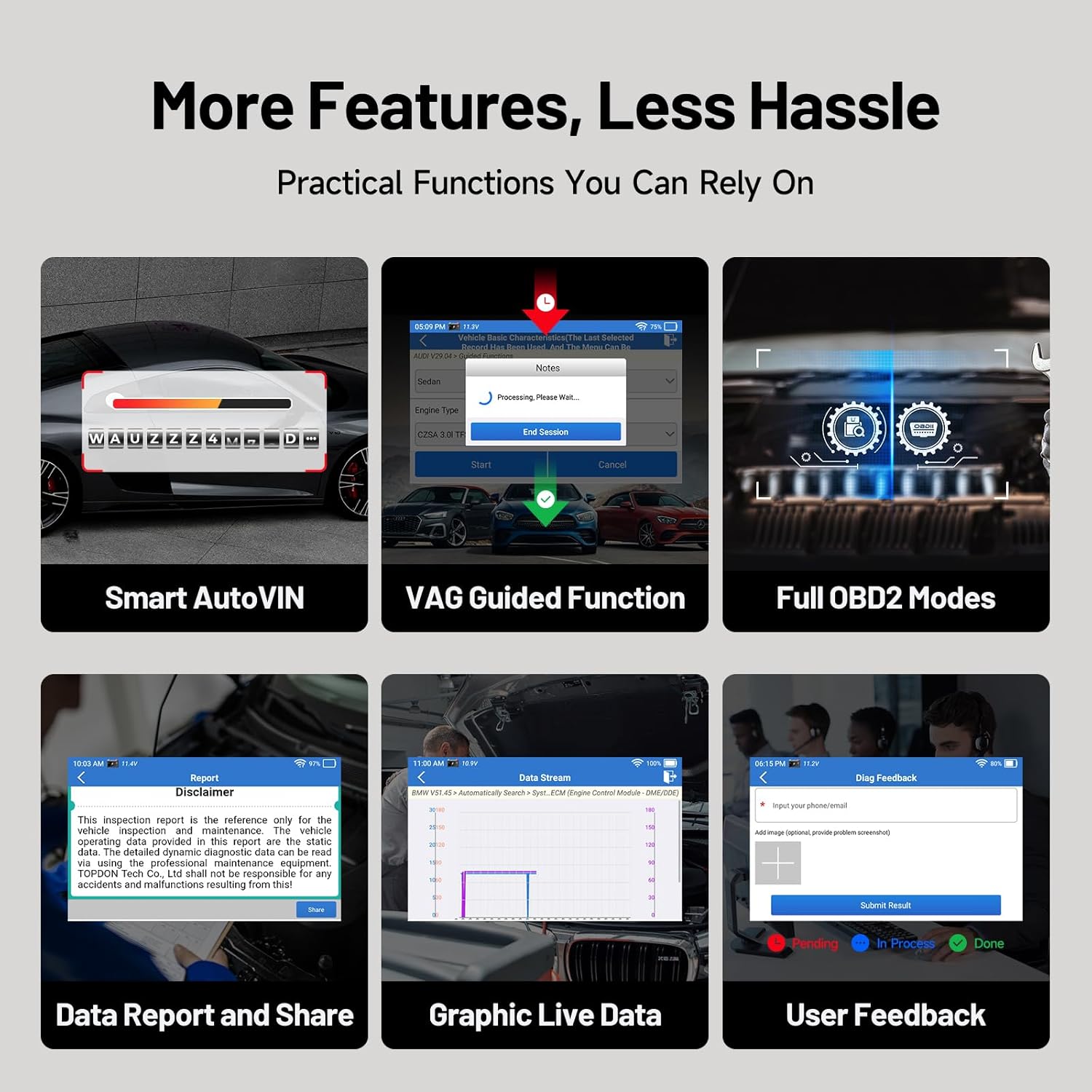
Mynd: Yfirview of additional practical functions on the ArtiDiag EU-BBA.
5. Viðhald
5.1 Hugbúnaðaruppfærslur
Ensure your device is always up-to-date by regularly checking for and installing software updates via Wi-Fi. These updates provide new features, vehicle coverage, and bug fixes.
5.2 Þrif á tækinu
Wipe the device screen and body with a soft, damp klút. Forðist að nota slípiefni eða leysiefni sem gætu skemmt skjáinn eðaasing.
5.3 Umhirða rafhlöðu
Til að lengja endingu rafhlöðunnar skaltu forðast að tæma tækið alveg oft. Geymdu tækið á köldum, þurrum stað þegar það er ekki í notkun í langan tíma.
6. Bilanagreining
If you encounter issues with your ArtiDiag EU-BBA, consider the following:
- Kveikir ekki á tækinu: Ensure the device is charged or properly connected to the vehicle's OBD2 port.
- Tengingarvandamál: Verify the diagnostic cable is securely connected to both the device and the vehicle. Ensure the vehicle's ignition is on.
- Software update failures: Check your Wi-Fi connection. Ensure there is sufficient storage space on the device.
- Inaccurate readings or functions: Ensure the vehicle's make, model, and year are correctly identified. Perform a software update to ensure the latest vehicle data is installed.
For persistent issues, utilize the 'User Feedback' function on the device or contact TOPDON customer support.
7. Tæknilýsing

Image: Key technical specifications and internal components of the ArtiDiag EU-BBA.
| Eiginleiki | Forskrift |
|---|---|
| Skjár | 4-inch, 800x480 pixels |
| Örgjörvi | 1.3GHz fjórkjarna |
| vinnsluminni | 2GB |
| ROM | 32GB |
| Stýrikerfi | Android 8.1 |
| Rafhlaða | 3000mAh litíumjón |
| Mál | 25 x 17.5 x 7.6 cm |
| Þyngd | 897 g |
| Tungumál studd | 11 (including English, French, German, Spanish, Italian, Portuguese, Polish, Russian, Chinese) |
8. Ábyrgð og stuðningur
8.1 Upplýsingar um ábyrgð
The TOPDON ArtiDiag EU-BBA comes with a 1-year warranty from the date of purchase, covering manufacturing defects. Please retain your proof of purchase for warranty claims.
8.2 Þjónustuver
For technical assistance, warranty inquiries, or any questions regarding the operation of your device, please contact TOPDON customer support. Refer to the official TOPDON websíðu fyrir nýjustu tengiliðaupplýsingar.


