Inngangur
This manual provides detailed instructions for the setup, operation, maintenance, and troubleshooting of your MANBASNAKE M68 Tri-Mode Wireless Keyboard. This keyboard offers versatile connectivity options including Bluetooth 5.0, 2.4GHz wireless, and USB-C wired modes, designed for compatibility with various operating systems and devices.
Please read this manual thoroughly before using the product to ensure proper function and to maximize your user experience.
Innihald pakka
Gakktu úr skugga um að allir hlutir séu til staðar í pakkanum þínum:
- MANBASNAKE M68 Tri-Mode Wireless Keyboard
- USB-C í USB-A snúra (fyrir hleðslu og tengingu með snúru)
- 2.4GHz USB Receiver (stored within the keyboard)
- Notendahandbók
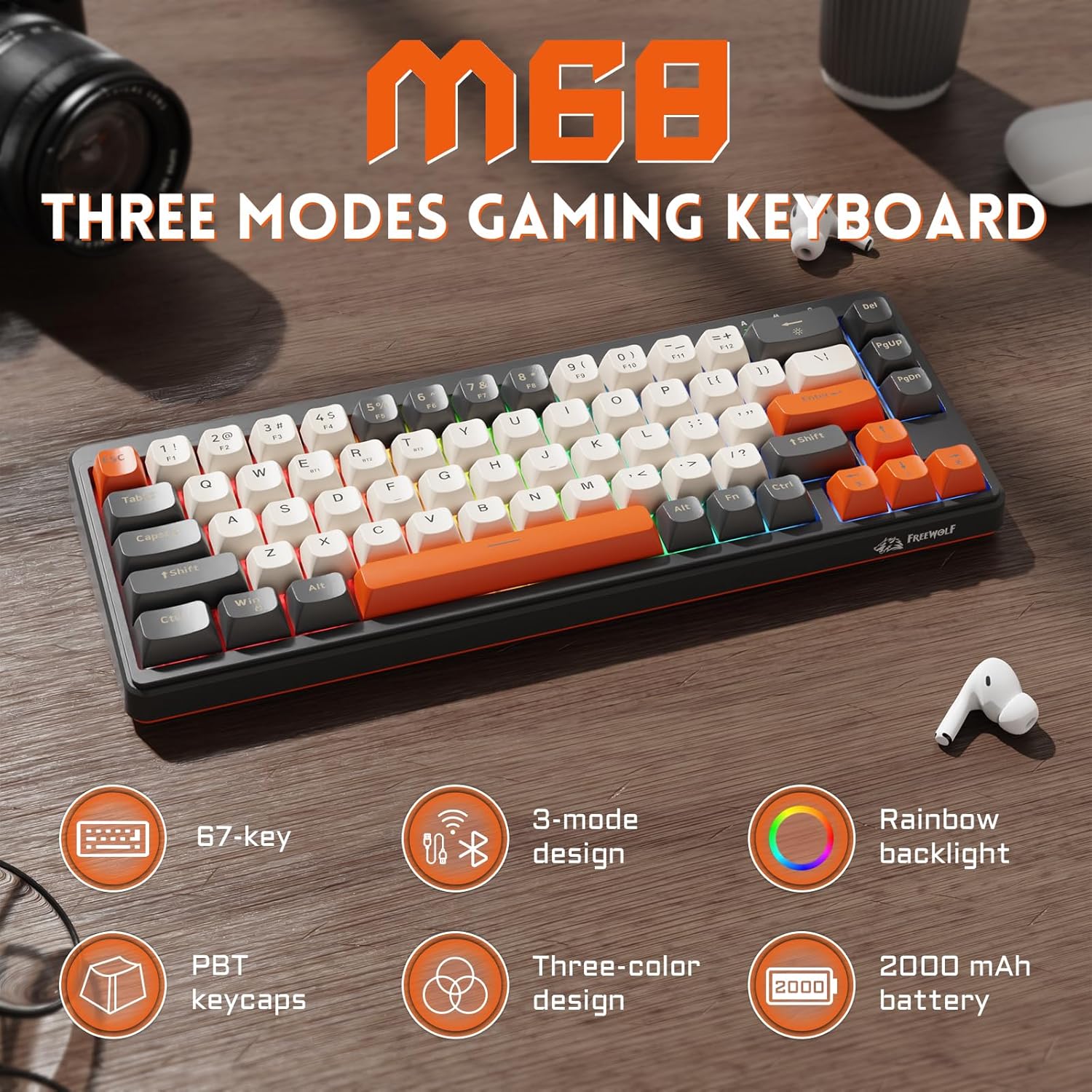
Image: The MANBASNAKE M68 keyboard shown with its USB-C cable and 2.4GHz receiver.
Vara lokiðview
The MANBASNAKE M68 keyboard features a compact 67-key layout with PBT spherical keycaps. It includes a mode switch, USB-C port, and indicator lights for connectivity and battery status.
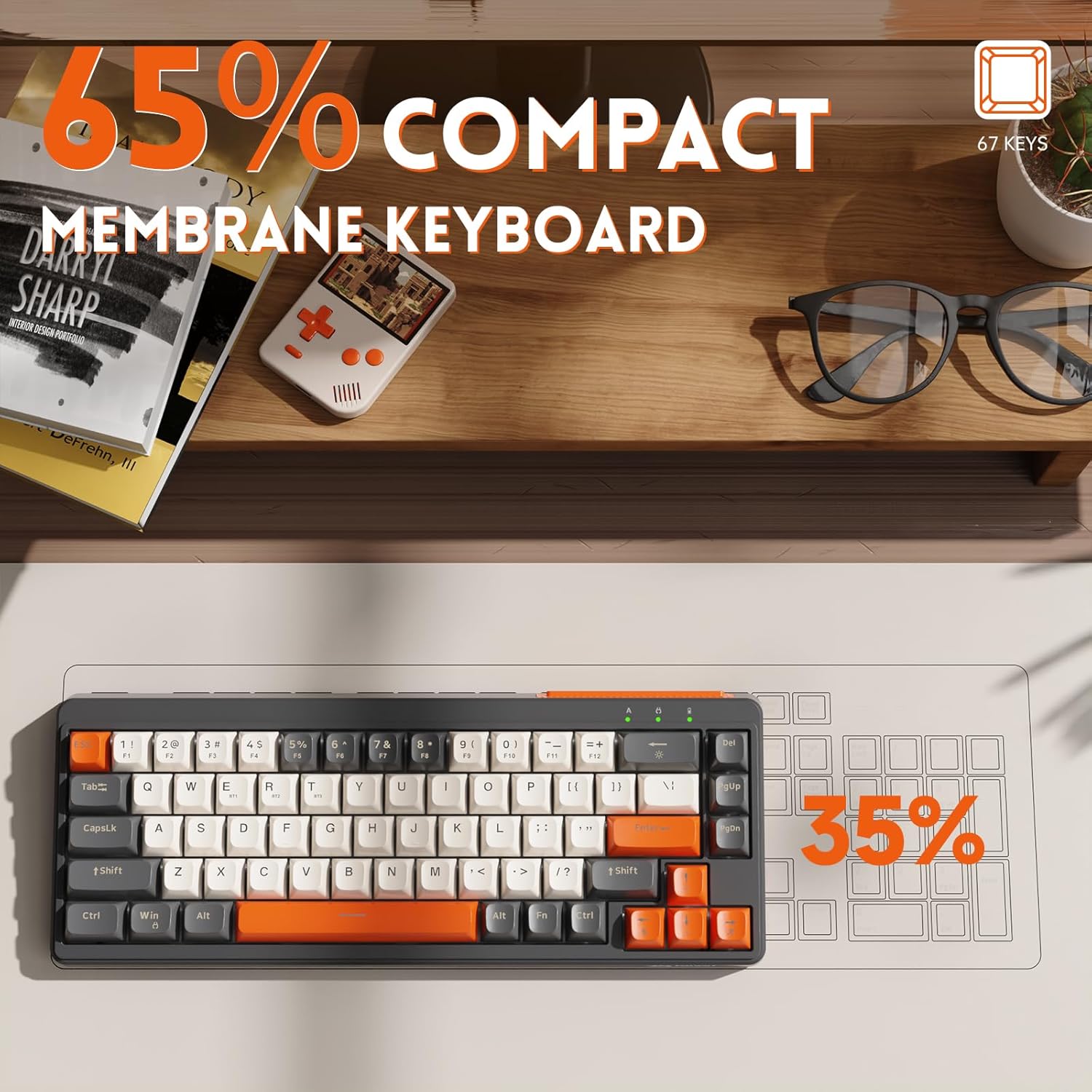
Mynd: Ofan frá og niður view of the MANBASNAKE M68 keyboard, highlighting its compact 67-key layout.
Lykilhlutir:
- USB-C tengi: Located on the side for wired connection and charging.
- Stillingarrofi: Allows selection between Bluetooth (BT), 2.4GHz wireless, and Wired modes.
- Gaumljós: Display connection status, charging status, and battery level.
- Stillanlegir fætur: Two-level adjustable stand on the underside for ergonomic typing angles.
- 2.4GHz Receiver Storage: The 2.4GHz USB receiver is stored in a dedicated slot on the side of the keyboard.
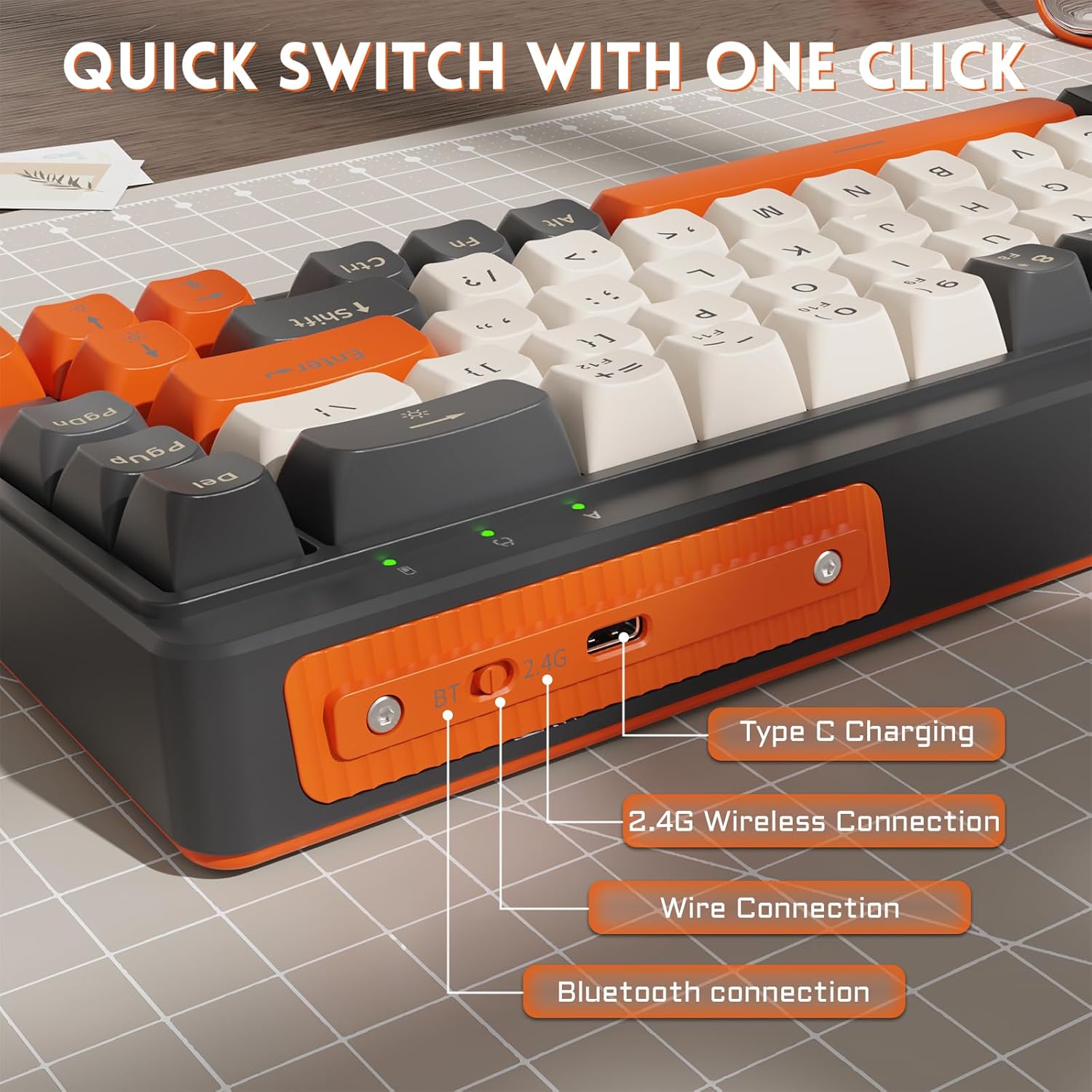
Mynd: Nærmynd af hliðinni view of the keyboard, illustrating the USB-C charging port, the mode switch (BT/2.4G/Wired), and the storage compartment for the 2.4GHz wireless receiver.
Uppsetning
1. Þráðlaus tenging
- Tengdu meðfylgjandi USB-C snúru við USB-C tengi lyklaborðsins.
- Tengdu hinn endann á USB-C snúrunni við lausa USB tengi á tölvunni þinni.
- Slide the mode switch on the keyboard to the "Wired" position.
- The keyboard will be automatically recognized by your system and ready for use.
2. 2.4GHz þráðlaus tenging
- Locate the 2.4GHz USB receiver stored in the keyboard's side compartment.
- Tengdu 2.4GHz USB móttakara í lausu USB tengi á tölvunni þinni.
- Slide the mode switch on the keyboard to the "2.4G" position.
- The keyboard will automatically connect to the receiver. No additional drivers are typically required.
3. Bluetooth-tenging
The keyboard supports pairing with up to three Bluetooth devices.
- Slide the mode switch on the keyboard to the "BT" position.
- To enter pairing mode for a specific channel (BT1, BT2, BT3), press and hold the Fn+E (fyrir BT1), Fn + R (fyrir BT2), eða Fn + T (for BT3) keys for approximately 3-5 seconds until the corresponding indicator light flashes rapidly.
- On your device (PC, Mac, iPad, Android), enable Bluetooth and search for new devices.
- Select "MANBASNAKE M68" (or similar name) from the list of available devices to pair.
- Once paired, the indicator light will stop flashing and remain solid for a few seconds, then turn off.
- Til að skipta á milli paraðra Bluetooth-tækja skaltu einfaldlega ýta á Fn+E, Fn + R, eða Fn + T stuttlega.

Image: The keyboard displaying its three connectivity modes: Wired, 2.4GHz, and Bluetooth 5.0.
Notkunarleiðbeiningar
Samsetningar virknilykla (Fn)
The keyboard features multi-function keys accessible via the Fn lykill:
- Fn + ESC: Toggles between F1-F12 function keys and number/symbol keys.
- Fn + (Light Icon Key): Toggles backlight on/off and cycles through lighting modes (e.g., breathing effect).
- Fn + Bilslá: Restores factory settings. Use with caution as this will erase all custom settings.
- Fn + Win: Læsir/opnar Windows takkann til að koma í veg fyrir að ýtt sé óvart á hann meðan á leik stendur.
- Fn + E/R/T: Switches between Bluetooth devices 1, 2, and 3 respectively. (Hold for 3-5 seconds to initiate pairing mode).

Image: The keyboard highlighting various FN key combinations for multimedia and system controls.
Baklýsingastýring
The keyboard features RGB backlighting. Use the Fn + (Light Icon Key) to turn the backlight on or off and to cycle through available lighting effects, such as a breathing mode.
Power Management and Charging
The keyboard is equipped with a built-in 2000mAh rechargeable battery. When the battery is low, the indicator light will flash. Connect the USB-C cable to the keyboard and a power source (e.g., computer USB port, USB wall adapter) to charge. A 5V/1A power adapter is recommended for optimal battery health. The indicator light will show charging status and turn off when fully charged. The keyboard features intelligent power-saving technology to extend battery life.

Image: An illustration emphasizing the 2000mAh battery capacity of the keyboard, indicating long-lasting power.
Adjustable Typing Angles
The keyboard includes a two-level adjustable stand on its underside, allowing you to set the typing angle to either 5° or 8° for improved ergonomic comfort and reduced wrist strain.

Image: The keyboard shown from the side, demonstrating the two adjustable height settings (5° and 8°) provided by its foldable feet.
Viðhald
Að þrífa lyklaborðið
- Aftengdu lyklaborðið frá öllum aflgjöfum og tækjum áður en þú þrífur það.
- Notaðu mjúkan, lólausan klút örlítið dampÞurrkið með vatni eða mildri hreinsilausn til að þurrka lyklaborðið og yfirborðið.
- Forðist að nota sterk efni, slípiefni eða leysiefni.
- Notið þrýstiloft til að fjarlægja ryk og rusl á milli lykla.
Umhirða rafhlöðu
- Forðastu að tæma rafhlöðuna alveg oft.
- Hladdu lyklaborðið reglulega, jafnvel þótt það sé ekki í stöðugri notkun, til að viðhalda heilbrigði rafhlöðunnar.
- Geymið lyklaborðið á köldum og þurrum stað þegar það er ekki í notkun í langan tíma.
Úrræðaleit
Lyklaborð svarar ekki
- Athugaðu tengingu: Ensure the keyboard is properly connected in Wired, 2.4GHz, or Bluetooth mode. Verify the mode switch is in the correct position.
- Rafhlöðustig: Hladdu lyklaborðið ef rafhlaðan er lítil.
- 2.4 GHz móttakari: For 2.4GHz mode, ensure the USB receiver is securely plugged into your device. Try a different USB port.
- Bluetooth-parun: For Bluetooth mode, re-pair the keyboard if the connection is lost. Ensure Bluetooth is enabled on your device.
- Endurræsa: Endurræstu tölvuna eða tækið.
Keys Not Working or Input Lag
- Hreinsa lykla: Check for debris under the affected keycaps.
- Truflun: For wireless modes, move closer to the receiver/device or away from potential sources of interference (e.g., other wireless devices, large metal objects).
- Fastbúnaður: Athugaðu framleiðanda websíðu fyrir allar tiltækar uppfærslur á vélbúnaði.
Baklýsing virkar ekki
- Toggle Backlight: Ýttu á Fn + (Light Icon Key) til að tryggja að baklýsingin sé ekki slökkt.
- Rafhlöðustig: Low battery can disable backlighting. Charge the keyboard.
Vandamál með Bluetooth-tengingu
- Samhæfni tækis: Ensure your device's Bluetooth version is compatible (Bluetooth 4.0 or higher is generally recommended).
- Gleymdu tæki: On your device, remove the keyboard from the list of paired Bluetooth devices and attempt to re-pair.
- Endurstilla lyklaborð: Perform a factory reset using Fn + Bilslá.
Tæknilýsing
| Gerðarnúmer | M68 |
| Tengingar | Bluetooth 5.0, 2.4GHz þráðlaust, USB-C snúrutenging |
| Lyklakippur | PBT Spherical Keycaps |
| Lyklaborðsgerð | Membrane Silent Keyboard |
| Rafhlöðugeta | 2000mAh |
| Hleðsluport | USB-C (5V/1A mælt með) |
| Baklýsing | RGB |
| Samhæf tæki | Fartölva, tölva, snjallsími, spjaldtölva |
| Stýrikerfi | Windows, macOS, Linux, iOS, Android |
| Þyngd hlutar | 1.34 pund (u.þ.b. 608 g) |
| Stærðir pakka | 14.53 x 5.16 x 1.85 tommur |
Ábyrgð og stuðningur
Upplýsingar um ábyrgð
Please refer to the warranty card included with your product or visit the official MANBASNAKE webSjá nánari skilmála ábyrgðar á vefsíðunni. Ábyrgðin nær yfirleitt yfir framleiðslugalla í tiltekið tímabil frá kaupdegi.
Þjónustudeild
If you encounter any issues not covered in this manual or require further assistance, please contact MANBASNAKE customer support through their official website or the contact information provided in your product packaging. Please have your model number (M68) and purchase details ready when contacting support.
Vörumyndbönd
Video: A demonstration of the MANBASNAKE M68 keyboard's features and functionality.
Myndband: Yfirview of the MANBASNAKE M68 keyboard's design and connectivity options.


