1. Inngangur
This manual provides essential information for the safe and efficient operation of your VIZIO 50-inch 4K UHD LED Smart TV, model V4K50C-08. Please read this manual thoroughly before using your television and retain it for future reference.
The VIZIO V4K50C-08 Smart TV delivers vivid 4K picture quality with Dolby Vision HDR, enhancing detail, contrast, and color. It features WiFi 6 for faster streaming and gaming, and built-in VIZIO Home for instant access to applications, free channels, and on-demand titles.

Mynd 1.1: Framan view of the VIZIO 50-inch 4K UHD LED Smart TV.
2. Öryggisupplýsingar
Always follow basic safety precautions when using this television to reduce the risk of fire, electric shock, and injury to persons. Keep this manual handy for reference.
- Ekki útsetja þetta tæki fyrir rigningu eða raka.
- Ekki loka neinum loftræstiopum. Setjið upp í samræmi við leiðbeiningar framleiðanda.
- Ekki setja upp nálægt neinum hitagjöfum eins og ofnum, hitatöflum, ofnum eða öðrum tækjum (þ. amplyftara) sem framleiða hita.
- Verndaðu rafmagnssnúruna gegn því að ganga á hana eða klemma hana, sérstaklega við innstungur, innstungur og staðinn þar sem þau fara út úr tækinu.
- Notaðu aðeins viðhengi/aukahluti sem framleiðandi tilgreinir.
- Látið alla þjónustu til hæfs þjónustufólks.
3. Hvað er í kassanum
Your VIZIO 50-inch 4K UHD LED Smart TV package includes the following items:
- VIZIO 50 tommu 4K UHD LED snjallsjónvarp
- Raddfjarstýring
- 2 AAA rafhlöður (fyrir fjarstýringu)
- Rafmagnssnúra
- Sjónvarpsstandur (2 stykki)

Image 3.1: Included components and TV dimensions.
4. Uppsetning
4.1 Standurinn festur
- Leggið sjónvarpið varlega með framhliðina niður á mjúkan, hreinan flöt til að koma í veg fyrir skemmdir.
- Stilltu hverjum standhluta saman við samsvarandi raufar neðst á sjónvarpinu.
- Festið hvern standstykki með meðfylgjandi skrúfum. Gangið úr skugga um að þær séu vel hertar.
4.2 Tengja jaðartæki
Connect your external devices to the appropriate ports on the back or side of your VIZIO TV.
- HDMI: For high-definition video and audio devices (e.g., Blu-ray players, gaming consoles). Your TV features multiple HDMI ports, including HDMI 1 (eARC) for enhanced audio return channel functionality.
- USB: Til að tengja USB geymslutæki.
- Loftnet: Til að tengja loftnet sem er í lofti.
- Audio Out Optical (S/PDIF): Til að tengjast við hljóðstiku eða hljóðmóttakara.
- Ethernet: Fyrir snúrubundið nettengingu.
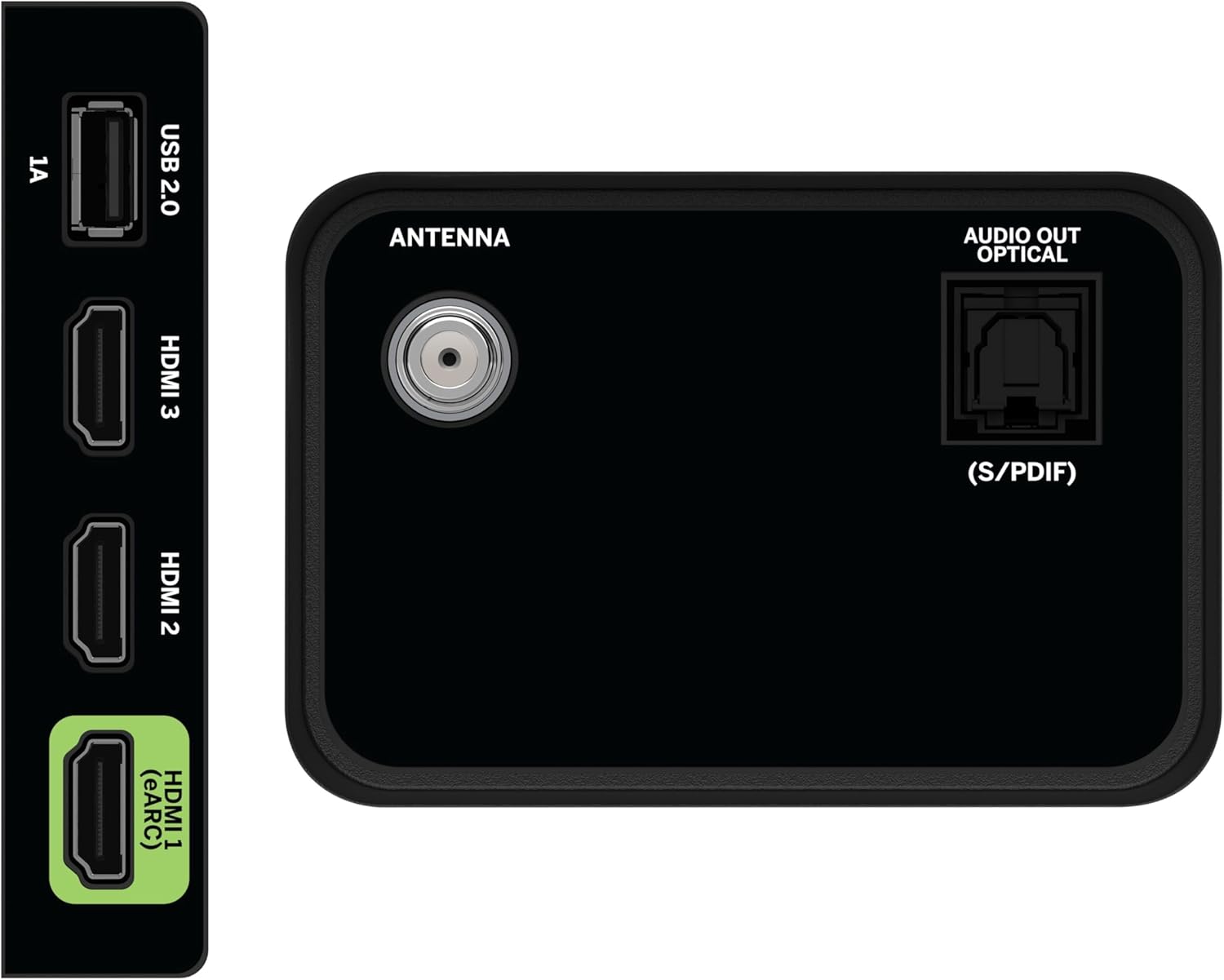
Image 4.1: Rear and side input/output ports.
4.3 Fyrsta ræsing og nettenging
- Stingdu rafmagnssnúrunni í sjónvarpið og síðan í rafmagnsinnstungu.
- Ýttu á aflhnappinn á fjarstýringunni eða sjónvarpinu.
- Follow the on-screen prompts to select your language, country, and connect to your Wi-Fi network (WiFi 6 supported for faster performance).
4.4 VIZIO Account Setup
A VIZIO Account is required for Smart TV functionality and product updates. Follow the on-screen instructions to create or log in to your VIZIO Account. This allows access to VIZIO Home, app subscriptions, and free channels.

Image 4.2: VIZIO Account setup via mobile device.
5. Að stjórna sjónvarpinu
5.1 Fjarstýring yfirview
The included Voice Remote provides intuitive control over your TV. It features dedicated buttons for popular streaming apps and voice assistance integration.
- Inntak: Skipta á milli tengdra tækja.
- Kraftur: Kveiktu/slökktu á sjónvarpinu.
- Siglingarpúði: Notaðu stefnuhnappana og OK hnappinn til að fletta í gegnum valmyndir.
- Heimili: Access the VIZIO Home screen.
- Horfa á Ókeypis+: Direct access to VIZIO's free streaming service.
- Raddhnappur: Virkjaðu raddskipanir.
- Hljóðstyrkur/rás: Stilla hljóðstyrk og skipta um rás.
- Flýtileiðir forrita: Skjótur aðgangur að fyrirfram uppsettum streymiforritum.

Image 5.1: VIZIO Voice Remote and mobile app functionality.
5.2 Navigating VIZIO Home
The VIZIO Home screen is your central hub for all entertainment. It provides quick access to:
- Apps & Inputs: Browse and launch your favorite streaming apps (Netflix, Prime Video, Hulu, Disney+, etc.) and switch between connected inputs.
- Sjónvarp í beinni: Access hundreds of free channels and thousands of free On Demand titles with the built-in WatchFree+ app.
- Trending Now: Discover popular movies and shows.

Image 5.2: The VIZIO Home screen, your destination for easy streaming.
5.3 Myndastillingar
Your VIZIO TV features Dolby Vision HDR, HDR10+, HDR10, and HLG for a true-to-life picture with a wider range of color and detail. Adjust picture modes (e.g., Calibrated, Vivid, Game) in the settings menu to optimize your viewupplifun.

Image 5.3: Breathtaking details for a crystal-clear 4K picture with Dolby Vision.
5.4 Hljóðstillingar
Experience immersive sound with DTS Virtual:X setting. You can also connect Bluetooth headphones for private listening.

Image 5.4: Pair your wireless Bluetooth headphones for uninterrupted audio.
5.5 Snjallir eiginleikar
The VIZIO Smart TV supports Apple AirPlay and Google Cast Built-in, allowing you to stream content directly from your compatible devices. WiFi 6 ensures better streaming and gaming performance in a congested smart home environment.
5.6 Leikjaeiginleikar
For gamers, the TV offers Dolby Vision HDR Gaming for enhanced in-game color. When a console or PC is detected, Auto Low Latency Mode is automatically enabled to reduce input lag.

Image 5.5: Venture into game realism with Dolby Vision HDR.
6. Viðhald
6.1 Þrif á sjónvarpinu þínu
- Taktu alltaf sjónvarpið úr sambandi áður en það er þrifið.
- Notið mjúkan, lólausan klút til að þurrka varlega af skjánum og skápnum.
- Do not use liquid or aerosol cleaners directly on the TV.
6.2 Hugbúnaðaruppfærslur
Your VIZIO TV will automatically receive software updates when connected to the internet. Ensure your TV is connected to a network for optimal performance and access to the latest features.
7. Bilanagreining
If you encounter issues with your VIZIO TV, try the following common solutions:
- Enginn kraftur: Ensure the power cable is securely connected to both the TV and the outlet. Try a different outlet.
- Engin mynd/hljóð: Check all cable connections (HDMI, audio). Ensure the correct input source is selected.
- Fjarstýring virkar ekki: Skiptu um rafhlöður. Gakktu úr skugga um að engar hindranir séu á milli fjarstýringarinnar og sjónvarpsins.
- Vandamál með nettengingu: Restart your router and modem. Reconnect the TV to the Wi-Fi network via the settings menu.
- Léleg myndgæði: Check the source content resolution. Adjust picture settings in the TV menu.
For further assistance, refer to the VIZIO support websíðuna eða hafðu samband við þjónustuver.
8. Tæknilýsing
| Eiginleiki | Forskrift |
|---|---|
| Vörumerki | VIZIO |
| Gerðarnúmer | V4K50C-08 |
| Skjástærð | 50 tommur |
| Skjátækni | LED |
| Upplausn | 4K UHD |
| HDR stuðningur | Dolby Vision HDR, HDR10+, HDR10, HLG |
| Endurnýjunartíðni | HDMI VRR |
| Tengitækni | Bluetooth, HDMI, Wi-Fi (WiFi 6) |
| Sérstakir eiginleikar | Apple AirPlay, Bluetooth Headphone compatibility, Built-in apps with VIZIO Home, Closed Captioning, Google Chromecast, Sleep Timer, Voice Assistance Integration, Voice Remote |
| Vörumál | 9.68" D x 43.69" B x 27.57" H |
| Þyngd hlutar | 28.4 pund |
| Hlutfall | 16:9 |
9. Ábyrgð og stuðningur
For warranty information and customer support, please visit the official VIZIO website or refer to the warranty card included with your product. VIZIO provides award-winning customer support to assist with any questions or issues you may have.


